Introduction
Ahdapa is an OAuth 2.0 and OpenID Connect authorization server built for FreeIPA Kerberos environments. It bridges your existing Kerberos identity infrastructure to the OAuth 2.0 / OIDC ecosystem used by modern applications — issuing cryptographically signed JWT tokens to users and services that are already authenticated via Kerberos, with no separate user database and no external identity broker required.
It is the token-issuance counterpart to Akāmu, the ACME certificate authority: where Akāmu issues X.509 certificates, Ahdapa issues OAuth 2.0 bearer tokens.
Key capabilities
-
Zero-click SSO for Kerberos domain members via SPNEGO. Clients that are not on the domain can authenticate with a password form, a passkey (WebAuthn), or a federated external IdP.
-
Full OAuth 2.0 and OpenID Connect coverage — authorization code + PKCE, client credentials, device flow, token exchange, refresh tokens, DPoP, PAR, mutual-TLS client authentication, and Kerberos machine client authentication (
kerberos_client_auth). See Standards for the complete RFC list. -
Machine-readable directory API (
/api/identity/) for SSSD and other system-level clients. Bearer-token-gated user and group lookups with a two-phase search protocol compatible with SSSD’sahdapa_lookup(). Enrolled machines obtain tokens viakerberos_client_auth(no per-machine secret) and use them to resolve users and group memberships on demand. -
Built-in horizontal scaling via a gossip protocol — no external coordinator or shared database required. Signing keys, client registry, and session revocations replicate automatically across all nodes.
-
Post-quantum ready — JWT signing with ML-DSA (FIPS 204 / Dilithium); gossip traffic encrypted with ML-KEM-768 (FIPS 203 / Kyber). Classical EC and EdDSA algorithms are supported alongside PQC for mixed-client environments.
-
Self-service profile editing — authenticated users can view and modify their own IPA attributes (name, contact, address, work info, SSH public keys, X.509 certificates, password) through the
/ui/mepage. Editability is determined at runtime from IPAattributelevelrights; administrators can further restrict visibility and write access via the[webui.self_service]configuration section. -
FreeIPA-native — discovers external IdP registrations and per-user authentication constraints directly from FreeIPA LDAP at startup, without duplicating IdP configuration into a local file.
-
Access control policies (HBAC) modelled on FreeIPA HBAC rules: define which users may obtain tokens for which clients, from which source networks, with what required authentication strength. Manageable via the admin WebUI, REST API, or
ahdapactl hbacCLI commands. In FreeIPA co-deployments, ahdapa respects the built-inallow_allHBAC rule – when it is enabled (the default), ahdapa HBAC enforcement is transparently skipped. -
SPIFFE Workload API — ahdapa can act as a trust domain authority and Workload API server for SPIFFE. When
[spiffe] trust_domainis set, ahdapa issues X.509-SVIDs and JWT-SVIDs to local workloads via a Unix domain socket gRPC server, publishes the trust bundle at/.well-known/spiffe-bundle, and bridges SPIFFE identity to OAuth2 by recognising workloads that present their X.509-SVID in an mTLS connection. -
ACME Token Authority (RFC 9447) — when
[gssapi]is configured, ahdapa acts as an RFC 9447 Token Authority for ACMEtkauth-01challenges. Clients authenticated via Kerberos SPNEGO obtain a signed authority token JWT whoseatc.tkvaluecarries base64url-encodedEnhancedJWTClaimConstraints(RFC 9118) withmustInclude: ["sub"]andpermittedValuesbindingsubto the Kerberos principal name andissto the server’s issuer URL. For host and service principals, the server additionally looks up IPA-managed FQDNs via LDAP and adds adnsentry topermittedValues; user principals receive an identity-only token with nodnsconstraint. This is a Kerberos-identity binding — not the telephonytnauthlistprofile. The endpoint is advertised in the AS discovery document astoken_authority_endpoint.
What Ahdapa is not
-
Not a reverse proxy or API gateway. Ahdapa can terminate TLS natively (see
[tls]configuration) or run behind a TLS-terminating load balancer (nginx, HAProxy, Caddy). -
Not a Kerberos KDC or FreeIPA administration interface. It reads from FreeIPA LDAP and acquires service tickets; it does not create or manage Kerberos principals or directory entries.
-
Not a general-purpose ACME certificate authority. Use Akāmu for X.509 certificate issuance within the same Kerberos realm.
-
Not a user identity store. Users are authenticated against Kerberos, PAM, or FreeIPA LDAP. Ahdapa does not maintain its own user registry.
Standards coverage
Ahdapa implements OAuth 2.0 (RFC 6749), OpenID Connect Core 1.0, and 20+ related specifications including DPoP, PAR, mTLS client authentication, token exchange, device flow, and the RFC 9447 ACME Token Authority protocol. See Standards for the complete list with implementation scope and known limitations.
Where to go next
| Goal | Page |
|---|---|
| Install and start Ahdapa | Installation |
| Configure and register a first client | First run |
| Run a self-contained demo | Demos |
| Configure a multi-node cluster | Cluster setup |
| Manage the cluster from the command line | Admin CLI (ahdapactl) |
| Configure the SPIFFE Workload API | SPIFFE Integration |
| ACME Token Authority endpoint | Protocol Endpoints — ACME Token Authority |
| All configuration keys | Configuration reference |
SSSD id_provider = idp secretless deployment | FreeIPA Co-deployment — SSSD |
| Machine-readable identity API reference | Identity API |
| Self-service profile editing design | Self-Service Profile |
| Understand the internal design | Architecture |
| Full RFC and standards coverage | Standards |
Installation
Prerequisites
- Rust toolchain 1.80 or later (install via rustup)
- OpenSSL 3.x development headers (required by
native-osslandsynta-certificate). OpenSSL 3.3 or later is required to connect to servers whose TLS certificate is signed with ML-DSA-65 or ML-DSA-87 (e.g. a FreeIPA installation with a post-quantum PKI). Earlier OpenSSL 3.x versions still work for all classical TLS connections. - MIT Kerberos development libraries (required by
ahdapa-gssapi) - OpenLDAP client development libraries (required by
ahdapa-ldap)
Fedora / RHEL
sudo dnf install openssl-devel krb5-devel openldap-devel
To build with PAM support (--features pam), also install:
sudo dnf install pam-devel
The varlink userdb backend (--features varlink) requires no additional system
packages; its dependencies are pure-Rust.
Debian / Ubuntu
sudo apt install libssl-dev libkrb5-dev libldap-dev
To build with PAM support (--features pam), also install:
sudo apt install libpam0g-dev
The varlink userdb backend (--features varlink) requires no additional system
packages; its dependencies are pure-Rust.
Checking out the source
git clone <ahdapa-repo> ahdapa
All synta dependencies are fetched from crates.io automatically.
Building from source
The repository is a Cargo workspace. Its members include the ahdapa server binary, the ahdapactl admin CLI, and five library crates (ahdapa-gssapi, ahdapa-jose, ahdapa-ldap, ahdapa-varlink, ahdapa-pam).
cd ahdapa
cargo build --release
The server binary is placed at target/release/ahdapa. The admin CLI is
placed at target/release/ahdapactl.
To build only the server or only the CLI:
cargo build --bin ahdapa --release
cargo build --bin ahdapactl --release
To enable the optional PAM and varlink authentication backends (recommended for production deployments on systemd-based hosts):
cargo build --bin ahdapa --release --features pam,varlink
Both features are enabled by default in the RPM package.
Building the WebUI
The WebUI is a separate build step. It requires Node.js 20 or later and npm.
cd webui
npm install
npm run build
The built assets are placed at webui/dist/. Point webui.static_dir in the config to this directory.
Verifying the build
./target/release/ahdapa --help
The binary accepts the configuration file path as an optional positional argument, falling back to the AHDAPA_CONFIG environment variable, and finally to /etc/ahdapa/ahdapa.toml. Pass --check to validate the config without starting the server.
Installing
sudo install -m 0755 target/release/ahdapa /usr/local/bin/ahdapa
sudo install -d /etc/ahdapa /var/lib/ahdapa
sudo install -m 0644 webui/dist -r /usr/share/ahdapa/webui
systemd service
Production-grade unit files are provided in contrib/systemd/ in the repository
(and installed by the RPM package). Copy them to create a manual installation:
sudo install -m 0644 contrib/systemd/ahdapa.service \
    /etc/systemd/system/ahdapa.service
sudo install -m 0644 contrib/systemd/ahdapa.socket \
    /etc/systemd/system/ahdapa.socket
ahdapa.service passes the configuration file path as a positional argument and
includes a full set of hardening directives. ahdapa.socket enables socket
activation — see Systemd socket activation
for details on when to use it.
A minimal service unit for reference:
[Unit]
Description=Ahdapa OAuth2/OIDC identity provider
After=network-online.target
Wants=network-online.target

[Service]
Type=simple
User=ahdapa
Group=ahdapa
WorkingDirectory=/var/lib/ahdapa
ExecStart=/usr/local/bin/ahdapa /etc/ahdapa/ahdapa.toml
Restart=on-failure
RestartSec=5s
Environment=RUST_LOG=info

NoNewPrivileges=yes
ProtectSystem=strict
ProtectHome=yes
PrivateTmp=yes
StateDirectory=ahdapa
ConfigurationDirectory=ahdapa
LogsDirectory=ahdapa

[Install]
WantedBy=multi-user.target
Enable and start:
sudo systemctl daemon-reload
sudo systemctl enable --now ahdapa
First Run
1. Create directories
sudo mkdir -p /etc/ahdapa /var/lib/ahdapa
sudo chown ahdapa:ahdapa /etc/ahdapa /var/lib/ahdapa
sudo chmod 0750 /etc/ahdapa /var/lib/ahdapa
2. Write a minimal configuration file
Create /etc/ahdapa/ahdapa.toml:
[server]
issuer = "https://idp.example.com"
realm  = "EXAMPLE.COM"

[db]
url = "sqlite:///var/lib/ahdapa/ahdapa.db"

[gssapi]
service = "HTTP"
keytab  = "/etc/ahdapa/ahdapa.keytab"

[ipa]
uri = "ldaps://ipa.example.com"

[webui]
static_dir = "/usr/share/ahdapa/webui"
Replace idp.example.com, EXAMPLE.COM, and the IPA hostname with your actual values.
3. Register the service principal in FreeIPA
ipa service-add HTTP/idp.example.com@EXAMPLE.COM
ipa-getkeytab -s ipa.example.com -p HTTP/idp.example.com@EXAMPLE.COM \
    -k /etc/ahdapa/ahdapa.keytab
4. Start the server
ahdapa /etc/ahdapa/ahdapa.toml
Or via systemd:
sudo systemctl start ahdapa
On first run, the server:
- Opens (or creates) the database and runs migrations.
- Generates a fresh JWT signing key pair using the configured algorithm (default: ES256 / ECDSA P-256) and stores it in the cluster state database.
- Generates a 32-byte AES-256-GCM cluster wrapping key and stores it in the cluster state database.
- Acquires the GSSAPI server credential from the keytab.
- Binds on the address from
server.listenin the config file (default0.0.0.0:8080), overridden byAHDAPA_LISTENif set.
You will see log output like:
INFO ahdapa: Ahdapa starting issuer=https://idp.example.com
INFO ahdapa: GSSAPI server credential acquired
INFO ahdapa: listening addr=0.0.0.0:8080
5. Verify the discovery document
curl https://idp.example.com/.well-known/openid-configuration | jq .
The response is a static JSON document cached for 24 hours. All endpoint URLs will use the configured issuer.
6. Configure RBAC and register an OAuth2 client
All admin API endpoints require RBAC to be configured. Without a [[rbac.role]] / [[rbac.group_role]] section the server returns 403 for every admin request — access is denied to everyone.
Add the following to your config.toml and map it to a group that your admin user belongs to (via the static users file or FreeIPA LDAP memberOf):
[[rbac.role]]
name        = "admin"
permissions = ["*"]

[[rbac.group_role]]
group = "admins"
role  = "admin"
See Configuration Reference — [rbac] for the full permission list and group resolution details.
Once RBAC is configured, use the admin API (requires an authenticated session — log in via the WebUI first):
# Obtain a session cookie by logging in via the browser at:
#   https://idp.example.com/ui/auth/login

# Then register a client:
curl -X POST https://idp.example.com/api/admin/clients \
  -H 'Content-Type: application/json' \
  --cookie 'session=<your-session-cookie>' \
  -d '{
    "client_name": "My Application",
    "redirect_uris": ["https://myapp.example.com/callback"],
    "scopes": ["openid", "profile", "email"],
    "token_endpoint_auth_method": "client_secret_basic",
    "client_secret": "changeme"
  }'
The response contains the generated client_id.
Changing the listen address
Set server.listen in the config file to bind on a non-default address:
[server]
issuer  = "https://idp.example.com"
realm   = "EXAMPLE.COM"
listen  = "127.0.0.1:9090"
For a Unix domain socket (useful when a local reverse proxy or application talks to ahdapa over the same host):
[server]
listen = "unix:/run/ahdapa/ahdapa.sock"
ahdapa removes a stale socket file from a previous run on startup. Note that TLS ([tls] enabled = true) cannot be combined with a Unix socket listener.
The AHDAPA_LISTEN environment variable overrides server.listen without editing the config file, which is convenient for systemd drop-in overrides or container deployments:
AHDAPA_LISTEN=127.0.0.1:9090 ahdapa
Systemd socket activation
ahdapa supports systemd socket activation. When the ahdapa.socket unit is enabled, systemd pre-creates the socket and passes it to ahdapa as an inherited file descriptor. ahdapa detects the passed socket automatically and uses it instead of binding its own.
Enable the socket unit alongside the service:
sudo systemctl enable --now ahdapa.socket
sudo systemctl start ahdapa.service
With socket activation, systemd can start ahdapa on-demand when the first connection arrives, and connections made while ahdapa is restarting are queued by the kernel rather than refused.
The socket address in ahdapa.socket (ListenStream=) must match server.listen in the config file, since ahdapa logs the configured address even when using the inherited socket. The server.listen and AHDAPA_LISTEN values are ignored when a socket is passed by systemd.
Authentication Methods
ahdapa supports several authentication methods for interactive user login. The login
page at /ui/auth/login applies them in a fixed priority order: federated identity
first, then passkey, then password (static → PAM → LDAP). Only the first matching
method is used.
1. Federated identity (upstream IdP redirect)
Ahdapa can delegate authentication to an external OIDC or OAuth2 provider. When a federated IdP is configured, the login page redirects the user there automatically based on their username.
See Federation for setup, FreeIPA auto-discovery, and ACR/AMR override configuration.
2. Passkey (WebAuthn)
After the federated-identity check, if WebAuthn is available in the browser, the
login page automatically probes POST /api/auth/passkey/begin for the entered username.
If the user has passkeys enrolled, the browser invokes the platform authenticator (Touch ID, Windows Hello, security key, or phone passkey). On success, a session is issued without the user typing a password. If the user dismisses the authenticator prompt or has no passkeys enrolled, the login page falls through to the password form.
Required configuration:
[ipa]
passkey_rp_id = "idp.example.com"   # must match the domain of the server
passkey_rp_id must be set in [ipa] even when FreeIPA/LDAP is not otherwise used for
authentication. Without it, passkey endpoints return 501 Not Implemented and passkey
login is silently skipped.
Multi-origin support:
When [server] issuer_aliases is configured (or when IPA auto-derives node aliases from
[gssapi] initiator_principal), passkey assertions and registrations are accepted from
all configured origins, not just the canonical issuer origin. This means a user can
authenticate to https://ipa1.ipa.test/idp with a passkey that was registered against
https://ipa-ca.ipa.test/idp, as long as both origins are in the accepted set. The
accepted origins are: issuer + all issuer_aliases + auto-derived IPA aliases
(node FQDN and ipa-ca.<realm>). No additional configuration is needed for standard
IPA deployments.
Passkey self-service enrollment:
Authenticated users can register and delete their own passkeys at /ui/user/profile.
The page lists enrolled passkeys by name and registration date and provides a “Register
new passkey” button that drives the full WebAuthn attestation flow in the browser.
For FreeIPA/LDAP users, passkey credentials are written to the ipapasskey attribute
on the user’s FreeIPA entry using Kerberos S4U2Self impersonation. This makes them
visible to any other FreeIPA-aware service (e.g., sssd). For non-IPA users, passkeys
are stored in ahdapa’s local database.
3. Password
If neither federated identity nor passkey authentication succeeds, the login page shows a password field. Passwords are verified in order:
- Static users — username and password are checked against the
[[users]]entries in the configuration file. - PAM (optional, requires
--features pamand a[pam]config section) — credentials are passed to the configured PAM service (typically/etc/pam.d/ahdapa). Covers SSSD, winbindd, systemd-homed, and any other PAM-integrated backend. - LDAP simple bind — a bind is attempted against the configured LDAP server as
uid=<username>within the discovered domain suffix.
The first backend that returns a definitive answer (authenticated or rejected) wins. PAM and LDAP simple bind are only tried if the previous steps found no match.
Expired passwords (PAM only):
When PAM reports PAM_NEW_AUTHTOK_REQD, the user is redirected to
/login/change-password to set a new password before their session is created.
Required configuration (LDAP password):
[ipa]
uri = "ldaps://ipa.example.com"
Required configuration (PAM):
[pam]
service      = "ahdapa"   # /etc/pam.d/ahdapa
timeout_secs = 30
4. OTP (TOTP / HOTP)
Users with OTP tokens enrolled in FreeIPA can authenticate using their password combined with a one-time code. The OTP login stage is reached from the password stage: a link “Sign in with password + OTP code instead” appears below the password form.
The OTP stage shows two separate fields:
- Password — the user’s regular FreeIPA password.
- OTP code — the current 6- (or 8-) digit code from the enrolled token, entered separately on screen.
The server concatenates password + otp_code into a single bind credential, opens an
anonymous LDAP connection, and calls a simple bind with the OTP_REQUIRED_OID client
control (2.16.840.1.113730.3.8.10.7). FreeIPA’s ipa-pwd-extop SLAPI plugin
validates the combined credential at bind time — ahdapa never reads the raw OTP secret
(ipatokenOTPkey). The control also tells ipa-pwd-extop to reject the bind if no
valid OTP code is appended, even if the password alone is correct.
Invalid credentials (LDAP code 49) produce a “Wrong username, password, or OTP code” error. All other LDAP errors are treated as server errors.
Required configuration:
[ipa]
uri = "ldaps://ipa.example.com"
OTP tokens must be enrolled in FreeIPA for the user. They can be enrolled using the
FreeIPA CLI (ipa otptoken-add) or via the self-service profile page at /ui/me
(see OTP token self-service below).
OTP token self-service
Authenticated users can list, add, and delete their own OTP tokens at /ui/me (the
profile page), under the “OTP tokens” section. No administrator action is required.
- List — shows all enrolled tokens with label, type (TOTP/HOTP), algorithm, digits, period, and status.
- Add — creates a new TOTP token. The
otpauth://URI is displayed once as a QR code (inline SVG) and as a copyable text string. Close the dialog only after the token has been scanned — the dialog cannot be dismissed any other way, and the secret is not stored by ahdapa. - Delete — removes a token by its unique ID. Only tokens owned by the current user can be deleted.
The self-service endpoints require a valid session cookie. The sub from the session
identifies the acting user; no privilege escalation is possible.
5. SPNEGO / Kerberos (browser-level)
For domain-joined browsers (Firefox, Chrome on Linux with Kerberos credentials), SPNEGO negotiation happens at the HTTP layer on two routes:
-
GET /ui/auth/login— The login page handler inspectsAuthorization: Negotiatebefore serving the SPA HTML. On success it sets a session cookie (ACRurn:oasis:names:tc:SAML:2.0:ac:classes:Kerberos, AMRkerberos) and redirects toreturn_to. OnContinue(multi-round GSSAPI exchange) it returns 401. When no valid Negotiate token is present it falls through to the SPA HTML so password login still works. -
GET/POST/authorize— The authorization endpoint also runs SPNEGO before validating query-string parameters. This enables a single-round-trip OAuth2 flow for curl-style command-line clients:Authorization: Negotiatepresent + valid OAuth2 params → authenticates, creates a session, and continues the OAuth2 authorization flow in the same request (no redirect-then-retry). The session cookie is appended to the consent redirect response.Authorization: Negotiatepresent + no OAuth2 params → authenticates, creates a session, returns400 {"error":"invalid_request","error_description":"client_id required"}withSet-Cookie(no redirect, so curl keeps the cookie for subsequent requests).- No Negotiate header → existing session-cookie flow unchanged.
Continue→ 401 challenge.
This dual-endpoint design is transparent: users visiting the login page are forwarded
to their destination automatically if their browser holds a valid Kerberos ticket and
the server accepts Negotiate. Command-line clients (curl, httpie) can obtain a
session cookie from /authorize without being redirected to the login page.
Service-principal self-registration of OAuth2 clients:
Kerberos service principals (principals whose local part contains /, such as
HTTP/client.ipa.test@IPA.TEST) can use the SPNEGO session obtained from
/authorize to self-register an OAuth2 client at POST /register without
requiring a pre-shared server.registration_token. User principals (no / in the
local part, e.g. alice@IPA.TEST) and cross-realm principals are excluded from
this path. See Dynamic Client Registration
for the full curl workflow and response format.
Required configuration:
[server]
realm = "EXAMPLE.COM"

[gssapi]
service = "HTTP"
keytab  = "/etc/ahdapa/ahdapa.keytab"
Or, using gssproxy instead of a keytab:
[gssapi]
service  = "HTTP"
gssproxy = true
If [gssapi] is absent or the keytab is unreadable at startup, SPNEGO is disabled
and a warning is logged. Password and passkey authentication continue to work.
Kerberos client authentication (kerberos_client_auth)
This section covers machine-to-machine OAuth2 client authentication using Kerberos.
It is distinct from user-facing SPNEGO (section 5 above): rather than a user proving
their identity to obtain a session, a machine proves the identity of the OAuth2
client itself at the token endpoint, replacing a client_secret.
This feature is designed for large-scale SSSD id_provider = idp deployments where
every FreeIPA-enrolled machine already holds a Kerberos keytab (host/hostname@REALM)
and rotating a shared client_secret across thousands of machines is operationally
undesirable.
Prerequisites
[ipa] gssapi = truemust be set in the server configuration.[gssapi] keytabor[gssapi] gssproxy = truemust be configured so the server can accept SPNEGO tokens.- The client must be registered via the admin API (not dynamic registration — see below).
Two registration modes
Single-machine client — binds one client ID to one specific host principal:
{
  "client_name": "node1.example.com SSSD client",
  "token_endpoint_auth_method": "kerberos_client_auth",
  "kerberos_principal": "host/node1.example.com@EXAMPLE.COM",
  "scopes": ["openid"]
}
Template client — one client ID covers all machines whose principal matches a glob:
{
  "client_name": "SSSD template client",
  "token_endpoint_auth_method": "kerberos_client_auth",
  "kerberos_principal_pattern": "host/*@EXAMPLE.COM",
  "scopes": ["openid"]
}
The * wildcard in kerberos_principal_pattern matches any sequence of characters
except @. At most three wildcards are permitted per pattern.
Exactly one of kerberos_principal or kerberos_principal_pattern must be set.
kerberos_client_auth is mutually exclusive with client_secret, jwks_uri, and
tls_client_certificate.
HBAC access control (kerberos_hbac_service)
An optional kerberos_hbac_service field names a FreeIPA HBAC service. When set, the
server evaluates the replicated IPA HBAC rule set for the authenticated machine
principal before issuing a token:
{
  "client_name": "SSSD template client",
  "token_endpoint_auth_method": "kerberos_client_auth",
  "kerberos_principal_pattern": "host/*@EXAMPLE.COM",
  "kerberos_hbac_service": "sssd-idp",
  "scopes": ["openid"]
}
Create the corresponding HBAC service and rules in FreeIPA:
ipa hbacsvc-add sssd-idp --desc "SSSD IdP token endpoint access"
ipa hbacrule-add sssd-idp-allowed --desc "Allow enrolled hosts to get IdP tokens"
ipa hbacrule-add-service sssd-idp-allowed --hbacsvcs=sssd-idp
ipa hbacrule-add-host sssd-idp-allowed --hosts=node1.example.com --hosts=node2.example.com
Known limitation: Rules that match machines by hostgroup membership currently evaluate as deny — individual hostname-based rules work correctly. Use individual host entries in the HBAC rule until hostgroup resolution for machine principals is implemented.
When kerberos_hbac_service is configured and the HBAC rule set is empty (no rules
have been mirrored yet), the server denies all tokens (fail-closed) rather than
granting open access.
Token flow
The machine presents its Kerberos AP-REQ token in the standard HTTP Negotiate header.
kerberos_client_auth is accepted on both the token endpoint (/token) and the device
authorization endpoint (/device_authorization), enabling Kerberos-authenticated clients
to use either the client credentials flow or the device authorization flow.
Client credentials (machine-only token):
POST /token
Authorization: Negotiate <base64-encoded-AP-REQ>
Content-Type: application/x-www-form-urlencoded

grant_type=client_credentials&client_id=<template_client_id>&scope=openid
Device authorization (machine authenticates the client, user authorises via browser):
POST /device_authorization
Authorization: Negotiate <base64-encoded-AP-REQ>
Content-Type: application/x-www-form-urlencoded

client_id=<template_client_id>&scope=openid+offline_access
The client must have urn:ietf:params:oauth:grant-type:device_code in its
grant_types to use the device authorization endpoint.
The server calls try_spnego() to verify the token and extract the authenticated
principal. Multi-round GSSAPI exchanges are not supported on these endpoints — the
AP-REQ must complete authentication in a single round trip (which is the normal case
for host/ service principals).
Token sub for template clients
For single-principal clients, the sub of issued access tokens is the registered
client_id.
For template clients (those with kerberos_principal_pattern), the sub is the
actual authenticated machine principal (e.g. host/node1.example.com@EXAMPLE.COM)
rather than the template client_id. This makes individual machines distinguishable
in audit logs and token introspection responses even though they share a single client
registration.
Discovery advertisement
kerberos_client_auth is listed in token_endpoint_auth_methods_supported in both
/.well-known/oauth-authorization-server and /.well-known/openid-configuration only
when [ipa] gssapi = true. When GSSAPI is disabled, the method is absent from
discovery so that clients do not attempt to use it.
Dynamic registration exclusion
POST /register rejects "token_endpoint_auth_method": "kerberos_client_auth" with
invalid_client_metadata. Kerberos clients must be registered through the admin API
(POST /api/admin/clients) by an administrator.
SSSD deployment model
The template client pattern enables a zero-secret SSSD deployment. Every enrolled
machine uses the same sssd.conf — no per-machine client secret needs to be generated,
distributed, or rotated:
# /etc/sssd/sssd.conf — identical on every enrolled machine
[domain/example.com]
id_provider = idp
idp_client_id = <template_client_id>
# No idp_client_secret — SSSD uses the machine's Kerberos keytab directly
The template client must include directory.read in its allowed scopes so that SSSD
can call the identity API (/api/identity/users, /api/identity/groups) after
obtaining a token. SSSD uses a two-phase lookup: Phase 1 searches by username or
group name; Phase 2 resolves group memberships or group members using the id from
Phase 1. See Identity API for the full endpoint reference.
FreeIPA admin workflow for a new deployment:
- Register one template client via the admin API with
kerberos_principal_pattern = "host/*@EXAMPLE.COM",scopes: ["openid", "directory.read"], and optionallykerberos_hbac_service = "sssd-idp". - In IPA, create HBAC service
sssd-idpand create HBAC rules scoped to the relevant hosts or hostgroups. - Deploy
sssd.confwith the singleidp_client_idacross all enrolled machines. No secrets to distribute or rotate.
FreeIPA ipauserauthtype enforcement
When [ipa] gssapi = true, ahdapa reads each user’s ipauserauthtype LDAP attribute during the password (api_auth), OTP, and passkey token flows and applies it as a method gate before proceeding with authentication. The per-user attribute overrides the global default fetched from cn=ipaconfig,cn=etc,<suffix>. An empty effective set means no restriction.
The recognised values are: password, otp, pkinit, hardened, idp, and passkey.
Effect on token flows:
-
If
idpis in the effective set, the flow immediately returns a401with:{ "error": "federated_login_required", "error_description": "This account must authenticate via an external identity provider.", "redirect_to": "/auth/external/ipa-google-workspace" }The
redirect_tofield names the upstream IdP derived from the user’sipaidpconfiglinkattribute. The client or browser should redirect the user to that path to complete authentication via the external IdP. -
If the attempted method is absent from a non-empty effective set (and
idpis not set), the flow returns:{ "error": "invalid_credentials", "error_description": "Authentication method not allowed by user policy." }
The gate is a soft check: if the user entry cannot be fetched from LDAP or the IPA API, the flow proceeds as if there is no restriction (fail-open). The SPNEGO / Kerberos flow is not gated — Kerberos authentication is always permitted when the server has a valid keytab.
The global default auth types are loaded at startup and refreshed every 300 seconds alongside IPA IdP discovery.
Identity HBAC policy enforcement
After a user session is established, Ahdapa evaluates all live Identity HBAC
policies before issuing a token. In FreeIPA co-deployments, when the built-in
allow_all HBAC rule is enabled (the default), HBAC evaluation is skipped
entirely. HBAC rules can be managed via the admin WebUI, REST API, or the
ahdapactl hbac CLI commands. See Identity HBAC Policy for rule
structure, axis semantics, the FreeIPA allow_all integration, and
management interfaces.
Session lifetime
A successful login by any method issues a session cookie. The session is valid for the
duration configured in [tokens]:
| Key | Default | Description |
|---|---|---|
session_ttl | 3600 (1 hour) | Session cookie lifetime in seconds. |
The session cookie is HttpOnly, Secure, and SameSite=Lax. It is used by the
admin WebUI and by the consent/device-verification flows.
Rate limiting
Authentication attempts (password, SPNEGO, passkey) are rate-limited per source IP.
The default limit is 20 attempts per five-minute rolling window, configurable via
server.auth_rate_limit in [server].
Requests exceeding the limit receive 429 Too Many Requests.
Authentication context claims (acr and amr)
Every token ahdapa issues for a user session carries two standard claims that describe how the user authenticated:
acr— Authentication Context Class Reference (SAML 2.0 Authentication Context classes, as referenced by OIDC Core §2).amr— Authentication Method Reference (RFC 8176 value strings).
| Authentication method | acr | amr |
|---|---|---|
| SPNEGO / Kerberos | urn:oasis:names:tc:SAML:2.0:ac:classes:Kerberos | ["kerberos"] |
| Password (static, PAM, or LDAP) | urn:oasis:names:tc:SAML:2.0:ac:classes:Password | ["pwd"] |
| Password + OTP (TOTP/HOTP) | urn:oasis:names:tc:SAML:2.0:ac:classes:TimeSyncToken | ["pwd", "otp"] |
| Passkey / WebAuthn | urn:oasis:names:tc:SAML:2.0:ac:classes:MobileOneFactorContract | ["hwk"] |
| Federated upstream IdP | Forwarded from upstream ID token | Forwarded from upstream ID token |
MobileOneFactorContract (SAML AC §3.4) covers authentication with a registered,
hardware-bound credential — the appropriate class for FIDO2/WebAuthn passkeys.
hwk (RFC 8176 §2) indicates a hardware-protected key.
Machine-to-machine grant types (client_credentials, token_exchange, jwt_bearer,
device_code) do not set acr or amr; there is no interactive user session to
characterise.
All four user-facing ACR values are advertised in the OIDC discovery document under
acr_values_supported. Relying parties that require a minimum assurance level can
include acr_values=... in their authorization request; ahdapa will reject the
request with access_denied if the authenticated session does not satisfy the
requested class.
The values are preserved across token refresh: the acr and amr from the original
login session are carried into every renewed access token and ID token until the
refresh token family expires.
Federation
Ahdapa can delegate authentication to an external OIDC or OAuth2 identity provider (upstream IdP). When a user’s identity is managed by an upstream IdP — a corporate SSO, a cloud provider, or a FreeIPA-registered external directory — Ahdapa redirects the browser there, receives the callback, maps the returned claims to a local identity, and issues its own OAuth2/OIDC tokens.
The result is a seamless single sign-on flow: end users authenticate at the provider they already use, and applications receive standard Ahdapa tokens.
How the federated login flow works
When an [[federation.upstream_idps]] entry is configured (or auto-discovered
from FreeIPA), the login page checks the entered username against
GET /api/auth/federated-hint. If the response contains an upstream_id, the
browser is immediately redirected to that provider’s authorization endpoint —
no local password form is shown.
The hint endpoint resolves an upstream IdP via two steps:
- Fast path — looks up the username in the
federated_accountsdatabase table (accounts that have previously completed a federated login or were linked by an administrator). - Slow path (IPA only) — when no entry is found and
[ipa] gssapi = true, performs an IPA LDAP lookup using the service principal credential (not S4U2Self, because the user has not authenticated yet and cannot read their ownipaidpconfiglinkattribute). Ifipauserauthtype=idpis set on the IPA user, the endpoint returns{"upstream_id":"ipa-<slug>"}so that first-time IPA IdP users are correctly redirected without needing a priorfederated_accountsrecord.
When configured, a “Sign in with …” button also appears on the login page for users who want to choose their provider explicitly rather than typing an email-matched username.
return_to parameter
The federated login start endpoint (GET /auth/external/{upstream_id})
accepts an optional return_to query parameter. When the upstream
authentication completes and no pending OAuth2 authorization request was
captured (i.e. the user navigated directly to the IdP login rather than
being redirected from /authorize), the browser is sent to return_to
instead of the default WebUI path (/ui/).
The value must be a relative path starting with / and must not start with
// (to prevent open-redirect attacks). Invalid values are silently ignored
and the user is redirected to /ui/.
Example:
/auth/external/corp-sso?return_to=/ui/admin
After authenticating at the upstream IdP, the browser returns to /ui/admin
instead of the default /ui/ landing page.
Manual configuration
Add one [[federation.upstream_idps]] block per upstream IdP in ahdapa.toml:
[[federation.upstream_idps]]
id = "corp-sso"
issuer = "https://sso.partner.example.com"
client_id = "ahdapa"
callback_path = "/internal/callback/corp-sso"
# client_secret = "…" # omit for public clients (PKCE-only)
The callback_path value must be registered as a redirect URI at the upstream
provider. Use the stable cluster hostname (e.g. ipa-ca.<domain>) rather than
a per-node FQDN so the URI stays valid across node failures.
Cluster deployments and load balancers: Using a stable cluster hostname for the callback URI is recommended but not strictly required for correctness. Even if the upstream IdP sends the callback to a cluster node that did not start the flow, the handler will forward the browser to the correct originating node via a 302 redirect — see Cross-node callback routing below.
See Configuration Reference — [[federation.upstream_idps]]
for the full list of fields including account linkage, scope mapping, and
authentication method.
FreeIPA auto-discovery
When [ipa] gssapi = true (the default for IPA co-deployment), Ahdapa
automatically reads all ipaIdP LDAP objects from cn=idp,<suffix> at
startup and refreshes them every 300 seconds. Each discovered IdP becomes an
upstream IdP registration without any TOML entry:
id: the CN lowercased with spaces replaced by-, prefixed withipa-(e.g."Google Workspace"→"ipa-google-workspace").callback_path:/internal/callback/ipa-{slug}— register this URL as a redirect URI at the upstream provider. Use the stableipa-ca.<domain>hostname:https://ipa-ca.ipa.test/idp/internal/callback/ipa-<idp-cn>- Authentication method:
client_secret_postwhenipaIdpClientSecretis present, otherwisenone(public client, PKCE-only). - The IdP’s issuer is automatically added to the trusted issuers list for JWT validation.
If a static [[federation.upstream_idps]] entry has the same id as an
IPA-sourced entry, the static entry takes precedence.
Federated user resolution — no local database row required
When a user whose ipaidpconfiglink points to an IPA-managed IdP completes the
federated login flow, Ahdapa resolves the local uid directly via LDAP using
the filter:
(&(objectClass=ipaIdpUser)(ipaIdpConfigLink=<dn>)(ipaIdpSub=<external-subject>))
No federated_accounts database row is needed for these users — the link
between the IPA uid and the external identity is stored in the IPA directory
(ipaIdpConfigLink + ipaIdpSub on the user entry). Only users whose IdP is
not registered in FreeIPA require a federated_accounts row created at
first login.
LDAP indexes (recommended)
The filter above triggers a full scan of cn=accounts,<suffix> unless equality
indexes exist on ipaIdpConfigLink and ipaIdpSub. Add them once on the
primary IPA server:
# Replace IPA-EXAMPLE-COM with your realm (dots → dashes).
dsconf slapd-IPA-EXAMPLE-COM backend index add \
--attr ipaIdpConfigLink --index-type eq userRoot
dsconf slapd-IPA-EXAMPLE-COM backend index add \
--attr ipaIdpSub --index-type eq userRoot
dsconf slapd-IPA-EXAMPLE-COM backend index reindex \
--attr ipaIdpConfigLink --attr ipaIdpSub --wait userRoot
The Ansible playbook playbooks/ipa_permissions.yml creates these indexes
automatically.
IPA upstream IdP ACR/AMR overrides
IPA-sourced IdPs often do not return acr or amr claims in their userinfo
response. To stamp meaningful authentication context into tokens issued after
an IPA-managed upstream IdP flow, set per-IdP defaults via the admin panel.
These overrides are stored in the CRDT and gossiped to all cluster nodes, so they survive restarts and take effect on every node without changing the TOML file.
Admin UI
The IPA Upstream IdPs page in the admin panel (/ui/admin/federation/ipa-idps)
lists all IdPs currently discovered from cn=idp,<suffix>. Each entry shows
the LDAP-sourced fields (issuer, client ID, scopes, callback path) as read-only
and exposes two writable fields:
| Field | Description |
|---|---|
default_acr | ACR value stamped when the upstream omits acr in its response. Example: "urn:oasis:names:tc:SAML:2.0:ac:classes:PasswordProtectedTransport". |
default_amr | AMR values stamped when the upstream omits amr. Comma-separated in the UI; stored as a JSON array. Example: ["pwd", "fed"]. |
Requires federation:read to view, federation:write to edit.
Admin API
See Admin API — IPA Identity Providers for the full endpoint listing and request/response examples.
Trusted issuers
IPA-sourced IdP issuers are automatically trusted for JWT validation. For manually configured IdPs, list their issuers explicitly:
[federation]
trusted_issuers = [
"https://sso.partner.example.com",
]
Federation state security
Each time a user is redirected to an upstream IdP, Ahdapa generates a
structured state token that is round-tripped through the browser:
base64url(issuer) . base64url(rand32) . base64url(HMAC-SHA256(refresh_key, "ahdapa-fed-state-v1:" || issuer || "." || rand_b64))
The three dot-separated components are:
| Component | Content |
|---|---|
base64url(issuer) | The canonical issuer URL of the cluster node that started the flow. |
base64url(rand32) | 32 bytes of cryptographically secure randomness (unique per flow). |
base64url(MAC) | HMAC-SHA256 of the issuer and random components, keyed by the cluster refresh key. |
The refresh key is derived from the cluster wrapping key via HKDF
(info = "ahdapa-refresh-v1") and is therefore identical on all cluster
nodes that share a wrapping key.
When the upstream IdP returns the user to /internal/callback/{id}, the
handler verifies the MAC in constant time (using subtle::ConstantTimeEq)
before touching the database. A tampered or forged state value is rejected
before any redirect or database lookup occurs, preventing open-redirect attacks.
upstream_id CSRF guard: After the MAC is verified and the state row is
retrieved from the database, the callback handler confirms that the
upstream_id recorded in the database row matches the upstream_id from the
URL path. A mismatch (which would indicate tampering with the callback URL)
causes the handler to restart the auth flow rather than proceed with the
mismatched configuration.
Rolling-upgrade tolerance: state tokens from an older node that did not include the MAC (legacy single-component format, no dots) are detected and handled as an unknown state — the handler restarts the auth flow rather than returning an error, allowing zero-downtime upgrades.
Cross-node callback routing
In a cluster behind a load balancer, the upstream IdP may send the callback to a different node than the one that started the flow. The pending auth state (nonce, PKCE verifier, original request parameters) is stored in the originating node’s local database and is not gossiped.
When the callback handler cannot find the state in its local database, it
extracts the originating node’s issuer URL from the verified MAC state token
and checks it against the configured gossip.peers and dynamically discovered
IPA topology peers. If the issuer belongs to a known cluster member, the
handler issues a 302 redirect to forward the browser to the correct node. The
originating node completes the normal DB lookup and finishes the flow.
sequenceDiagram
participant B as Browser
participant LB as Load Balancer
participant NA as Node A (started flow)
participant NB as Node B (received callback)
B->>LB: GET /internal/callback/corp-sso?code=…&state=…
LB->>NB: forward
NB->>NB: verify state MAC — OK
NB->>NB: DB lookup — not found (flow started on Node A)
NB->>NB: extract issuer from state → Node A URL
NB->>NB: check issuer ∈ gossip.peers — known peer
NB-->>B: 302 → Node A /internal/callback/corp-sso?code=…&state=…
B->>NA: GET /internal/callback/corp-sso?code=…&state=…
NA->>NA: verify state MAC — OK
NA->>NA: DB lookup — found
NA->>NA: exchange code, create session
NA-->>B: 302 → resume URL + Set-Cookie: session=…
Security: the forwarding step only occurs after the HMAC is verified. Only
known cluster members (listed in gossip.peers or discovered via
ipa_topology) are forwarding targets. An unknown or forged issuer in the
state token is rejected, and the flow is restarted rather than forwarded.
This mechanism requires no CRDT gossip of pending auth state and adds only
one browser round-trip of latency. The upstream IdP callback URI does not need
to be node-specific, and using a stable cluster hostname for callback_path
remains the recommended practice.
SSRF protection for external URLs
Any administrator-supplied URL that Ahdapa will fetch from — federation
callback base URLs, upstream IdP issuer/discovery URLs, OAuth2 client
jwks_uri, and SPIFFE bundle endpoint URLs — is validated before storage or
use. URLs that could cause server-side request forgery (SSRF) are rejected
with 400 Bad Request. The following address ranges are blocked:
| Category | Range / pattern |
|---|---|
| Non-HTTPS | Any http:// URL |
| Loopback | 127.0.0.0/8, ::1, localhost, *.localhost |
| Private IPv4 | 10.0.0.0/8, 172.16.0.0/12, 192.168.0.0/16 |
| Link-local IPv4 | 169.254.0.0/16 |
| CGNAT / shared address space (RFC 6598) | 100.64.0.0/10 |
| Network benchmarking (RFC 2544) | 198.18.0.0/15 |
| Unspecified / broadcast | 0.0.0.0, 255.255.255.255 |
| IPv6 unique-local | fc00::/7 |
| IPv6 link-local | fe80::/10 |
| IPv4-mapped IPv6 | ::ffff:0:0/96 |
| IPv6 unspecified / loopback | ::, ::1 |
Public HTTPS URLs that do not resolve to any of the above are accepted.
Upstream token storage during federation
When [upstream_token_store] store_on_federation = true and the upstream IdP
is listed in store_for_idps, the federation callback automatically stores the
upstream access token, refresh token, and ID token for later retrieval. See
Configuration Reference — [upstream_token_store]
for the full set of keys.
Token replacement semantics
The upstream token store maintains one token slot per (user, upstream IdP)
pair. The internal key is "{local_sub}\0{issuer}" — so each upstream IdP
gets its own slot for each user, but a single user can only have one stored
token per IdP.
When a user re-authenticates via federation — for example, when a device authorization flow triggers another upstream login, or the user signs in again through the browser — the new tokens replace the previous ones. The old encrypted blob is overwritten both in memory and in the database (LWW / last-writer-wins CRDT register semantics).
By default, the previous access token issued by the upstream IdP remains valid there until its natural expiry. When per-IdP lifecycle flags are configured, ahdapa can actively manage old tokens:
revoke_on_replace = true– revoke the old access token at the upstream IdP (via RFC 7009) whenever a new token replaces it (federation callback, explicit deposit, or token refresh). Requires the upstream to advertise arevocation_endpointin OIDC discovery or a static override; if unavailable, revocation is skipped with a warning.single_use = true– delete the token from the CRDT after the first retrieval. The consumer receives the token, but no second retrieval is possible.
These flags can be set per-IdP in [[federation.upstream_idps]] or as
global defaults (default_revoke_on_replace, default_single_use) in
[upstream_token_store]. IPA-sourced IdPs inherit the global defaults.
The four lifecycle modes formed by combining the two flags are:
revoke_on_replace | single_use | Behaviour |
|---|---|---|
false (default) | false (default) | Fire-and-forget – old tokens remain valid at the upstream until natural expiry. |
true | false | Revoke-on-replace – old access token is revoked at the upstream when a new one arrives. |
false | true | Single-use retrieval – token is deleted from the store after the first retrieval; no upstream revocation. |
true | true | Revoke-on-replace + single-use – old token revoked at upstream on replacement, and the new token is deleted after the first retrieval. |
Automatic token refresh
When a stored access token has expired and a refresh token is available, the
retrieval endpoint (POST /api/upstream-token/retrieve) automatically
refreshes the access token against the upstream IdP’s token endpoint. The
refreshed token is stored back into the CRDT, replacing the expired entry.
Token expiry purging
Stored tokens whose expires_at has passed are periodically purged by the
gossip cleanup loop. This is independent of token replacement — it handles
natural expiry of tokens that were never retrieved or refreshed.
OIDC Federation 1.0
Ahdapa publishes a spec-compliant Entity Statement at
/.well-known/openid-federation. Incoming federated assertions are validated
against pre-configured trusted_issuers (fast path) and via
direct-subordinate trust-chain validation against configured trust_anchors
(leaf to anchor, no intermediaries). Multi-hop intermediary resolution and
metadata_policy merging are not yet implemented.
See Standards for the known-limitations entry.
Multi-node Cluster
A single ahdapa instance is sufficient for most deployments. Run multiple nodes when you need horizontal redundancy — any node can serve all OAuth2 and OIDC endpoints, and gossip keeps their state in sync automatically.
How the cluster works
Each node holds its full cluster state in memory and in its local database. The
gossip loop wakes either immediately after a local CRDT write (via
tokio::sync::Notify) or after gossip.interval_secs seconds (default 5 s,
passive fallback). It contacts all peers listed under gossip.peers concurrently
(via tokio::task::JoinSet) and sends only the CRDT entries that changed since
the last successful exchange with each peer (a delta), rather than the full state.
On first contact, or after any error, it falls back to a full-state push. The peer
merges the received state and replies (also as a delta or full state) with its own.
One round-trip brings both nodes to the same state. See
Gossip Protocol for full protocol details.
The cluster wrapping key is the AEAD key for session cookies and auth codes. All nodes must share the same wrapping key for session cookies to be interchangeable across nodes. The wrapping key itself is stored node-locally (not gossiped); only a UUID identifier is gossiped so that nodes can detect key rotation. Gossip messages are authenticated and encrypted using CMS (see Gossip encryption below).
Distributed modes
The [cluster] configuration section controls how tightly the cluster coordinates
token issuance. Four modes are available, ordered from least to most coordination:
JTI cache: Each auth code contains a unique JWT ID (JTI). When an auth code is exchanged for tokens, the JTI is recorded in an in-memory cache on the receiving node so that a second exchange attempt is rejected. This prevents a stolen auth code from being replayed — but only on the node that holds the cache entry.
| Mode | Auth code single-use | Cross-node auth code exchange | Session revocation | Quorum |
|---|---|---|---|---|
off (default) | Node-local JTI cache (issuing node only) | Node-pinned (must be exchanged on the issuing node) | Node-local DB only | No |
eventual | Node-local JTI cache (issuing node only) | Any node (~gossip-interval replay window) | CRDT-replicated (all nodes) | No |
forwarding | Forward to origin node | Zero replay window via forwarding | CRDT-replicated (all nodes) | No |
strict | Forward to origin node | Zero replay window via forwarding | CRDT-replicated (all nodes) | k-of-n peer pre-approval |
Modes are strictly ordered: each higher mode is a superset of the features below it.
The default (off) is correct for single-node deployments and benchmarks. For
high-availability clusters, eventual is the recommended starting point.
off — no cross-node coordination
Auth codes are single-use enforced by a node-local JTI cache. They can only be exchanged on the node that issued them. Session revocation is node-local only: a logout on node A does not propagate to node B. Suitable for single-node deployments.
eventual — CRDT session revocation
Session revocations (logout, back-channel logout) are written into the
revoked_sessions LwwMap in the CRDT and propagated to all peers via gossip.
The CRDT write wakes the gossip loop immediately via gossip_notify, so
revocations typically reach all peers within milliseconds (see
Performance – Gossip convergence).
Any cluster node rejects cookies whose iat is before the stored revoked_at
for that subject.
Auth codes may be exchanged on any cluster node with a replay window of approximately one gossip convergence cycle (typically under 12 ms). This is acceptable for most HA deployments where occasional replay is tolerable.
Propagation latency: revocation is not instantaneous. A logout issued on one node reaches all peers within one gossip convergence cycle (typically under 12 ms in a full-mesh cluster). Use
forwardingorstrictmode if a shorter window is required for auth codes; session cookie revocation remains gossip-propagated in all modes.
forwarding — zero-window auth code exchange
Adds auth code forwarding on top of eventual. When a node receives an auth code
exchange request for a code it did not issue, it uses the internal endpoint
POST /api/internal/token/auth-code to forward the request to the origin node.
The origin node performs single-use enforcement, eliminating the gossip-interval
replay window.
Forwarding supports hub-spoke topologies via a 1-hop relay: if node A and node B
are not directly peered (e.g. in a hub-spoke topology), A sends the request to a
relay C that has both A and B as RecipientInfos in the CMS envelope. C forwards
the original encrypted body to B. The X-Ahdapa-Final-Dest header carries the
ultimate destination. A hop-count guard returns 508 Loop Detected when the hop
count reaches 2, preventing forwarding loops.
strict — quorum pre-approval
Adds k-of-n quorum pre-approval on top of forwarding. Before signing any access
token, the issuer broadcasts a VoteRequest to all live peers via
POST /api/internal/quorum/vote and waits for k approvals within
quorum_timeout_ms milliseconds. A minority partition cannot unilaterally issue
tokens.
The effective quorum size k is controlled by cluster.quorum_k:
0(default): majority —floor(live_peer_count / 2) + 1- positive integer: exact count required
When quorum cannot be reached and cluster.quorum_fallback = true, a warning is
logged and the token is issued anyway. When quorum_fallback = false (default),
the token request is rejected with an error.
Internal node-to-node endpoints
Both forwarding and strict modes use the following internal endpoints. These
endpoints return 404 Not Found when distributed_mode = off or eventual.
| Endpoint | Purpose |
|---|---|
POST /api/internal/token/auth-code | Auth code exchange forwarded from another cluster node. Body is SignedData(EnvelopedData) (CMS-authenticated). |
POST /api/internal/quorum/vote | Quorum vote request from the issuing node. Body is SignedData(EnvelopedData). Returns a VoteResponse JSON with approved: true/false. |
Both endpoints authenticate the request body using the sender’s gossip signing key
(ECDSA P-256). Nodes whose signing key is not yet registered in the CRDT are
rejected with 401 Unauthorized.
Like /api/gossip/sync, these endpoints authenticate the request body using the
sender’s pinned gossip signing key and reject unsigned or unknown senders with
401 Unauthorized.
Node configuration
Each node needs its own config file. The sections that differ between nodes are
[gossip].peers (which lists the other nodes) and whatever address-specific settings
your deployment uses ([server].issuer, TLS paths, etc.).
For FreeIPA-integrated deployments, you can replace the static peer list with automatic topology-based discovery — see IPA topology discovery.
Minimum gossip stanza (static peers)
# node1.toml
[gossip]
peers = ["https://node2.example.com:8080", "https://node3.example.com:8080"]
interval_secs = 5
# node2.toml
[gossip]
peers = ["https://node1.example.com:8080", "https://node3.example.com:8080"]
interval_secs = 5
# node3.toml
[gossip]
peers = ["https://node1.example.com:8080", "https://node2.example.com:8080"]
interval_secs = 5
Set a stable identity for each node. The preferred method is the [server] node_id
configuration key; ahdapa also falls back to the HOSTNAME environment variable,
then to the system hostname, then to a random UUID (which changes on every restart
and should be avoided in clustered deployments):
# node1.toml
[server]
node_id = "node1.example.com"
Full-mesh vs hub-and-spoke
ahdapa gossip is full-mesh by default: every node lists every other node as a peer. Full-mesh uses N×(N−1) pushes per interval. In steady state each push carries only the delta of entries that changed since the last successful sync with that peer; a full-state push (the worst case for bandwidth) occurs only on first contact or after an error.
These figures are theoretical maximums (every gossip round pushes a full state). In practice, two optimisations suppress traffic in converged clusters:
- Generation-skip: if the local CRDT has not changed since the last successful sync
with a peer (
CRDT_GENERATIONunchanged), the push is skipped entirely. - Delta exchange: when a push does occur, only entries newer than the peer’s last known generation are included.
A live token-issuing cluster observed 93% of rounds skipped (7 actual pushes / 108 attempts in a 35 s window). When pushes do occur, deltas are typically a small fraction of the full state. Pushes happen only when a client is created/deleted, a key is rotated, or a node joins/leaves. Steady-state bandwidth in a converged cluster is near zero.
Worst-case (full-state) bandwidth at the default 5-second interval with a 3-node baseline push size of ~7.5 KB (empirically observed; includes CMS envelope overhead):
| Nodes | Full-mesh | Hub-and-spoke |
|---|---|---|
| 3 | ~65 MB/h | ~43 MB/h |
| 5 | ~300 MB/h | ~120 MB/h |
| 7 | ~820 MB/h | ~235 MB/h |
Per-push size growth:
- Each additional cluster node: +~1,530 B (ML-KEM-768 public key dominates)
- Each registered OAuth2 client: +~150 B per push body (compact CBOR, 2-char field names)
- Each active session (refresh family): +~60 B — expired families are purged every gossip round, so growth is bounded by
max_refresh_token_age
Recommendation: Use full-mesh for up to 5 nodes. Switch to hub-and-spoke for 7+ nodes, or earlier if you have thousands of active sessions.
Hub-and-spoke configuration example (node1 is the hub):
# hub: node1.toml — peers with all spokes
[gossip]
peers = ["https://node2.example.com:8080", "https://node3.example.com:8080",
"https://node4.example.com:8080", "https://node5.example.com:8080"]
# spoke: node2.toml — peers with hub only
[gossip]
peers = ["https://node1.example.com:8080"]
With hub-and-spoke, state propagates from spoke to spoke in 2 gossip rounds (spoke →
hub → spoke) rather than 1. When CRDT writes trigger gossip_notify, both hops
fire immediately, so spoke-to-spoke convergence is typically under 12 ms (see
Performance).
The interval_secs fallback applies only when writes happen outside the gossip loop
(e.g. inbound sync from another peer).
Provisioning a fresh cluster
IPA-integrated deployments: If you are deploying ahdapa on a FreeIPA cluster, the Ansible playbooks in
contrib/demo/ipa/ansible/handle node provisioning, wrapping-key synchronisation, and IPA privilege grants automatically. Runansible-playbook -i inventory.ini contrib/demo/ipa/ansible/site.ymland skip the manual steps below. See FreeIPA Co-deployment for details.
Using the admin CLI: The
ahdapactl cluster bootstrapcommand automates steps 2–5 below. Run it with the list of node URLs and it handles login, key generation, key distribution, and re-authentication in a single invocation:ahdapactl cluster bootstrap \ https://node1.example.com:8080 \ https://node2.example.com:8080 \ https://node3.example.com:8080After the command completes, verify gossip convergence with step 6 below. See Admin CLI for full
ahdapactlreference.
When nodes start with empty databases each generates its own random 32-byte wrapping key. Nodes with different wrapping keys cannot exchange session cookies. The bootstrap procedure aligns all nodes to a shared key without copying database files or restarting anything.
Step 1 — start all nodes
Start every node before attempting key synchronisation. Wait until each node’s health endpoint responds:
curl -sf https://node1.example.com:8080/api/auth/info >/dev/null && echo ready
Step 2 — generate a shared wrapping key
Generate 32 cryptographically random bytes and base64url-encode them (no padding).
python3 is available on any Linux system without extra dependencies:
CLUSTER_KEY=$(python3 -c "
import secrets, base64
print(base64.urlsafe_b64encode(secrets.token_bytes(32)).rstrip(b'=').decode())
")
Keep this value in a shell variable for the remainder of the provisioning session. Do not write it to disk or log it — it is the root secret for the cluster.
Step 3 — log in to every node before rotating any key
Session cookies are AEAD-sealed with each node’s current wrapping key. Rotating the key immediately invalidates all cookies issued under the previous key. Log in to all nodes before pushing the new key to any of them:
# Obtain one session cookie per node.
curl -c /tmp/n1.cookie -sf -X POST https://node1.example.com:8080/api/auth/login \
-H 'Content-Type: application/json' \
-d '{"username":"admin","password":"..."}'
curl -c /tmp/n2.cookie -sf -X POST https://node2.example.com:8080/api/auth/login \
-H 'Content-Type: application/json' \
-d '{"username":"admin","password":"..."}'
curl -c /tmp/n3.cookie -sf -X POST https://node3.example.com:8080/api/auth/login \
-H 'Content-Type: application/json' \
-d '{"username":"admin","password":"..."}'
Step 4 — push the shared key to every node
Use each node’s own pre-rotation cookie. The PUT /api/admin/keys/cluster endpoint
requires keys:rotate permission and takes effect immediately — no restart needed:
for i in 1 2 3; do
curl -sf -b "/tmp/n${i}.cookie" \
-X PUT "https://node${i}.example.com:8080/api/admin/keys/cluster" \
-H 'Content-Type: application/json' \
-d "{\"key\":\"$CLUSTER_KEY\"}"
echo "node${i}: key set"
done
Step 5 — re-authenticate to obtain a cross-node cookie
After the key rotation, log in to any one node to get a fresh cookie sealed under the shared key. This cookie is accepted by every node in the cluster:
curl -c /tmp/admin.cookie -sf \
-X POST https://node1.example.com:8080/api/auth/login \
-H 'Content-Type: application/json' \
-d '{"username":"admin","password":"..."}'
Clean up the per-node bootstrap cookies:
rm /tmp/n1.cookie /tmp/n2.cookie /tmp/n3.cookie
Step 6 — verify gossip convergence
You can inspect the gossip health of any node at any time — no authentication required:
curl -sf http://node1.example.com:8080/api/gossip/stats | python3 -m json.tool
The response shows live CRDT counts, the number of successfully completed gossip rounds,
the last sync time per peer, and cumulative error counters (persist_errors,
wrapping_key_pull_errors). This endpoint is also displayed in the admin web UI on the
Cluster Nodes page alongside the list of registered nodes.
Register an OAuth2 client on one node and poll the others until it appears:
# Create on node1.
CLIENT_ID=$(curl -sf -b /tmp/admin.cookie \
-X POST https://node1.example.com:8080/api/admin/clients \
-H 'Content-Type: application/json' \
-d '{"client_name":"test","redirect_uris":[],"scopes":["openid"]}' \
| python3 -c "import sys,json; print(json.load(sys.stdin)['client_id'])")
# Wait for convergence on node2 (typically < 12 ms with gossip_notify).
# Option A: long-poll via the await-client endpoint (no polling loop):
curl -sf "https://node2.example.com:8080/api/gossip/await-client?client_id=$CLIENT_ID&timeout_ms=10000"
echo "converged on node2"
# Option B: poll the admin API:
until curl -sf -b /tmp/admin.cookie \
https://node2.example.com:8080/api/admin/clients \
| python3 -c "import sys,json; [exit(0) for c in json.load(sys.stdin) if c['client_id']=='$CLIENT_ID']; exit(1)" \
2>/dev/null; do
sleep 1; echo "waiting..."
done
echo "converged on node2"
Delete the test client when done:
curl -sf -b /tmp/admin.cookie \
-X DELETE "https://node1.example.com:8080/api/admin/clients/$CLIENT_ID"
Adding a node to an existing cluster
- Start the new node with an empty database. Let it fully boot.
- Log in to the new node with its freshly generated key (step 3 pattern above).
- Push the cluster’s existing shared wrapping key to the new node (step 4 pattern).
- Make the new node reachable by existing nodes:
- Static peer list: add the new node’s address to the
gossip.peerslist on every existing node and restart each process. ahdapa does not reload configuration at runtime; a restart is required to pick up the updated peer list. - IPA topology (
ipa_topology = true): no configuration change is needed. Once the new IPA replica is added to the replication topology, ahdapa automatically discovers it at the next topology refresh (default: within 5 minutes) and begins gossiping with it.
- Static peer list: add the new node’s address to the
- The new node will receive the full cluster state on the first gossip round and
converge within
interval_secsseconds.
IPA topology discovery
When ahdapa runs on a FreeIPA replica, you can enable automatic peer discovery
instead of maintaining a static peers list:
[gossip]
ipa_topology = true
ipa_topology_interval_secs = 300 # re-query every 5 minutes (default)
interval_secs = 5
With ipa_topology = true:
- ahdapa queries
cn=topology,cn=ipa,cn=etc,<suffix>at startup (before the first gossip round) and everyipa_topology_interval_secsseconds thereafter. - Peer URLs are constructed as
https://<hostname><issuer-path>— for examplehttps://ipa2.example.com/idpwhen the issuer ishttps://ipa1.example.com/idp. - All discovered replica hostnames are automatically added to the gossip admission
allowlist (
allowed_node_ids), so no manual allowlist configuration is needed. - After each successful topology fetch, if
gssapi.initiator_principalis set, ahdapa callsPOST /api/gossip/register-kemon each newly-discovered peer that does not yet have this node’s ML-KEM-768 key. The request is authenticated with a Kerberos AP-REQ forHTTP@<peer_host>using the local machine credential, and includes both the ML-KEM-768 public key and the ECDSA P-256 gossip signing key. This pre-seeds both keys before the first gossip push so that the signing key is pinned and a rogue node cannot claim the allowlisted identity. The gossip layer rejects messages from senders with no pinned signing key, so seeding must complete before gossip can proceed. - If a topology peer returns HTTP 404 (replica exists in IPA but does not yet run ahdapa), the error is logged at debug level and gossip continues with the next peer.
- Gossip is not disabled when
peersis empty, providedipa_topology = true.
Prerequisite — IPA permission grants
The HTTP service principal must be granted three IPA privileges:
| Privilege | Permissions | Purpose |
|---|---|---|
Ahdapa Topology Read | System: Read Topology Segments | Peer discovery via replication topology |
Ahdapa IdP Read | Ahdapa - Read user IdP attributes (custom) | Read ipauserauthtype, ipaidpconfiglink, ipaidpsub per user — needed to enforce ipauserauthtype=idp and resolve federated users |
Ahdapa IdP Read | System: Read External IdP server (built-in) | Read ipaIdP entries for automatic IdP discovery |
These lookups use the service principal credential directly (no S4U2Self impersonation) because the target attributes are not visible to users reading their own entries.
With Ansible, playbooks/ipa_permissions.yml (part of site.yml) handles all of
this in one idempotent run — using ipapermission, ipaprivilege, iparole, and
delegation modules from ansible-freeipa — for every principal in the ipa_nodes
and ahdapa_standalone inventory groups:
ansible-playbook -i inventory.ini contrib/demo/ipa/ansible/playbooks/ipa_permissions.yml
For manual setups, run once as an IPA admin:
# Custom permission — read user IdP attributes
ipa permission-add "Ahdapa - Read user IdP attributes" \
--right=read --right=search --right=compare \
--attrs=ipauserauthtype --attrs=ipaidpconfiglink --attrs=ipaidpsub \
--type=user
# Topology read privilege
ipa privilege-add "Ahdapa Topology Read" \
--desc="Allows ahdapa to read IPA replication topology for peer discovery"
ipa privilege-add-permission "Ahdapa Topology Read" \
--permission="System: Read Topology Segments"
# IdP read privilege
ipa privilege-add "Ahdapa IdP Read" \
--desc="Allows ahdapa to read IPA IdP configurations and user IdP bindings"
ipa privilege-add-permission "Ahdapa IdP Read" \
--permissions="Ahdapa - Read user IdP attributes,System: Read External IdP server"
# Role — assign both privileges, add each HTTP service principal
ipa role-add "Ahdapa Services" \
--desc="Role for ahdapa service accounts"
ipa role-add-privilege "Ahdapa Services" \
--privileges="Ahdapa Topology Read,Ahdapa IdP Read"
ipa role-add-member "Ahdapa Services" \
--services="HTTP/ipa.example.com@EXAMPLE.COM"
Replace ipa.example.com@EXAMPLE.COM with the HTTP service principal for each
IPA server that runs ahdapa.
389-ds indexes for federated user lookups
ahdapa resolves federated users with an LDAP filter that matches both
ipaIdpConfigLink and ipaIdpSub. Without equality indexes on those attributes
the filter falls back to a full table scan (visible as notes=U in the 389-ds
access log) and adds hundreds of milliseconds to every federated login. Run once
per Directory Server instance:
INSTANCE="slapd-EXAMPLE-COM" # realm, dots replaced with hyphens
dsconf $INSTANCE backend index add --attr ipaIdpConfigLink --index-type eq userRoot
dsconf $INSTANCE backend index add --attr ipaIdpSub --index-type eq userRoot
dsconf $INSTANCE backend index reindex \
--attr ipaIdpConfigLink --attr ipaIdpSub --wait userRoot
The Ansible playbook runs these steps automatically when indexes are missing.
Standalone (non-replica) nodes
A standalone node is an IPA-enrolled host that runs ahdapa but is not an IPA replica (no local 389-ds or KDC). Its HTTP service principal must be granted Kerberos constrained delegation (S4U2Proxy) so it can forward impersonated user credentials to the IPA LDAP and HTTP services when performing S4U2Self.
Run once as an IPA admin after enrolling the standalone host:
# Enable S4U2Self on the standalone HTTP principal
ipa service-mod HTTP/ahdapa.example.com@EXAMPLE.COM \
--ok-to-auth-as-delegate=True
# Delegation target — list each IPA replica's HTTP and LDAP principals
ipa servicedelegationtarget-add ahdapa-delegation-targets
ipa servicedelegationtarget-add-member ahdapa-delegation-targets \
--principals=HTTP/ipa.example.com@EXAMPLE.COM
ipa servicedelegationtarget-add-member ahdapa-delegation-targets \
--principals=ldap/ipa.example.com@EXAMPLE.COM
# Repeat the two add-member lines for each additional IPA replica.
# Delegation rule — grant the standalone HTTP principal access to the target
ipa servicedelegationrule-add ahdapa-delegation
ipa servicedelegationrule-add-member ahdapa-delegation \
--principals=HTTP/ahdapa.example.com@EXAMPLE.COM
ipa servicedelegationrule-add-target ahdapa-delegation \
--servicedelegationtargets=ahdapa-delegation-targets
With Ansible, add the standalone node to the [ahdapa_standalone] inventory
group. ipa_permissions.yml applies the delegation automatically for every host
in that group. No ahdapa.toml changes are needed for standalone nodes beyond
the standard IPA stanzas; gssproxy is configured with
allow_constrained_delegation = true regardless of node type.
Gossip encryption
Each ahdapa node generates three cryptographic key pairs on first start:
- An ML-KEM-768 encryption key pair (post-quantum, FIPS 203). Peer nodes use the public key to encrypt gossip messages so that only this node can read them.
- An ECDSA P-256 signing key pair for gossip authentication. This node uses the private key to sign every gossip message it sends so that peers can verify the message came from this node and has not been tampered with.
- A JWT signing key pair using the algorithm configured by
[server] jwt_signing_algorithm(default: ES256 / ECDSA P-256). This node uses the private key to sign JWT access tokens and ID tokens it issues. The private key never leaves the node; only the public key is distributed to peers so they can validate tokens this node issued. If the configured algorithm differs from the algorithm of the stored key, a new key is generated automatically on startup.
The ML-KEM-768 and ECDSA P-256 public keys are automatically distributed to peer nodes
through the CRDT gossip mechanism. The JWT signing public key for token validation is
likewise gossiped as part of SigningKeyEntry. Once all nodes have exchanged public keys,
every gossip message is both encrypted (only the recipient can read it) and signed (the
recipient can verify who sent it).
Cross-node token validation: Because every node’s JWT signing public key is available
in the CRDT on all peers, any cluster node can cryptographically verify a token issued by
any other node. The iss claim check in verify_bearer_jwt (used by /userinfo and
/introspect) accepts not only the local [server] issuer but also any issuer URL
listed in gossip.peers and any URL discovered via ipa_topology. This means
introspecting a token issued by node A on node B succeeds without any session forwarding —
the gossiped signing key provides the cryptographic guarantee, and the iss check
confirms the token came from a known cluster member.
Key generation is automatic; all private keys are stored in the node’s local database
(node_keys table) and are never transmitted over the network. The cluster wrapping
key — used to protect session cookies — is CMS-encrypted with the node’s own ML-KEM-768
public key and stored locally; when a new node needs it, it pulls the key on demand
from an existing peer via GET /api/gossip/wrapping-key. The response is a full
SignedData(EnvelopedData) blob: the serving node signs the response with its gossip
ECDSA P-256 key and encrypts it to the requester’s ML-KEM-768 key, so both the sender’s
identity and the payload’s integrity are verified before the wrapping key is accepted.
Controlling which nodes can join
To prevent unauthorized nodes from self-registering, set gossip.allowed_node_ids to
the explicit list of node identifiers that are permitted to participate:
[gossip]
peers = ["https://node2.example.com:8080"]
allowed_node_ids = ["node1.example.com", "node2.example.com"]
The node_id is the value of the HOSTNAME environment variable (or the system
hostname) at startup. Gossip messages that attempt to register a node_id not in the
combined allowlist are silently dropped before merge.
When allowed_node_ids is empty and ipa_topology is false, the combined allowlist
is empty and no node can self-register (fail-closed). Enable ipa_topology so that
hostnames are discovered automatically, or list allowed_node_ids explicitly.
Bootstrapping a new cluster with CMS gossip
Important: The first gossip exchange between two nodes requires each node to already know the other’s ML-KEM-768 public key. On a completely fresh cluster, neither node knows the other’s key, so the gossip loop skips peers it has no KEM key for and waits.
IPA-integrated deployments (recommended): When ipa_topology = true and
gssapi.initiator_principal is set, the topology refresh task automatically seeds each
peer’s ML-KEM-768 key and ECDSA P-256 gossip signing key via POST /api/gossip/register-kem
using the node’s Kerberos machine credential (HTTP/<hostname>@<REALM>). This happens
before the first gossip round, so all IPA-enrolled nodes have pinned signing keys and
known KEM keys without any manual intervention. No database copying or manual key seeding
is needed.
Static-peer deployments: Use one of the following procedures:
-
Start Node A. Its public keys are registered in its own CRDT.
-
Copy Node A’s database to Node B before starting Node B (or start Node A first and let it run a few seconds, then start Node B). Node B will contain A’s NodeEntry and vice versa after the first successful merge.
-
Alternatively, fetch each node’s KEM key via
GET /api/gossip/kem-infoand seed it on all peers viaPOST /api/admin/nodes/seed(requireskeys:rotatepermission):# Fetch node A's KEM key. KEM_KEY=$(curl -sf https://nodeA.example.com:8080/api/gossip/kem-info \ | python3 -c "import sys,json; print(json.load(sys.stdin)['kem_public_key_der'])") # Seed it into node B. curl -sf -b /tmp/nb.cookie \ -X POST https://nodeB.example.com:8080/api/admin/nodes/seed \ -H 'Content-Type: application/json' \ -d "{\"node_id\":\"nodeA\",\"kem_public_key_der\":\"$KEM_KEY\"}"Or with ahdapactl:
ahdapactl cluster nodes seed --node-id nodeA --kem-key <base64url>
Once the first successful gossip exchange occurs, nodes learn each other’s KEM keys and all subsequent exchanges are encrypted automatically. The cluster wrapping key is re-sealed for the updated recipient set within one gossip cycle.
Joining a new node
IPA-integrated deployments: No manual key seeding is required. Once the new IPA
replica appears in the replication topology, the topology refresh task on each existing
node automatically discovers it, calls POST /api/gossip/register-kem to seed the new
node’s ML-KEM-768 key and gossip signing key (authenticated with the existing node’s
Kerberos machine credential), and begins gossiping with it. Similarly, the new node
seeds its keys on all existing peers after its first topology refresh. The new node
pulls the cluster wrapping key on the first successful gossip exchange.
Static-peer deployments:
- Start the new node — its ML-KEM-768 key pair is generated automatically.
- Add it to
allowed_node_idson all existing nodes (if configured). - Add the new node’s address to
gossip.peerson all existing nodes and reload. - Within two gossip cycles (default 10 s), existing nodes learn the new node’s KEM key.
The new node detects the cluster’s
wrapping_key_idvia gossip and pulls the actual wrapping key from a peer viaGET /api/gossip/wrapping-key. It can then unseal session cookies from other nodes once the pull completes.
Automatic KEM re-registration after peer restart
When a peer restarts and loses its CRDT state (e.g. after a database wipe or a fresh
reinstall), its KEM key and gossip signing key are gone. Subsequent gossip pushes from
existing nodes are rejected with 401 Unauthorized because the peer no longer recognises
their signing keys.
The gossip loop detects this automatically: a 401 response from a peer triggers an
immediate call to POST /api/gossip/register-kem on that peer, seeding this node’s
ML-KEM-768 public key and ECDSA P-256 gossip signing key. Re-registration is throttled
to at most once per 60 seconds per peer so that a persistently-rejecting peer does not
cause excessive Kerberos ticket acquisition. Once re-registration succeeds, gossip
resumes automatically on the next round.
This recovery is fully automatic in IPA-integrated deployments where
gssapi.initiator_principal is set. In static-peer deployments without a machine
credential, the 401 is logged as a warning and the gossip push to that peer is skipped
until the peer is manually re-seeded (see Bootstrapping a new cluster).
Removing a node
- Remove the node from
gossip.peerson all remaining nodes. - Remove it from
allowed_node_idsif configured. - Rotate the cluster wrapping key via
PUT /api/admin/keys/cluster(orahdapactl cluster key rotate) — the removed node’s KEM key is no longer included in future re-seals, so it loses access to the wrapping key after rotation.
The removed node’s CRDT entry (signing key, KEM key, etc.) remains visible in
GET /api/admin/nodes until it ages out past gossip.tombstone_ttl_secs. This is
harmless: with the node absent from every peer list and the wrapping key rotated, it
cannot participate in or decrypt cluster traffic.
Security considerations
Gossip and internal endpoint access control
POST /api/gossip/sync, GET /api/gossip/wrapping-key, the internal forwarding
endpoints (/api/internal/token/auth-code, /api/internal/quorum/vote), and the
credential exchange endpoint (/api/internal/ccache) are served on the same port
as the public OAuth2 endpoints — port-level firewall rules cannot isolate them
without also blocking public OAuth2 clients. Access is enforced at the application
layer by complementary mechanisms:
Cryptographic authentication (primary)
Every gossip sync payload is a CMS SignedData(EnvelopedData) structure. The
receiver verifies the ECDSA P-256 outer signature against the sender’s pinned
gossip signing key. A sender whose key is not registered in the CRDT is rejected
with 401 Unauthorized before any payload is read or applied. The ML-KEM-768
inner encryption additionally ensures the payload is opaque to any party that does
not hold the addressed node’s private key.
Node admission allowlist (secondary)
The allowed_node_ids list and IPA topology discovery together control which
node_ids may exchange CRDT state. Gossip messages from unlisted node_ids are
dropped at the admission filter after signature verification. The combined allowlist
fails closed: an empty union admits nobody.
Bearer token + HBAC (/api/internal/ccache)
The credential exchange endpoint uses a different authentication model from the
cluster-internal endpoints above. Requests must carry a valid OAuth2 Bearer access
token with the krb5:ccache scope. When HBAC rules exist, access is further
gated by HBAC evaluation (group, network, MFA, ACR). In FreeIPA co-deployments,
when the built-in allow_all HBAC rule is enabled (the default), HBAC
evaluation is skipped for this endpoint. The exported credential is encrypted
with gssproxy’s master key and is only usable on the same machine. See
Internal API — Credential exchange.
Proxy-layer path restriction (optional)
If a reverse proxy fronts the cluster, its Location / location block can
additionally restrict gossip paths to the cluster subnet as a defence-in-depth
measure — see Reverse Proxy Setup for Apache and nginx examples.
This is optional: the cryptographic and allowlist controls above already prevent
any useful action by an unauthenticated caller.
Protect the wrapping key
The cluster wrapping key is the root of trust for session cookies. Each node stores its
own CMS-encrypted copy locally (node_keys.wrapping_key_cms_der); the 32-byte key
never appears in gossip payloads.
- If a node is decommissioned, delete it from the cluster. Future key rotations will not serve the wrapping key to its (now-absent) KEM public key, so it loses access.
- If you need to manually rotate the wrapping key, follow the provisioning procedure (steps 3–5): log in to all nodes first, push the new key, then re-authenticate. Peers detect the UUID change via gossip and pull the new key automatically.
TLS for inter-node traffic
Configure TLS on all nodes ([tls] section) and use https:// peer URLs in
gossip.peers. TLS encrypts the transport; the CMS envelope encrypts the application
payload. Both layers together prevent passive monitoring and active interception. See
Configuration Reference.
Running the demo locally
contrib/demo/cluster/run.sh implements all of the above steps against three local
nodes on ports 8080–8082 and verifies convergence end-to-end. It is also used as a
CI integration test:
contrib/demo/cluster/run.sh # non-interactive: exits 0 on pass, 1 on fail
contrib/demo/cluster/run.sh --interactive # keeps nodes running until Ctrl-C
SPIFFE Integration
Ahdapa can act as a SPIFFE trust domain authority and Workload API server.
When [spiffe] trust_domain is set in the configuration file, ahdapa:
- Generates or loads an ECDSA P-256 (or P-384) CA for the trust domain.
- Issues X.509-SVIDs and JWT-SVIDs to workloads that connect to the gRPC Workload API Unix socket.
- Publishes the trust bundle (CA cert + JWT signing keys) at
GET /.well-known/spiffe-bundle. - Bridges SPIFFE identity into OAuth2: workloads that present an X.509-SVID in an mTLS connection and whose SPIFFE ID matches a registered OAuth2 client receive an access token.
SPIFFE features are fully optional. When [spiffe] trust_domain is absent,
no SPIFFE code paths are activated.
Specification coverage
The table below maps Ahdapa against the SPIFFE implementation feature matrix.
| Feature | Status | Notes |
|---|---|---|
| X.509 SVID | ✔ Supported | ECDSA P-256/P-384 CA; fresh leaf keypair per SVID; correct cert profile (empty subject, critical URI SAN, cA=false, digitalSignature, serverAuth+clientAuth EKU). |
| JWT SVID | ✔ Supported | RS/PS/ES algorithm allowlist enforced per SPIFFE JWT-SVID spec; ML-DSA explicitly excluded. Issue, validate, and bundle endpoints all implemented. |
| Attestation-based issuance | ✔ Supported | SO_PEERCRED (pid/uid/gid) + /proc/<pid>/exe path + supplemental GIDs + IMA hash + hostname + IPA hostgroups. Fail-closed on unparseable selectors. Re-attests on every X.509-SVID refresh cycle for revocation detection. |
| Workload API | ✔ Supported | All five gRPC methods (FetchX509SVID, FetchJWTSVID, ValidateJWTSVID, FetchX509Bundles, FetchJWTBundles) on a Unix domain socket. ahdapa-spiffe-proxy extends coverage to IPA-enrolled hosts that do not run a local Ahdapa node. |
| PKI integration | ✔ Supported | Auto-generated software CA (CRDT-distributed, AES-256-GCM encrypted key), external PEM key + cert files, or PKCS#11 HSM-backed key. |
| VM / bare metal | ✔ Supported | Linux-native via /proc; IPA/LDAP hostgroup integration for host-based attestation. |
| SDS API | ✗ Not implemented | The Envoy Secret Discovery Service API is not implemented. Envoy integration requires the Workload API via the proxy or a bridge such as SPIRE agent. |
| SPIFFE Federation | ✔ Supported | Cross-trust-domain bundle distribution via https_web (WebPKI TLS) and https_spiffe (X.509-SVID authenticated) bundle endpoint profiles. Federation relationships are managed via the admin API (GET/POST/DELETE /api/admin/spiffe/federation). Cached foreign bundles are CRDT-gossiped across cluster nodes and served in FetchX509SVIDResponse.federated_bundles, FetchX509BundlesResponse, and FetchJWTBundlesResponse. Bundle refresh is triggered manually; automatic periodic polling is a planned follow-up. |
| OIDC Federation | ✔ Supported | GET /spiffe/oidc/openid-configuration and GET /spiffe/oidc/jwks when [spiffe] oidc_issuer is set. Only RS/PS/ES signing keys are advertised (ML-DSA excluded per SPIFFE JWT-SVID spec). |
| Kubernetes | ✔ Supported (cgroup-based) | Pod UID, container ID, and QoS class selectors (K8sPodUid, K8sContainerId, K8sQosClass) via /proc/<pid>/cgroup parsing (cgroup v1 and v2). Namespace, pod name, and service account selectors are not implemented — they require the kubelet API and are deferred to a follow-up. |
| Serverless | N/A | Not applicable to this deployment model. |
Quick start
Add a [spiffe] section to the configuration file:
[spiffe]
trust_domain = "example.org"
workload_socket = "/run/spiffe/workload.sock"
svid_ttl_seconds = 3600
ca_ttl_days = 365
On first startup ahdapa generates a fresh ECDSA P-256 CA for the trust domain, stores the encrypted private key in the CRDT (so all cluster nodes share one CA), and begins serving the Workload API on the Unix socket.
Workload registration
Before a workload can receive an SVID, a registration entry must exist in the
CRDT that matches the workload’s Unix identity. Registration entries are
managed via the admin API (/api/admin/spiffe/entries) and the SPIFFE
Entries page in the management WebUI. See
Admin API — SPIFFE Workload Entries
for the full endpoint reference. Each entry contains:
| Field | Type | Description |
|---|---|---|
id | UUID string | Unique identifier for this entry. |
spiffe_id | SPIFFE ID URI | SPIFFE ID to issue to matching workloads, e.g. spiffe://example.org/workload/myapp. |
selectors | list of strings | Workload attestation selectors stored as JSON objects — see below. |
node_constraint | string or null | Restrict this entry to a specific cluster node ID. null means any node. |
ttl_seconds | integer | SVID TTL override. 0 uses the global [spiffe] svid_ttl_seconds default. |
A workload must match all selectors in an entry to receive that entry’s SPIFFE ID.
Selector types
Selectors are stored as JSON objects with a "type" tag and a "value" field.
Eleven selector types are supported:
| Type | Value | Attestation source | Match condition |
|---|---|---|---|
Uid | u32 | SO_PEERCRED on the Unix socket | Caller’s Unix UID equals the value |
Gid | u32 | SO_PEERCRED on the Unix socket | Caller’s primary GID equals the value |
SupplementalGid | u32 | /proc/<pid>/status Groups: line | Caller’s supplemental group list contains the value |
Path | string | /proc/<pid>/exe symlink | Executable path equals the value (must start with /) |
Hostname | string | gethostname() at service init (local) or caller-declared (remote) | Machine hostname equals the value |
Hostgroup | string | IPA LDAP hostgroup lookup (server-verified) | Machine belongs to the named IPA host group |
ImaHash | string | Hash of the executable binary, computed at accept time | Hash of the running executable matches; value format: "alg:hexdigest" (supported algorithms: sha256, sha512, sha1) |
NodeId | string | Ahdapa node identity | The Workload API request originates from the named Ahdapa node |
K8sPodUid | string | /proc/<pid>/cgroup cgroup path | Pod UID from the pod<UUID> cgroup path component |
K8sContainerId | string | /proc/<pid>/cgroup cgroup path | Container ID from the last cgroup path component (runtime prefix stripped) |
K8sQosClass | string | /proc/<pid>/cgroup cgroup path | Kubernetes QoS class: "guaranteed", "burstable", or "besteffort" |
Important notes on remote attestation: When a remote caller uses POST /spiffe/jwt-svid with a hostname field, the server builds an AttestationContext with UID and GID set to u32::MAX sentinel values. This means Uid, Gid, SupplementalGid, and Path selectors will never match remote callers of that endpoint — only Hostname, Hostgroup, ImaHash (if ima_hash is also provided), and NodeId selectors can match via jwt-svid.
When using the ahdapa-spiffe-proxy daemon (see SPIFFE Workload Proxy below), the proxy reads the actual SO_PEERCRED, /proc/<pid>/exe, and /proc/<pid>/status from its own local socket and forwards the real values to POST /spiffe/issue-svid. All eight selector types — including Uid, Gid, SupplementalGid, and Path — can therefore match in the proxy path.
Example entry (JSON body for POST /api/admin/spiffe/entries):
{
"id": "550e8400-e29b-41d4-a716-446655440000",
"spiffe_id": "spiffe://example.org/workload/myapp",
"selectors": [
"{\"type\":\"Uid\",\"value\":1000}",
"{\"type\":\"Path\",\"value\":\"/usr/bin/myapp\"}"
],
"node_constraint": null,
"ttl_seconds": 3600
}
The admin WebUI provides a SelectorBuilder widget that handles the JSON encoding automatically — use it to add selectors by type without writing raw JSON.
Selector JSON examples:
| Selector JSON | Meaning |
|---|---|
{"type":"Uid","value":1000} | Caller UID must be 1000 (local Unix socket only) |
{"type":"Gid","value":1000} | Caller primary GID must be 1000 (local Unix socket only) |
{"type":"SupplementalGid","value":5000} | Caller supplemental groups must include GID 5000 (local only) |
{"type":"Path","value":"/usr/bin/myapp"} | /proc/<pid>/exe must resolve to /usr/bin/myapp (local only) |
{"type":"Hostname","value":"web01.example.org"} | Machine hostname must be web01.example.org |
{"type":"Hostgroup","value":"web-servers"} | Machine must belong to the IPA host group web-servers (server-verified) |
{"type":"ImaHash","value":"sha256:deadbeef..."} | Executable SHA-256 hash must match (local: computed at accept time; remote: caller-declared) |
{"type":"NodeId","value":"node1.example.org"} | Request must arrive on the named Ahdapa node |
{"type":"K8sPodUid","value":"550e8400-e29b-41d4-a716-446655440000"} | Pod UID must match (Kubernetes cgroup attestation) |
{"type":"K8sContainerId","value":"abc123def456"} | Container ID must match (runtime prefix stripped) |
{"type":"K8sQosClass","value":"burstable"} | QoS class must match: guaranteed, burstable, or besteffort |
Kubernetes attestation
Ahdapa supports cgroup-based Kubernetes pod attestation with no additional
network calls or dependencies. When a workload connects to the Workload API
Unix socket from inside a Kubernetes pod, Ahdapa reads /proc/<pid>/cgroup
at accept time and parses the pod UID, container ID, and QoS class from the
cgroup path.
How it works
Both cgroup v1 and cgroup v2 are supported:
- cgroup v2 — a single line
0::/kubepods[.burstable|.besteffort]/pod<UUID>/<container-id>. - cgroup v1 — any line whose third
:field contains/kubepods.
The following information is extracted from the cgroup path:
| Field | Source | Example |
|---|---|---|
| Pod UID | pod<UUID> component | 550e8400-e29b-41d4-a716-446655440000 |
| Container ID | Last path component, runtime prefix (containerd-, docker-, crio-) stripped | abc123def456 |
| QoS class | First path component: kubepods → guaranteed; kubepods.burstable → burstable; kubepods.besteffort → besteffort | burstable |
On non-Kubernetes nodes the /proc/<pid>/cgroup read succeeds but the path
does not match the kubepods pattern; all three Kubernetes selectors are simply
left unset and never match. There is no configuration required and no overhead
on non-Kubernetes deployments.
Selector examples
A registration entry that matches a specific pod (by UID) and QoS class:
{
"id": "550e8400-e29b-41d4-a716-446655440001",
"spiffe_id": "spiffe://example.org/k8s/my-namespace/my-app",
"selectors": [
"{\"type\":\"K8sPodUid\",\"value\":\"550e8400-e29b-41d4-a716-446655440000\"}",
"{\"type\":\"K8sQosClass\",\"value\":\"burstable\"}"
],
"node_constraint": null,
"ttl_seconds": 3600
}
A registration entry that matches by container ID (useful when pods are ephemeral and the UID changes on each restart, but a specific container image has a known ID):
{
"id": "550e8400-e29b-41d4-a716-446655440002",
"spiffe_id": "spiffe://example.org/k8s/sidecar",
"selectors": [
"{\"type\":\"K8sContainerId\",\"value\":\"abc123def456\"}"
],
"node_constraint": null,
"ttl_seconds": 3600
}
What is not supported
The following Kubernetes-specific selectors are not yet implemented because they require calling the kubelet API (TLS configuration and network access to the node-local kubelet):
- Pod name
- Pod namespace
- Service account name
- Node name
These are tracked as a follow-up to the current cgroup-based implementation.
OIDC Federation
When [spiffe] oidc_issuer is set, Ahdapa exposes two OIDC endpoints that
allow external OIDC-aware systems to discover and verify JWT-SVIDs:
| Endpoint | Description |
|---|---|
GET /spiffe/oidc/openid-configuration | OIDC Discovery document for the SPIFFE trust domain. |
GET /spiffe/oidc/jwks | JWK Set containing the active JWT signing keys (RS/PS/ES only). |
[spiffe]
trust_domain = "example.org"
oidc_issuer = "https://spiffe.example.org"
The issuer field in the discovery document is set to the configured oidc_issuer
URL. The jwks_uri points to <server-issuer>/spiffe/oidc/jwks, where
<server-issuer> is [server] issuer in the Ahdapa configuration.
For strict SPIFFE OIDC Federation compliance (where the discovery document must be
at https://<trust-domain>/.well-known/openid-configuration), set up a reverse
proxy or DNS alias so that https://spiffe.example.org/.well-known/openid-configuration
redirects to the Ahdapa node.
Algorithm note: ML-DSA signing keys are excluded from the OIDC JWKS because the SPIFFE JWT-SVID specification only permits RS256/384/512, PS256/384/512, and ES256/384/512. The OIDC JWKS endpoint deliberately matches the SPIFFE allowlist so that JWT-SVIDs validated via OIDC Discovery behave identically to those validated via the Workload API.
SPIFFE Federation
SPIFFE Federation allows workloads in one trust domain to authenticate to workloads in another trust domain by sharing trust bundle material via signed bundle endpoints.
Configuring a federation relationship
Use the admin API to register a foreign trust domain’s bundle endpoint:
# https_web profile (WebPKI TLS — the endpoint's certificate is validated
# against the system trust roots or a configured CA bundle).
curl -s -X POST https://idp.example.org/api/admin/spiffe/federation \
-H "Authorization: Bearer $TOKEN" \
-H "Content-Type: application/json" \
-d '{
"trust_domain": "partner.example.com",
"bundle_endpoint_url": "https://partner.example.com/spiffe-bundle",
"bundle_endpoint_profile": "https_web"
}'
# https_spiffe profile (the endpoint server presents an X.509-SVID;
# its SPIFFE ID must match endpoint_spiffe_id and its cert must chain
# to the cached foreign bundle — bootstrapped via https_web first).
curl -s -X POST https://idp.example.org/api/admin/spiffe/federation \
-H "Authorization: Bearer $TOKEN" \
-H "Content-Type: application/json" \
-d '{
"trust_domain": "partner.example.com",
"bundle_endpoint_url": "https://partner.example.com/spiffe-bundle",
"bundle_endpoint_profile": "https_spiffe",
"endpoint_spiffe_id": "spiffe://partner.example.com/bundle-endpoint"
}'
Refreshing a foreign bundle
After registering the relationship, import the foreign bundle:
# Fetch the bundle manually and import it via the admin API.
BUNDLE_JSON=$(curl -s https://partner.example.com/spiffe-bundle)
curl -s -X POST https://idp.example.org/api/admin/spiffe/federation/partner.example.com/bundle \
-H "Authorization: Bearer $TOKEN" \
-H "Content-Type: application/json" \
-d "$BUNDLE_JSON"
Note: Automatic periodic bundle refresh (background polling) is not yet implemented. Until that feature lands, bundle refresh must be triggered manually via the admin API or via a cron job / CI pipeline.
Listing and deleting relationships
# List all configured federation relationships.
curl -s https://idp.example.org/api/admin/spiffe/federation \
-H "Authorization: Bearer $TOKEN"
# Delete a relationship (the cached bundle is not automatically evicted).
curl -s -X DELETE https://idp.example.org/api/admin/spiffe/federation/partner.example.com \
-H "Authorization: Bearer $TOKEN"
Workload API behaviour
Once a foreign bundle is cached, the SPIFFE Workload API includes it in all bundle responses:
FetchX509SVIDResponse.federated_bundles— concatenated X.509 CA cert DER bytes per trust domain.FetchX509BundlesResponse.bundles— same as above, plus the local trust domain.FetchJWTBundlesResponse.bundles— raw JWK Set JSON bytes per trust domain.
Foreign bundles are CRDT-gossiped across cluster nodes so any node can serve them without contacting the remote endpoint directly.
Workload API (gRPC)
The Workload API is a gRPC service on the Unix domain socket configured by
[spiffe] workload_socket. All RPC calls must carry the metadata header:
workload.spiffe.io: true
Calls that omit this header are rejected with PermissionDenied.
Caller attestation uses SO_PEERCRED on the Unix socket to obtain the caller’s
UID, GID, and PID. The kernel-returned ucred struct length is verified to
equal sizeof(ucred); a truncated response denies attestation (uid/gid are
set to u32::MAX so no selector will match). At accept time the server also:
- Reads
/proc/<pid>/exeto resolve the executable path. - Reads
/proc/<pid>/statusto collect the supplemental group ID list (Groups:line). - Reads
/proc/<pid>/cgroupto extract Kubernetes pod identity (pod UID, container ID, QoS class). - Computes SHA-256, SHA-512, and SHA-1 hashes of the executable binary (capped at 256 MB).
- Injects the node’s hostname (from
/proc/sys/kernel/hostnameat service init) into the context.
All eleven selector types are evaluated against this full AttestationContext.
| RPC | Type | Description |
|---|---|---|
FetchX509SVID | server-streaming | Attest the caller; issue an X.509-SVID (DER leaf cert + PKCS#8 private key) for each matching registration entry. If SVID issuance fails for any matched entry, the stream terminates with Status::internal. |
FetchJWTSVID | unary | Attest the caller; issue a JWT-SVID signed with the node’s active JWT signing key. Returns Status::internal if issuance fails. |
FetchX509Bundles | server-streaming | Return the DER-encoded CA certificate for the trust domain. |
FetchJWTBundles | server-streaming | Return the JWKS for JWT-SVID verification. |
ValidateJWTSVID | unary | Validate a JWT-SVID using the trust bundle. Propagates a Status::unauthenticated error if the system clock is before the Unix epoch. |
JWT-SVID signing key: JWT-SVIDs are signed with the node’s active OAuth2 JWT signing key (same key used for OAuth2 access tokens), loaded from the shared cluster signing key store. The key is included in the trust bundle returned by
FetchJWTBundlesandGET /.well-known/spiffe-bundle. ML-DSA keys are excluded from the JWT-SVID bundle because the SPIFFE JWT-SVID specification only permits RS/PS/ES algorithms.
Trust bundle endpoint
GET /.well-known/spiffe-bundle
Returns an application/json JWK Set containing:
- The CA certificate as an
x509-svidkey (DER-encoded, base64url inx5c). - Each active non-ML-DSA JWT signing key as a
jwt-svidkey. spiffe_sequence— monotonically increasing counter; consumers can detect bundle updates by comparing this value.spiffe_refresh_hint— suggested polling interval in seconds (configured by[spiffe] bundle_refresh_hint, default 300).
This endpoint is public and requires no authentication. The bundle is also
served at /spiffe/bundle (same handler, both paths are active).
CA key management
The SPIFFE CA key is stored encrypted (AES-256-GCM, using the cluster wrapping key) in the CRDT and gossiped to all cluster nodes. Key loading follows this priority order:
- CRDT contains an encrypted blob → decrypt and use.
ca_key_filestarts withpkcs11:→ load from HSM; cert loaded fromca_cert_file. The HSM-backed key is not stored in the CRDT.ca_key_fileandca_cert_fileare both set → load PEM files; encrypt the private key and gossip via CRDT.- Nothing found → generate a new ECDSA CA (algorithm from
ca_algorithm); encrypt and gossip the key.
OAuth2 bridge
To issue OAuth2 access tokens to a workload that authenticates with its
X.509-SVID, register an OAuth2 client and set its spiffe_id field to the
workload’s SPIFFE ID:
POST /api/admin/clients
Content-Type: application/json
{
"client_name": "myapp",
"token_endpoint_auth_method": "tls_client_auth",
"tls_client_certificate": "-----BEGIN CERTIFICATE-----\n...\n-----END CERTIFICATE-----",
"spiffe_id": "spiffe://example.org/workload/myapp",
"scopes": ["openid"]
}
When a workload presents its X.509-SVID in an mTLS connection and the SPIFFE
URI SAN in the certificate matches the spiffe_id of a registered client,
ahdapa issues an OAuth2 access token for that client. The certificate chain
is also structurally verified against the SPIFFE CA before the SPIFFE ID is
trusted.
OAuth2 token → JWT-SVID (reverse bridge)
A client that already holds a valid OAuth2 access token can exchange it for one
or more JWT-SVIDs by calling POST /spiffe/jwt-svid.
Simple exchange (client SPIFFE ID)
When the request body contains only an audience, the server issues a single
JWT-SVID using the spiffe_id registered on the OAuth2 client:
POST /spiffe/jwt-svid
Authorization: Bearer <access-token>
Content-Type: application/json
{"audience": ["https://target-service.example.org"]}
audience is optional and defaults to the server issuer URL. Returns 403
if the client has no spiffe_id registered.
Remote attestation exchange (hostname-based)
For workloads that cannot connect to the Unix socket directly (e.g. remote
machines or containerised services), the exchange endpoint supports
selector-based remote attestation. Include hostname (and optionally
ima_hash) in the request body:
POST /spiffe/jwt-svid
Authorization: Bearer <access-token>
Content-Type: application/json
{
"audience": ["https://target-service.example.org"],
"hostname": "web01.example.org",
"ima_hash": "sha256:deadbeef..."
}
When hostname is provided, the server:
- Looks up IPA host group memberships for the declared hostname via LDAP (server-verified — the caller cannot fake this step).
- Builds an
AttestationContextwith the hostname, host groups, and (if supplied) theima_hash. UID and GID are set tou32::MAXsentinel values so thatUid,Gid,SupplementalGid, andPathselectors never match remote callers. - Runs the full selector matching against all live
RegistrationEntrys. - Issues one JWT-SVID per matching entry’s SPIFFE ID.
- Falls back to the client’s registered
spiffe_idif no entries match and the client has one set. - Returns
403if neither path yields a SPIFFE ID.
The response always contains a svids array (one element per matched SPIFFE
ID) and the current trust bundle:
{
"svids": [
{
"spiffe_id": "spiffe://example.org/workload/web-fleet",
"svid": "<compact-jwt>",
"hint": ""
}
],
"bundle": "<trust-bundle-jwks-json>"
}
See Protocol Endpoints — SPIFFE JWT-SVID Exchange for the full request/response reference.
Socket permissions
The workload_socket_mode key controls the Unix permission bits on the Workload
API socket (expressed as a decimal integer). Common values:
| Decimal | Octal | Effect |
|---|---|---|
432 | 0o660 | Owner and group read-write (default). |
438 | 0o666 | Any local user can connect. Use only in development/demo. |
384 | 0o600 | Owner only. |
The socket is created by the ahdapa process user. Workload processes must
have read-write access to the socket file to call the Workload API. In
production, set the socket file’s group to a shared group containing both the
ahdapa service user and the workload users, and use workload_socket_mode = 432 (0o660).
Multi-node clusters
In a multi-node cluster the SPIFFE CA key is shared via the CRDT gossip protocol. All nodes present the same CA certificate, so X.509-SVIDs issued by any node are verifiable by any other node and by external workloads that trust the CA.
When using an HSM-backed CA key (ca_key_file = "pkcs11:..."), the private key
never leaves the HSM and is not gossiped. Each node must have local access to
the HSM and to the CA cert file (ca_cert_file).
Demo
A self-contained demo is included at contrib/demo/spiffe/. Run it with:
contrib/demo/spiffe/run.sh
The script generates a TLS PKI, pre-seeds a registration entry for the current
user’s UID, starts a single-node ahdapa instance, bootstraps an admin account,
and runs workload_client.py — a Python gRPC client that exercises all four
Workload API RPCs (FetchX509SVID, FetchJWTSVID, FetchX509Bundles,
FetchJWTBundles).
SPIFFE Workload Proxy
ahdapa-spiffe-proxy is a standalone daemon for IPA-enrolled hosts that do
not run an Ahdapa instance of their own. It presents a full SPIFFE Workload
API gRPC endpoint on a local Unix socket and forwards SVID requests to a
remote Ahdapa node using the host’s Kerberos credentials.
When to use the proxy
Use the proxy when workloads on a non-Ahdapa host need SPIFFE identities but you cannot or do not want to run a full Ahdapa cluster node on that host. Typical scenarios:
- Application servers or batch hosts enrolled in IPA but not running Ahdapa.
- Containers where the host’s keytab is available but Ahdapa is not installed.
- Environments where a single central Ahdapa cluster serves multiple hosts.
How it works
- At startup the proxy reads its configuration from
/etc/ahdapa/spiffe-proxy.toml(overridable with a positional CLI argument). - If
credential = "keytab", the proxy calls into libgssapi (equivalent tokinit -k -t <keytab> <principal>) to obtain a Kerberos TGT stored in a private in-memory ccache. Ifcredential = "ccache", it uses the default ccache maintained externally (e.g. by SSSD or a systemd credential). - It exchanges a SPNEGO token for an OAuth2 bearer token by posting
grant_type=client_credentialsto<ahdapa_url>/tokenwithAuthorization: Negotiate <base64-SPNEGO>. This is the samekerberos_client_authflow that SSSD uses for the identity API. - The bearer token is cached and refreshed proactively in the background at
75% of its
expires_inlifetime. - The proxy serves all five SPIFFE Workload API RPCs on the configured Unix
socket:
FetchJWTSVID— readsSO_PEERCREDfrom the local socket, reads/proc/<pid>/exeand/proc/<pid>/status, and forwards the real workload identity to Ahdapa viaPOST /spiffe/issue-svid. Returns the JWT-SVIDs from the response.FetchX509SVID— additionally generates an ephemeral EC keypair locally (algorithm fromx509_key_algorithm), sends only the SPKI DER to Ahdapa, receives the signed X.509-SVID certificate chain back, and assembles theX509SVIDmessage with the local private key. The private key never leaves the proxy host.FetchJWTBundlesandFetchX509Bundles— fetch fromGET /spiffe/spiffe-bundleevery 300 seconds and stream updates to connected clients.ValidateJWTSVID— fetches the bundle and validates the JWT locally.
Ahdapa server-side setup
On the Ahdapa node, the proxy host’s OAuth2 client must be registered with
kerberos_client_auth and its service principal must appear in
[spiffe] accepted_proxies.
POST /api/admin/clients
Content-Type: application/json
{
"client_name": "proxy-myhost.ipa.example.com",
"token_endpoint_auth_method": "kerberos_client_auth",
"kerberos_principal": "host/myhost.ipa.example.com@IPA.REALM"
}
The default accepted_proxies = ["host", "HTTP"] accepts both
host/myhost@REALM and HTTP/myhost@REALM principals. To restrict proxy
access to a specific set of principals, list only the service components you
trust:
[spiffe]
trust_domain = "example.org"
accepted_proxies = ["host"] # only host/ principals; not HTTP/
Set accepted_proxies = [] to disable the POST /spiffe/issue-svid endpoint
entirely.
Proxy configuration file
The proxy reads /etc/ahdapa/spiffe-proxy.toml at startup.
[proxy]
ahdapa_url = "https://ahdapa.ipa.example.com/idp"
trust_domain = "example.org"
workload_socket = "/run/spiffe/workload.sock" # default
workload_socket_mode = 432 # default (0o660)
svid_ttl_seconds = 3600 # default
x509_key_algorithm = "EC-P256" # default
[kerberos]
credential = "keytab" # or "ccache"
keytab = "/etc/krb5.keytab"
principal = "host/myhost.ipa.example.com@IPA.REALM"
target_service = "HTTP@ahdapa.ipa.example.com"
client_id = "host/myhost.ipa.example.com@IPA.REALM"
[tls]
# ca_cert = "/etc/ipa/ca.crt" # optional; defaults to system trust roots
[proxy] keys
| Key | Type | Default | Description |
|---|---|---|---|
ahdapa_url | string | — | HTTPS base URL of the Ahdapa node, e.g. "https://ahdapa.ipa.example.com/idp". |
trust_domain | string | — | SPIFFE trust domain, e.g. "example.org". Used as the bundle map key in Workload API responses. |
workload_socket | string | "/run/spiffe/workload.sock" | Local Unix socket path for the SPIFFE Workload API. |
workload_socket_mode | integer | 432 (= 0o660) | Unix permission bits for the socket. |
svid_ttl_seconds | integer | 3600 | SVID lifetime hint in seconds. The proxy uses half this value as the X.509-SVID refresh interval (minimum 30 s). |
x509_key_algorithm | string | "EC-P256" | Algorithm for ephemeral leaf keypairs used in FetchX509SVID. Accepted values: "EC-P256", "EC-P384", "EC-P521". Must be compatible with the Ahdapa CA algorithm. |
[kerberos] keys
| Key | Type | Required | Description |
|---|---|---|---|
credential | string | yes | "keytab" or "ccache". When "keytab", the proxy initiates a TGT from the specified keytab. When "ccache", it uses the default ccache maintained externally. |
keytab | string | keytab only | Path to the host keytab file, e.g. "/etc/krb5.keytab". |
principal | string | keytab only | Kerberos principal to use for the TGT, e.g. "host/myhost.ipa.example.com@IPA.REALM". |
target_service | string | yes | Kerberos target service for SPNEGO, e.g. "HTTP@ahdapa.ipa.example.com". |
client_id | string | yes | OAuth2 client_id to present at the token endpoint. Typically the Kerberos principal string. |
[tls] keys
| Key | Type | Default | Description |
|---|---|---|---|
ca_cert | string | — | Path to a PEM CA certificate to validate Ahdapa’s TLS certificate. When absent, the system trust roots are used. Set this to /etc/ipa/ca.crt when Ahdapa uses the IPA CA. |
Keytab access
/etc/krb5.keytab is typically 0600 root:root. The proxy service user
(conventionally spiffe-proxy) must be able to read it. The recommended
approach is to provision a dedicated keytab file:
ipa-getkeytab -s ipa.example.com -p host/myhost.ipa.example.com \
-k /etc/ahdapa/spiffe-proxy.keytab
chown root:spiffe-proxy /etc/ahdapa/spiffe-proxy.keytab
chmod 0640 /etc/ahdapa/spiffe-proxy.keytab
Then reference it in the config:
[kerberos]
credential = "keytab"
keytab = "/etc/ahdapa/spiffe-proxy.keytab"
principal = "host/myhost.ipa.example.com@IPA.REALM"
Systemd service
The binary is installed as ahdapa-spiffe-proxy. The recommended systemd
unit runs it as a dedicated system user and uses RuntimeDirectory=spiffe to
create /run/spiffe/ with appropriate ownership:
[Unit]
Description=SPIFFE Workload API proxy for IPA-enrolled hosts
After=network-online.target
[Service]
Type=simple
User=spiffe-proxy
Group=spiffe-proxy
RuntimeDirectory=spiffe
RuntimeDirectoryMode=0755
ExecStart=/usr/sbin/ahdapa-spiffe-proxy /etc/ahdapa/spiffe-proxy.toml
Restart=on-failure
RestartSec=5s
[Install]
WantedBy=multi-user.target
See also
- Protocol Endpoints — SPIFFE Proxy SVID Issuance for the full
POST /spiffe/issue-svidrequest/response reference.
Configuration reference
See [spiffe] in the Configuration Reference for
all keys and defaults.
Reverse Proxy Setup
ahdapa can run behind a TLS-terminating reverse proxy. The proxy handles HTTPS towards clients; ahdapa listens on a plain HTTP port reachable only from the proxy.
This page covers Apache httpd and nginx. Other proxies (HAProxy, Caddy) follow the same principles.
ahdapa configuration
Regardless of which proxy you use, configure ahdapa as follows:
Set issuer to the public HTTPS URL — it appears in the OIDC discovery
document and in JWT iss claims. Set listen to a loopback address or Unix
socket that the proxy can reach. Do not add a [tls] section; the proxy
terminates TLS so ahdapa does not need to.
[server]
issuer = "https://idp.example.com"
listen = "127.0.0.1:8080" # reachable only from the proxy
[db]
url = "sqlite:///var/lib/ahdapa/ahdapa.db"
# No [tls] section — TLS is terminated by the proxy.
Using a Unix domain socket instead of a TCP port is also supported:
[server]
issuer = "https://idp.example.com"
listen = "unix:/run/ahdapa/ahdapa.sock"
Point the proxy’s ProxyPass / proxy_pass at unix:/run/ahdapa/ahdapa.sock|http://localhost/
(Apache) or http://unix:/run/ahdapa/ahdapa.sock (nginx) instead of http://127.0.0.1:8080.
Apache httpd
Required modules
The following modules must be loaded. On Fedora and RHEL they are included
in the httpd and mod_ssl packages; the LoadModule lines are present
in the default configuration under /etc/httpd/conf.modules.d/.
mod_proxy – reverse proxy core
mod_proxy_http – HTTP backend support
mod_headers – RequestHeader / Header directives
mod_remoteip – rewrite REMOTE_ADDR from X-Forwarded-For
mod_ssl – TLS for the public-facing listener
Install if not already present:
dnf install httpd mod_ssl
Virtual host
Place this file at /etc/httpd/conf.d/ahdapa.conf:
# Redirect plain HTTP to HTTPS.
<VirtualHost *:80>
ServerName idp.example.com
Redirect permanent / https://idp.example.com/
</VirtualHost>
<VirtualHost *:443>
ServerName idp.example.com
# TLS certificate — replace with your actual paths.
SSLEngine on
SSLCertificateFile /etc/pki/tls/certs/idp.example.com.crt
SSLCertificateKeyFile /etc/pki/tls/private/idp.example.com.key
SSLProtocol TLSv1.2 TLSv1.3
SSLCipherSuite ECDHE-ECDSA-AES256-GCM-SHA384:ECDHE-RSA-AES256-GCM-SHA384:!aNULL
# Rewrite REMOTE_ADDR so ahdapa's access log shows real client IPs.
RemoteIPHeader X-Forwarded-For
# Forward requests to ahdapa.
ProxyPreserveHost On
ProxyPass / http://127.0.0.1:8080/
ProxyPassReverse / http://127.0.0.1:8080/
# Inform ahdapa that the client connection is HTTPS.
# ahdapa uses this to set the Secure flag on session cookies.
RequestHeader set X-Forwarded-Proto "https"
# Optional: restrict gossip paths to cluster peers at the proxy layer.
# Gossip endpoints are protected by CMS authentication (ECDSA P-256 +
# ML-KEM-768) and the allowed_node_ids allowlist, so this block provides
# defence-in-depth only. Remove it if gossip traffic reaches the nodes
# directly rather than through this vhost.
<Location /api/gossip>
Require ip 192.168.0.0/24 # replace with your cluster subnet
</Location>
</VirtualHost>
After editing, reload Apache:
apachectl configtest && systemctl reload httpd
nginx
Installation
dnf install nginx
Server block
Place this file at /etc/nginx/conf.d/ahdapa.conf:
# Redirect plain HTTP to HTTPS.
server {
listen 80;
listen [::]:80;
server_name idp.example.com;
return 301 https://$host$request_uri;
}
server {
listen 443 ssl;
listen [::]:443 ssl;
server_name idp.example.com;
# TLS certificate — replace with your actual paths.
ssl_certificate /etc/pki/tls/certs/idp.example.com.crt;
ssl_certificate_key /etc/pki/tls/private/idp.example.com.key;
ssl_protocols TLSv1.2 TLSv1.3;
ssl_ciphers ECDHE-ECDSA-AES256-GCM-SHA384:ECDHE-RSA-AES256-GCM-SHA384:!aNULL;
# Pass real client IP to ahdapa's access log.
real_ip_header X-Forwarded-For;
set_real_ip_from 127.0.0.1; # trust the loopback address
# set_real_ip_from 192.168.0.0/24; # add if nginx itself is behind a load balancer
location / {
proxy_pass http://127.0.0.1:8080;
proxy_http_version 1.1;
proxy_set_header Host $host;
proxy_set_header X-Forwarded-For $proxy_add_x_forwarded_for;
proxy_set_header X-Forwarded-Proto $scheme;
# Increase timeouts for long-polling endpoints (token introspection,
# device flow polling). The defaults (60 s) are usually sufficient.
proxy_read_timeout 120s;
}
# Optional: restrict gossip paths to cluster peers at the proxy layer.
# Gossip endpoints are protected by CMS authentication (ECDSA P-256 +
# ML-KEM-768) and the allowed_node_ids allowlist, so this block provides
# defence-in-depth only. Remove it if gossip traffic reaches the nodes
# directly rather than through this server block.
location /api/gossip {
allow 192.168.0.0/24; # replace with your cluster subnet
deny all;
proxy_pass http://127.0.0.1:8080;
proxy_http_version 1.1;
proxy_set_header Host $host;
proxy_set_header X-Forwarded-For $proxy_add_x_forwarded_for;
proxy_set_header X-Forwarded-Proto $scheme;
}
}
After editing, reload nginx:
nginx -t && systemctl reload nginx
Interaction notes
These notes apply to both Apache and nginx.
Security headers
ahdapa emits Strict-Transport-Security, X-Frame-Options,
X-Content-Type-Options, Referrer-Policy, and Content-Security-Policy
on every response. The headers are set with if_not_present semantics: a
value already present in the response from the proxy wins. You can therefore
override individual headers in the proxy config without modifying ahdapa.
The Content-Security-Policy header includes frame-ancestors 'none' (RFC 9700
§4.16), which prevents ahdapa pages from being embedded in frames or iframes
on any origin.
Referrer-Policy: no-referrer is applied specifically to the /authorize
endpoint (RFC 9700 §4.2.4) in addition to the global Referrer-Policy response
header. This prevents OAuth parameters in the authorization URL (such as state
and code_challenge) from leaking to any resource loaded during the auth flow.
Kerberos / SPNEGO
SPNEGO authentication works unchanged through both proxies. The
Authorization: Negotiate … header is forwarded to ahdapa unmodified.
Do not strip or rewrite the Authorization header in the proxy config.
RFC 5929 TLS channel binding
tls-server-end-point channel binding (RFC 5929) ties authentication to the
TLS session between the client and the server. Behind a TLS-terminating
proxy, ahdapa sees only a plain-text connection from the proxy and cannot
observe the client’s TLS session, so channel binding is not available in this
topology. This is a known limitation of TLS termination at the proxy layer.
Gossip topology
The recommended layout is to have gossip peers communicate directly on an internal network interface rather than through the public proxy vhost:
# node1.toml — gossip uses internal addresses, not the public hostname
[gossip]
peers = ["https://192.168.0.2:8080", "https://192.168.0.3:8080"]
This avoids routing intra-cluster traffic through the public-facing TLS
terminator while still keeping gossip on HTTPS end-to-end. Configure
gossip.ca_cert if the nodes present certificates signed by an internal CA
rather than a public one.
If your network topology requires gossip to traverse the public proxy (for
example, nodes in different data centres with no shared private network),
point the peers at the public HTTPS URLs, ensure gossip.ca_cert is set or
that the public CA is in the system trust store, and optionally tighten the
proxy-layer <Location> / location ACL to the specific peer IP addresses.
FreeIPA Co-deployment
Ahdapa can run directly on an IPA server, sharing the existing Apache httpd instance
that already serves /ipa (the IPA web API) and /ca, /kra, /acme (Dogtag PKI).
The pattern follows the same drop-in conf.d model IPA uses for Dogtag: one extra
Apache config file, one gssproxy entry, one ahdapa TOML file.
The resulting deployment serves ahdapa at https://<ipa-fqdn>/idp/.
How it fits together
graph TD
B["Browser / OAuth2 client"]
subgraph httpd["Apache httpd (IPA-managed) — HTTPS :443"]
R1["/ipa/* → mod_wsgi (IPA API)"]
R2["/ca/* → AJP → Dogtag"]
R3["/idp/* → mod_proxy → ahdapa"]
end
E["ahdapa process<br/>(plain HTTP, Unix socket)"]
DS["IPA Directory Server<br/>(slapd — ldapi://)"]
KDC["KDC<br/>(GSSAPI / SPNEGO)"]
B -->|"HTTPS :443"| httpd
R3 -->|"Unix socket"| E
E -->|"GSSAPI SASL<br/>(service cred / S4U2Self)"| DS
E -->|"SPNEGO acceptor<br/>S4U2Self initiator"| KDC
Ahdapa handles its own Kerberos SPNEGO, password, OTP, and passkey authentication
internally — Apache does not apply mod_auth_gssapi to the /idp path. TLS is
terminated by Apache; ahdapa runs over plain HTTP on the Unix socket.
For LDAP attribute lookups, OTP token management, and passkey writes, ahdapa connects to the local Directory Server socket and authenticates via GSSAPI SASL — the same mechanism IPA tools use, with no special group membership required.
Two distinct LDAP credential modes are used:
- Service principal credential — used for all pre-authentication lookups
(e.g.
GET /api/auth/federated-hint, theipauserauthtypegate at the start of every token flow). The HTTP service principal binds directly to LDAP without impersonating the user. This is required because FreeIPA LDAP ACLs prevent users from reading their ownipaidpconfiglinkand related IdP attributes. - S4U2Self — used for post-authentication operations (OTP token management,
passkey writes, profile attribute lookups) where the request is scoped to an
already-authenticated user. S4U2Self impersonation ensures that FreeIPA’s standard
self-service ACIs apply and that the audit trail reflects the user, not the service.
Also used by
POST /api/internal/ccacheto acquire an exported GSSAPI credential for OIDC-to-Kerberos bridging — see Internal API.
Prerequisites
- FreeIPA is installed and the IPA server is running.
mod_proxyandmod_proxy_httpare loaded (they are standard on Fedora / RHEL).- The
ahdapapackage is installed (/usr/bin/ahdapa,/usr/share/ahdapa/webui/). - The ahdapa system user exists (
useradd -r -s /sbin/nologin ahdapa).
Runtime directory —
/run/ahdapa/is created automatically bysystemd-tmpfilesfromahdapa-tmpfiles.conf(mode2750, ownerahdapa, groupapache). The setgid bit causes the Unix socket created inside to inherit groupapache; combined withUMask=0117in the service unit, the socket ends upahdapa:apache 0660so Apache mod_proxy can connect without any explicit group membership changes.
Automated deployment with Ansible
For deployments that manage a full FreeIPA cluster, the Ansible playbooks under
contrib/demo/ipa/ansible/ automate every step described in this page across all
IPA nodes simultaneously.
# 1. Copy and edit the inventory.
cp contrib/demo/ipa/ansible/inventory.ini.example inventory.ini
$EDITOR inventory.ini # set hostnames, ipa_domain, ipa_realm, passwords
# 2. Run the full site playbook.
ansible-playbook -i inventory.ini contrib/demo/ipa/ansible/site.yml
The site.yml entry point runs four phases in order:
| Phase | Playbook | What it does |
|---|---|---|
| 1 | playbooks/ipa_server.yml | Installs the IPA server (via freeipa.ansible_freeipa.ipaserver) |
| 2 | playbooks/ipa_replica.yml | Installs replicas one at a time (via freeipa.ansible_freeipa.ipareplica) |
| 3 | playbooks/ahdapa.yml | Enables the abbra/synta COPR, installs ahdapa, deploys Jinja2-rendered configs, enables the service |
| 4 | playbooks/ipa_permissions.yml | Creates the “Ahdapa Topology Read” and “Ahdapa IdP Read” privileges and the “Ahdapa Services” role via ipaprivilege/iparole modules; adds all node HTTP principals as role members |
After site.yml completes, ahdapa is running on every IPA node, the gossip layer
discovers peers automatically via IPA replication topology, and Kerberos
self-registration seeds each node’s ML-KEM-768 key on its peers before the first gossip
round — no manual bootstrap is needed. See
contrib/demo/ipa/ansible/README.md for inventory variables, vault encryption, and
troubleshooting guidance.
The manual steps below remain accurate for single-node or non-Ansible deployments.
Files to install
| Source file | Install path |
|---|---|
contrib/demo/ipa/ahdapa-gssproxy.conf | /etc/gssproxy/20-ahdapa.conf |
contrib/demo/ipa/ipa-idp-proxy.conf | /etc/httpd/conf.d/ipa-idp-proxy.conf |
contrib/demo/ipa/ahdapa.toml | /etc/ahdapa/ahdapa.toml |
Step-by-step setup
1. Install the gssproxy drop-in
IPA manages the HTTP service keytab at /var/lib/ipa/gssproxy/http.keytab through
gssproxy (/etc/gssproxy/10-ipa.conf). Ahdapa reuses the same keytab via its own
gssproxy service entry; no separate keytab extraction is needed.
cp contrib/demo/ipa/ahdapa-gssproxy.conf /etc/gssproxy/20-ahdapa.conf
chmod 0600 /etc/gssproxy/20-ahdapa.conf
systemctl restart gssproxy
The drop-in grants the ahdapa process:
allow_protocol_transition = true— S4U2Self: obtain a Kerberos credential on behalf of an authenticated user for LDAP lookups and OTP/passkey self-service.allow_constrained_delegation = true— S4U2Proxy: forward that credential to the IPA LDAP service under constrained delegation.cred_usage = both— accept Kerberos service tickets from browsers (SPNEGO) and initiate credentials for S4U2Self.
The HTTP service principal also needs ok_to_auth_as_delegate so the KDC
issues forwardable S4U2Self tickets (required for S4U2Proxy to work):
ipa service-mod HTTP/<hostname> --ok-to-auth-as-delegate=true
Without this flag, S4U2Proxy requests are rejected by the KDC with
EVIDENCE_TKT_NOT_FORWARDABLE.
2. Edit ahdapa.toml
Replace the placeholder strings throughout the sample config file:
| Placeholder | Where | Replace with |
|---|---|---|
ipa.example.com (in [server] issuer) | Optional — omit when gssapi.initiator_principal is set; ahdapa derives https://<node-fqdn>/idp automatically from the principal. Set explicitly to use the stable ipa-ca.<domain> alias (recommended for multi-node clusters) | The stable ipa-ca.<domain> alias or a per-node FQDN |
ipa.example.com (in [gssapi] initiator_principal) | Required | The IPA server’s FQDN (output of hostname -f) |
EXAMPLE.COM | Required | The Kerberos realm (output of ipa env realm) |
slapd-EXAMPLE-COM (in [ipa] uri) | Required | The realm with dots replaced by hyphens |
The ldapi:// URI uses percent-encoded slashes in the socket path. Read the
canonical value from /etc/ipa/default.conf (ldap_uri key), which already contains
the correctly encoded URI for the local server. For realm IPA.TEST the encoded URI
is ldapi://%2Fvar%2Frun%2Fdirsrv%2Fslapd-IPA-TEST.socket.
Install the config:
install -o root -g ahdapa -m 0640 \
contrib/demo/ipa/ahdapa.toml /etc/ahdapa/ahdapa.toml
3. Install the Apache config
cp contrib/demo/ipa/ipa-idp-proxy.conf /etc/httpd/conf.d/ipa-idp-proxy.conf
apachectl configtest && systemctl reload httpd
The Apache config:
- Strips the
/idpprefix before forwarding to ahdapa’s Unix socket. - Rewrites the
Pathattribute on ahdapa’s session cookie from/to/idp/so it does not collide with theipa_sessioncookie at/ipa. - Injects
X-Forwarded-Proto: httpsso ahdapa generates correcthttps://URIs in OAuth2 responses. - Redirects HTTP requests for
/idp/to HTTPS using theRewriteEnginethatipa-rewrite.confalready enables.
4. Enable and start ahdapa
systemctl enable --now ahdapa
On first boot ahdapa initialises the database and generates a JWT signing key using the configured algorithm (default: ES256 / ECDSA P-256). Check startup logs:
journalctl -u ahdapa -n 50
Verification
# OIDC discovery document — issuer must end with /idp
curl -s https://ipa.example.com/idp/.well-known/openid-configuration | python3 -m json.tool
# Confirm the IPA web API is unaffected
curl -s https://ipa.example.com/ipa/json | python3 -m json.tool
# HTTP → HTTPS redirect
curl -I http://ipa.example.com/idp/
# Expected: HTTP/1.1 301 Moved Permanently
# Location: https://ipa.example.com/idp/
# WebUI
firefox https://ipa.example.com/idp/ui/
After logging in, open browser DevTools → Application → Cookies and confirm:
ipa_sessionhasPath: /ipa(IPA’s cookie, unchanged).sessionhasPath: /idp(ahdapa’s cookie, scoped by the proxy).
Configuration notes
issuer is optional for IPA co-deployments
When gssapi.initiator_principal is set, [server] issuer is optional.
Ahdapa derives it automatically as https://<node-fqdn>/idp where
<node-fqdn> is the hostname extracted from the principal — for example,
"HTTP/ipa1.ipa.test@IPA.TEST" yields https://ipa1.ipa.test/idp.
For multi-node clusters, set issuer explicitly to the stable
ipa-ca.<domain> DNS alias so that all nodes mint tokens with the same iss:
[server]
# Optional when gssapi.initiator_principal is set.
# Derived automatically as https://<node-fqdn>/idp otherwise.
# Set explicitly to the ipa-ca alias for consistent iss across all nodes.
issuer = "https://ipa-ca.ipa.test/idp"
When issuer is absent and gssapi.initiator_principal is not set,
Config::load() returns a validation error and ahdapa refuses to start.
Regardless of how issuer is determined, it must include the path prefix
(/idp for IPA co-deployments). Every token’s iss claim, every redirect URI,
and the OIDC Discovery and OAuth2 Authorisation Server Metadata documents are
derived from this value. Clients validate iss against it, so the prefix must
be present end-to-end.
ldapi:// uses GSSAPI SASL, not EXTERNAL
Ahdapa connects to the Directory Server via the Unix socket but still authenticates
with GSSAPI SASL — the same as connecting over LDAPS. IPA Directory Server accepts
GSSAPI SASL binds over ldapi:// without any special configuration or group
membership for the ahdapa process user. The ldapi:// URI simply replaces the TCP
connection with a Unix socket connection; the authentication layer is identical.
The socket path in the URI must use percent-encoded slashes (%2F). The
correctly encoded URI for the local server is in /etc/ipa/default.conf under the
ldap_uri key:
grep ldap_uri /etc/ipa/default.conf
# ldap_uri = ldapi://%2Fvar%2Frun%2Fdirsrv%2Fslapd-IPA-TEST.socket
Because the URI starts with ldapi://, ahdapa automatically uses direct LDAP for
all attribute lookups, OTP management, and passkey writes (the IPA JSON-RPC API
dispatch path is not activated).
gssproxy and the HTTP service principal
IPA’s HTTP/ipa.example.com service principal is shared by several processes:
| Process | gssproxy entry |
|---|---|
Apache httpd (mod_auth_gssapi) | [service/ipa-httpd] |
| IPA API daemon | [service/ipa-api] |
| ahdapa | [service/ahdapa] (the drop-in) |
All three entries in /etc/gssproxy/10-ipa.conf and /etc/gssproxy/20-ahdapa.conf
point at the same keytab. Gssproxy authorises each service separately by euid;
there is no conflict.
GSS_USE_PROXY is set automatically
When gssproxy = true in [gssapi], ahdapa calls std::env::set_var("GSS_USE_PROXY", "yes")
before any GSSAPI operation. This routes all credential acquisition through gssproxy,
which is required because the HTTP keytab at /var/lib/ipa/gssproxy/http.keytab is
readable only by gssproxy (mode 0600, owner gssproxy), not by the ahdapa process user.
No manual environment variable export is needed in the unit file or shell.
URL prefix from issuer
Ahdapa derives its internal redirect base path from the path component of the issuer
URL. With issuer = "https://ipa.example.com/idp" (whether set explicitly or
auto-derived), every login redirect, consent page URL, device endpoint, and session
cookie path is automatically prefixed with /idp. No additional configuration is
required.
Passkey RP ID is derived automatically
FreeIPA derives the WebAuthn Relying Party ID from the Kerberos realm lowercased
(e.g. IPA.TEST → ipa.test). Ahdapa applies the same derivation when
passkey_rp_id is not set, so for a standard IPA deployment the key can be omitted
from [ipa] entirely:
[ipa]
uri = "ldapi://%2Fvar%2Frun%2Fdirsrv%2Fslapd-IPA-TEST.socket"
# passkey_rp_id is not required — derived from [server] realm = "IPA.TEST"
Set passkey_rp_id explicitly only when you need to override the derived value (e.g.
"localhost" for local development or "corp.example.com" for a custom domain).
The WebAuthn origin checked during passkey registration and assertion is always
scheme://host — no path. Ahdapa strips the path component from the issuer URL
automatically, so issuer = "https://ipa.example.com/idp" yields expected origin
https://ipa.example.com. No additional configuration is needed.
Multi-node HA
For a high-availability setup with multiple IPA replicas each running ahdapa, you can either list peers manually or use automatic topology-based discovery.
Recommended: IPA topology-based discovery with Kerberos self-registration
Enable ipa_topology and ahdapa will query the IPA replication topology from LDAP
and automatically gossip with all directly connected replica peers. No manual peer
list is needed, and the peer list stays up to date as replicas are added or removed.
When gssapi.initiator_principal is also set, ahdapa additionally performs Kerberos
self-registration after each topology refresh: for every newly-discovered peer that does
not yet have this node’s ML-KEM-768 public key, ahdapa calls POST /api/gossip/register-kem on that peer authenticated with a Kerberos AP-REQ for
HTTP@<peer_host>. This seeds the KEM key before the first gossip push, eliminating
both the TOFU squatting window and the two-round bootstrap delay that static-peer
deployments require. No database copying or manual key seeding is needed when bringing
up a new replica.
[gossip]
ipa_topology = true
ipa_topology_interval_secs = 300 # re-query every 5 minutes (default)
interval_secs = 5
[gssapi]
service = "HTTP"
gssproxy = true
initiator_principal = "HTTP/ipa.example.com@EXAMPLE.COM"
ccache = "FILE:/run/ahdapa/ahdapa.ccache"
This requires granting the HTTP service principal several IPA permissions. The full set of required privileges is:
| Privilege | IPA permission | Purpose |
|---|---|---|
Ahdapa Topology Read | System: Read Topology Segments | Peer discovery via IPA replication topology |
Ahdapa IdP Read | Ahdapa - Read user IdP attributes | Read ipauserauthtype, ipaidpconfiglink, and ipaidpsub on user objects — needed to enforce ipauserauthtype=idp and resolve federated users via their IPA-stored external identity |
Ahdapa IdP Read | System: Read External IdP server | Built-in IPA permission — read all ipaIdP entries under cn=idp,<suffix> for automatic IdP discovery (fetch_ipa_idps) |
These lookups use the service principal credential directly (no S4U2Self impersonation)
because the target attributes (ipaidpconfiglink, ipaIdP entries) are not visible to
users reading their own entries.
With Ansible (recommended for multi-node deployments), all three privileges are provisioned
idempotently by playbooks/ipa_permissions.yml:
ansible-playbook -i inventory.ini contrib/demo/ipa/ansible/playbooks/ipa_permissions.yml
For manual or single-node deployments, run once as an IPA admin (replace the principal name as appropriate):
# Topology privilege
ipa privilege-add "Ahdapa Topology Read" \
--desc="Allows ahdapa to read IPA replication topology"
ipa privilege-add-permission "Ahdapa Topology Read" \
--permission="System: Read Topology Segments"
# Custom permission for reading per-user IdP attributes
ipa permission-add "Ahdapa - Read user IdP attributes" \
--right=read --right=search --right=compare \
--attrs=ipauserauthtype --attrs=ipaidpconfiglink --attrs=ipaidpsub \
--type=user
# IdP read privilege (one custom + one built-in permission)
ipa privilege-add "Ahdapa IdP Read" \
--desc="Allows ahdapa to read IPA IdP configuration and user IdP attributes"
ipa privilege-add-permission "Ahdapa IdP Read" \
--permission="Ahdapa - Read user IdP attributes"
ipa privilege-add-permission "Ahdapa IdP Read" \
--permission="System: Read External IdP server"
# Role
ipa role-add "Ahdapa Services" \
--desc="Role for ahdapa service accounts"
ipa role-add-privilege "Ahdapa Services" \
--privilege="Ahdapa Topology Read"
ipa role-add-privilege "Ahdapa Services" \
--privilege="Ahdapa IdP Read"
ipa role-add-member "Ahdapa Services" \
--services="HTTP/ipa.example.com@EXAMPLE.COM"
389-ds equality indexes (recommended)
The LDAP filter ahdapa uses to resolve federated users is:
(&(objectClass=ipaIdpUser)(ipaIdpConfigLink=<dn>)(ipaIdpSub=<value>))
Without equality indexes on ipaIdpConfigLink and ipaIdpSub, every federated login triggers a
full scan of cn=accounts,<suffix>, emitting notes=U in the 389-ds access log and adding
hundreds of milliseconds to each login. Add the indexes once on the primary IPA server:
# Replace IPA-EXAMPLE-COM with your realm, dots replaced by dashes.
dsconf slapd-IPA-EXAMPLE-COM backend index add \
--attr ipaIdpConfigLink --index-type eq userRoot
dsconf slapd-IPA-EXAMPLE-COM backend index add \
--attr ipaIdpSub --index-type eq userRoot
dsconf slapd-IPA-EXAMPLE-COM backend index reindex \
--attr ipaIdpConfigLink --attr ipaIdpSub --wait userRoot
The Ansible playbook playbooks/ipa_permissions.yml creates these indexes automatically.
Stable cluster hostname (ipa-ca)
FreeIPA creates a DNS alias ipa-ca.<domain> (e.g. ipa-ca.ipa.test) that resolves
(round-robin) to all CA-capable IPA servers. Setting this as the OIDC issuer gives external IdPs
a single redirect URI that survives individual node failures.
When gssapi.initiator_principal is configured (the standard IPA co-deployment), the [server] issuer field is optional. When absent, ahdapa derives it from the principal’s hostname
(e.g. "HTTP/ipa1.ipa.test@IPA.TEST" → https://ipa1.ipa.test/idp). For multi-node clusters
set it explicitly to the stable ipa-ca.<domain> alias so all nodes issue tokens with the
same iss value:
[server]
# Recommended for multi-node clusters — all nodes use the same iss.
# When absent, derived from the principal FQDN (node-specific).
issuer = "https://ipa-ca.ipa.test/idp"
Ahdapa also automatically derives two issuer aliases at startup:
- Node FQDN — extracted from the principal (e.g.
HTTP/ipa1.ipa.test@IPA.TEST→https://ipa1.ipa.test/idp). ipa-ca.<domain>— derived from the Kerberos realm lowercased (e.g.IPA.TEST→ipa-ca.ipa.test).
No issuer_aliases entry is needed for IPA deployments. Add issuer_aliases only for additional
hostnames beyond these two (e.g. a load-balancer VIP).
Tokens are always minted with iss = https://ipa-ca.ipa.test/idp regardless of which node handles
the request. The auto-derived per-node alias is accepted for:
- WebAuthn passkey origin: a user’s browser connecting directly to
ipa1.ipa.testsendsorigin = https://ipa1.ipa.testin the WebAuthn assertion — accepted without error. - Backchannel logout
aud: upstream IdPs that have the alias registered as the RP client URL sendaud = https://ipa1.ipa.test/idpin logout notifications — accepted. client_assertionJWTaud(RFC 7521): local services configured against the per-node FQDN may puthttps://ipa1.ipa.test/idp(or/token) inaud— accepted.
Discovery documents served from any alias hostname always advertise the canonical issuer value,
so OIDC libraries see a consistent issuer regardless of which node they contacted.
Standalone (non-replica) ahdapa nodes
When ahdapa runs on a host that is not an IPA replica (for example, a
dedicated IdP node enrolled in the IPA realm but not running dirsrv / KDC),
S4U2Proxy delegation must be set up explicitly. IPA replicas already inherit the
necessary delegation via the replica-join process; standalone nodes require the
following one-time setup on the IPA server (performed as an IPA admin):
# Enable ok-to-auth-as-delegate on the standalone node's HTTP principal
ipa service-mod HTTP/ahdapa.example.com@EXAMPLE.COM \
--ok-to-auth-as-delegate=True
# Create a service delegation target that includes the LDAP service
ipa servicedelegationtarget-add ahdapa-standalone-target
ipa servicedelegationtarget-add-member ahdapa-standalone-target \
--principals=ldap/ipa.example.com@EXAMPLE.COM
# Create a service delegation rule authorising the standalone HTTP principal
ipa servicedelegationrule-add ahdapa-standalone-s4u2proxy
ipa servicedelegationrule-add-member ahdapa-standalone-s4u2proxy \
--principals=HTTP/ahdapa.example.com@EXAMPLE.COM
ipa servicedelegationrule-add-target ahdapa-standalone-s4u2proxy \
--servicedelegationtargets=ahdapa-standalone-target
With the Ansible playbooks, add the standalone node to the [ahdapa_standalone]
inventory group and re-run playbooks/ipa_permissions.yml; the playbook handles all
three steps idempotently for every host in that group.
Alternative: static peer list
If you prefer to manage peers explicitly, add the other nodes to peers using their
full /idp URIs:
[gossip]
peers = [
"https://ipa2.example.com/idp",
"https://ipa3.example.com/idp",
]
Each node must use the same [db] cluster wrapping key. See Multi-node Cluster
for the key synchronisation procedure.
FreeIPA external IdP auto-discovery
When [ipa] gssapi = true, Ahdapa automatically reads all ipaIdP objects
from FreeIPA LDAP at startup and refreshes them every 300 seconds, making them
available as upstream IdPs without any TOML configuration.
See Federation — FreeIPA auto-discovery for the full description, federated user resolution, and the recommended LDAP indexes.
IPA upstream IdP ACR/AMR overrides
IPA-sourced IdPs often do not return acr or amr claims. Per-IdP defaults
can be set via the admin panel and are stored in the CRDT.
See Federation — IPA upstream IdP ACR/AMR overrides for the admin UI and API details.
SSSD id_provider = idp — secretless deployment with kerberos_client_auth
For large-scale SSSD deployments, ahdapa supports a template client registration
that lets every FreeIPA-enrolled machine authenticate as an OAuth2 client using its
existing Kerberos host keytab (host/hostname@REALM). No per-machine client_secret
needs to be generated, distributed, or rotated.
How it works
- An administrator registers one template OAuth2 client with
kerberos_principal_pattern = "host/*@REALM". - Each enrolled machine’s SSSD is configured with that single
idp_client_idand noidp_client_secret. - At token time SSSD presents a Kerberos AP-REQ (the machine’s TGS for the ahdapa
HTTP service) in
Authorization: Negotiate. Ahdapa verifies the token via SPNEGO, extracts the machine principal, checks it against the glob pattern, and issues aclient_credentialsaccess token.
Step-by-step setup
1. Register the template client
curl -s -b session.jar \
-X POST -H 'Content-Type: application/json' \
-d '{
"client_name": "SSSD template client",
"token_endpoint_auth_method": "kerberos_client_auth",
"kerberos_principal_pattern": "host/*@EXAMPLE.COM",
"scopes": ["openid", "directory.read"]
}' \
https://idp.example.com/api/admin/clients | python3 -m json.tool
Note the returned client_id — this is the value machines place in idp_client_id.
The directory.read scope is required for SSSD’s identity lookups via the
/api/identity/ endpoints. SSSD performs a two-phase lookup: Phase 1 searches
by username or group name; Phase 2 resolves group memberships or group members
using the id returned in Phase 1. See Identity API for
the full endpoint specification and JSON contract.
2. (Optional) Add HBAC-based access control
Create a FreeIPA HBAC service and rules to restrict which machines may obtain tokens:
ipa hbacsvc-add sssd-idp --desc "SSSD IdP token endpoint access"
ipa hbacrule-add sssd-idp-enrolled \
--desc "Allow enrolled workstations to get IdP tokens"
ipa hbacrule-add-service sssd-idp-enrolled --hbacsvcs=sssd-idp
# Add individual hosts (hostgroup matching is not yet supported — see known limitation):
ipa hbacrule-add-host sssd-idp-enrolled \
--hosts=node1.example.com --hosts=node2.example.com
Then update the template client to reference the HBAC service:
curl -s -b session.jar \
-X PUT -H 'Content-Type: application/json' \
-d '{
"kerberos_hbac_service": "sssd-idp"
}' \
https://idp.example.com/api/admin/clients/<client_id>
Known limitation: HBAC rules that grant access by hostgroup membership currently evaluate as deny for Kerberos machine principals. Use individual host entries in the HBAC rule until this limitation is resolved. When
kerberos_hbac_serviceis set and the HBAC rule set contains no applicable rules, the server denies all token requests (fail-closed).
3. Deploy sssd.conf — same file on every machine
[domain/example.com]
id_provider = idp
idp_client_id = <template_client_id>
# No idp_client_secret — the machine keytab is used automatically
Token sub for template clients
Access tokens issued to template clients carry the actual machine principal as the
sub claim (e.g. host/node1.example.com@EXAMPLE.COM), not the template client_id.
This makes individual machines distinguishable in audit logs and token introspection
responses even though they share a single client registration.
Discovery advertisement
kerberos_client_auth appears in token_endpoint_auth_methods_supported only when
[ipa] gssapi = true. When GSSAPI is disabled, the method is absent from discovery.
Dynamic registration exclusion
POST /register rejects token_endpoint_auth_method = "kerberos_client_auth" with
invalid_client_metadata. Kerberos clients must be registered by an administrator
via the admin API.
See Kerberos client authentication for full field reference and validation rules.
FreeIPA allow_all HBAC integration
When [ipa] gssapi = true, ahdapa queries the FreeIPA built-in allow_all
HBAC rule (cn=allow_all,cn=hbac,<suffix>) at startup and every 300 seconds.
When allow_all is enabled (the default in FreeIPA), ahdapa skips its own
HBAC evaluation entirely for both the token endpoint and the
/api/internal/ccache endpoint. This matches FreeIPA’s default open policy.
When allow_all is disabled, ahdapa evaluates its local CRDT-based HBAC
rules. See Identity HBAC Policy for the full rule semantics.
The check uses AtomicBool – no lock contention on the token issuance
hot path.
At startup, the result is logged:
INFO ahdapa: FreeIPA allow_all HBAC rule is enabled — ahdapa HBAC enforcement skipped
To transition from FreeIPA’s default open policy to fine-grained access control:
-
Create the desired HBAC rules in ahdapa (via WebUI, API, or
ahdapactl hbac create/ahdapactl hbac update). -
Disable the FreeIPA
allow_allrule:ipa hbacrule-disable allow_all -
Ahdapa picks up the change within 300 seconds (or immediately on restart).
FreeIPA HBAC rule mirroring
FreeIPA HBAC rules (stored in cn=hbac,<suffix>) can be imported into
ahdapa as Identity HBAC policies via the admin API. The conceptual mapping
is direct: FreeIPA’s “Who”, “Host”, and “Service” axes correspond to ahdapa’s
Identity Subject (users/user groups), Identity Handler (OAuth2 client), and
Scoped Access (allowed scopes) respectively.
The LDAP search bases for host and service objects used by the HBAC typeahead
lookup endpoints (/api/admin/hbac/lookup/hosts and
/api/admin/hbac/lookup/services) are derived automatically from the
discovered domain suffix — no configuration keys are needed:
- Hosts:
cn=computers,cn=accounts,<suffix> - Services:
cn=services,cn=accounts,<suffix>
See Identity HBAC Policy for a full description of the policy engine, axis semantics, and the admin API.
Remote IPA (ahdapa on a separate host)
When ahdapa runs on a separate host rather than on the IPA server itself, use an
LDAPS URI instead of ldapi://:
[ipa]
uri = "ldaps://ipa.example.com"
With a non-ldapi:// URI and a GSSAPI initiator configured, ahdapa automatically
switches to the FreeIPA JSON-RPC API (https://ipa.example.com/ipa/session/json)
for attribute lookups, OTP token management, and passkey writes. The API session
cookie is cached per user (default TTL 1200 s) so the GSSAPI round-trip happens at
most once per session rather than on every request.
This mode requires only HTTP/ahdapa-host → HTTP/ipa-host Kerberos constrained
delegation; ldap/ipa-host delegation is not needed.
OTP bind verification always uses direct LDAP regardless of the uri scheme, because
the OTP_REQUIRED_OID client control is a bind-time mechanism with no JSON-RPC
equivalent.
For the reverse proxy, replace the ldapi:// line and use a standalone Apache or
nginx vhost as described in Reverse Proxy Setup; the issuer
and listen configuration principles are the same.
Identity HBAC Policy
Identity HBAC (Identity Handler-Based Access Control) is a way to restrict which users can obtain tokens from which applications. Think of it as a firewall between your users and your OAuth2 clients: you decide who can log in to what, and what data each application is allowed to receive.
The basic idea
Without any policies, every authenticated user can get a token for any registered client. Once you create at least one policy, Ahdapa starts enforcing rules — a user can only get a token if at least one live policy explicitly allows it.
Policies follow the same mental model as FreeIPA’s HBAC rules for SSH access, extended to the OAuth2 world:
| Traditional HBAC | Identity HBAC |
|---|---|
| User logs in to a server | User logs in to an application (OAuth2 client) |
| Access to a service (SSH, FTP…) | Access via specific scopes (openid, email, groups…) |
Common use cases
Restrict an application to a specific group
Only members of hr-staff can log in to the HR portal:
Rule: "HR portal access"
Users: (any) → User groups: hr-staff
Client: hr-portal
Scopes: openid, email, profile
Lock down a sensitive client to named individuals
Only alice and bob may access the payroll system:
Rule: "Payroll access"
Users: alice, bob
Client: payroll-app
Scopes: openid, email
Require MFA for a privileged client
Finance users need a second factor before getting tokens for the reporting tool:
Rule: "Finance reporting — MFA required"
User groups: finance-team
Client: reporting-tool
MFA bypass: off (MFA step-up required)
Scopes: openid, profile, email, groups
Allow any user for a low-sensitivity app, but restrict scopes
All users can use the wiki, but it only receives openid and email — no
group membership or POSIX attributes:
Rule: "Wiki — any user, limited scopes"
Users: any user
Client: company-wiki
Scopes: openid, email
Restrict by network
Internal dashboard is only accessible from the corporate network:
Rule: "Internal dashboard — office network only"
User groups: employees
Client: internal-dashboard
Source networks: 10.0.0.0/8, 172.16.0.0/12
Scopes: openid, profile, groups
Grant Kerberos credential exchange (ccache)
The POST /api/internal/ccache endpoint requires a bearer token with the
krb5:ccache scope. When no HBAC rules exist, requests pass through (the
scope check alone gates access). Once at least one HBAC rule is created,
enforcement activates for all endpoints. To restrict ccache issuance to a
specific client and require MFA:
Rule: "IPA ccache bridge — admins with MFA"
User groups: ipa-admins
Client: ipa-ccache-bridge
Scopes: krb5:ccache
MFA bypass: off (MFA step-up required)
Source networks: 127.0.0.0/8, ::1/128 (localhost only)
The krb5:ccache scope must first be defined via
PUT /api/admin/scopes/krb5:ccache and assigned to the calling client.
Control OBO delegation targets
A pipeline agent is allowed to perform token exchange on behalf of users, but
only when delegating to the specific backend service. Because all HBAC rules
default to mfa_bypass=false, any rule covering a machine-to-machine flow
must set mfa_bypass=true explicitly:
Rule: "Pipeline agent OBO delegation"
Users: (any)
Client: pipeline-agent
Scopes: openid, email
MFA bypass: true (required for M2M flows — default is false = MFA required)
Delegation targets: host/backend.example.com
To allow the agent to delegate to any service without an explicit allowlist:
Rule: "Pipeline agent — wildcard delegation"
Users: (any)
Client: pipeline-agent
Scopes: openid, email
MFA bypass: true
Delegation target category: true (wildcard — any target_service is permitted)
Two-rule pattern for OBO deployments with multiple clients
When any deployment has at least one live HBAC rule (enforcement is active), machine-to-machine clients that issue client credentials tokens also need coverage. A reliable pattern uses two rules:
Rule 1 — CC base (covers all clients for client_credentials):
Rule: "M2M base — client credentials for all clients"
client_category: all
user_category: all
scope_category: all
mfa_bypass: true
delegation_targets: ["_cc_only"] ← sentinel SPN prevents OBO delegation
The _cc_only sentinel is an SPN that no real service will ever request via
target_service. When a token exchange request specifies a real backend SPN,
this rule fails the delegation check and does not grant OBO access. The rule
covers only plain client credentials requests (where no target_service is
evaluated).
Rule 2 — OBO rule (explicit delegation to the backend):
Rule: "Agent OBO to backend"
clients: [pipeline-agent-id]
user_category: all
scope_category: all
mfa_bypass: true
delegation_targets: ["host/backend.example.com"]
With this two-rule setup:
- All clients can obtain CC tokens (
_cc_onlysentinel prevents accidental OBO). - Only the designated agent can perform OBO delegation to the backend.
- Both rules set
mfa_bypass=trueso the exchange is not rejected for missing AMR.
Delegation targets for OBO token exchange
When a client performs RFC 8693 token exchange with a target_service
parameter, the HBAC rule that grants the exchange must also explicitly permit
that Kerberos SPN. Two fields on each rule control this:
| Field | Default | Meaning |
|---|---|---|
delegation_targets | [] (empty) | List of Kerberos SPNs this rule permits as target_service. An empty list means no SPN is explicitly allowed unless delegation_target_category is set. |
delegation_target_category | false | Wildcard flag: if true, any target_service value is accepted regardless of delegation_targets. |
delegation_target_count | (read-only) | Count of SPNs in delegation_targets; returned in GET responses for display. |
When a token exchange request includes target_service, the server:
- Evaluates all regular HBAC axes (user, client, scope, network, device, ACR).
- Among the rules that match those axes, checks whether at least one permits the SPN.
- If none does →
403 access_denied.
When no target_service is provided, the delegation-target axis is not
evaluated and delegation_targets has no effect.
If target_service is provided but no live HBAC rules exist at all, the
request is denied (fail-closed), even though an empty rule set is normally
allow-all for user identity flows.
Unconstrained-axis warning: A rule with delegation_targets = []
(empty list) and delegation_target_category = false does not restrict
delegation at all — any target_service value will match it. When this
condition is detected at evaluation time, a WARN-level log entry is emitted
so operators can identify rules that may grant broader delegation than
intended. The request is still processed; no error is returned to the client.
To manage delegation targets via the API, use the PATCH (PUT) endpoint with
add_delegation_targets and remove_delegation_targets arrays:
# Allow delegation to a specific backend
curl -s -b session.jar \
-X PUT -H 'Content-Type: application/json' \
-d '{"add_delegation_targets": ["host/backend.example.com"]}' \
https://idp.example.com/api/admin/hbac/<rule-id>
# Enable wildcard (any target_service allowed)
curl -s -b session.jar \
-X PUT -H 'Content-Type: application/json' \
-d '{"delegation_target_category": true}' \
https://idp.example.com/api/admin/hbac/<rule-id>
Or with ahdapactl:
ahdapactl hbac update <rule-id> --add-delegation-targets host/backend.example.com
ahdapactl hbac update <rule-id> --delegation-target-category true
FreeIPA allow_all HBAC integration
When ahdapa runs in a FreeIPA co-deployment ([ipa] gssapi = true), it
queries the built-in FreeIPA allow_all HBAC rule
(cn=allow_all,cn=hbac,<suffix>) at startup and every 300 seconds.
allow_allenabled (FreeIPA default): Ahdapa skips its own HBAC evaluation entirely for both the token endpoint and the ccache endpoint. This matches FreeIPA’s default open policy, where all users can access all services.allow_alldisabled: Ahdapa evaluates its local CRDT-based HBAC rules as described in this document. If no local rules exist, the no-policies-means-everyone-allowed default applies.
The allow_all state is stored as an AtomicBool in IpaState, so the
check on the hot path (every token request) incurs no lock contention.
At startup, ahdapa logs the result:
INFO ahdapa: FreeIPA allow_all HBAC rule is enabled — ahdapa HBAC enforcement skipped
Typical deployment workflow: Default FreeIPA deployments have allow_all
enabled. When an administrator decides to enforce fine-grained access
control, they first create the desired ahdapa HBAC rules (via the WebUI, API,
or ahdapactl), then disable the FreeIPA allow_all rule:
ipa hbacrule-disable allow_all
Ahdapa picks up the change within 300 seconds (or immediately on restart) and begins enforcing local rules.
When GSSAPI is not configured ([ipa] gssapi = false), the allow_all check
is skipped and always returns false – local HBAC rules are evaluated
normally.
Managing policies
Admin CLI (ahdapactl)
The ahdapactl hbac command group provides full HBAC rule management from
the command line. See Admin CLI – HBAC rule management
for the complete reference.
Quick example – restrict an app to a group:
# Option A: create with all members in one step
ahdapactl hbac create --name "HR portal — hr-staff only" \
--user-groups hr-staff \
--clients hr-portal \
--scopes openid,email,profile \
--enabled true
# Option B: create empty, then configure separately
ahdapactl hbac create --name "HR portal — hr-staff only"
ahdapactl hbac update <id> \
--add-user-groups hr-staff \
--add-clients hr-portal \
--add-scopes openid,email,profile
ahdapactl hbac enable <id>
# Verify
ahdapactl hbac list
Manage delegation targets for OBO:
# Allow delegation to a specific backend
ahdapactl hbac update <id> \
--add-delegation-targets host/backend.example.com
# Enable wildcard delegation
ahdapactl hbac update <id> --delegation-target-category true
Admin WebUI
Navigate to Identity HBAC policy in the sidebar. The list shows all active policies with their enabled status and a count of members.
Click any policy name to open the detail editor. Two collapsible sections keep the form focused:
- Users — who is allowed (specific users, user groups, or any user)
- PAM / SSH — hosts and services carried from FreeIPA rules; Ahdapa stores them but does not use them for OAuth2 evaluation
- OAuth2 — which clients, which scopes, source networks, device groups, and security requirements (MFA, ACR)
The General section at the top controls the policy name, description, and whether the policy is enabled.
Click Edit to make changes, Save to apply them, Delete to remove the policy.
On the Clients page, the “Identity HBAC policy” section at the bottom shows which policies apply to that client, and links directly to creating a new policy pre-scoped to that client.
Via the API
Administrators can also manage policies through the REST API. See the developer reference for the full endpoint list. A quick example:
# Restrict the HR portal to hr-staff members
curl -s -b session.jar \
-X POST -H 'Content-Type: application/json' \
-d '{
"name": "HR portal — hr-staff only",
"description": "Only hr-staff members can log in to the HR portal",
"enabled": true,
"user_groups": ["hr-staff"],
"clients": ["hr-portal"],
"allowed_scopes": ["openid", "email", "profile"]
}' \
https://idp.example.com/api/admin/hbac
The same result with ahdapactl (in one step):
ahdapactl hbac create --name "HR portal — hr-staff only" \
--description "Only hr-staff members can log in to the HR portal" \
--user-groups hr-staff \
--clients hr-portal \
--scopes openid,email,profile \
--enabled true
Key behaviours to know
FreeIPA allow_all overrides everything. In FreeIPA co-deployments,
when the built-in allow_all HBAC rule is enabled (the default), ahdapa
skips HBAC evaluation entirely – even if local rules exist. Disable
allow_all in FreeIPA (ipa hbacrule-disable allow_all) before local
rules will take effect.
No policies → everyone allowed. If you have not created any policies, all authenticated users can get tokens for all clients. This preserves backward compatibility for fresh deployments.
First policy starts enforcement. The moment at least one live policy exists, access is evaluated. A user who does not match any policy is denied.
Machine-to-machine flows are excluded from user-identity HBAC. The
client_credentials grant type carries no user principal, so user-axis HBAC
evaluation is skipped for it. However, if you use any user-facing HBAC rule
at all (which starts enforcement), M2M clients that perform OBO token exchange
are evaluated via the subject token’s sub. Any HBAC rule that may match an
OBO or CC flow must set mfa_bypass: true explicitly — DWRegister
defaults to false (no enable-tags → disabled), so a rule without an
explicit mfa_bypass=true returns mfa_required=true, and the token exchange
handler rejects the request because machine-to-machine flows carry no AMR.
Token exchange (OBO) is subject to HBAC. RFC 8693 token exchange requests
are evaluated against the HBAC rule set using the subject token’s sub as the
identity. Group-based rules and network-axis rules do not apply during OBO
exchange (group membership is not embedded in access tokens; the originating
network is not available at token exchange time).
OBO with no live rules emits a warning but is allowed (without target_service). When a token exchange request arrives and no live HBAC rules exist, Ahdapa logs a WARN-level message noting that all policy checks will be skipped. If the request also carries a target_service parameter, the request is denied (403 access_denied) even with no live rules — preventing implicit Kerberos delegation in a misconfigured environment.
Malformed act chain returns 400 invalid_request. If the actor_token JWT carries an act claim that cannot be deserialized as a valid actor-claim chain, the token exchange endpoint returns 400 invalid_request rather than silently truncating the chain.
Disabled policies are ignored. A disabled policy has no effect — it does not grant or deny anything. Use the enabled toggle to temporarily suspend a policy without deleting it.
Multiple matching rules expand access. If two rules both match a request, the user gets the union of the scopes each rule allows. Rules are not ordered; the most permissive matching combination wins.
Policy changes replicate automatically. In a multi-node cluster, policy changes trigger an immediate gossip push and typically converge on all nodes within milliseconds. You do not need to restart anything.
RBAC: who can manage policies
Assign the hbac:read and hbac:write permissions to roles that should
manage policies. A read-only role can view policies but not modify them:
[[rbac.role]]
name = "hbac-admin"
permissions = ["hbac:read", "hbac:write"]
[[rbac.role]]
name = "hbac-viewer"
permissions = ["hbac:read"]
[[rbac.group_role]]
group = "admins"
role = "hbac-admin"
OAuth2 Client Lifecycle
This section covers the complete lifecycle of an OAuth2 client interacting with ahdapa: from initial registration through token issuance, use, renewal, and final revocation. Each chapter is self-contained — you can read whichever chapter covers the flow your application needs without reading the others.
The Registering a client chapter explains how to create and manage clients. The remaining chapters cover each OAuth2 grant type, how to use the tokens that result, and how to perform a clean sign-out.
Registering an OAuth2 Client
Before a client application can request tokens from ahdapa it must be registered. ahdapa provides three registration paths:
- Static clients file — a TOML file declared via
[clients] file = ...inahdapa.toml. Clients are seeded into the CRDT at startup, gossiped to peers, and protected from API modification. Suitable for pre-provisioned infrastructure clients (e.g. SSSD machine templates, CI pipelines). See Configuration §[clients] for the file format. - Admin API (
POST /api/admin/clients) — operator-controlled registration with full access to every client field. - Dynamic Client Registration (
POST /register, RFC 7591) — automated or self-service registration for applications that manage their own credentials.
All client state lives in the database and is replicated across cluster nodes via CRDT gossip regardless of how the client was registered.
Admin API registration
The admin API gives an operator full control over every client field, including fields that dynamic registration does not expose (Kerberos authentication, grant-type restrictions, mTLS certificate binding, and pairwise subject types).
The admin API requires an authenticated admin session. See
Authentication Methods and the RBAC configuration
in Configuration for how
to grant the clients:write permission.
Create a client
curl -s -X POST https://idp.example.com/api/admin/clients \
-b session.jar \
-H "Content-Type: application/json" \
-d '{
"client_name": "My Web App",
"redirect_uris": ["https://app.example.com/callback"],
"scopes": ["openid", "profile", "email", "offline_access"],
"token_endpoint_auth_method": "client_secret_basic",
"client_secret": "change-me-to-a-random-secret"
}'
Successful response — 201 Created:
{
"client_id": "3f8a2c1e-7d4b-4e9f-a0c1-2b3d4e5f6a7b",
"client_name": "My Web App",
"redirect_uris": ["https://app.example.com/callback"],
"scopes": ["openid", "profile", "email", "offline_access"],
"token_endpoint_auth_method": "client_secret_basic",
"source": "dynamic"
}
The client_id is a UUID generated by the server. Store it alongside
the client_secret you supplied (the server does not echo secrets on
subsequent GET calls).
Request body fields
| Field | Type | Required | Description |
|---|---|---|---|
client_name | string | yes | Human-readable display name. |
redirect_uris | array of strings | yes (for interactive flows) | Allowed redirect URIs. Must be https:// except for loopback addresses (127.0.0.1, [::1]). |
scopes | array of strings | no | Scopes the client is permitted to request. Defaults to []. |
token_endpoint_auth_method | string | no | Authentication method at the token endpoint. Default: private_key_jwt. See table below. |
client_secret | string | if client_secret_basic or client_secret_post | Shared secret. Stored in the database; choose a high-entropy random value. |
jwks_uri | string | if private_key_jwt | URL of the client’s JWKS endpoint. The server fetches the public key from here to verify signed assertions. |
tls_client_certificate | string (PEM) | if tls_client_auth or self_signed_tls_client_auth | PEM-encoded client certificate. The server extracts and stores the SHA-256 thumbprint; the full PEM is not persisted. |
tls_client_auth_subject_dn | string | no | Expected Subject DN for tls_client_auth. Not enforced by the server today; stored for informational purposes. |
grant_types | array of strings | no | If present, restricts which grant types the client may use. When absent, all grant types are permitted. Valid values: authorization_code, refresh_token, client_credentials, urn:ietf:params:oauth:grant-type:device_code, urn:ietf:params:oauth:grant-type:token-exchange, urn:ietf:params:oauth:grant-type:jwt-bearer. |
subject_type | string | no | "public" (default) or "pairwise". Pairwise derives a per-client pseudonymous sub from the underlying identity. |
kerberos_principal | string | if kerberos_client_auth (single-machine) | Exact Kerberos service principal. Format: service/host@REALM. |
kerberos_principal_pattern | string | if kerberos_client_auth (template) | Glob pattern matching multiple Kerberos principals. The * wildcard matches any sequence of non-@ characters. At most three * wildcards. Format: service/*@REALM. |
kerberos_hbac_service | string | no | FreeIPA HBAC service name. When set, the server enforces HBAC rules before issuing a token to a kerberos_client_auth client. |
id_token_signed_response_alg | string | no | JWS algorithm to use for signing both the ID token and the access token for this client (OIDC Dynamic Registration §3.1). Overrides the server-wide jwt_signing_algorithm. Allowed values: RS256, RS384, RS512, PS256, PS384, PS512, ES256, ES384, ES512, EdDSA, ML-DSA-44, ML-DSA-65, ML-DSA-87. When absent, the server default is used. |
Supported token endpoint authentication methods
token_endpoint_auth_method | Required fields | Notes |
|---|---|---|
private_key_jwt | jwks_uri | Default. RFC 7523 §2.2 signed JWT assertion. Requires no shared secret. |
client_secret_basic | client_secret | HTTP Basic authentication header. |
client_secret_post | client_secret | client_id + client_secret in the POST body. |
client_secret_jwt | client_secret | HMAC-signed JWT assertion (HS256/HS384/HS512). |
tls_client_auth | tls_client_certificate | RFC 8705 mutual TLS with a CA-issued certificate. |
self_signed_tls_client_auth | tls_client_certificate | RFC 8705 mutual TLS with a self-signed certificate. |
kerberos_client_auth | kerberos_principal or kerberos_principal_pattern | Ahdapa extension. Requires [ipa] gssapi = true. Admin API only — not available via DCR. |
none | (none) | Public client. No credential check. PKCE is required for all flows. |
Update a client
PUT /api/admin/clients/{client_id} replaces the registration with
the supplied body. The same field constraints apply. Fields that are
omitted revert to their defaults; the exception is client_secret and
tls_client_certificate_thumbprint, which are preserved from the
existing record when the update body omits them.
curl -s -X PUT https://idp.example.com/api/admin/clients/3f8a2c1e-7d4b-4e9f-a0c1-2b3d4e5f6a7b \
-b session.jar \
-H "Content-Type: application/json" \
-d '{
"client_name": "My Web App (v2)",
"redirect_uris": [
"https://app.example.com/callback",
"https://app.example.com/callback2"
],
"scopes": ["openid", "profile", "email", "offline_access"],
"token_endpoint_auth_method": "client_secret_basic"
}'
Response: 200 OK with the full updated client object.
Delete a client
curl -s -X DELETE https://idp.example.com/api/admin/clients/3f8a2c1e-7d4b-4e9f-a0c1-2b3d4e5f6a7b \
-b session.jar
Response: 204 No Content. The client is tombstoned in the CRDT and
propagated to all cluster nodes. Any existing tokens for this client
remain valid until they expire (access tokens are self-contained JWTs);
revoke outstanding refresh token families separately via
DELETE /api/admin/refresh-families/{family_id} if needed.
List and inspect clients
# List all clients
curl -s https://idp.example.com/api/admin/clients -b session.jar
# Get a specific client
curl -s https://idp.example.com/api/admin/clients/3f8a2c1e-7d4b-4e9f-a0c1-2b3d4e5f6a7b \
-b session.jar
Dynamic Client Registration (RFC 7591)
POST /register allows a client to register itself without operator
involvement. It is available via two authorization paths:
Path 1 — Pre-shared initial access token
Set server.registration_token in ahdapa.toml:
[server]
registration_token = "a-random-high-entropy-token"
Then register:
curl -s -X POST https://idp.example.com/register \
-H "Authorization: Bearer a-random-high-entropy-token" \
-H "Content-Type: application/json" \
-d '{
"redirect_uris": ["https://app.example.com/callback"],
"client_name": "Self-registered App",
"token_endpoint_auth_method": "client_secret_basic",
"scope": "openid profile email"
}'
Path 2 — Kerberos service-principal session
A session cookie whose sub is a service principal in the server’s
own Kerberos realm (format service/host@REALM) may register without
a pre-shared token. See Authentication Methods
for how to obtain such a session via SPNEGO at /authorize.
DCR request body
| Field | Type | Notes |
|---|---|---|
redirect_uris | array of strings | Required. |
client_name | string | Optional. Defaults to the generated client_id. |
token_endpoint_auth_method | string | client_secret_basic (default), client_secret_post, private_key_jwt, or none. kerberos_client_auth is not available via DCR. |
scope | string | Space-separated. Defaults to "openid". |
jwks_uri | string | Required when token_endpoint_auth_method = "private_key_jwt". |
client_secret | string | Optional. When omitted for client_secret_* methods, the server generates a random 32-byte secret. |
subject_type | string | "public" or "pairwise". |
DCR response — 201 Created
{
"client_id": "9b2e4f1a-3c7d-4a0e-b8f2-1d5a6c7e8f9g",
"client_name": "Self-registered App",
"redirect_uris": ["https://app.example.com/callback"],
"token_endpoint_auth_method": "client_secret_basic",
"scope": "openid profile email",
"client_secret": "server-generated-secret-here",
"registration_client_uri": "https://idp.example.com/api/admin/clients/9b2e4f1a-3c7d-4a0e-b8f2-1d5a6c7e8f9g"
}
The registration_client_uri points to the admin API resource for
this client. Subsequent management (updates, deletion) requires admin
RBAC permissions via the admin session — RFC 7592 management tokens
are not issued.
Registration for Kerberos clients
kerberos_client_auth clients must be registered via the admin API.
Dynamic registration rejects them with invalid_client_metadata.
See Authentication Methods
for the full workflow including HBAC enforcement and SSSD deployment patterns.
curl -s -X POST https://idp.example.com/api/admin/clients \
-b session.jar \
-H "Content-Type: application/json" \
-d '{
"client_name": "SSSD template client",
"token_endpoint_auth_method": "kerberos_client_auth",
"kerberos_principal_pattern": "host/*@EXAMPLE.COM",
"kerberos_hbac_service": "sssd-idp",
"scopes": ["openid"]
}'
The * wildcard in kerberos_principal_pattern matches any hostname in
the realm. Each matched machine presents its own Kerberos AP-REQ at the
token endpoint; the server verifies it against the pattern and, if
kerberos_hbac_service is set, against the replicated HBAC rule set.
Authorization Code Flow
The authorization code flow (RFC 6749 §4.1) is the standard mechanism for web applications and native apps that act on behalf of a user. It separates the authorization step (user consent in the browser) from the token step (server-to-server exchange), so access tokens never appear in the browser’s address bar or history.
PKCE (RFC 7636) is required for all clients — confidential and public alike — in line with RFC 9700 best practices.
Step 1 — Discover endpoints (one-time setup)
Fetch the server metadata to locate all endpoint URLs:
curl -s https://idp.example.com/.well-known/openid-configuration | python3 -m json.tool
Key fields:
| Field | Value |
|---|---|
authorization_endpoint | https://idp.example.com/authorize |
token_endpoint | https://idp.example.com/token |
jwks_uri | https://idp.example.com/jwks |
pushed_authorization_request_endpoint | https://idp.example.com/par |
The discovery document is cached for 24 hours (Cache-Control: public, max-age=86400).
Step 2 — Generate PKCE values
PKCE binds the authorization request to the token request, preventing authorization code interception attacks.
import secrets, hashlib, base64
# Generate a cryptographically random verifier (43-128 chars)
code_verifier = base64.urlsafe_b64encode(secrets.token_bytes(32)).rstrip(b'=').decode()
# Derive the challenge: S256 = BASE64URL(SHA-256(ASCII(verifier)))
digest = hashlib.sha256(code_verifier.encode()).digest()
code_challenge = base64.urlsafe_b64encode(digest).rstrip(b'=').decode()
Store code_verifier in the server-side session; include code_challenge and
code_challenge_method=S256 in the authorization request.
ahdapa only accepts S256. The plain method is rejected with invalid_request.
Step 3 — Send the authorization request
Redirect the user’s browser to the authorization endpoint:
GET https://idp.example.com/authorize
?response_type=code
&client_id=3f8a2c1e-7d4b-4e9f-a0c1-2b3d4e5f6a7b
&redirect_uri=https%3A%2F%2Fapp.example.com%2Fcallback
&scope=openid%20profile%20email%20offline_access
&state=OPAQUE_RANDOM_STATE_VALUE
&nonce=OPAQUE_RANDOM_NONCE_VALUE
&code_challenge=BASE64URL_SHA256_OF_VERIFIER
&code_challenge_method=S256
| Parameter | Required | Description |
|---|---|---|
response_type | yes | Must be code. |
client_id | yes | The client’s registered ID. |
redirect_uri | yes | Must exactly match a registered URI. |
scope | recommended | Space-separated scope list. Unrecognised scopes are silently dropped; if the intersection with the client’s registered scopes is empty, invalid_scope is returned. |
state | strongly recommended | Opaque value returned unchanged in the redirect; protects against CSRF. |
nonce | recommended when openid is in scope | Bound into the ID token; prevents replay of ID tokens. |
code_challenge | required | BASE64URL(SHA-256(code_verifier)). |
code_challenge_method | required | Must be S256. |
The authorization endpoint also emits Referrer-Policy: no-referrer on all
responses (RFC 9700 §4.2.4) to prevent OAuth parameters from leaking to
third-party resources loaded by the consent page.
Pushed Authorization Requests (PAR, RFC 9126)
Rather than putting all parameters in the browser’s URL, POST them directly to
the server first and receive a request_uri to use in the redirect. This keeps
parameters out of browser history and validates them before the user ever sees the
consent screen.
curl -s -X POST https://idp.example.com/par \
-u "CLIENT_ID:CLIENT_SECRET" \
-d "response_type=code" \
-d "redirect_uri=https://app.example.com/callback" \
-d "scope=openid profile email offline_access" \
-d "state=OPAQUE_STATE" \
-d "nonce=OPAQUE_NONCE" \
-d "code_challenge=BASE64URL_CHALLENGE" \
-d "code_challenge_method=S256"
Response — 201 Created:
{
"request_uri": "urn:ietf:params:oauth2:request_uri:BASE64URL_TOKEN",
"expires_in": 90
}
Then redirect the browser with only client_id and request_uri:
GET https://idp.example.com/authorize
?client_id=3f8a2c1e-7d4b-4e9f-a0c1-2b3d4e5f6a7b
&request_uri=urn%3Aietf%3Aparams%3Aoauth2%3Arequest_uri%3ABASE64URL_TOKEN
The request_uri expires after 90 seconds and can be used only once. PAR
accepts all token endpoint authentication methods except kerberos_client_auth
(which is not a browser-facing flow).
Step 4 — User authentication and consent
If the user has no valid session, ahdapa redirects them to the login page
(/ui/auth/login?return_to=...). When GSSAPI is configured, the authorization
endpoint first attempts SPNEGO negotiation, enabling single-round-trip
authentication for Kerberos-capable browsers.
After authentication, the user is shown a consent page listing the requested
scopes. On approval the browser is redirected to redirect_uri.
Scopes are intersected with the client’s registered scope set before being
offered for consent. If you request openid email profile but the client is
only registered for openid email, only those two scopes are offered and stored
in the authorization code.
Step 5 — Authorization response
On success, the user’s browser is redirected to:
https://app.example.com/callback
?code=AUTHORIZATION_CODE
&state=OPAQUE_RANDOM_STATE_VALUE
&iss=https%3A%2F%2Fidp.example.com
The iss parameter is always included (RFC 9207 / authorization_response_iss_parameter_supported).
Verify that state matches what you stored in step 3 before proceeding.
On error, the redirect carries error and error_description instead:
https://app.example.com/callback
?error=access_denied
&error_description=User+denied+access
&state=OPAQUE_RANDOM_STATE_VALUE
Common error values: access_denied, invalid_scope, invalid_request.
Step 6 — Exchange the code for tokens
From your server (never from the browser), POST to the token endpoint:
curl -s -X POST https://idp.example.com/token \
-u "3f8a2c1e-7d4b-4e9f-a0c1-2b3d4e5f6a7b:CLIENT_SECRET" \
-d "grant_type=authorization_code" \
-d "code=AUTHORIZATION_CODE" \
-d "redirect_uri=https://app.example.com/callback" \
-d "code_verifier=CODE_VERIFIER_FROM_STEP_2"
The redirect_uri must exactly match the one used in the authorization request.
A missing redirect_uri returns invalid_request; a mismatched value returns
invalid_grant.
Successful response — 200 OK:
{
"access_token": "eyJhbGciOiJFUzI1NiIsInR5cCI6ImF0K0pXVCIsImtpZCI6IkFCQ0QxMjM0In0...",
"token_type": "Bearer",
"expires_in": 900,
"refresh_token": "BASE64URL_ENCRYPTED_REFRESH_TOKEN",
"id_token": "eyJhbGciOiJFUzI1NiIsInR5cCI6IkpXVCIsImtpZCI6IkFCQ0QxMjM0In0...",
"scope": "openid profile email offline_access"
}
access_token— a signed JWT (RFC 9068at+JWTtype), valid fortokens.access_token_ttlseconds (default 900).id_token— included whenopenidis in the granted scope. A signed JWT (JWTtype) with identity claims. Expires at the same time as the access token.refresh_token— included whenoffline_accessis in the granted scope. An AEAD-encrypted opaque blob; not a JWT.
Error responses use the RFC 6749 error format:
{"error": "invalid_grant"}
Common errors: invalid_grant (bad code, replayed code, PKCE failure, wrong
redirect_uri), invalid_request (missing required parameter), invalid_client
(authentication failure), invalid_scope.
Authorization codes are single-use; replaying one returns invalid_grant.
Step 7 — Validate tokens
Access token
The access token is a compact JWT. Validate it using the server’s JWKS:
- Fetch
GET https://idp.example.com/jwksand cache it (5-minute cache TTL). - Find the key matching the token’s
kidheader claim. - Verify the signature using the algorithm in
alg(ES256, EdDSA, ML-DSA-65, etc.). - Verify standard claims:
issequalshttps://idp.example.comaudcontains yourclient_idexpis in the futureiatis reasonable (not too far in the past)
The access token payload looks like:
{
"iss": "https://idp.example.com",
"sub": "alice@EXAMPLE.COM",
"aud": ["3f8a2c1e-7d4b-4e9f-a0c1-2b3d4e5f6a7b"],
"exp": 1716000900,
"iat": 1716000000,
"nbf": 1716000000,
"jti": "node1/550e8400-e29b-41d4-a716-446655440000",
"scope": "openid profile email offline_access",
"client_id": "3f8a2c1e-7d4b-4e9f-a0c1-2b3d4e5f6a7b"
}
ID token
The ID token contains identity claims for the authenticated user:
{
"iss": "https://idp.example.com",
"sub": "alice@EXAMPLE.COM",
"aud": ["3f8a2c1e-7d4b-4e9f-a0c1-2b3d4e5f6a7b"],
"exp": 1716000900,
"iat": 1716000000,
"nbf": 1716000000,
"auth_time": 1715999990,
"nonce": "OPAQUE_RANDOM_NONCE_VALUE",
"acr": "urn:oasis:names:tc:SAML:2.0:ac:classes:Password",
"amr": ["pwd"],
"at_hash": "BASE64URL_LEFT_HALF_SHA256_OF_ACCESS_TOKEN"
}
aud is always a JSON array of strings. nbf is always present and equals
iat. at_hash is the base64url encoding of the left half of the SHA-256
hash (or the hash corresponding to the ID token signing algorithm) of the
ASCII representation of the access token (OIDC Core §3.3.2.11).
Verify that nonce matches what you sent in step 3.
Step 8 — Use the access token
Include the access token as a Bearer credential on protected resource requests:
GET /api/me HTTP/1.1
Host: resource.example.com
Authorization: Bearer eyJhbGciOiJFUzI1NiIsInR5cCI6ImF0K0pXVCIsImtpZCI6IkFCQ0QxMjM0In0...
For stronger security, upgrade to DPoP sender-constrained tokens.
Client Credentials Flow
The client credentials flow (RFC 6749 §4.4) is the machine-to-machine grant type. There is no user involved: the client authenticates itself at the token endpoint and receives an access token scoped to that client’s own permissions.
Public clients (token_endpoint_auth_method = "none") are not permitted to use
this grant — a client must prove its identity to receive a token.
When to use
Use the client credentials flow when:
- A backend service needs to call another service and no user session is involved.
- A machine (SSSD host, CI runner, monitoring agent) needs to authenticate itself.
- You need a token that represents the client rather than a specific user.
For user-delegated access, use the authorization code flow or device authorization flow instead.
Token request
POST /token with grant_type=client_credentials. Authenticate the client
using one of the methods described below.
The response does not include a refresh_token (RFC 6749 §4.4.3 — the
server SHOULD NOT issue one). To renew, simply repeat the token request.
Successful response — 200 OK:
{
"access_token": "eyJhbGciOiJFUzI1NiIsInR5cCI6ImF0K0pXVCIsImtpZCI6IkFCQ0QxMjM0In0...",
"token_type": "Bearer",
"expires_in": 900,
"scope": "openid"
}
The access token sub is the client_id (RFC 9068 §2.2), except for
Kerberos template clients where sub is the authenticated machine principal
(see kerberos_client_auth below).
Authentication methods
client_secret_basic
The client ID and secret are encoded as HTTP Basic credentials:
curl -s -X POST https://idp.example.com/token \
-u "CLIENT_ID:CLIENT_SECRET" \
-d "grant_type=client_credentials" \
-d "scope=openid"
client_secret_post
Credentials are sent as form body parameters:
curl -s -X POST https://idp.example.com/token \
-d "grant_type=client_credentials" \
-d "client_id=CLIENT_ID" \
-d "client_secret=CLIENT_SECRET" \
-d "scope=openid"
client_secret_jwt
A JWT is signed with an HMAC key derived from the client_secret. The JWT
must contain iss = sub = client_id, aud pointing to the token endpoint
or issuer, a short exp, and a unique jti. The server validates the
HMAC signature, the claims, and enforces single-use on jti.
curl -s -X POST https://idp.example.com/token \
-d "grant_type=client_credentials" \
-d "client_id=CLIENT_ID" \
-d "client_assertion_type=urn:ietf:params:oauth:client-assertion-type:jwt-bearer" \
-d "client_assertion=HMAC_SIGNED_JWT" \
-d "scope=openid"
private_key_jwt
A JWT is signed with the client’s private key. The server fetches the
corresponding public key from the client’s registered jwks_uri.
# Build and sign the assertion JWT (example using Python's PyJWT):
# {
# "iss": "CLIENT_ID",
# "sub": "CLIENT_ID",
# "aud": "https://idp.example.com/token",
# "iat": <now>,
# "exp": <now + 60>,
# "jti": "<unique-uuid>"
# }
curl -s -X POST https://idp.example.com/token \
-d "grant_type=client_credentials" \
-d "client_id=CLIENT_ID" \
-d "client_assertion_type=urn:ietf:params:oauth:client-assertion-type:jwt-bearer" \
-d "client_assertion=SIGNED_JWT" \
-d "scope=openid"
The aud claim must be either the token endpoint URL
(https://idp.example.com/token) or the issuer URL
(https://idp.example.com). A unique jti is required; replay is detected
and rejected.
tls_client_auth and self_signed_tls_client_auth
The client presents its registered TLS certificate during the TLS handshake.
The server verifies that the SHA-256 thumbprint of the presented certificate
matches the stored thumbprint. The resulting access token contains a
cnf.x5t#S256 claim binding it to the certificate.
curl -s -X POST https://idp.example.com/token \
--cert /path/to/client.pem \
--key /path/to/client.key \
-d "grant_type=client_credentials" \
-d "client_id=CLIENT_ID" \
-d "scope=openid"
For reverse-proxy deployments, configure tls.client_cert_header in
ahdapa.toml. See Configuration.
kerberos_client_auth
An ahdapa-specific extension for SSSD deployments where every enrolled
machine holds a Kerberos host keytab (host/hostname@REALM).
The machine presents its Kerberos AP-REQ in the standard HTTP Negotiate
header. Multi-round GSSAPI exchanges are not supported on the token
endpoint — the AP-REQ must complete in a single round trip (normal for
host/ service principals).
# Acquire a service ticket for the IdP's HTTP service principal
kinit -k -t /etc/krb5.keytab host/node1.example.com@EXAMPLE.COM
curl -s -X POST https://idp.example.com/token \
--negotiate -u: \
-d "grant_type=client_credentials" \
-d "client_id=TEMPLATE_CLIENT_ID" \
-d "scope=openid directory.read"
Include directory.read in the scope when the token will be used with the
Identity API (/api/identity/users, /api/identity/groups).
kerberos_client_auth requires:
[ipa] gssapi = truein the server configuration.- The client registered via the admin API with
kerberos_principalorkerberos_principal_pattern(not via DCR — dynamic registration rejects it).
For template clients (those with kerberos_principal_pattern), the access
token sub is the authenticated machine principal (e.g.
host/node1.example.com@EXAMPLE.COM) rather than the client_id. This
makes individual machines distinguishable in audit logs and introspection
responses.
See Authentication Methods for registration details and SSSD deployment patterns.
Scopes
The granted scope is the intersection of the requested scope with the client’s
registered scope set. If scope is omitted, all of the client’s registered
scopes are granted.
# Request only a subset of registered scopes
curl -s -X POST https://idp.example.com/token \
-u "CLIENT_ID:CLIENT_SECRET" \
-d "grant_type=client_credentials" \
-d "scope=openid"
DPoP sender-constrained tokens
Add a DPoP header to the token request to obtain a sender-constrained access
token. See Using and Validating Tokens for
the full DPoP proof construction.
curl -s -X POST https://idp.example.com/token \
-u "CLIENT_ID:CLIENT_SECRET" \
-H "DPoP: DPOP_PROOF_JWT" \
-d "grant_type=client_credentials" \
-d "scope=openid"
When a DPoP proof is accepted, the response includes "token_type": "DPoP" and
the access token’s cnf claim contains "jkt" — the JWK thumbprint of the
client’s DPoP key. Every subsequent use of the access token must be accompanied
by a fresh DPoP proof.
Token renewal
Client credentials tokens do not have refresh tokens. When a token expires, repeat the token request with the same credentials. The short default lifetime (15 minutes) means that leaked access tokens are naturally short-lived, which is why refresh tokens are not needed for machine-to-machine flows.
Device Authorization Flow
The device authorization flow (RFC 8628) enables devices that cannot display a URL or receive a redirect — TVs, CLI tools, smart appliances, IoT sensors — to authorize a user without a browser on the device itself.
Overview
- The device requests a code pair from ahdapa.
- The device displays a short user code and the verification URL to the user.
- The user visits the URL on a separate device (phone, laptop) and enters the code to grant access.
- The device polls the token endpoint until the user approves or the code expires.
Step 1 — Device authorization request
POST /device_authorization with the client_id and requested scope.
Client authentication follows the same rules as the token endpoint:
client_secret_basic, client_secret_post, client_secret_jwt,
private_key_jwt, tls_client_auth, self_signed_tls_client_auth, none
(public clients), or kerberos_client_auth (SPNEGO/Negotiate).
curl -s -X POST https://idp.example.com/device_authorization \
-u "CLIENT_ID:CLIENT_SECRET" \
-d "scope=openid profile email offline_access"
Successful response — 200 OK:
{
"device_code": "BASE64URL_DEVICE_CODE",
"user_code": "BCDF-GHJK",
"verification_uri": "https://idp.example.com/device",
"verification_uri_complete": "https://idp.example.com/device?user_code=BCDF-GHJK",
"expires_in": 1800,
"interval": 5
}
| Field | Description |
|---|---|
device_code | Opaque code used to poll the token endpoint. Keep this secret on the device. |
user_code | 8-character code (consonants only, hyphen-separated) displayed to the user. Case-insensitive. |
verification_uri | The URL the user must visit. Always <issuer>/device. |
verification_uri_complete | A pre-filled URL that includes the user code; suitable for QR codes. |
expires_in | Seconds until the device code expires (1800 = 30 minutes). |
interval | Minimum number of seconds to wait between polling attempts (5 seconds). |
Machine clients using kerberos_client_auth
An enrolled machine (e.g. an SSSD host) can authenticate to
/device_authorization using its Kerberos host keytab instead of a client
secret. The machine presents its AP-REQ in the standard HTTP Negotiate header:
# The machine acquires a Kerberos ticket for the IdP's HTTP service principal.
kinit -k -t /etc/krb5.keytab host/node1.example.com@EXAMPLE.COM
curl -s -X POST https://idp.example.com/device_authorization \
--negotiate -u: \
-d "client_id=TEMPLATE_CLIENT_ID" \
-d "scope=openid offline_access"
The client must be registered with:
token_endpoint_auth_method = "kerberos_client_auth"grant_typescontainingurn:ietf:params:oauth:grant-type:device_code- The desired scopes including
offline_accessif a refresh token is wanted
The server verifies the SPNEGO token, matches the machine principal against the
registered kerberos_principal or kerberos_principal_pattern, and issues the
device code pair exactly as for a secret-authenticated client.
Use case: A headless machine (IoT gateway, data-collection appliance) holds a Kerberos keytab and needs to act on behalf of an authorised user. The machine itself has no browser and no client secret. It authenticates the OAuth2 client registration with Kerberos, then prompts a user to visit the verification URL on a phone or laptop to grant the specific user-level authorization.
Polling the token endpoint after the user approves also uses Kerberos:
curl -s -X POST https://idp.example.com/token \
--negotiate -u: \
-d "grant_type=urn:ietf:params:oauth:grant-type:device_code" \
-d "client_id=TEMPLATE_CLIENT_ID" \
-d "device_code=BASE64URL_DEVICE_CODE"
See Kerberos client authentication for registration requirements and template-client patterns.
Step 2 — User interaction
Show the user the verification_uri and user_code:
To authorize this device, visit:
https://idp.example.com/device
And enter the code:
BCDF-GHJK
Or scan this QR code: [QR for verification_uri_complete]
This code expires in 30 minutes.
The user visits the URL on a separate authenticated device (or authenticates on arrival if they have no session), enters the code, and approves or denies access. The server records their decision in the database.
Step 3 — Polling the token endpoint
While the user is authorizing, the device polls POST /token at the rate
specified by interval. Authenticate the client the same way as in step 1.
curl -s -X POST https://idp.example.com/token \
-u "CLIENT_ID:CLIENT_SECRET" \
-d "grant_type=urn:ietf:params:oauth:grant-type:device_code" \
-d "device_code=BASE64URL_DEVICE_CODE"
Poll responses before the user acts:
{"error": "authorization_pending"}
If you poll too quickly:
{"error": "slow_down"}
When slow_down is received, increase the polling interval by at least 5 seconds
for all subsequent attempts.
Step 4 — Successful authorization
Once the user approves, the next poll returns tokens:
{
"access_token": "eyJhbGciOiJFUzI1NiIsInR5cCI6ImF0K0pXVCIsImtpZCI6IkFCQ0QxMjM0In0...",
"token_type": "Bearer",
"expires_in": 900,
"refresh_token": "BASE64URL_ENCRYPTED_REFRESH_TOKEN",
"id_token": "eyJhbGciOiJFUzI1NiIsInR5cCI6IkpXVCIsImtpZCI6IkFCQ0QxMjM0In0...",
"scope": "openid profile email offline_access"
}
The device code is consumed on first successful redemption. Subsequent polls
for the same device_code return invalid_grant.
Step 5 — Expiry and error handling
| Error code | Meaning | What to do |
|---|---|---|
authorization_pending | User has not yet acted. | Keep polling at the specified interval. |
slow_down | Polling too fast. | Increase interval by ≥ 5 s, then retry. |
access_denied | User denied access. | Inform the user; device cannot proceed. |
expired_token | The device code expired (30 minutes). | Restart from step 1 with a new device authorization request. |
invalid_grant | Code already used or not found. | Restart from step 1. |
Using refresh tokens
The device flow issues a refresh token when offline_access is in the granted
scope. Use it to renew the access token without requiring the user to re-authorize
the device. See Refresh Tokens.
Token Exchange
The token exchange grant (RFC 8693) allows a client to exchange an existing
token for a new one — typically to narrow scope, change the audience, or
delegate authority from one service to another. Ahdapa implements the full
RFC 8693 OBO (On-Behalf-Of) flow including actor token validation, act claim
chains, three-way scope intersection, delegation target guards, and HBAC
policy enforcement.
Use cases
- Service-to-service delegation (OBO) — Service A holds a user’s access
token and needs to call Service B on the user’s behalf. A exchanges the
token for a new one addressed to Service B, presenting its own access token
as the
actor_token. The issued token carries anactclaim identifying Service A as the actor. - Scope narrowing — A gateway holds a broad-scope token but wants to call a downstream service with only the scopes that service needs.
- Federation bridge — A client presents an upstream IdP’s ID token and receives an ahdapa-issued access token.
Token request
POST /token with grant_type=urn:ietf:params:oauth:grant-type:token-exchange.
Authenticate the client at the token endpoint using any supported method.
curl -s -X POST https://idp.example.com/token \
-u "CLIENT_ID:CLIENT_SECRET" \
-d "grant_type=urn:ietf:params:oauth:grant-type:token-exchange" \
-d "subject_token=SUBJECT_ACCESS_TOKEN" \
-d "subject_token_type=urn:ietf:params:oauth:token-type:access_token" \
-d "actor_token=ACTOR_ACCESS_TOKEN" \
-d "actor_token_type=urn:ietf:params:oauth:token-type:access_token" \
-d "scope=openid" \
-d "audience=TARGET_CLIENT_ID" \
-d "target_service=host/backend.example.com"
| Parameter | Required | Description |
|---|---|---|
subject_token | yes | The token being exchanged (the user’s token). |
subject_token_type | yes | Type of the subject token. See table below. |
actor_token | no | The requesting client’s own access token, proving it is acting as the OBO actor. Required if allow_token_exchange_actor is set on the client. |
actor_token_type | no | Type of the actor token. Must be urn:ietf:params:oauth:token-type:access_token when present. |
scope | no | Requested scope for the new token. Bounded by the three-way intersection: requested ∩ subject token scopes ∩ client registered scopes. |
audience | no | Intended audience (aud) for the new token. Defaults to the requesting client_id. |
target_service | no | Kerberos SPN identifying the service the actor is delegating to (e.g. host/backend.example.com). When present, the HBAC rule must explicitly permit this SPN via delegation_targets or delegation_target_category. |
Supported subject_token_type values
| Type URI | Token type | Validation |
|---|---|---|
urn:ietf:params:oauth:token-type:access_token | ahdapa-issued JWT access token | Verified against ahdapa’s own JWKS; must not be expired. |
urn:ietf:params:oauth:token-type:id_token | OIDC ID token from a trusted upstream | Verified against the upstream’s JWKS; iss must be in federation.trusted_issuers, auto-discovered IPA IdPs, or reachable via a configured OIDC Federation trust chain. |
Actor token validation
When actor_token is supplied, ahdapa performs the following checks before
any token is issued:
-
OBO actor gate — The requesting client must have
allow_token_exchange_actor = truein its registration. If this flag is absent (the default), the request is rejected immediately with403 access_deniedbefore any token parsing occurs. -
JWT validity — The
actor_tokenis verified as a signed JWT against ahdapa’s own JWKS. An actor token from an external issuer is not accepted. -
issandaudbinding — The actor token’sissmust match the ahdapa issuer URL. Itsaudmust contain the requestingclient_id(not the issuer URL). Ahdapa issues access tokens withaud = [client_id]per RFC 9068, so a token issued to a different client is rejected here, preventing cross-client actor token theft. -
subbinding — The actor token’ssubclaim must equal the requestingclient_id. Cross-client delegation (one client acting on behalf of a different client) is not supported. -
Act chain depth cap — The nested
actchain within the actor token is counted. Chains deeper than 5 hops are rejected with400 invalid_requestto prevent stack-overflow and DoS via unbounded nesting.
Scope intersection
The granted scope is the three-way intersection of:
- The scopes explicitly requested in the
scopeparameter (or the subject token’s full scope ifscopeis omitted), - The scopes carried in the subject token (
scopeclaim), and - The scopes registered for the requesting client.
A client cannot receive more via OBO than the original subject token held, regardless of its own registered scopes.
- If the intersection is empty →
400 invalid_scope. - If the intersection is non-empty but smaller than requested →
200 OKwith the narrowed scope (silent narrowing per RFC 8693).
Act claim
When actor_token is present and passes validation, the issued OBO token
carries an act claim:
{
"act": {
"sub": "pipeline-agent",
"workload_type": "pipeline-agent"
}
}
sub is the actor’s client_id. workload_type is resolved from the
CRDT-registered client entry — not from the actor token claim — to prevent
label spoofing. If the client has no workload_type set, the field is omitted.
For multi-hop delegation, existing act chains from the actor token are
preserved and nested inside the new act object (up to the depth cap of 5).
Delegation target guard
When target_service is included in the request, HBAC evaluation additionally
checks whether the matching rule permits that Kerberos SPN:
- If the rule has
delegation_target_category = true, anytarget_serviceis permitted (wildcard). - Otherwise, the SPN must appear in the rule’s
delegation_targetslist. - If no matching rule permits the SPN →
403 access_denied. - If
target_serviceis provided but no live HBAC rules exist →403 access_denied(fail-closed for delegation).
HBAC enforcement
HBAC policy is evaluated for every token exchange request (when live rules
exist). The evaluation uses the subject token’s sub as the identity, the
requesting client_id, the granted scopes, and the target_service (if any).
In FreeIPA co-deployments, when the built-in allow_all HBAC rule is enabled
(the default), HBAC evaluation is skipped entirely for token exchange.
Network-axis HBAC rules (source IP matching) are not applied during token exchange — the originating network of the OBO caller is not available at this point. Group-based HBAC rules are also not applied during OBO exchange, as group membership is not embedded in the subject token JWT.
If HBAC denies the request, the response is 403 access_denied and an audit
event token_exchange_denied is written.
Response — 200 OK
{
"access_token": "eyJhbGciOiJFUzI1NiIsInR5cCI6ImF0K0pXVCIsImtpZCI6IkFCQ0QxMjM0In0...",
"issued_token_type": "urn:ietf:params:oauth:token-type:access_token",
"token_type": "Bearer",
"expires_in": 900,
"scope": "openid"
}
When a DPoP proof was included in the request, "token_type": "DPoP" is
returned and the access token’s cnf.jkt contains the DPoP key thumbprint.
When the subject token came from an upstream IdP (ID token exchange), the
resulting access token contains a sub_id claim in iss_sub format linking
the token back to the upstream identity:
{
"sub_id": {
"format": "iss_sub",
"iss": "https://upstream.example.com",
"sub": "upstream-user-id"
}
}
Grant type restriction
If the requesting client has an explicit grant_types list (set at
registration), it must include
"urn:ietf:params:oauth:grant-type:token-exchange". Clients without a
grant_types list may use this grant type freely.
Client registration requirements
For a client to participate in OBO token exchange as an actor (supplying
actor_token), its registration must have allow_token_exchange_actor = true.
This field is false by default.
The workload_type field on the client registration provides a machine-readable
label that appears in the act.workload_type claim of issued OBO tokens. Set
this to a meaningful category such as "pipeline-agent" or "api-gateway" to
enable audit correlation across multi-hop chains.
See Admin API — Client fields for how to set these fields.
Trusting upstream ID tokens
To exchange an upstream provider’s ID token, that provider’s issuer must be:
- Listed in
federation.trusted_issuers, or - Discovered automatically as a FreeIPA IdP (
[ipa] gssapi = true), or - Reachable via an OIDC Federation 1.0 trust chain anchored in
federation.trust_anchors.
An ID token from an untrusted issuer is rejected with invalid_grant.
Example: OBO exchange with actor token
# Step 1: obtain the subject user's access token (e.g. via authorization_code)
SUBJECT_TOKEN="<user access token>"
# Step 2: obtain the agent's own access token (client_credentials)
ACTOR_TOKEN=$(curl -s -X POST https://idp.example.com/token \
-u "pipeline-agent:agent-secret" \
-d "grant_type=client_credentials&scope=openid" \
| python3 -c "import sys,json; print(json.load(sys.stdin)['access_token'])")
# Step 3: perform OBO exchange
curl -s -X POST https://idp.example.com/token \
-u "pipeline-agent:agent-secret" \
-d "grant_type=urn:ietf:params:oauth:grant-type:token-exchange" \
-d "subject_token=$SUBJECT_TOKEN" \
-d "subject_token_type=urn:ietf:params:oauth:token-type:access_token" \
-d "actor_token=$ACTOR_TOKEN" \
-d "actor_token_type=urn:ietf:params:oauth:token-type:access_token" \
-d "scope=openid" \
-d "target_service=host/backend.example.com"
The issued token’s act claim will identify the pipeline agent and its
workload_type. See also the OBO demo for a
self-contained walkthrough.
Using and Validating Tokens
This chapter explains how to present ahdapa-issued tokens to resource servers and how to validate them.
Bearer tokens
The standard way to present an access token is as a Bearer credential in the
Authorization header (RFC 6750):
GET /api/resource HTTP/1.1
Host: resource.example.com
Authorization: Bearer eyJhbGciOiJFUzI1NiIsInR5cCI6ImF0K0pXVCIsImtpZCI6IkFCQ0QxMjM0In0...
If the token is missing or invalid, the resource server should respond with
401 Unauthorized and a WWW-Authenticate: Bearer header. A token with
insufficient scope should return 403 Forbidden.
DPoP (RFC 9449)
DPoP (Demonstrating Proof-of-Possession) binds an access token to a specific public key controlled by the client. Even if the access token is stolen, it cannot be used without the corresponding private key.
Generating a DPoP key pair
Generate a key pair and keep the private key in memory. Common choices: ES256 (ECDSA P-256), RS256, EdDSA.
Constructing a DPoP proof
For each request, construct a compact JWS with:
Header:
{
"typ": "dpop+jwt",
"alg": "ES256",
"jwk": {
"kty": "EC",
"crv": "P-256",
"x": "BASE64URL_X",
"y": "BASE64URL_Y"
}
}
Payload:
{
"jti": "UNIQUE_UUID_PER_PROOF",
"htm": "POST",
"htu": "https://idp.example.com/token",
"iat": 1716000000
}
jti— unique identifier for this proof. The server rejects replays within a 5-minute window (±300 seconds ofiat).htm— HTTP method (uppercase) of the request this proof accompanies.htu— Full URI of the endpoint, without fragment. Must exactly match the URL the server sees.iat— Current Unix timestamp. The server rejects proofs whoseiatis more than 300 seconds from the current time.
Sign the compact JWS <header_b64>.<payload_b64> with your private key and
append the signature.
Requesting a DPoP-bound token
Include the DPoP header in the token request:
curl -s -X POST https://idp.example.com/token \
-u "CLIENT_ID:CLIENT_SECRET" \
-H "DPoP: DPOP_PROOF_JWT_FOR_TOKEN_ENDPOINT" \
-d "grant_type=client_credentials" \
-d "scope=openid"
When the proof is valid, the response includes "token_type": "DPoP" and the
access token’s cnf claim contains the JWK thumbprint:
{
"cnf": { "jkt": "SHA256_JWK_THUMBPRINT" }
}
Using a DPoP-bound access token
For every subsequent use of the token, construct a fresh DPoP proof with:
htm= the HTTP method of the resource requesthtu= the URL of the resource endpointath=BASE64URL(SHA-256(ASCII(access_token)))(RFC 9449 §4.3)
Present both headers:
GET /api/resource HTTP/1.1
Host: resource.example.com
Authorization: DPoP eyJhbGciOiJFUzI1NiIsInR5cCI6ImF0K0pXVCIsImtpZCI6IkFCQ0QxMjM0In0...
DPoP: DPOP_PROOF_JWT_FOR_THIS_RESOURCE_REQUEST
Note Authorization: DPoP (not Bearer) when the token is DPoP-bound.
Resource servers that support DPoP must verify both the token signature and
the DPoP proof, and check that cnf.jkt matches the thumbprint of the key
in the DPoP proof header.
DPoP nonces
RFC 9449 §5 allows servers to issue a DPoP-Nonce response header and require
clients to embed the nonce in the nonce claim of subsequent proofs. This prevents
replay within the iat window at the cost of a round-trip to obtain the nonce.
ahdapa does not currently issue DPoP-Nonce headers. Clients should not include
a nonce claim in DPoP proofs sent to ahdapa. A future version may enforce nonces
as a stronger replay-prevention measure; the use_dpop_nonce error code will be
returned when that change is deployed.
DPoP and mTLS combined
When a client uses both mTLS and DPoP simultaneously, the access token’s cnf
object contains both x5t#S256 (mTLS binding) and jkt (DPoP binding):
{
"cnf": {
"x5t#S256": "BASE64URL_CERT_SHA256",
"jkt": "SHA256_JWK_THUMBPRINT"
}
}
mTLS-bound tokens (RFC 8705)
When a client uses tls_client_auth or self_signed_tls_client_auth, every
access token it receives contains a cnf.x5t#S256 claim:
{
"cnf": {
"x5t#S256": "BASE64URL_SHA256_OF_LEAF_CERT_DER"
}
}
Resource servers that enforce certificate binding must verify that the
SHA-256 thumbprint of the client certificate presented in the TLS connection
matches cnf.x5t#S256 in the token.
ahdapa advertises "tls_client_certificate_bound_access_tokens": true in
both discovery documents, indicating that all tokens issued to mTLS clients
carry this binding claim.
JWKS and token verification
Fetching the JWKS
curl -s https://idp.example.com/jwks
Response:
{
"keys": [
{
"kid": "ABCD1234",
"use": "sig",
"kty": "EC",
"crv": "P-256",
"x": "BASE64URL_X",
"y": "BASE64URL_Y"
}
]
}
The JWKS is cached for 5 minutes (Cache-Control: public, max-age=300). Cache
it in your application and refresh when a token presents an unknown kid.
Supported algorithms
ahdapa supports the following signing algorithms for access tokens and ID tokens:
| Algorithm | JWS alg value | Key type |
|---|---|---|
| ECDSA P-256 | ES256 | EC |
| ECDSA P-384 | ES384 | EC |
| ECDSA P-521 | ES512 | EC |
| Ed25519 | EdDSA | OKP |
| RSA PKCS#1 v1.5 | RS256, RS384, RS512 | RSA |
| RSA-PSS | PS256, PS384, PS512 | RSA |
| ML-DSA (post-quantum) | ML-DSA-44, ML-DSA-65, ML-DSA-87 | ML-DSA |
The configured algorithm is set via server.jwt_signing_algorithm in
ahdapa.toml (default: ES256).
ID tokens support a subset: RS256, ES256, EdDSA, ML-DSA-65.
Validating an access token
- Decode the JWT header to find
kidandalg. - Fetch the JWKS and locate the key with matching
kid. - Verify the signature.
- Validate the standard claims:
issmust equal the configured issuer (e.g.https://idp.example.com).audmust contain your client’sclient_id(or your resource server’s identifier).expmust be in the future.iatshould be in the recent past (not more than a few minutes ago).nbfmust not be in the future.nbfis always present in ahdapa-issued access tokens and ID tokens (RFC 9068 §2.2).
- For DPoP tokens: also verify
cnf.jktagainst the DPoP proof. - For mTLS tokens: also verify
cnf.x5t#S256against the presented certificate.
The access token type header is "typ": "at+JWT". ID tokens use "typ": "JWT".
Token introspection (POST /introspect, RFC 7662)
Resource servers that cannot validate JWTs locally (e.g. because they do not have a JWT library, or because they need to check revocation state for refresh tokens) can call the introspection endpoint.
Authentication is required — same methods as the token endpoint.
curl -s -X POST https://idp.example.com/introspect \
-u "RESOURCE_SERVER_CLIENT_ID:RESOURCE_SERVER_SECRET" \
-d "token=TOKEN_TO_INSPECT" \
-d "token_type_hint=access_token"
Active token response:
{
"active": true,
"sub": "alice@EXAMPLE.COM",
"scope": "openid profile email",
"client_id": "3f8a2c1e-7d4b-4e9f-a0c1-2b3d4e5f6a7b",
"username": "alice@EXAMPLE.COM",
"token_type": "Bearer",
"exp": 1716000900,
"iat": 1716000000,
"iss": "https://idp.example.com",
"jti": "node1/550e8400-e29b-41d4-a716-446655440000"
}
Inactive or unknown token response:
{"active": false}
The token_type_hint parameter (access_token or refresh_token) influences
which format is tried first. The server tries both regardless.
For refresh tokens, the introspection response also checks the CRDT revocation
state — a token whose family has been revoked returns "active": false even
if it has not yet expired.
The introspecting client’s client_id is checked against the token’s aud
claim. A resource server can only introspect tokens addressed to it.
UserInfo endpoint
For OIDC flows, fetch the user’s profile claims from the UserInfo endpoint (OIDC Core §5.3) using the access token:
curl -s https://idp.example.com/userinfo \
-H "Authorization: Bearer ACCESS_TOKEN"
The response includes the claims associated with the scopes granted:
{
"sub": "alice@EXAMPLE.COM",
"iss": "https://idp.example.com",
"name": "Alice Smith",
"given_name": "Alice",
"family_name": "Smith",
"preferred_username": "alice",
"email": "alice@example.com",
"email_verified": true,
"groups": ["admins", "developers"]
}
preferred_username is mapped from the LDAP uid attribute (OIDC Core §5.1).
It is present when the profile scope is granted and the user’s uid attribute
is available from the directory.
The openid scope is required. Requesting the endpoint without openid in
the token’s scope returns 403 Forbidden. The claims returned depend on which
scopes were granted and what scope definitions are configured in the admin panel.
Refresh Tokens
A refresh token lets a client obtain a new access token without asking the user to re-authenticate. ahdapa implements refresh token rotation: every use of a refresh token immediately invalidates it and issues a replacement. Reuse of an old token signals theft and revokes the entire family.
When are refresh tokens issued?
Refresh tokens are issued only for:
- Authorization code flow (
authorization_codegrant) — always, as part of theissue_tokenscall. - Device authorization flow (
device_codegrant) — always, as part of the sameissue_tokenscall.
Refresh tokens are not issued for:
client_credentials— RFC 6749 §4.4.3 says the server SHOULD NOT issue one. Re-request a new access token directly.token-exchange— no refresh token.jwt-bearer— no refresh token.
Refresh tokens are only issued when the client requests the offline_access scope
(OIDC Core §11 / RFC 9700). Flows that do not include offline_access in the
granted scope receive an access token (and, if requested, an ID token) but no
refresh token. Re-authenticate or include offline_access to obtain a refresh token.
Using a refresh token
POST /token with grant_type=refresh_token. Authenticate the client the same
way as on the original token request.
curl -s -X POST https://idp.example.com/token \
-u "CLIENT_ID:CLIENT_SECRET" \
-d "grant_type=refresh_token" \
-d "refresh_token=BASE64URL_ENCRYPTED_REFRESH_TOKEN"
Optional parameters:
scope— Request a subset of the original scopes. Scope widening (requesting scopes not in the original grant) is rejected withinvalid_scope. When omitted, the original scope is preserved unchanged.
Successful response — 200 OK:
{
"access_token": "eyJhbGciOiJFUzI1NiIsInR5cCI6ImF0K0pXVCIsImtpZCI6IkFCQ0QxMjM0In0...",
"token_type": "Bearer",
"expires_in": 900,
"refresh_token": "NEW_BASE64URL_ENCRYPTED_REFRESH_TOKEN",
"id_token": "eyJhbGciOiJFUzI1NiIsInR5cCI6IkpXVCIsImtpZCI6IkFCQ0QxMjM0In0...",
"scope": "openid profile email offline_access"
}
The response always includes a new refresh_token. The old token is immediately
invalid.
Rotation and replay detection
Refresh tokens are stateful: ahdapa tracks each token family in the CRDT using
a monotonically increasing token_index. When a refresh token is used:
- The server checks the CRDT family record. If
token_indexin the presented token is less than the storedmax_index, the token has already been used — replay detected, returninvalid_grant. - The server increments
max_indexand stores the new state (gossipped to all cluster nodes). - A new refresh token with
token_index = max_indexis issued.
If a token is replayed (an old index is re-presented), the server returns
invalid_grant immediately. This signals that the refresh token may have been
stolen; the client should force the user to re-authenticate.
The family is explicitly revocable via DELETE /api/admin/refresh-families/{family_id}
(admin API). Revoking a family sets max_index = u64::MAX, permanently
invalidating all tokens in that family.
Expiry
Refresh tokens expire after tokens.refresh_token_ttl seconds (default:
86400 = 24 hours). An expired token returns invalid_grant. The expiry is
from the time the token was issued, not from its last use.
When a refresh token expires:
- The client receives
invalid_granton the next refresh attempt. - The user must re-authenticate via the authorization code flow or device authorization flow to obtain new tokens.
Scope narrowing on refresh
You can request a subset of the originally granted scopes on refresh:
curl -s -X POST https://idp.example.com/token \
-u "CLIENT_ID:CLIENT_SECRET" \
-d "grant_type=refresh_token" \
-d "refresh_token=BASE64URL_ENCRYPTED_REFRESH_TOKEN" \
-d "scope=openid"
The acr, amr, and auth_time claims in the resulting access token and
ID token are preserved from the original authentication session — refreshing
does not change the authentication assurance level.
DPoP and mTLS on refresh
If the original access token was DPoP-bound or mTLS-bound, include the same
DPoP proof or client certificate on the refresh request. The new access token
will carry the same cnf binding.
Best practices
- Store refresh tokens securely (server-side session, encrypted persistent storage). Never store them in browser localStorage or cookies accessible to JavaScript.
- Detect
invalid_granton refresh and prompt the user to re-authenticate. - Use the shortest access token lifetime that is practical for your deployment
(
tokens.access_token_ttl). Refresh tokens compensate for short-lived access tokens without requiring frequent re-authentication. - Revoke refresh token families on explicit sign-out via
POST /revoke. See Revocation and Sign-Out.
Revocation and Sign-Out
Revoking tokens and terminating user sessions are distinct operations in ahdapa. This chapter covers both.
Token revocation (POST /revoke, RFC 7009)
The revocation endpoint accepts an access token or a refresh token. The client must authenticate using the same method it uses at the token endpoint.
Revoke a refresh token
Revoking a refresh token invalidates its entire family. Any subsequent use of
any token in that family — including tokens issued by previous rotations —
returns invalid_grant.
curl -s -X POST https://idp.example.com/revoke \
-u "CLIENT_ID:CLIENT_SECRET" \
-d "token=BASE64URL_REFRESH_TOKEN" \
-d "token_type_hint=refresh_token"
Internals: the server sets max_index = u64::MAX for the family in the CRDT
and persists this to the database immediately. The change is gossipped to all
cluster nodes. Any node that receives a subsequent refresh request for this
family will reject it.
Revoke an access token
Access tokens can be revoked via the same endpoint:
curl -s -X POST https://idp.example.com/revoke \
-u "CLIENT_ID:CLIENT_SECRET" \
-d "token=BASE64URL_ACCESS_TOKEN" \
-d "token_type_hint=access_token"
Internals: the server extracts the jti and exp claims from the JWT
without re-verifying the signature and inserts them into the
crdt_revoked_access_tokens LWW-map. The entry is gossiped to all
cluster nodes immediately. Token introspection on any node will return
active: false for that jti until the access token’s natural expiry.
Expired entries are pruned automatically from both memory and the database
on each gossip cleanup tick, so the blocklist does not grow unboundedly.
Resource servers that validate access tokens locally (JWK-set signature
check only) will not see the revocation unless they call /introspect.
Use short access token lifetimes (tokens.access_token_ttl) together
with revocation for defence-in-depth against compromised tokens.
Response
The revocation endpoint always returns 200 OK, even for unknown or
already-expired tokens (RFC 7009 §2.2). This prevents oracle attacks that
would let an attacker determine which tokens are valid.
HTTP/1.1 200 OK
Error responses
Authentication failures return 401 Unauthorized before reaching the
revocation logic:
{"error": "invalid_client"}
Rate limit exceeded returns 429 Too Many Requests.
Session revocation (admin API)
To revoke all sessions for a specific user — for example after a security incident or account lockout — use the refresh families admin API:
# List all refresh families for a given subject
curl -s https://idp.example.com/api/admin/refresh-families -b session.jar \
| python3 -m json.tool
# Revoke a specific family
curl -s -X DELETE \
https://idp.example.com/api/admin/refresh-families/FAMILY_ID \
-b session.jar
This requires the clients:write RBAC permission.
RP-initiated logout (OIDC Session Management)
Relying parties can initiate logout by redirecting the user’s browser to the
/logout path:
GET https://idp.example.com/logout
?id_token_hint=ID_TOKEN
&post_logout_redirect_uri=https%3A%2F%2Fapp.example.com%2Flogout-complete
&state=OPAQUE_STATE_VALUE
What happens server-side:
- The session cookie is cleared.
- If
id_token_hintis provided and parseable, the corresponding refresh token family is looked up and revoked. - The user is redirected to
post_logout_redirect_uri(if provided), with thestateparameter appended.
post_logout_redirect_uri does not need to be pre-registered; any HTTPS URL
is accepted.
Front-channel vs. back-channel logout
ahdapa provides RP-initiated logout as described above. Formal OIDC front-channel logout (iframes in the browser) and back-channel logout (HTTP callbacks from the IdP to RPs) are not implemented. Use token revocation and short access token lifetimes to limit the exposure window when a session ends.
Best practices
- Always call
POST /revokewith the refresh token when the user explicitly signs out of your application. This propagates across all cluster nodes via CRDT gossip. - Keep access token lifetimes short (
tokens.access_token_ttl). Even with revocation, resource servers that do local JWT validation won’t honour the blocklist — short lifetimes remain the primary mitigation. - Use
offline_accessonly when persistent access is genuinely required. Omitting it means no refresh token is requested and the user must re-authenticate after the session expires. - Revoke the refresh token on sign-out even when you also redirect to the logout endpoint — belt-and-suspenders against the user manually returning to your app before the session cookie expires.
Demos
The contrib/demo/ directory contains self-contained scenarios that each
exercise one or more ahdapa features. Every demo ships with a configuration
file, a users template (.toml.in), and a run.sh script. Most scripts
exit 0 on pass and 1 on failure and are run as CI integration tests after
every successful build.
Quick-start — basic single-node run
For an unstructured single-node session with no particular feature focus, use the top-level script:
bash contrib/demo/run.sh
The script builds the WebUI if webui/dist/ is absent, then locates the
ahdapa binary (system-installed PATH → target/release/ahdapa →
target/debug/ahdapa → cargo build) and prints the resolved path before
starting. It starts ahdapa at http://127.0.0.1:8080 using
contrib/demo/ahdapa.sample.toml. Credentials are generated randomly at
startup and printed to the console. Press Ctrl-C to stop.
Demo overview
| Demo | Features exercised | Interactive |
|---|---|---|
| cluster | CRDT gossip, three-node full-mesh, TLS, cross-node token issuance and introspection | yes (--interactive) |
| federation | IdP-to-IdP delegation, OIDC dynamic registration, federated account linking | yes (Ctrl-C) |
| github | GitHub as upstream OAuth2 provider, numeric-ID subject claim | yes (Ctrl-C) |
| ipa | Ansible-based FreeIPA + ahdapa production deployment | no (infrastructure) |
| obo | RFC 8693 OBO token exchange, HBAC delegation targets, act claim chains, actor gate | yes (--interactive) |
| passkey | WebAuthn credential registration and authentication without FreeIPA | yes (Ctrl-C) |
| ahdapactl | CLI session management, client CRUD, credential generation (client_secret, mTLS, private_key_jwt), key rotation, HBAC lifecycle, audit | yes (--interactive) |
| static-clients | TOML-seeded OAuth2 clients, write-protection, identity directory API for SSSD | yes (--interactive) |
Each demo page describes:
- what it shows,
- prerequisites,
- how to run it (with example output),
- how to explore it interactively where applicable.
Common options
Binary selection
All demo scripts use the same binary selection order:
- System-installed
ahdapafound in$PATH(resolved to its full absolute path). target/release/ahdapa— a release build in the repository workspace.target/debug/ahdapa— a debug build in the repository workspace.- Falls back to
cargo build(produces a debug binary) if none of the above exist.
The selected path is printed before the server starts:
Using binary: /usr/bin/ahdapa
Log verbosity
All scripts default to RUST_LOG=ahdapa=debug,info (ahdapa debug messages
plus info level for all other crates). Set RUST_LOG in the environment
before running a script to override:
# Quieter — ahdapa info only
RUST_LOG=info contrib/demo/run.sh
# More verbose — trace everything
RUST_LOG=trace contrib/demo/run.sh
Demo: three-node gossip cluster
Location: contrib/demo/cluster/
Runs three ahdapa instances on loopback ports 8080, 8081, and 8082 behind a shared self-signed TLS certificate. The script verifies that CRDT state converges across all three nodes, cross-node token issuance works, and a token issued on one node is introspected successfully on another.
What it shows
- CRDT convergence — a public OAuth2 client registered on node1 appears on
node2 and node3 within milliseconds (the CRDT write wakes the gossip loop
immediately via
Notify; the 2 s polling interval is only a fallback). - Tombstone propagation — deleting the client on node3 propagates back to node1 within the same convergence window.
- Any-node token issuance — a confidential OAuth2 client registered on
node1 can obtain a
client_credentialsaccess token from any of the three nodes once the CRDT has converged. - Cross-node token introspection — a token issued by node1 is accepted by
node2’s
/introspectendpoint; all nodes share the same signing keys via gossip. - Cross-node session revocation — enabled by
distributed_mode = "eventual"in each node config. Logouts written into therevoked_sessionsLwwMap propagate to all peers within one gossip round. - Scope definition replication — custom scope-to-claim mappings created on any node propagate to all peers.
- Sustained multi-client traffic — three confidential clients (created on different nodes) are exercised across all nodes in rotation for 35 s; per-node latency and gossip push statistics are printed at the end.
Prerequisites
openssl(1)— for generating the demo TLS PKI (present on all modern Linux systems).python3— for JSON parsing in convergence checks.- Ports 8080, 8081, and 8082 free. The script evicts any stale processes bound to those ports before starting.
- The
ahdapabinary — the script looks in$PATHfirst (resolved to its full absolute path), thentarget/release/ahdapa, thentarget/debug/ahdapa, and falls back tocargo buildif none is found.
Running
# Non-interactive: runs all steps, prints PASS/FAIL, exits.
contrib/demo/cluster/run.sh
# Interactive: same steps, then keeps nodes running until Ctrl-C.
contrib/demo/cluster/run.sh --interactive
What the script does
- Generates a P-256 CA root and a server certificate with
subjectAltName=IP:127.0.0.1, shared by all three nodes. Valid for 1 day. - Starts all three nodes with fresh SQLite databases under
/tmp/. - Logs in as
aliceon each node, then generates a random 32-byte cluster wrapping key and pushes it to all three viaPUT /api/admin/keys/cluster, then re-authenticates on node1 to obtain a cross-node session cookie. - Fetches each node’s ML-KEM-768 and ECDSA P-256 gossip keys via
GET /api/gossip/kem-infoand seeds them into the other two viaPOST /api/admin/nodes/seedso that the first encrypted gossip round can proceed. - Creates a public OAuth2 client on node1 and polls node2 and node3 until it appears (convergence check).
- Deletes the client on node3 and confirms the deletion propagates to node1.
- Creates a confidential client on node1 (
client_secret_post), waits for convergence, then requests aclient_credentialstoken from each node and verifies HTTP 200 withaccess_tokenon each. - Introspects the node1 token via node2’s
/introspectendpoint and assertsactive: true. - Creates two more clients (one on node2, one on node3), waits for convergence, then runs 35 s of rotating token traffic across all three nodes and clients.
- Prints per-node token latency, per-client success rates, and gossip push
statistics, then prints
PASSorFAIL.
Example output (abbreviated)
Generating TLS PKI (CA + server certificate)...
CA cert: .../tls/ca.pem
server cert: .../tls/cert.pem
Starting node1 (:8080)...
Starting node2 (:8081)...
Starting node3 (:8082)...
Waiting for all nodes to be ready...
node1 ready.
node2 ready.
node3 ready.
Synchronizing cluster wrapping key across all nodes...
generated cluster key: dGVzdGtleXRl... (truncated)
node1: cluster key set.
node2: cluster key set.
node3: cluster key set.
re-authenticated on node1 with shared key.
Bootstrapping gossip KEM and signing key exchange...
node1 KEM node_id: 127.0.0.1:8080
node2 KEM node_id: 127.0.0.1:8081
node3 KEM node_id: 127.0.0.1:8082
seeded node2 keys → node1
...
Waiting 5 s for first gossip rounds...
━━━━━━━━━━━━━━━━━━━━━━━━━━━━━━━━━━━━━━━━━━━━━━━━━━━━━━━━━━━━━━
Step 1 — create an OAuth2 client on node1
━━━━━━━━━━━━━━━━━━━━━━━━━━━━━━━━━━━━━━━━━━━━━━━━━━━━━━━━━━━━━━
Created client: 3f8a1b2c-...
━━━━━━━━━━━━━━━━━━━━━━━━━━━━━━━━━━━━━━━━━━━━━━━━━━━━━━━━━━━━━━
Step 2 — wait for gossip to replicate the client to node2 and node3
━━━━━━━━━━━━━━━━━━━━━━━━━━━━━━━━━━━━━━━━━━━━━━━━━━━━━━━━━━━━━━
node2: client appeared after 3s
node3: client appeared after 3s
...
━━━━━━━━━━━━━━━━━━━━━━━━━━━━━━━━━━━━━━━━━━━━━━━━━━━━━━━━━━━━━━
Statistics — 35s window, 11 batches × 3 clients
━━━━━━━━━━━━━━━━━━━━━━━━━━━━━━━━━━━━━━━━━━━━━━━━━━━━━━━━━━━━━━
Token endpoint (by node):
Node Requests Success Avg latency
──────── ──────── ─────── ───────────
node1 8 8/8 6ms
node2 8 8/8 5ms
node3 8 8/8 5ms
total 24 24/24
Gossip (outbound pushes, traffic window only):
Node Pushes Total bytes Avg/push Skips
──────── ────── ─────────── ──────── ─────
node1 3 22500 7500 8
node2 2 15000 7500 9
node3 2 15000 7500 9
total 7 52500 — 26
Generation-skip rate: 26/33 push attempts skipped (78%)
cluster converged — majority of gossip rounds were no-ops
━━━━━━━━━━━━━━━━━━━━━━━━━━━━━━━━━━━━━━━━━━━━━━━━━━━━━━━━━━━━━━
PASS — all cluster demo steps succeeded.
━━━━━━━━━━━━━━━━━━━━━━━━━━━━━━━━━━━━━━━━━━━━━━━━━━━━━━━━━━━━━━
Interactive exploration
With --interactive, the script keeps all three nodes running after the
verification steps. The browser will warn about the self-signed certificate;
add contrib/demo/cluster/tls/cert.pem to your browser’s trust store or
click through the warning for local testing.
node1 https://127.0.0.1:8080/ui/
node2 https://127.0.0.1:8081/ui/
node3 https://127.0.0.1:8082/ui/
Log in as alice (password printed at startup) on any node. The admin panel reflects the same
client list on all three nodes; changes made on any node appear on the others
within milliseconds (gossip wakes immediately on CRDT writes).
Configuration notes
| File | Description |
|---|---|
node1.toml | Port 8080, gossip peers: 8081 and 8082, distributed_mode = "eventual" |
node2.toml | Port 8081, gossip peers: 8080 and 8082, distributed_mode = "eventual" |
node3.toml | Port 8082, gossip peers: 8080 and 8081, distributed_mode = "eventual" |
users.toml.in | Users template shared by all nodes; password substituted at runtime |
Key settings in each node config:
[gossip]
peers = ["https://127.0.0.1:808x", "https://127.0.0.1:808y"]
interval_secs = 2
allowed_node_ids = ["127.0.0.1:8080", "127.0.0.1:8081", "127.0.0.1:8082"]
[cluster]
distributed_mode = "eventual"
GSSAPI/Kerberos is disabled (keytab path set to /nonexistent/keytab); alice
authenticates with a password from the static users file. The [tls] section is
not present in the static config files; the script appends it at runtime using
the paths of the generated certificate and key.
CI usage
The script is also run as a CI integration test in the cluster-demo job of
.github/workflows/ci.yml. It exits 0 on pass and 1 on any assertion failure.
See also
- Multi-node Cluster — full cluster configuration reference.
- Gossip Protocol — protocol internals.
Demo: two-IdP federation
Location: contrib/demo/federation/
Starts two ahdapa instances on loopback ports 8080 and 8081 and demonstrates section-6 authentication delegation: a downstream IdP (IdP A) redirects users to an upstream IdP (IdP B) for authentication, then maps the returned identity to a local account.
Topology
| Instance | Role | URL | Realm |
|---|---|---|---|
| IdP A — “Downstream Corp” | downstream (relying) IdP | http://127.0.0.1:8080 | CORP.LOCAL |
| IdP B — “Partner IdP” | upstream (authenticating) IdP | http://127.0.0.1:8081 | PARTNER.LOCAL |
What it shows
- Federation login —
alice@CORP.LOCALis linked tobob@PARTNER.LOCAL. Enteringaliceat IdP A’s login page redirects the browser to IdP B; the user authenticates asbobthere, and IdP A issues a local session foralice. - Local login —
carol@CORP.LOCALlogs in with a local password at IdP A without any federation redirect. - Two-stage login UX — the login page first asks for a username, calls
GET /api/auth/federated-hintto check for a federation hint, then either redirects to the upstream (federated case) or shows a password field (local case). - OIDC dynamic client registration — IdP A registers itself as a client at
IdP B via
POST /register(RFC 7591) during setup; the assignedclient_idis substituted into IdP A’s runtime config. - Federated account linking — the admin API (
POST /api/admin/federated-accounts) creates thebob@PARTNER.LOCAL → alice@CORP.LOCALmapping; no manual database editing is needed. - Upstream token store — upstream tokens from IdP B are automatically
encrypted and stored during federated login; retrievable via SPNEGO
(
curl --negotiate) when Kerberos tools are installed. - Device authorization grant with
return_to— a device-flow client requests a device code, then the user authenticates via the federated login flow withreturn_to=/device?user_code=...so that after upstream authentication the browser lands on the device consent page instead of the default WebUI. - Upstream token refresh verification — after a device-flow federation login deposits new upstream tokens, the demo verifies that the previously stored token has been replaced by the fresh one.
Demo accounts
Passwords are generated randomly at startup and printed to the console.
| Username | IdP | What happens on login at IdP A |
|---|---|---|
| alice | A (local) | Redirect to IdP B; log in as bob; redirected back as alice |
| carol | A (local) | Local password login; no federation redirect |
| bob | B (local) | Direct login at IdP B only |
| diana | B (local) | Direct login at IdP B only |
Prerequisites
ahdapabinary — the script looks in$PATHfirst (resolved to its full path), thentarget/release/ahdapa, thentarget/debug/ahdapa, and falls back tocargo buildif none is found.python3— for JSON parsing in the setup script.curl.openssl— for generating the EC P-256 key used in the upstream client auth stanza.npm— if the WebUIdist/directory does not yet exist, the script builds it.- Ports 8080 and 8081 free.
Running
# Non-interactive (automated test, exits with pass/fail):
contrib/demo/federation/run.sh
# Interactive (run tests, then keep servers up for manual exploration):
contrib/demo/federation/run.sh --interactive
What the script does
- Checks that ports 8080 and 8081 are free; exits with an error if not.
- Builds the WebUI (
webui/dist/) if the directory is absent, then locates or builds theahdapabinary (PATH → release → debug →cargo build). - Generates a P-256 private key for IdP A’s upstream client auth stanza (stored
at
/tmp/ahdapa-demo-idpa-upstream.pem). - If Kerberos tools are installed, starts an ephemeral MIT KDC for realm
CORP.LOCALwithalice@CORP.LOCALandHTTP/localhost@CORP.LOCALprincipals. - Starts IdP B on port 8081; waits for its discovery document to be served.
- Registers IdP A as a public OIDC client at IdP B via
POST http://127.0.0.1:8081/registerusing the demo registration token (demo-federation-setup-token— set inidpb.toml). The response contains the generatedclient_id. - Writes a runtime config for IdP A at
/tmp/ahdapa-demo-idpa-runtime.tomlby substituting the realclient_idand keytab path into the template. - Starts IdP A on port 8080; waits for its discovery document.
- Logs in as
aliceat IdP A via the admin API, then callsPOST /api/admin/federated-accountsto linkbob@PARTNER.LOCALtoalice@CORP.LOCAL. - Runs automated tests:
- Drives a scripted federated login (alice → IdP B → bob → callback).
- Verifies
upstream-token.depositedaudit event in idpa.log. - If KDC is available: kinit + SPNEGO retrieval of the stored upstream token.
- Prints PASS/FAIL summary.
- In interactive mode: prints URLs and waits for Ctrl-C.
Example non-interactive output
==> Starting IdP A (Downstream Corp) on :8080…
Waiting for IdP A. ready.
==> Creating admin session at IdP A (alice)…
==> Linking bob@PARTNER.LOCAL → alice@CORP.LOCAL…
bob@PARTNER.LOCAL → alice@CORP.LOCAL
━━━━━━━━━━━━━━━━━━━━━━━━━━━━━━━━━━━━━━━━━━━━━━━━━━━━━━━━━━━━━━━━━━━━━━━━━━
Step 1 — drive federated login (alice → bob) to store upstream token
✓ Federation redirect to IdP B
✓ Got callback URL for IdP A
✓ Federation callback completed (HTTP 302)
Step 2 — verify upstream token was deposited
✓ upstream-token.deposited audit event found in idpa.log
Step 3 — retrieve upstream token via SPNEGO
✓ Retrieved upstream token via SPNEGO (HTTP 200)
✓ upstream-token.retrieved audit event found in idpa.log
Step 5 — device authorization grant with federated login + return_to
✓ Got device code (user_code: ABCD-EFGH)
✓ Federation redirect to IdP B (with return_to)
✓ Callback redirected to device verification page (return_to works)
✓ Device authorized
✓ Device token obtained
Step 6 — re-retrieve upstream token after device-flow federation
✓ Upstream token refreshed after device-flow federation
━━━━━━━━━━━━━━━━━━━━━━━━━━━━━━━━━━━━━━━━━━━━━━━━━━━━━━━━━━━━━━━━━━━━━━━━━━
PASS — all federation demo steps succeeded.
━━━━━━━━━━━━━━━━━━━━━━━━━━━━━━━━━━━━━━━━━━━━━━━━━━━━━━━━━━━━━━━━━━━━━━━━━━
Exploring the demo
With --interactive, the servers stay running after the automated tests.
Open http://127.0.0.1:8080/ui/ in a browser.
Federated login path:
- Enter
alicein the username field and press Enter. - The page detects the federation hint and redirects to IdP B’s login form.
- Enter
boband the password printed at startup at IdP B. - IdP B redirects back to IdP A’s callback (
/internal/callback/partner-idp). - IdP A maps
bob@PARTNER.LOCALtoalice@CORP.LOCALand issues a local session. - The admin panel shows
aliceas the logged-in user.
Local login path:
- Enter
caroland press Enter. - A password field appears (no federation hint for carol).
- Enter the password printed at startup. Session is established at IdP A directly.
To initiate the federation flow from a client application, redirect to:
http://127.0.0.1:8080/auth/external/partner-idp
Append standard OAuth2 parameters (client_id, redirect_uri, response_type,
scope, state, code_challenge, code_challenge_method) as query parameters.
Upstream token store
The demo enables the upstream token store on IdP A (store_on_federation = true).
When alice performs a federated login (redirected to IdP B, logs in as bob), the
upstream tokens from IdP B are automatically encrypted and stored in the CRDT.
If Kerberos tools are installed (krb5-server, krb5-workstation), the script
starts an ephemeral MIT KDC for realm CORP.LOCAL. After a federated login,
retrieve the stored upstream token with SPNEGO:
# Get a Kerberos ticket for alice (password printed at startup)
KRB5_CONFIG=/tmp/ahdapa-demo-federation-kdc/krb5.conf \
kinit alice@CORP.LOCAL
# Retrieve the stored upstream token via SPNEGO.
# Use "localhost" (not 127.0.0.1) so SPNEGO targets HTTP/localhost@CORP.LOCAL.
curl --negotiate -u: -X POST \
http://localhost:8080/api/upstream-token/retrieve
The response contains the upstream IdP B access token:
{
"access_token": "eyJ...",
"token_type": "Bearer",
"expires_in": 842,
"scope": "openid profile email"
}
Without Kerberos tools, the token store is still enabled and tokens are stored on federated login, but SPNEGO retrieval is not available. The demo prints a note at startup if Kerberos tools are missing.
Configuration notes
| File | Description |
|---|---|
idpa.toml | IdP A base config; __IDPA_CLIENT_ID__ placeholder substituted at runtime |
idpb.toml | IdP B config; registration_token = "demo-federation-setup-token" enables POST /register |
users-idpa.toml.in | Users template for IdP A (alice, carol); passwords substituted at runtime |
users-idpb.toml.in | Users template for IdP B (bob, diana); passwords substituted at runtime |
clients-idpa.toml | Static OAuth2 clients for IdP A: token-retriever (upstream token retrieval) and demo-device (device authorization grant) |
The upstream IdP stanza in IdP A’s config:
[[federation.upstream_idps]]
id = "partner-idp"
issuer = "http://127.0.0.1:8081"
client_id = "<substituted at runtime>"
private_key_path = "/tmp/ahdapa-demo-idpa-upstream.pem"
scopes = ["openid", "profile", "email"]
callback_path = "/internal/callback/partner-idp"
IdP A trusts tokens issued by IdP B:
[federation]
trusted_issuers = ["http://127.0.0.1:8081"]
See also
- Federation — full federation configuration reference.
- GitHub federation demo — using GitHub as an upstream OAuth2 provider.
Demo: GitHub OAuth2 social login
Location: contrib/demo/github/
Starts one ahdapa instance configured to use GitHub as an upstream OAuth2 provider. Users authenticate at GitHub and are mapped to a local ahdapa account. This demo shows how to integrate a plain OAuth2 provider that does not support OIDC Discovery or ID tokens.
What it shows
- Non-OIDC upstream provider — GitHub does not expose an OIDC Discovery
document or issue ID tokens. All three endpoints
(
authorization_endpoint,token_endpoint,userinfo_endpoint) are configured explicitly in the[[federation.upstream_idps]]stanza. - Numeric subject claim — after the code exchange, ahdapa calls
GET https://api.github.com/userwith the GitHub access token and extracts theidfield (a numeric integer) as theupstream_sub. - Auto-link flow — the script detects the numeric GitHub user ID from
the server log after the first (rejected) login attempt, then creates the
federated_accountsrow automatically so the second visit succeeds. - Default group and ACR/AMR injection — the upstream stanza sets
default_groups,default_acr, anddefault_amrso that downstream applications receive meaningful authentication context even though GitHub does not return these fields.
Prerequisites
-
A GitHub OAuth App with:
- Homepage URL:
http://127.0.0.1:8080 - Authorization callback URL:
http://127.0.0.1:8080/internal/callback/github
Register one at: GitHub → Settings → Developer settings → OAuth Apps → New OAuth App. Copy the Client ID and generate a Client Secret.
- Homepage URL:
-
ahdapabinary — the script looks in$PATHfirst (resolved to its full path), thentarget/release/ahdapa, thentarget/debug/ahdapa, and falls back tocargo buildif none is found. -
Port 8080 free.
-
A browser to complete the GitHub OAuth2 flow.
Running
contrib/demo/github/run.sh
The script prompts for the GitHub OAuth App credentials if they are not already set in the environment:
GitHub OAuth App Client ID: <paste here>
GitHub OAuth App Client Secret: <paste here>
Alternatively, export them before running:
export GITHUB_CLIENT_ID=Ov23liABCDEF123456
export GITHUB_CLIENT_SECRET=abcdef1234567890abcdef1234567890abcdef12
contrib/demo/github/run.sh
What the script does
- Reads
GITHUB_CLIENT_IDandGITHUB_CLIENT_SECRETfrom the environment or prompts for them. - Substitutes the values into
github.toml(__GITHUB_CLIENT_ID__and__GITHUB_CLIENT_SECRET__placeholders) and writescontrib/demo/github/github-runtime.toml. - Starts ahdapa on port 8080 and waits for it to be ready.
- Logs in as
alicevia the admin API to obtain a session cookie. - Checks
GET /api/admin/federated-accounts— if the GitHub account is already linked, prints the URL and waits for Ctrl-C. - If not yet linked, prints the URL and watches the server log for a
"no local account linked"line that contains the GitHub numeric user ID.
First-time link flow
━━━━━━━━━━━━━━━━━━━━━━━━━━━━━━━━━━━━━━━━━━━━━━━━━━━━━━━━━━━━━━
Step 1 — visit this URL to start the GitHub login:
http://127.0.0.1:8080/auth/external/github
GitHub will ask for permission and redirect back here.
Because your account is not linked yet you will see a
403 page — that is expected. This script detects your
GitHub user ID from the server log and links the account
automatically.
━━━━━━━━━━━━━━━━━━━━━━━━━━━━━━━━━━━━━━━━━━━━━━━━━━━━━━━━━━━━━━
Watching for your GitHub user ID...
- Visit
http://127.0.0.1:8080/auth/external/githubin a browser. - GitHub prompts for permission to share your profile. Authorize it.
- GitHub redirects back to ahdapa. Because no
federated_accountsrow exists yet, ahdapa returns HTTP 403. This is expected. - The script detects your numeric GitHub user ID (e.g.
12345678) from the server log and callsPOST /api/admin/federated-accountsto create the link between your GitHub account andabbra@CORP.LOCAL.
Detected GitHub user ID: 12345678
Linking to abbra@CORP.LOCAL...
Account linked.
━━━━━━━━━━━━━━━━━━━━━━━━━━━━━━━━━━━━━━━━━━━━━━━━━━━━━━━━━━━━━━
Step 2 — visit the URL again to complete the login:
http://127.0.0.1:8080/auth/external/github
You will be redirected to GitHub and back, then land in the
admin panel logged in as abbra@CORP.LOCAL.
━━━━━━━━━━━━━━━━━━━━━━━━━━━━━━━━━━━━━━━━━━━━━━━━━━━━━━━━━━━━━━
- Visit the URL again. GitHub recognizes the already-authorized app and
redirects immediately. ahdapa finds the link and issues a local session
for
abbra@CORP.LOCAL. The admin panel opens.
On subsequent runs the account is already linked and the login works on the first visit.
Configuration notes
The relevant upstream IdP stanza in github.toml:
[[federation.upstream_idps]]
id = "github"
issuer = "https://github.com"
client_id = "__GITHUB_CLIENT_ID__"
client_secret = "__GITHUB_CLIENT_SECRET__"
token_endpoint_auth_method = "client_secret_post"
authorization_endpoint = "https://github.com/login/oauth/authorize"
token_endpoint = "https://github.com/login/oauth/access_token"
userinfo_endpoint = "https://api.github.com/user"
subject_claim = "id"
scopes = ["read:user", "user:email"]
callback_path = "/internal/callback/github"
default_groups = ["corp-staff"]
default_acr = "urn:oasis:names:tc:SAML:2.0:ac:classes:InternetProtocolPassword"
default_amr = ["pwd", "fed"]
Key points:
subject_claim = "id"— uses the numeric integer field from the GitHub userinfo response as the external subject identifier rather than a username string.default_groups,default_acr,default_amr— injected into every token issued after a successful GitHub login because GitHub’s userinfo does not include these fields.- No
discovery_url— OIDC Discovery is not used; all three endpoints are provided explicitly.
The demo maps GitHub users to abbra@CORP.LOCAL. To map to a different local
account, change the LOCAL_SUB variable in run.sh.
| File | Description |
|---|---|
github.toml | Server config with GitHub upstream IdP stanza and __GITHUB_CLIENT_ID__ placeholders |
users.toml.in | Users template: alice (admin); password substituted at runtime |
Security notes
github-runtime.toml is git-ignored because it contains the real client
secret. Do not commit it. The secret is held only in the script’s environment
and the runtime config file, which is deleted on Ctrl-C.
See also
- Federation — full federation configuration reference.
- Two-IdP federation demo — OIDC federation between two ahdapa instances.
Demo: FreeIPA/Kerberos deployment
Location: contrib/demo/ipa/
Ansible playbooks that install a FreeIPA cluster and deploy ahdapa on every node behind IPA’s Apache httpd. This demo describes a production-representative deployment rather than a local script: it requires real infrastructure (Fedora 44 hosts with DNS) and takes 15–30 minutes to complete.
Architecture
Browser / OAuth2 client
|
| HTTPS :443
v
Apache httpd (IPA-managed)
/ipa/* → mod_wsgi (IPA API)
/ca/* → AJP → Dogtag PKI
/idp/* → mod_proxy → ahdapa (Unix socket)
|
v
ahdapa process (plain HTTP over Unix socket)
GSSAPI SASL → IPA Directory Server (slapd, ldapi://)
SPNEGO → KDC
ahdapa listens on a Unix domain socket at /run/ahdapa/ahdapa.sock. Apache
proxies all /idp/* traffic there. TLS is terminated by Apache; ahdapa needs
no [tls] section.
After installation, ahdapa is available at https://<node-fqdn>/idp/.
What the demo shows
- IPA-integrated authentication — SPNEGO single sign-on for domain members; password, OTP, and passkey login for others.
- Automatic peer discovery via IPA topology — ahdapa reads the IPA replication topology from LDAP and gossips with all directly connected replicas automatically. No static peer list is required.
- Kerberos key bootstrapping — each node seeds its ML-KEM-768 key on
peers via
POST /api/gossip/register-kemauthenticated with the node’s Kerberos machine credential. No manual key seeding is needed. - FreeIPA IdP auto-discovery — IdPs registered with
ipa idp-add …are discovered at startup and refreshed every 300 s. No[[federation.upstream_idps]]entries are needed inahdapa.toml. ipauserauthtypeenforcement — users withipauserauthtype=idpset in FreeIPA are automatically redirected to the correct upstream IdP; password, OTP, and passkey flows are blocked for those users.- SSSD
id_provider = idpsecretless deployment — IPA-enrolled machines usekerberos_client_auth(no per-machine secret) to obtain tokens and call the/api/identity/directory API for user and group lookups. - HBAC policies — Identity HBAC rules restrict which users may obtain tokens
for which OAuth2 clients, enforced at the token endpoint. Manageable via
the WebUI, admin API, or
ahdapactl hbaccommands. - FreeIPA
allow_allHBAC integration — ahdapa queries the FreeIPA built-inallow_allrule at startup and every 300 s; when it is enabled (the default), ahdapa HBAC enforcement is transparently skipped.
Prerequisites
-
Fedora 44 on all target hosts.
-
Working forward and reverse DNS for every FQDN (IPA requires this).
-
SSH key-based access with passwordless sudo on all hosts.
-
On the Ansible control node:
pip install ansible ansible-galaxy collection install freeipa.ansible_freeipa ansible.posixOr install from the distribution package:
dnf install ansible-freeipa ansible-galaxy collection install ansible.posix -
ahdapa packages are installed from the abbra/synta COPR.
Running
# 1. Copy and edit the inventory.
cp contrib/demo/ipa/ansible/inventory.ini.example \
contrib/demo/ipa/ansible/inventory.ini
$EDITOR contrib/demo/ipa/ansible/inventory.ini
# 2. (Recommended) encrypt passwords with ansible-vault.
ansible-vault encrypt_string 'SomeAdminPass1!' --name ipa_admin_password
ansible-vault encrypt_string 'SomeDSPass1!' --name ipa_ds_password
# Paste the output into inventory.ini.
# 3. Run the full site playbook.
ansible-playbook -i contrib/demo/ipa/ansible/inventory.ini \
contrib/demo/ipa/ansible/site.yml
Individual phases
# Install and configure the IPA primary server.
ansible-playbook -i inventory.ini playbooks/ipa_server.yml
# Enroll IPA replicas (serial).
ansible-playbook -i inventory.ini playbooks/ipa_replica.yml
# Deploy ahdapa on all IPA nodes.
ansible-playbook -i inventory.ini playbooks/ahdapa.yml
# Grant IPA permissions to all ahdapa service principals.
ansible-playbook -i inventory.ini playbooks/ipa_permissions.yml
What gets installed
| Phase | Playbook | Target group | Action |
|---|---|---|---|
| 1 | ipa_server.yml | ipa_server | Runs ipa-server-install |
| 2 | ipa_replica.yml | ipa_replicas | Runs ipa-replica-install, serial |
| 3 | ahdapa.yml | ipa_nodes (all) | Installs COPR packages, drops config and service files |
| 4 | ipa_permissions.yml | ipa_server (once) | Grants required IPA privileges to all node service principals |
IPA privilege grants
ahdapa authenticates to the FreeIPA LDAP directory as its HTTP service
principal (HTTP/<fqdn>@<REALM>). Three privileges are required:
| Privilege | Permissions | Purpose |
|---|---|---|
Ahdapa Topology Read | System: Read Topology Segments | Peer discovery via IPA replication topology |
Ahdapa IdP Read | Ahdapa - Read user IdP attributes | Read ipauserauthtype, ipaidpconfiglink, ipaidpsub on user objects |
Ahdapa IdP Read | System: Read External IdP server | Read all ipaIdP entries for automatic IdP discovery |
ipa_permissions.yml creates and assigns these privileges idempotently for
all node HTTP principals.
Inventory variables
| Variable | Example | Description |
|---|---|---|
ipa_domain | ipa.example.com | IPA DNS domain |
ipa_realm | IPA.EXAMPLE.COM | Kerberos realm (usually the domain uppercased) |
ipa_admin_password | — | IPA admin account password |
ipa_ds_password | — | LDAP Directory Manager password |
ahdapa_issuer_path | /idp | URL path prefix for ahdapa behind Apache |
Additional defaults are in contrib/demo/ipa/ansible/group_vars/all.yml.
Post-installation verification
After site.yml completes:
# Verify OIDC discovery endpoint.
curl -s https://ipa1.example.com/idp/.well-known/openid-configuration \
| python3 -m json.tool | head -20
# Obtain a Kerberos ticket and test SPNEGO login.
kinit alice@IPA.EXAMPLE.COM
curl -s --negotiate -u: -c /tmp/alice.jar \
https://ipa1.example.com/idp/api/auth/info | python3 -m json.tool
# Register an OAuth2 client via Kerberos-authenticated dynamic registration.
kinit -k -t /etc/http.keytab HTTP/client.ipa.example.com@IPA.EXAMPLE.COM
curl -s -o /dev/null -w "%{http_code}\n" \
--negotiate -u: -c /tmp/session.jar \
https://ipa1.example.com/idp/authorize
# → 400 (expected; no OAuth2 params given but session cookie is set)
curl -s -b /tmp/session.jar \
-X POST -H 'Content-Type: application/json' \
-d '{
"redirect_uris": ["https://client.ipa.example.com/callback"],
"client_name": "My App",
"scope": "openid profile email"
}' \
https://ipa1.example.com/idp/register | python3 -m json.tool
HBAC demo
Note: Default FreeIPA deployments have the built-in
allow_allHBAC rule enabled. Whenallow_allis enabled, ahdapa skips its own HBAC evaluation entirely. To test HBAC enforcement, first disableallow_all:ipa hbacrule-disable allow_allAhdapa picks up the change within 300 seconds (or immediately on restart).
Restrict which users can obtain tokens for a specific OAuth2 client:
Using curl
# 1. Create the demo OAuth2 client.
curl -s -b /tmp/admin.jar \
-X POST -H 'Content-Type: application/json' \
-d '{
"client_id": "demo-app",
"client_name": "Demo Application",
"redirect_uris": ["https://demo.ipa.example.com/callback"],
"scope": "openid profile email"
}' \
https://ipa1.example.com/idp/api/admin/clients | python3 -m json.tool
# 2. Create an HBAC policy: only alice may use demo-app.
curl -s -b /tmp/admin.jar \
-X POST -H 'Content-Type: application/json' \
-d '{
"name": "alice can use demo-app",
"enabled": true,
"users": ["alice"],
"clients": ["demo-app"],
"allowed_scopes": ["openid", "profile"]
}' \
https://ipa1.example.com/idp/api/admin/hbac | python3 -m json.tool
# 3. List active HBAC policies.
curl -s -b /tmp/admin.jar \
https://ipa1.example.com/idp/api/admin/hbac | python3 -m json.tool
Using ahdapactl
# 1. Log in (uses Kerberos if a valid TGT is present).
ahdapactl login https://ipa1.example.com/idp
# 2. Create the demo OAuth2 client.
ahdapactl clients create \
--name "Demo Application" \
--redirect-uris https://demo.ipa.example.com/callback \
--scopes openid,profile,email
# 3. Create the HBAC rule with initial members (one step).
ahdapactl hbac create --name "alice can use demo-app" \
--users alice \
--clients demo-app \
--scopes openid,profile \
--enabled true
# 4. List active HBAC policies.
ahdapactl hbac list
After the HBAC rule is created and enabled, any user other than alice who
attempts to obtain a token for demo-app receives an access_denied error
at the token endpoint. The gossip protocol replicates the rule to all cluster
nodes immediately (the CRDT write wakes the gossip loop via Notify).
Configuration notes
The static reference configuration is at contrib/demo/ipa/ahdapa.toml.
Key points:
[server]
issuer = "https://ipa.example.com/idp"
listen = "unix:/run/ahdapa/ahdapa.sock"
[gssapi]
gssproxy = true
initiator_principal = "HTTP/ipa.example.com@EXAMPLE.COM"
[ipa]
uri = "ldapi://%2Fvar%2Frun%2Fdirsrv%2Fslapd-EXAMPLE-COM.socket"
cache_ttl_secs = 60
[gossip]
ipa_topology = true
interval_secs = 5
listen = "unix:/run/ahdapa/ahdapa.sock"— Apache proxies to this socket.gssproxy = true— uses gssproxy to obtain the HTTP service credential; no separate keytab extraction is needed.ipa_topology = true— peers are discovered from the IPA replication topology; no staticpeerslist is required.
Troubleshooting
| Symptom | Check |
|---|---|
| ahdapa not starting | journalctl -u ahdapa — often a config parse error or missing DB dir |
| 502 Bad Gateway from Apache | ls -la /run/ahdapa/ — socket must be group-accessible by apache |
| gssproxy errors | journalctl -u gssproxy — verify /etc/gssproxy/20-ahdapa.conf |
| Gossip not discovering peers | Verify the HTTP principal has “Ahdapa Topology Read” (ipa role-show "Ahdapa Services") |
| Kerberos self-registration failing | Check journalctl -u ahdapa on the peer for register-kem 403/503 errors |
| IPA IdPs not discovered at startup | Run ipa_permissions.yml — the service principal needs “Ahdapa IdP Read” |
upstream_id="ipa-unknown" in logs | Same as above — ipaidpconfiglink unreadable. Re-run ipa_permissions.yml and restart ahdapa |
| Federated user hits passkey/OTP flow | Confirm ipauserauthtype: idp on the user: ipa user-show <uid> --all |
| SELinux AVC denial for outbound HTTPS | Load the ahdapa SELinux module: semodule -i ahdapa.pp |
Federated login slow (notes=U in 389-ds) | LDAP indexes on ipaIdpConfigLink and ipaIdpSub are missing — re-run ipa_permissions.yml |
Files
| File | Description |
|---|---|
ahdapa.toml | Reference ahdapa config for IPA co-deployment |
ahdapa-gssproxy.conf | gssproxy config fragment for the HTTP service credential |
ipa-idp-proxy.conf | Apache conf.d fragment that proxies /idp/* to the Unix socket |
ansible/site.yml | Full site playbook (runs all four phases in order) |
ansible/inventory.ini.example | Inventory template |
ansible/group_vars/all.yml | Default variable values |
ansible/playbooks/ipa_server.yml | Phase 1: IPA primary server |
ansible/playbooks/ipa_replica.yml | Phase 2: IPA replicas |
ansible/playbooks/ahdapa.yml | Phase 3: ahdapa install |
ansible/playbooks/ipa_permissions.yml | Phase 4: IPA privilege grants |
ansible/templates/ahdapa.toml.j2 | Jinja2 template for the deployed ahdapa config |
ansible/templates/ahdapa-gssproxy.conf.j2 | Jinja2 template for the gssproxy config |
ansible/templates/ipa-idp-proxy.conf.j2 | Jinja2 template for the Apache proxy config |
See also
- FreeIPA Co-deployment — full IPA co-deployment guide.
- Multi-node Cluster — cluster configuration reference.
- Identity HBAC Policy — HBAC policy reference.
Demo: RFC 8693 OBO token exchange with HBAC
Location: contrib/demo/obo/
Demonstrates ahdapa’s full RFC 8693 On-Behalf-Of (OBO) token exchange flow
with HBAC policy enforcement, actor token validation, act claim chains,
and delegation target guards. Runs on a single node over plain HTTP with
SQLite and static users — no Kerberos, LDAP, or TLS setup required.
What it shows
-
Basic OBO with
actclaim chain — A pipeline agent performs token exchange on behalf of a frontend service. The issued JWT carries anactclaim withsubset to the agent’sclient_idandworkload_typeset from the agent’s registered client profile. -
Delegation target guard — The HBAC rule restricts which Kerberos service principals the agent may delegate to (
delegation_targets). A request with the matchingtarget_serviceis allowed; a request with a non-matching SPN is denied withaccess_denied. -
OBO actor gate — Clients must have
allow_token_exchange_actor = trueto supply anactor_token. A rogue service without this flag receivesaccess_deniedimmediately, before HBAC evaluation. -
Three-way scope narrowing — The granted scope is the intersection of the requested scopes, the subject token’s scopes, and the acting client’s registered scopes. Requesting a scope the agent is not registered for yields
invalid_scope. -
HBAC client-axis deny — The HBAC rule’s
clientslist includes only the pipeline agent. A service that omitsactor_tokenis still blocked by HBAC when it attempts token exchange as a different client.
Prerequisites
| Tool | Purpose |
|---|---|
python3 | obo-hbac-demo.py; stdlib only, no extra packages needed |
ahdapa | In $PATH, or built automatically by run.sh |
Running
# Non-interactive: exits 0 on pass, 1 on failure
contrib/demo/obo/run.sh
# Interactive: keeps node running until Ctrl-C
contrib/demo/obo/run.sh --interactive
Run the Python script manually against an already-running node:
python3 contrib/demo/obo/obo-hbac-demo.py \
--base-url http://127.0.0.1:8080 \
--admin-user alice \
--admin-password <password-from-startup>
Files
| File | Description |
|---|---|
node.toml | Single-node config: HTTP, SQLite, static users |
users.toml.in | Users template (alice); password substituted at runtime |
run.sh | Demo / CI script; starts ahdapa, runs scenarios, cleans up |
obo-hbac-demo.py | Python script that exercises all five scenarios |
Expected output
PASS scenario 1: basic OBO — act claim present and workload_type correct
PASS scenario 2: delegation target allowed (host/backend.example.com)
PASS scenario 3: delegation target denied (host/untrusted.example.com)
PASS scenario 4: actor gate — rogue service rejected (access_denied)
PASS scenario 5: scope narrowing — invalid_scope for unregistered scope
Key configuration concepts demonstrated
allow_token_exchange_actor must be true on a client for it to supply
actor_token. This is a client-level gate independent of HBAC.
workload_type is set on the client registration and embedded in
act.workload_type in OBO tokens issued when that client is the actor.
delegation_targets on an HBAC rule is a list of Kerberos SPNs the rule
permits as target_service. Only rules that already match user, client, scope,
and network axes are considered for the delegation check.
delegation_target_category = true on an HBAC rule is a wildcard: any
target_service value is permitted by that rule.
mfa_bypass = true is required for M2M rules. DWRegister (the CRDT
type backing mfa_bypass) defaults to false when no tags have been recorded.
A rule without an explicit mfa_bypass=true returns mfa_required=true from
HBAC evaluation, and the token exchange handler rejects the request because OBO
and CC flows carry no AMR.
HBAC rule structure
The demo creates two HBAC rules rather than one:
demo-cc-base — covers all clients for plain client credentials:
client_category=all, user_category=all, scope_category=all,
mfa_bypass=true, delegation_targets=["_cc_only"]. The _cc_only sentinel
prevents this rule from granting OBO delegation to any real service principal:
when a token exchange carries a real target_service, the delegation check
filters this rule out.
demo-obo-policy — explicit OBO grant for the agent:
clients=[agent_id], user_category=all, scope_category=all,
mfa_bypass=true, delegation_targets=["host/correct-server.example.com"].
Scenario 5 supplies target_service="host/correct-server.example.com" so
the delegation axis is evaluated. The _cc_only sentinel rule is excluded in
the delegation phase, and only the OBO rule satisfies the request.
Demo: passkey (WebAuthn) login
Location: contrib/demo/passkey/
Starts a single ahdapa instance configured for WebAuthn passkey authentication using static users — no FreeIPA or Kerberos infrastructure is required. On first run only password login is available; a registration helper page lets you create a passkey credential and add it to the users file.
What it shows
- WebAuthn credential registration — a standalone HTML page served by the
demo instance walks through the
navigator.credentials.create()call and generates thepasskey:<credentialId>,<SPKI_DER>line for the users file. FreeIPA stores passkey public keys as base64-encoded SPKI DER (the content of a PEMBEGIN PUBLIC KEYblock); the static users file uses the same format. - Passkey login — after adding the credential to the overlay file, entering
a username on the login page triggers the
navigator.credentials.get()prompt instead of (or before) the password field. - Overlay-based credential management — a gitignored overlay file is merged
with the base users file at startup. The overlay takes precedence over same-
username entries in the base file, so passkey credentials can be added without
modifying the tracked
users.toml.in. - RP ID scoping — the demo uses RP ID
localhost. Passkeys registered with this configuration are tied tolocalhostand will not work on any other origin.
Prerequisites
ahdapabinary — the script looks in$PATHfirst (resolved to its full path), thentarget/release/ahdapa, thentarget/debug/ahdapa, and falls back tocargo buildif none is found.npm— for building the WebUIdist/directory on first run.- A browser that supports WebAuthn (all modern browsers do).
- Port 8080 free.
- For hardware security key testing: a FIDO2-capable key (YubiKey, SoloKey, etc.)
- For virtual authenticator testing: Chrome DevTools → Application → Web Authentication → Enable virtual authenticator.
Running
contrib/demo/passkey/run.sh
On first run (when no webui/dist/ directory and no pre-built binary exist)
the script builds the WebUI and the binary, then starts ahdapa. If a binary
is already installed or built, it is used directly and the build step is
skipped. The selected binary path is printed before launch:
==> Building WebUI (first run)…
Using binary: /home/user/ahdapa/target/release/ahdapa
━━━━━━━━━━━━━━━━━━━━━━━━━━━━━━━━━━━━━━━━━━━━━━━━━━━━━━━━━━━━━━━━━━━━━━━━━━
PASSKEY DEMO
Server → http://localhost:8080
WebUI → http://localhost:8080/ui/
OIDC discovery → http://localhost:8080/.well-known/openid-configuration
Register page → http://localhost:8080/ui/passkey-register.html
Password logins (generated at startup):
alice / <password> (admins, editors)
bob / <password> (editors)
carol / <password>
Passkey login: no
RP ID: localhost
DB: /tmp/ahdapa-passkey-demo.db (delete to reset)
Press Ctrl-C to stop.
Enabling passkey login
Step 1 — start the demo
contrib/demo/passkey/run.sh
Step 2 — register a passkey for alice
Open http://localhost:8080/ui/passkey-register.html in a browser. Enter
alice and click Register passkey. The browser prompts for authentication
via platform authenticator, a hardware key, or a virtual authenticator in
DevTools.
After the ceremony completes, the page displays a line in the form:
passkey:<base64-credentialId>,<base64-SPKI-DER>
Copy this line.
Step 3 — create the overlay file
cp contrib/demo/passkey/users.passkeys.toml.example \
contrib/demo/passkey/users.passkeys.toml
Edit users.passkeys.toml and paste the copied line into alice’s passkeys
array. Ensure the password field is also present so password login continues
to work:
[[user]]
username = "alice"
password = "<password printed at startup>"
name = "Alice Admin"
given_name = "Alice"
family_name = "Admin"
email = "alice@dev.local"
groups = ["admins", "editors"]
passkeys = [
"passkey:AAAA...base64...,BBBB...base64...",
]
Step 4 — restart the demo
Stop the running server (Ctrl-C), then:
contrib/demo/passkey/run.sh
The startup output now shows Passkey login: yes (alice). On the login page,
entering alice triggers the passkey prompt from the browser instead of the
password field.
Configuration notes
| File | Description |
|---|---|
ahdapa.toml | Server config with passkey_rp_id = "localhost" and GSSAPI disabled |
users.toml.in | Users template (alice, bob, carol); passwords substituted at runtime |
users.passkeys.toml.example | Template for the passkey overlay; copy and fill in credential |
users.passkeys.toml | Your local overlay (gitignored); merged with users.toml at startup |
passkey-register.html | Registration helper page; served from webui/dist/ |
run.sh | Build and launch script |
The run.sh script merges the overlay and base files before starting:
# If overlay exists, prepend it (overlay entries take precedence).
cat users.passkeys.toml users.toml > /tmp/ahdapa-passkey-demo-users.toml
The merged file path is set in ahdapa.toml:
[users]
file = "/tmp/ahdapa-passkey-demo-users.toml"
RP ID
The passkey_rp_id must match the origin of the page that registered the
credential. For localhost development it is always "localhost". For a
production FreeIPA deployment, set it to the IPA domain name (e.g.
"ipa.example.com"), which is also what FreeIPA uses when managing passkeys
via ipa user-add-passkey.
[ipa]
passkey_rp_id = "localhost"
Resetting
Delete the demo database to discard all CRDT state (OAuth2 clients, keys) and start fresh:
rm /tmp/ahdapa-passkey-demo.db
The passkey credential registered in the browser is separate from the database: it is stored in the operating system’s credential store or on the hardware key. You can re-register any time using the registration page.
See also
- Authentication Methods — passkey and WebAuthn configuration reference.
- FreeIPA Co-deployment — passkey management
integrated with FreeIPA
ipa user-add-passkey.
Demo: ahdapactl CLI
Location: contrib/demo/ahdapactl/
Exercises all major ahdapactl subcommands against a local single-node
server. This is the first demo that uses the CLI tool rather than raw curl
calls, showcasing the typical admin workflow from session setup through
client management, OIDC credential generation, key rotation, HBAC rule
lifecycle, and audit log queries.
What it shows
- Session management — bootstrapping a session,
ahdapactl status, andahdapactl logout. - Client lifecycle — creating, showing, listing, and deleting OAuth2
clients via
ahdapactl clients create/show/list/delete. - OIDC credential generation — all three SSSD authentication methods:
client_secret— generates a random secret and prints it with SSSD configuration hints.mtls— generates an EC P-256 key pair, builds a self-signed certificate, packages into PKCS#12 with a random password, and registers the certificate with the server. Also demonstrates--dry-runmode.private_key_jwt— generates a key pair, builds a self-signed certificate, packages PKCS#12, writes a JWKS file, and registers thejwks_uriwith the server.
- Key management —
ahdapactl keys listandahdapactl keys rotate, verifying that the key count increases after rotation. - Scope management —
ahdapactl scopes list. - HBAC rule lifecycle — create, update (add users and scopes), enable, show (verify members), disable, and delete.
- Audit log —
ahdapactl audit listto query recent events.
Prerequisites
ahdapaandahdapactlbinaries — the script looks in$PATHfirst, thentarget/release/, thentarget/debug/, and falls back tocargo buildif neither is found.python3— for JSON extraction from CLI output.curl— for session bootstrap (see below).- Port 8080 free (or set
DEMO_PORT).
Running
# Non-interactive: runs all steps and exits 0 on pass, 1 on failure.
contrib/demo/ahdapactl/run.sh
# Interactive: same steps, then keeps the server running until Ctrl-C.
contrib/demo/ahdapactl/run.sh --interactive
Override the listen port with DEMO_PORT:
DEMO_PORT=9090 contrib/demo/ahdapactl/run.sh
Session bootstrap
ahdapactl login prompts for a password interactively (via /dev/tty),
which cannot be automated in a non-interactive script. The demo bootstraps
the session by logging in via curl and writing sessions.toml directly
into an isolated XDG_CONFIG_HOME. All subsequent commands use ahdapactl
with the bootstrapped session. The user’s real ~/.config/ahdapactl/
directory is never touched.
What the script does
- Finds both
ahdapaandahdapactlbinaries. - Starts the ahdapa server with
contrib/demo/ahdapactl/ahdapa.tomland a fresh temporary database. - Bootstraps a session via
curllogin and writessessions.toml. - Runs
ahdapactl statusto verify the session. - Creates, shows, lists, and deletes an OAuth2 client.
- Generates
client_secretcredentials for a new client. - Demonstrates
--dry-runfor mTLS credential generation (no file written). - Generates real mTLS credentials (PKCS#12 with 0600 permissions).
- Generates
private_key_jwtcredentials (PKCS#12 + JWKS file). - Lists and rotates JWT signing keys.
- Lists OAuth2 scopes.
- Performs full HBAC lifecycle: create, update, enable, show, disable, delete.
- Queries audit events.
- Logs out and verifies no sessions remain.
Interactive mode
With --interactive, the script re-bootstraps the session after the test
steps complete and prints suggested commands for manual exploration. Set
XDG_CONFIG_HOME as shown in the output to use ahdapactl from your shell.
Demo: static OAuth2 clients and identity directory API
Location: contrib/demo/static-clients/
Starts a single ahdapa instance with three OAuth2 clients pre-seeded from a
TOML file. The script verifies that the static clients are present and protected
from modification or deletion, then demonstrates the /api/identity/ directory
API used by SSSD and other machine-identity consumers.
What it shows
- TOML-seeded clients — clients declared in
clients.tomlare upserted into the CRDT at startup. They participate in normal gossip replication and database persistence. - Write protection — the admin API returns
403 ForbiddenforDELETEandPUTrequests targeting a client withsource = "static". kerberos_client_authtemplate client — thesssd-templateclient allows any IPA-enrolled host to authenticate using its Kerberos keytab without a per-machine secret. Thekerberos_principal_patternfield controls which principals match.- Identity directory API for SSSD — the
directory-readerclient holds thedirectory.readscope. The script obtains aclient_credentialstoken for it and exercises the two-phase user and group lookup API (/api/identity/users,/api/identity/groups,/api/identity/users/{id}/groups,/api/identity/groups/{id}/members). - Auth guards — the identity API returns
401 Unauthorizedwithout a token and403 Forbiddenfor a token that lacks thedirectory.readscope.
Prerequisites
ahdapabinary — the script looks in$PATHfirst (resolved to its full path), thentarget/release/ahdapa, thentarget/debug/ahdapa, and falls back tocargo buildif none is found.python3— for JSON parsing.- Port 8080 free.
Running
# Non-interactive: runs all steps and exits.
contrib/demo/static-clients/run.sh
# Interactive: same steps, then keeps the server running until Ctrl-C.
contrib/demo/static-clients/run.sh --interactive
What the script does
- Starts ahdapa with
ahdapa.toml(which sets[clients] file = "clients.toml"). The static clients are seeded into the CRDT before the first request is served. - Logs in as
alice(admin) to obtain a session cookie. - Lists all clients via
GET /api/admin/clientsand verifiessssd-template,dev-console, anddirectory-readerare present. - Attempts
DELETE /api/admin/clients/sssd-template— expects403 Forbidden. - Attempts
PUT /api/admin/clients/sssd-template— expects403 Forbidden. - Obtains a
client_credentialsaccess token fordirectory-readerusing HTTP Basic authentication (client_secret_basic). - Uses the token to call:
GET /api/identity/users?username=alice&exact=true— Phase 1 user lookup.GET /api/identity/users?username=bob&exact=true— Phase 1 user lookup.GET /api/identity/users/<alice-id>/groups— Phase 2 group membership.GET /api/identity/users/bob/groups— Phase 2 using short uid.GET /api/identity/groups?search=corp-staff&exact=true— Phase 1 group lookup.GET /api/identity/groups/corp-staff/members— Phase 2 group member list.
- Verifies auth guards: no token → 401, wrong scope → 403.
Example output (abbreviated)
Starting ahdapa (log: .../ahdapa.log)...
Server ready (pid 12345).
Logging in as alice (admin)...
── Listing clients ──────────────────────────────────────────────────────
[
{"client_id": "sssd-template", ...},
{"client_id": "dev-console", ...},
{"client_id": "directory-reader", ...}
]
✓ sssd-template is present
✓ dev-console is present
✓ directory-reader is present
── Testing delete protection ────────────────────────────────────────────
✓ DELETE /api/admin/clients/sssd-template → 403 (protected)
── Testing update protection ────────────────────────────────────────────
✓ PUT /api/admin/clients/sssd-template → 403 (protected)
── Identity API demo ────────────────────────────────────────────────────
Obtaining token for directory-reader (client_credentials)...
✓ Token obtained (512 chars)
── Phase 1 — user lookup: alice ─────────────────────────────────────────
[{"id": "alice@CORP.LOCAL", "username": "alice", ...}]
✓ alice resolved — id=alice@CORP.LOCAL
── Phase 1 — user lookup: bob ───────────────────────────────────────────
[{"id": "bob@CORP.LOCAL", "username": "bob", ...}]
✓ bob resolved — id=bob@CORP.LOCAL
── Phase 2 — groups for alice (using fully-qualified id) ────────────────
[{"id": "corp-staff", ...}, {"id": "editors", ...}]
✓ alice belongs to 2 group(s)
── Phase 2 — groups for bob (using short uid) ───────────────────────────
[{"id": "corp-staff", ...}]
── Phase 1 — group lookup: corp-staff ───────────────────────────────────
[{"id": "corp-staff", ...}]
✓ corp-staff resolved
── Phase 2 — members of corp-staff ─────────────────────────────────────
[{"username": "alice", ...}, {"username": "bob", ...}]
✓ corp-staff has 2 member(s)
── Auth guard: missing token → 401 ─────────────────────────────────────
✓ No token → 401 Unauthorized
── Auth guard: missing scope → 403 ──────────────────────────────────────
✓ Token without directory.read → 403 Forbidden
━━━━━━━━━━━━━━━━━━━━━━━━━━━━━━━━━━━━━━━━━━━━━━━━━━━━━━━━━━━━━━━━━━━━━━
Demo complete.
Static clients: seeded and read-only.
Identity API: two-phase user/group lookup verified.
━━━━━━━━━━━━━━━━━━━━━━━━━━━━━━━━━━━━━━━━━━━━━━━━━━━━━━━━━━━━━━━━━━━━━━
Interactive exploration
With --interactive, the server stays running after verification. The
following endpoints are available for manual testing:
Token endpoint: http://127.0.0.1:8080/token
Identity API: http://127.0.0.1:8080/api/identity/users?username=alice&exact=true
Admin API: http://127.0.0.1:8080/api/admin/clients
To obtain a token for manual identity API calls:
TOKEN=$(curl -sf -X POST http://127.0.0.1:8080/token \
-u "directory-reader:dir-reader-secret" \
-d "grant_type=client_credentials&scope=directory.read" \
| python3 -c "import sys,json; print(json.load(sys.stdin)['access_token'])")
curl -s -H "Authorization: Bearer $TOKEN" \
"http://127.0.0.1:8080/api/identity/users?username=alice&exact=true" \
| python3 -m json.tool
Configuration notes
ahdapa.toml points to the clients file:
[clients]
file = "contrib/demo/static-clients/clients.toml"
Static clients
sssd-template — Kerberos machine authentication template. Any host with a
host/<hostname>@EXAMPLE.COM keytab can authenticate using
kerberos_client_auth. The HBAC service sssd-idp gates which hosts are
allowed (when FreeIPA HBAC is configured).
[[client]]
client_id = "sssd-template"
client_name = "SSSD Machine Template (Kerberos)"
token_endpoint_auth_method = "kerberos_client_auth"
scopes = ["openid"]
grant_types = ["client_credentials"]
kerberos_principal_pattern = "host/*@EXAMPLE.COM"
kerberos_hbac_service = "sssd-idp"
dev-console — Public authorization-code client for a local developer
console. No client secret; uses PKCE.
[[client]]
client_id = "dev-console"
client_name = "Developer Console"
token_endpoint_auth_method = "none"
redirect_uris = ["http://localhost:8081/callback"]
scopes = ["openid", "profile", "email"]
grant_types = ["authorization_code"]
directory-reader — Confidential client for SSSD-style machine identity
lookups. Uses HTTP Basic authentication (client_secret_basic). The
directory.read scope gates access to the /api/identity/ endpoints.
[[client]]
client_id = "directory-reader"
client_name = "Directory Reader (SSSD / machine identity lookup)"
token_endpoint_auth_method = "client_secret_basic"
client_secret = "dir-reader-secret"
scopes = ["directory.read"]
grant_types = ["client_credentials"]
Identity API two-phase lookup
The /api/identity/ API follows the same two-phase protocol as SSSD’s
id_provider = idp lookup:
Phase 1 — search:
GET /api/identity/users?username=<name>&exact=true
GET /api/identity/groups?search=<name>&exact=true
Returns a JSON array with basic attributes. The id field in each entry is
the fully-qualified identity handle (e.g. alice@CORP.LOCAL) used in Phase 2
calls.
Phase 2 — detail:
GET /api/identity/users/<id>/groups
GET /api/identity/groups/<id>/members
<id> may be the fully-qualified handle (URL-encoded) or the short uid. Both
forms are accepted.
All identity API endpoints require a bearer token with the directory.read
scope. Requests without a token return 401 Unauthorized; requests with a
token that lacks the scope return 403 Forbidden.
Users file
users.toml.in includes POSIX attributes so that the identity API can return
uid_number, gid_number, home_directory, login_shell, and gecos:
[[user]]
username = "alice"
password = "<generated at runtime>"
uid_number = 10001
gid_number = 10001
home_directory = "/home/alice"
login_shell = "/bin/bash"
gecos = "Alice Atkinson,,,"
groups = ["corp-staff", "editors"]
How static clients work
On startup, AppState::new() reads the file pointed to by [clients] file,
converts each [[client]] entry to a ClientEntry with source = "static",
and calls crdt.clients.upsert() for each one using the current timestamp.
Because LWW (Last-Write-Wins) semantics apply, the file always wins on restart:
any database row for the same client_id from a prior run is overwritten.
After seeding, the CRDT is persisted to the database and gossiped to peers —
static clients participate in normal replication. The admin API rejects DELETE
and PUT requests for clients with source = "static", returning 403 Forbidden.
See also
- Identity API — full
/api/identity/endpoint reference. - Configuration —
[clients]—clients.filekey documentation. - FreeIPA Co-deployment — SSSD — production SSSD deployment with
kerberos_client_auth.
Configuration Reference
The configuration file is TOML. Its path is read from the AHDAPA_CONFIG environment variable (default: /etc/ahdapa/ahdapa.toml).
[server]
| Key | Type | Required | Description |
|---|---|---|---|
issuer | string | yes* | OAuth2 issuer URI. Appears in all JWT iss claims and in the discovery documents. Must be an https:// URL. Example: "https://idp.example.com". *When [gssapi] initiator_principal is set this field is optional — ahdapa auto-derives the issuer from the principal’s FQDN as https://{fqdn}/idp. Set explicitly to use the stable ipa-ca.<domain> DNS alias (recommended for multi-node IPA clusters). |
realm | string | yes | Kerberos realm. Used to construct full principal names for SPNEGO authentication. Example: "EXAMPLE.COM" |
listen | string | no | Address to listen on. Accepts host:port for TCP or unix:/path/to/socket (and the bare /path/to/socket shorthand) for a Unix domain socket. Default: "0.0.0.0:8080". Overridden by the AHDAPA_LISTEN environment variable. Security note: Unix socket behind a reverse proxy (Apache, nginx) is preferred over TCP direct binding for production. The socket is only accessible to local processes with matching file permissions, and the proxy provides TLS termination, X-Forwarded-For management, and network-level access control. TCP direct binding exposes the OAuth2 endpoints to the network without these layers. |
display_name | string | no | Human-readable name shown in the WebUI login page title and the admin panel header. Defaults to the issuer URI when not set. Example: "Acme Corp Identity" |
registration_token | string | no | When set, enables the pre-shared-token path of POST /register (RFC 7591 dynamic client registration): requests must carry Authorization: Bearer <token> matching this value. When absent, that path is unavailable. The endpoint is also reachable — independently of this key — by a session cookie whose sub is a Kerberos service principal from the server’s own realm (see Dynamic Client Registration). The endpoint returns 404 only when registration_token is absent and no valid service-principal session is present. |
auth_rate_limit | integer | no | Maximum number of authentication attempts per source IP in any five-minute rolling window. Applies to password login, SPNEGO, and passkey assertion endpoints. Default: 20. |
ccache_localhost_only | bool | no | When true, the POST /api/internal/ccache endpoint rejects requests from non-local source IPs with 403 access_denied. Accepts loopback addresses and any IP address assigned to a local network interface (enumerated via getifaddrs, cached for 30 seconds). Default: true. Set to false only when the endpoint must be reachable from a remote host (e.g. a separate Apache reverse proxy that is not on the same machine). |
node_id | string | no | Stable identifier for this cluster node. Used as the CRDT causality actor and for gossip peer matching. The value is compared against the hostname extracted from peer URLs (e.g. "node1.example.com" matches the peer URL "https://node1.example.com:8080"). Must be the exact hostname component of the peer URL that refers to this node — prefix collisions (e.g. "ipa1" matching "ipa10") are not possible. Defaults to the HOSTNAME environment variable or the system hostname from /proc/sys/kernel/hostname. |
issuer_aliases | list of strings | [] | Additional issuer URLs this node also answers to. Each entry must be a full issuer URL (e.g. "https://ipa1.example.com/idp"). Tokens are always minted with the canonical issuer; aliases are accepted transparently for WebAuthn passkey origin validation, backchannel-logout aud verification, and client_assertion JWT aud validation (RFC 7521). When [gssapi] initiator_principal is set, the node’s own FQDN and the ipa-ca.<domain> DNS alias are derived automatically — no explicit entry is needed for standard IPA deployments. |
allow_loopback_jwks_uri | bool | no | When true, the SSRF guard permits jwks_uri values with loopback addresses (e.g. https://127.0.0.1:PORT/...). HTTPS is still required. Use only in benchmarks and tests. Default: false. |
jwt_signing_algorithm | string | no | JWS algorithm used for JWT signing keys. Default: "ES256". Allowed values: RS256, RS384, RS512, PS256, PS384, PS512, ES256, ES384, ES512, EdDSA, ML-DSA-44, ML-DSA-65, ML-DSA-87. Changing this value on an existing deployment triggers automatic key rotation on the next startup; the old public key remains in the cluster CRDT so that tokens minted before the rotation are still verifiable until they expire. |
[db]
| Key | Type | Default | Description |
|---|---|---|---|
url | string | — | sqlx connection URL. Selects the database backend: sqlite:///path/to/file.db, postgres://user:pass@host/dbname, or mariadb://user:pass@host/dbname. |
max_connections | integer | 10 | Maximum number of connections in the pool. |
require_tls | bool | false | When true, refuse to start if the database URL does not include TLS parameters. Applies to Postgres and MariaDB; SQLite ignores this flag. |
[gssapi]
| Key | Type | Required | Description |
|---|---|---|---|
service | string | yes | GSSAPI service name component of the server principal. Almost always "HTTP". |
keytab | string | if not gssproxy | Path to the Kerberos keytab file for the server principal. The file must be readable by the process user. Omit when gssproxy = true. |
gssproxy | bool | no | When true, ahdapa acquires its GSSAPI credential via the gssproxy daemon instead of reading a keytab directly. The process must have a matching entry in /etc/gssproxy/conf.d/. Default: false. |
initiator_principal | string | no | Kerberos principal name in the keytab used to acquire an initiator (client) credential. Enables two distinct credential modes depending on context: (1) Service credential — used for pre-authentication LDAP lookups (e.g. GET /api/auth/federated-hint slow path, the ipauserauthtype gate before any token flow). The HTTP service principal binds to LDAP directly without impersonating the user, because FreeIPA LDAP ACLs prevent users from reading their own ipaidpconfiglink and related IdP attributes. (2) S4U2Self — used for post-authentication operations (OTP token management, passkey writes, per-user attribute lookups). Ahdapa impersonates the already-authenticated user via S4U2Self so that FreeIPA’s standard self-service ACIs apply. Additionally, when gossip.ipa_topology = true, ahdapa uses this credential to obtain Kerberos service tickets for newly-discovered gossip peers and call POST /api/gossip/register-kem to pre-seed this node’s ML-KEM-768 public key before the first gossip round. When absent, both the service-credential pre-auth path and gossip self-registration are disabled; S4U2Self for post-auth operations is also disabled. |
ccache | string | no | Path to a Kerberos credential cache for the GSSAPI initiator credential (e.g. "FILE:/run/ahdapa/ahdapa.ccache"). Required when gssproxy = true and initiator_principal is set: passed as the ccache entry in the credential store alongside keytab and client_keytab so that gssproxy has a persistent location to store the TGT it acquires. In IPA co-deployments the path should reside in /run/ahdapa/ and must match the ccache entry in the gssproxy drop-in (ahdapa-gssproxy.conf). |
Exactly one of keytab or gssproxy = true should be set. If neither is reachable at startup, the server logs a warning and continues with SPNEGO disabled. Password-based authentication via LDAP still works.
[ipa]
| Key | Type | Default | Description |
|---|---|---|---|
uri | string | — | LDAP server URI. Use ldaps:// for encrypted TCP, ldap:// for plain TCP (combine with starttls = true), or ldapi:///path/to/socket for a Unix domain socket (on-server only). Example: "ldaps://ipa.example.com" |
base_dn | string | optional | Domain suffix used as the root for all LDAP searches and distinguished-name construction. Example: "dc=example,dc=com". When absent, ahdapa queries the server’s rootDSE at startup to discover the suffix automatically (defaultNamingContext / namingContexts attribute). Set this only if rootDSE discovery fails or if you need to force a specific naming context on a multi-suffix server. Do not include cn=accounts or cn=users — those sub-containers are appended automatically from the discovered suffix. |
gssapi | bool | true | When true, authenticate to LDAP using GSSAPI (Kerberos machine credential from the server’s keytab). When false, use anonymous or simple bind. Setting this to true also enables the kerberos_client_auth token endpoint authentication method and causes it to appear in OAuth2/OIDC discovery documents. |
tls_ca_cert | string | — | Path to a PEM CA certificate file used to verify the LDAP server’s TLS certificate. When absent, the system trust store is used. Ignored for ldapi:// connections (no TLS). |
starttls | bool | false | When true, upgrade a plain ldap:// connection to TLS using STARTTLS before sending any bind or search. Has no effect on ldaps:// (already TLS) or ldapi:// (no TLS). |
s4u_cache_ttl_secs | integer | 300 | Seconds to cache per-user S4U2Self Kerberos credentials. Acquiring a S4U2Self credential requires a KDC round-trip; caching avoids that overhead on every LDAP request. Set to 0 to disable caching and always acquire a fresh credential. |
passkey_rp_id | string | — | WebAuthn Relying Party ID for passkey authentication. Must match the RP ID used when passkeys were registered. FreeIPA derives the RP ID from the Kerberos realm lowercased (e.g. IPA.TEST → ipa.test); when absent ahdapa applies the same derivation from [server] realm, so this key can be omitted for standard IPA deployments. Set explicitly to override, e.g. "localhost" for local development. |
cache_ttl_secs | integer | 60 | Seconds to cache per-user attribute lookups (name, email, groups, passkey credentials) in memory. Set to 0 to disable caching and always fetch from the backend. The cache is keyed on the bare uid (the part before @), so alice@REALM and alice share the same entry. Entries are evicted when the cache exceeds 200 entries. |
use_ldap | bool | false | Force direct LDAP for attribute lookups and OTP/passkey management even when a non-ldapi:// URI is configured. When false (default), a non-ldapi:// URI with a GSSAPI initiator uses the FreeIPA JSON-RPC API, which caches session cookies and requires only HTTP → HTTP constrained delegation instead of HTTP → ldap. Set to true only if the IPA API is not reachable or for debugging. |
ipa_url | string | derived | IPA JSON-RPC API base URL. When absent, derived from the uri hostname as https://{host}/ipa. Set this only when the IPA API is served on a different host than the LDAP server. Only used when use_ldap = false and the URI is not ldapi://. |
ipa_session_ttl_secs | integer | 1200 | Seconds to cache per-user IPA session cookies obtained via POST /ipa/session/login_kerberos. A cached session cookie avoids a GSSAPI round-trip on every request. Set to 0 to disable caching. |
Required IPA privileges
When [ipa] gssapi = true and [gssapi] initiator_principal is set, the HTTP service
principal must hold the following IPA privileges (granted via the Ahdapa Services role):
| Privilege | IPA permission | Why |
|---|---|---|
Ahdapa Topology Read | System: Read Topology Segments | gossip.ipa_topology = true peer discovery |
Ahdapa IdP Read | Ahdapa: Read user IdP attributes | Pre-auth ipauserauthtype / ipaidpconfiglink lookups (service credential, not S4U2Self) |
Ahdapa IdP Read | Ahdapa: Read IdP configurations | Automatic ipaIdP discovery (fetch_ipa_idps) including ipaidpclientsecret |
See FreeIPA Co-deployment — Multi-node HA for the
ipa privilege-add / ipa permission-add commands and the Ansible playbook that
provisions all of these idempotently.
ipauserauthtype enforcement
When [ipa] gssapi = true, ahdapa reads the ipauserauthtype LDAP attribute for each user at login time and enforces it as a gate on all non-Kerberos token flows. The per-user value overrides the global default stored in cn=ipaconfig,cn=etc,<suffix>; if neither is set, any method is permitted (backward-compatible, fail-open behaviour).
Recognised values (case-insensitive, may be combined):
| Value | Meaning |
|---|---|
password | Password (static file, PAM, or LDAP simple bind) is allowed. |
otp | Password + OTP (TOTP/HOTP) is allowed. |
pkinit | PKINIT / certificate-based authentication is allowed. |
hardened | Authentication-policy hardening flag (IPA internal; treated as a method selector in this context). |
idp | The user must authenticate via an external IdP. All other token flows return federated_login_required (see Error responses below). |
passkey | WebAuthn passkey authentication is allowed. |
An empty effective set (no per-user value and no global default) means no restriction — all methods are allowed.
ipauserauthtype error responses
When the ipauserauthtype gate rejects a token request, the token endpoint returns 401 Unauthorized with a JSON body:
Method not in allowed set:
{
"error": "invalid_credentials",
"error_description": "Authentication method not allowed by user policy."
}
idp in effective set — user must use an external IdP:
{
  "error": "federated_login_required",
  "error_description": "This account must authenticate via an external identity provider.",
  "redirect_to": "/auth/external/ipa-google-workspace"
}
The redirect_to field contains the path to initiate the upstream IdP login flow. The upstream IdP identifier (ipa-google-workspace in the example) is derived from the ipaidpconfiglink attribute on the user’s LDAP entry.
The global default auth types are fetched at startup and refreshed alongside the IPA IdP list every 300 seconds.
[webui]
| Key | Type | Required | Description |
|---|---|---|---|
static_dir | string | yes | Path to the built SPA dist/ directory. The server serves files from this directory under /ui/. |
logo_url | string | no | URL for a custom logo image. When set, the WebUI uses this instead of the built-in /ui/logo.svg on login, consent, device verification, profile, and admin pages. May be an absolute URL ("https://cdn.corp.example.com/logo.png") or a path served by a reverse proxy ("/branding/logo.png"). When the URL is an external origin, ahdapa automatically expands the Content Security Policy img-src directive to include that origin. Returned in the GET /api/auth/info response as logo_url. |
custom_css_url | string | no | URL for a custom CSS stylesheet injected as a <link rel="stylesheet"> tag into the SPA’s HTML before </head>. Use this to override PatternFly 6 design tokens (--pf-t--global--*) for brand colours, fonts, etc. The CSS file should be served by a reverse proxy or an external CDN. When the URL is an external origin, ahdapa automatically expands the Content Security Policy style-src directive to include that origin. |
default_theme | string | no | Default colour theme for unauthenticated users who have not yet set a preference in localStorage. Accepted values: "light" (default when absent) or "dark". Invalid values are rejected at startup. The value is injected into the HTML as a data-default-theme attribute on the <html> element and returned in the GET /api/auth/info response as default_theme. The frontend theme fallback chain is: localStorage preference > data-default-theme attribute > OS prefers-color-scheme media query. |
[webui.self_service]
Optional. Controls the self-service profile editing UI at /ui/me. When this subsection is absent, all defaults apply (everything visible, no custom groups, no forced read-only attributes).
| Key | Type | Default | Description |
|---|---|---|---|
hidden_groups | list of strings | [] | Profile field group labels to hide from the self-management page (e.g. ["Work", "Address"]). Groups are matched by their display label. Hidden groups are a UI-only concern – IPA ACIs remain the security boundary on the PATCH endpoint. |
hidden_attrs | list of strings | [] | Individual attribute names to hide from the self-management page, even if they would otherwise appear in a visible group or in “Other attributes” (e.g. ["carlicense"]). |
readonly_attrs | list of strings | [] | Attribute names to force read-only in the UI, even when IPA grants the user write permission. The backend strips the w flag from attributelevelrights for these attributes before returning the profile response, so the frontend will not offer edit controls. Useful for attributes where IPA self-service ACIs are permissive but the organization wants to restrict changes (e.g. ["loginshell", "manager"]). IPA ACIs are still the security boundary – a direct API call would be rejected by IPA itself only if the ACI disallows it. |
hide_unknown_attrs | bool | false | When true, the “Other attributes” catch-all group (which shows IPA attributes not claimed by any known or custom group) is hidden entirely. When false, unclaimed non-hidden attributes render in an “Other attributes” section at the bottom. |
[[webui.self_service.groups]]
Optional. Defines custom field groups for the self-service profile page. Each key under [webui.self_service.groups] is a group identifier, and the value is a table with label and fields.
Attributes claimed by a custom group are removed from their default group (or from “Other attributes”). If a custom group uses the same label as a default group (e.g. "Contact"), the custom definition replaces the default group’s field list entirely.
| Key | Type | Required | Description |
|---|---|---|---|
label | string | yes | Display label for the group heading. |
fields | list of tables | no | Fields to include in this group. Each entry has attr (required, the LDAP attribute name) and label (optional, overrides the default display label). |
Self-service configuration example
[webui.self_service]
hidden_groups = ["Address"]
hidden_attrs = ["carlicense"]
readonly_attrs = ["loginshell"]
hide_unknown_attrs = false
[webui.self_service.groups.fedora-account]
label = "Fedora Account"
fields = [
{ attr = "fasircnick", label = "IRC nick" },
{ attr = "fasgpgkeyid", label = "GPG key ID" },
{ attr = "fasrhbzemail", label = "Bugzilla email" },
]
Branding example
[webui]
static_dir = "/usr/share/ahdapa/webui"
logo_url = "/branding/logo.png"
custom_css_url = "/branding/custom.css"
default_theme = "dark"
The logo and custom CSS files should be served by the reverse proxy (e.g. an nginx location /branding/ block) or an external CDN. When external origins are used (e.g. "https://cdn.corp.example.com/logo.png"), ahdapa automatically adds the origin to the Content Security Policy so browsers do not block the resources.
[tokens]
All keys are optional. Lifetimes are in seconds.
| Key | Default | Description |
|---|---|---|
access_token_ttl | 900 (15 min) | Lifetime of JWT access tokens. |
refresh_token_ttl | 86400 (24 h) | Lifetime of refresh tokens. |
auth_code_ttl | 60 (1 min) | Lifetime of authorization codes. RFC 6749 recommends ≤10 minutes; 60 seconds is conservative. |
session_ttl | 3600 (1 h) | Lifetime of the user session cookie issued after SPNEGO or password login. |
[federation]
All keys are optional. When this section is absent, the server publishes a valid Entity Statement but rejects all incoming federated assertions.
| Key | Type | Default | Description |
|---|---|---|---|
trusted_issuers | list of strings | [] | Issuer URIs of upstream IdPs whose JWT bearer assertions and ID tokens are accepted statically. Used as a fast-path before trust-chain validation. IPA-sourced IdPs (auto-discovered via cn=idp,<suffix>) are added to this trust list automatically — no manual entry is needed for them. |
trust_anchors | list of strings | [] | Issuer URIs of OIDC Federation 1.0 trust anchors. When an incoming assertion’s iss is not in trusted_issuers, the server attempts trust-chain validation up to these anchors. |
max_clock_skew_secs | integer | 30 | Maximum clock skew (seconds) tolerated when validating iat and nbf in both incoming federated bearer assertions (urn:ietf:params:oauth:grant-type:jwt-bearer) and client authentication assertions (private_key_jwt, client_secret_jwt). |
max_assertion_lifetime_secs | integer | 3600 | Maximum assertion lifetime (seconds): the server rejects any incoming JWT assertion whose exp − now exceeds this value. Applies to both jwt-bearer grant assertions and private_key_jwt/client_secret_jwt client auth assertions at all endpoints (token, device, PAR). Set to 0 to disable the upper-bound check. |
[[federation.upstream_idps]]
Repeat this section once per upstream IdP for §6 authentication delegation. When configured, the login page redirects federated users to the upstream instead of showing a local password field.
IPA auto-discovery: When
[ipa] gssapi = true, ahdapa automatically reads allipaIdPLDAP objects fromcn=idp,<suffix>at startup and after every 300-second refresh cycle, and converts them into upstream IdP registrations without requiring any[[federation.upstream_idps]]entries. Each IPA-sourced IdP getsid = "ipa-{slug}"(the CN lowercased with spaces replaced by-) andcallback_path = "/internal/callback/ipa-{slug}". Entries in the static TOML take precedence over IPA-sourced entries that share the sameid. Manual[[federation.upstream_idps]]sections are still needed for IdPs that are not registered in FreeIPA (e.g. GitHub, Google, or custom providers without anipaIdPobject).
Client authentication
Exactly one authentication method must be configured:
token_endpoint_auth_method | Required field | Description |
|---|---|---|
private_key_jwt (default) | private_key_path | RFC 7523 §2.2 — signed JWT assertion. Supported by Keycloak, Okta, Auth0, Entra ID, Apple, and most enterprise providers. |
client_secret_post | client_secret | RFC 6749 §2.3.1 — client_id + client_secret in the POST body. Supported by Google, GitLab, LinkedIn, Twitch, and most social providers. |
client_secret_basic | client_secret | RFC 6749 §2.3.1 — credentials in Authorization: Basic header. |
none | (none) | Public client — only client_id is sent; PKCE is used for security. IPA-sourced IdPs without an ipaIdpClientSecret use this method automatically. |
Core fields
| Key | Type | Required | Description |
|---|---|---|---|
id | string | yes | Short identifier used in route paths (/auth/external/{id}, /internal/callback/{id}). URL-safe characters only. |
issuer | string | yes | Upstream IdP issuer URI. Must match the iss claim in tokens from that IdP. For plain OAuth2 providers (GitHub etc.) this is the provider’s base URL. |
client_id | string | yes | This server’s client_id at the upstream IdP. |
token_endpoint_auth_method | string | "private_key_jwt" | How to authenticate at the upstream token endpoint. See table above. |
private_key_path | string | if private_key_jwt | Path to PKCS#8 PEM private key (EC, RSA, or Ed25519). |
client_secret | string | if client_secret_* | Shared secret issued by the upstream IdP. |
scopes | list of strings | ["openid"] | Scopes to request in the upstream authorization redirect. |
callback_path | string | yes | Absolute path for the callback route. Must match a redirect URI registered at the upstream IdP. Example: "/internal/callback/corp-sso" |
default_groups | list of strings | [] | Groups automatically granted to any local user linked to this upstream IdP. Applied during group resolution when the user is not present in the static users file and LDAP returns no memberships. For users resolved via FreeIPA LDAP, real memberOf group memberships are returned instead of this static list. IPA-sourced IdP entries always have an empty default_groups. |
default_acr | string | — | ACR (Authentication Context Class Reference) value stamped into ahdapa tokens when the upstream IdP does not include one in its response. If absent and the upstream also omits acr, the token carries urn:oasis:names:tc:SAML:2.0:ac:classes:unspecified. For IPA-sourced IdPs this can be set via the admin panel (PUT /api/admin/federation/ipa-idps/{id}) without modifying the TOML. |
default_amr | list of strings | [] | AMR (Authentication Method References, RFC 8176) values stamped into ahdapa tokens when the upstream IdP does not include any. Typical values: pwd (password), otp (OTP), mfa (MFA), hwk (hardware key), swk (software key), fed (external IdP hop). For IPA-sourced IdPs this can be set via the admin panel without modifying the TOML. |
display_name | string | — | Human-readable display name for the IdP shown in the admin panel. For TOML-configured IdPs this is optional; for IPA-sourced IdPs it is set automatically from the LDAP CN of the ipaIdP object. |
Static endpoint overrides (non-OIDC providers)
By default the server fetches {issuer}/.well-known/openid-configuration to discover endpoints. For providers that don’t publish OIDC Discovery (GitHub, Discord, Slack, etc.) set these overrides instead:
| Key | Type | Description |
|---|---|---|
authorization_endpoint | string | Full URL of the authorization endpoint. When set, OIDC Discovery is skipped. |
token_endpoint | string | Full URL of the token endpoint. Required when authorization_endpoint is set. |
userinfo_endpoint | string | Full URL of the userinfo API. Required for non-OIDC providers (no ID token). |
jwks_uri | string | JWKS endpoint for ID token signature verification. Omit for plain OAuth2 providers. |
subject_claim | string | Field name in the userinfo response that carries the subject. Default "sub". Use "id" for GitHub (returns a numeric ID), "login" for username-based providers. |
§5 claims backing
| Key | Type | Default | Description |
|---|---|---|---|
claims_provider | bool | false | When true, this upstream also supplies §5 authorization-backing claims for any locally-linked user. |
claims_scopes | list of strings | [] | Scopes to request when fetching claims via Token Exchange. |
claims_pattern | "aggregated" or "distributed" | "aggregated" | How claims are returned in the UserInfo response. aggregated embeds a signed JWT; distributed embeds a claims endpoint reference. |
Token lifecycle policy
| Key | Type | Default | Description |
|---|---|---|---|
revoke_on_replace | bool | false | When true, revoke the old access token at the upstream IdP (via RFC 7009) whenever a new token replaces it (federation callback, explicit deposit, or token refresh). Requires the upstream to advertise a revocation_endpoint; if unavailable, revocation is skipped with a warning. |
single_use | bool | false | When true, delete the token from the CRDT after the first retrieval. The consumer receives the token, but no second retrieval is possible. No upstream revocation occurs on retrieval. |
revocation_endpoint | string | — | Static override for the upstream’s RFC 7009 token revocation endpoint. When set, OIDC Discovery is not used for the revocation endpoint. |
Account linkage
After setting up an [[federation.upstream_idps]], link accounts via the admin API:
POST /api/admin/federated-accounts
Content-Type: application/json
{
"upstream_iss": "https://partner.example.com",
"upstream_sub": "bob@PARTNER.LOCAL",
"local_sub": "alice@CORP.LOCAL"
}
Accounts can also be resolved automatically from FreeIPA’s ipaIdpUser LDAP schema when LDAP is configured.
Examples
Another ahdapa / Keycloak / Okta / Auth0 (OIDC + private_key_jwt):
[[federation.upstream_idps]]
id = "corp-sso"
issuer = "https://partner.example.com"
client_id = "abc123"
private_key_path = "/etc/ahdapa/upstream-corp-sso.pem"
scopes = ["openid", "profile", "email"]
callback_path = "/internal/callback/corp-sso"
Google / GitLab / LinkedIn (OIDC Discovery + client_secret_post):
[[federation.upstream_idps]]
id = "google"
issuer = "https://accounts.google.com"
client_id = "12345.apps.googleusercontent.com"
client_secret = "GOCSPX-..."
token_endpoint_auth_method = "client_secret_post"
scopes = ["openid", "profile", "email"]
callback_path = "/internal/callback/google"
GitHub (plain OAuth2 — no OIDC Discovery, no ID token):
[[federation.upstream_idps]]
id = "github"
issuer = "https://github.com"
client_id = "Iv1.abc123"
client_secret = "ghp_..."
token_endpoint_auth_method = "client_secret_post"
authorization_endpoint = "https://github.com/login/oauth/authorize"
token_endpoint = "https://github.com/login/oauth/access_token"
userinfo_endpoint = "https://api.github.com/user"
subject_claim = "id"
scopes = ["read:user", "user:email"]
callback_path = "/internal/callback/github"
Apple Sign In (private_key_jwt required by Apple):
[[federation.upstream_idps]]
id = "apple"
issuer = "https://appleid.apple.com"
client_id = "com.example.your-service-id"
private_key_path = "/etc/ahdapa/apple-authkey.pem"
scopes = ["openid", "name", "email"]
callback_path = "/internal/callback/apple"
[users]
Optional. Configures a static users file for local authentication without a live FreeIPA/LDAP server. When set, username and password authentication checks this file before PAM and LDAP. Users not found here fall through to PAM (if [pam] is configured and the binary was built with --features pam) and then to LDAP. Profile attribute and group lookup follows a three-step chain: static users → varlink (if [varlink] is configured) → LDAP.
| Key | Type | Default | Description |
|---|---|---|---|
file | string | — | Path to a TOML file listing static users. When absent, password authentication skips the static-user check and proceeds to PAM (if configured) and then LDAP. |
Static users file format
The file is TOML with one [[user]] section per user. Passwords are stored in plain text — use this only for local development and CI.
| Field | Type | Required | Description |
|---|---|---|---|
username | string | yes | Login name. The @REALM suffix is stripped automatically when matching against Kerberos UPNs. |
password | string | yes | Plain-text password. |
name | string | no | Full display name (name OIDC claim). |
given_name | string | no | Given name (given_name OIDC claim). |
family_name | string | no | Family name (family_name OIDC claim). |
email | string | no | Email address (email OIDC claim). |
groups | list of strings | no | Group memberships. Used by RBAC group resolution and identity API group queries. Defaults to []. |
uid_number | integer | no | POSIX UID number. Returned by the identity API (/api/identity/users) as uid_number. |
gid_number | integer | no | POSIX primary GID number. Returned by the identity API as gid_number. |
home_directory | string | no | POSIX home directory path. Returned by the identity API as home_directory. |
login_shell | string | no | POSIX login shell. Returned by the identity API as login_shell. |
gecos | string | no | POSIX GECOS field (informational). Returned by the identity API as gecos. |
Example
[users]
file = "/etc/ahdapa/users.toml"
# /etc/ahdapa/users.toml
[[user]]
username = "alice"
password = "changeme"
name = "Alice Admin"
given_name = "Alice"
family_name = "Admin"
email = "alice@example.com"
groups = ["admins"]
uid_number = 10001
gid_number = 10001
home_directory = "/home/alice"
login_shell = "/bin/bash"
[[user]]
username = "bob"
password = "changeme"
email = "bob@example.com"
groups = ["viewers"]
[clients]
Optional. Seeds a fixed set of OAuth2 clients from a TOML file at startup. Clients defined here are upserted into the CRDT with the current timestamp (so the file always wins after a restart), persisted to the database, and gossiped to cluster peers. The admin API rejects PUT and DELETE requests for static clients with 403 Forbidden.
If the file is configured but cannot be read or parsed, startup fails with a fatal error (unlike [users], which warns and continues). This is intentional: static clients are typically critical infrastructure (e.g. an SSSD machine-auth template).
| Key | Type | Default | Description |
|---|---|---|---|
file | string | — | Path to a TOML file listing static OAuth2 clients. When absent, no clients are pre-seeded. |
Static clients file format
The file is TOML with one [[client]] section per client.
| Field | Type | Required | Description |
|---|---|---|---|
client_id | string | yes | Stable client identifier. Must be unique across all clients. |
client_name | string | yes | Human-readable display name. |
token_endpoint_auth_method | string | yes | Authentication method at the token endpoint. One of: none, client_secret_basic, client_secret_post, client_secret_jwt, private_key_jwt, tls_client_auth, self_signed_tls_client_auth, or kerberos_client_auth. Must match the credential fields present on the entry. |
scopes | list of strings | no | Allowed scopes. Defaults to []. |
grant_types | list of strings | no | Allowed grant types. Defaults to null (any). |
redirect_uris | list of strings | no | Allowed redirect URIs (required for authorization_code flow). |
subject_type | string | no | public or pairwise. |
client_secret | string | no | Pre-shared secret (for client_secret_* methods). |
jwks_uri | string | no | URL of the client’s JWKS (for private_key_jwt). |
tls_client_auth_subject_dn | string | no | Expected Subject DN for mTLS client auth. |
tls_client_certificate_thumbprint | string | no | SHA-256 thumbprint (hex) of the client certificate. |
kerberos_principal | string | no | Exact Kerberos service principal (single-machine mode). |
kerberos_principal_pattern | string | no | Glob pattern matching multiple Kerberos principals (template mode). * matches any characters except @. |
kerberos_hbac_service | string | no | IPA HBAC service name used to gate access in template mode. |
id_token_signed_response_alg | string | no | JWS algorithm for ID tokens issued to this client (RFC 7591 id_token_signed_response_alg). When absent, the server-wide signing algorithm is used. |
workload_type | string | no | Workload role label embedded as act.workload_type in On-Behalf-Of (RFC 8693) token chains. Only meaningful when grant_types includes urn:ietf:params:oauth:grant-type:token-exchange. |
allow_token_exchange_actor | bool | no | When true, this client may supply an actor_token in an RFC 8693 token exchange request. Default: false. |
skip_consent | bool | no | When true, the /authorize endpoint bypasses the interactive consent screen and issues an authorization code directly. Only enable for trusted first-party clients where user consent is implicit. Default: false. |
Exactly one of kerberos_principal / kerberos_principal_pattern must be set when token_endpoint_auth_method = "kerberos_client_auth".
Example
[clients]
file = "/etc/ahdapa/clients.toml"
# /etc/ahdapa/clients.toml
[[client]]
client_id = "sssd-template"
client_name = "SSSD Machine Template"
token_endpoint_auth_method = "kerberos_client_auth"
scopes = ["openid", "directory.read"]
grant_types = ["client_credentials"]
kerberos_principal_pattern = "host/*@EXAMPLE.COM"
kerberos_hbac_service = "sssd-idp"
[[client]]
client_id = "ci-pipeline"
client_name = "CI Pipeline"
token_endpoint_auth_method = "private_key_jwt"
scopes = ["openid", "profile"]
grant_types = ["client_credentials"]
jwks_uri = "https://ci.example.com/.well-known/jwks.json"
[varlink]
Optional. When present, ahdapa queries the local system user database via the io.systemd.UserDatabase varlink interface for profile attributes and group memberships before falling back to FreeIPA LDAP. This is useful on systemd-based hosts where users are managed by systemd-homed, sssd, or another NSS/userdb provider registered with the systemd multiplexer.
Requires the varlink Cargo feature to be enabled at compile time (--features varlink). If the binary was built without this feature, the [varlink] section is accepted in the config file but silently ignored.
Password authentication is not supported through varlink: the privileged section of a userdb record (which contains hashed passwords) is not accessible to non-root processes. Password authentication uses the static users file, then PAM (if [pam] is configured), and finally LDAP.
Requires systemd 246 or later with /run/systemd/userdb/io.systemd.Multiplexer present.
| Key | Type | Default | Description |
|---|---|---|---|
service | string | "io.systemd.Multiplexer" | Varlink service name to query. The default multiplexer queries all registered userdb services (NSS, systemd-homed, sssd, etc.). Set to a specific service name to bypass the multiplexer. |
timeout_secs | integer | 5 | Seconds to wait for a varlink response. If the socket does not respond in time, ahdapa falls through to LDAP as if varlink were not configured. |
Example
[varlink]
service = "io.systemd.Multiplexer"
timeout_secs = 5
[pam]
Optional. When present, ahdapa delegates password verification to the system PAM stack before falling back to FreeIPA LDAP. This covers any PAM-integrated backend: SSSD (FreeIPA, Active Directory via SSSD), winbindd, systemd-homed, or any other PAM module. When PAM returns PAM_NEW_AUTHTOK_REQD (expired password), the user is redirected to /login/change-password to complete a password change before their session is established.
Requires the pam-devel package at build time. Enable at compile time with --features pam. If the binary was built without this feature, the [pam] section is accepted in the config file but silently ignored.
The password authentication lookup chain is: static users file → PAM (if [pam] configured) → LDAP simple bind.
Install contrib/systemd/ahdapa-pam.conf as /etc/pam.d/ahdapa to provide the PAM service definition. The default includes system-auth; replace it with sssd or winbind as appropriate for your environment.
| Key | Type | Default | Description |
|---|---|---|---|
service | string | "ahdapa" | Name of the PAM service file in /etc/pam.d/. Must match the filename of the installed PAM configuration. |
timeout_secs | integer | 30 | Seconds to wait for PAM to respond. If PAM does not return within this time, ahdapa falls through to LDAP as if [pam] were not configured. |
Example
[pam]
service = "ahdapa"
timeout_secs = 30
[rbac] / [[rbac.role]] / [[rbac.group_role]]
Role-based access control for the admin API. When this section is absent, all admin API requests return 403 — access is denied to everyone. Add it to grant admin access to specific groups.
Groups are resolved in order: (1) the static users file, (2) the varlink system userdb if [varlink] is configured and the binary was built with the varlink feature, (3) FreeIPA LDAP memberOf if LDAP is configured. The first source that returns a non-empty result is used.
[[rbac.role]]
Repeat once per role.
| Key | Type | Description |
|---|---|---|
name | string | Role name referenced by [[rbac.group_role]]. |
permissions | list of strings | Permissions granted by this role. See table below. |
[[rbac.group_role]]
Maps a group name to a role. Repeat once per (group, role) pair.
| Key | Type | Description |
|---|---|---|
group | string | Group name as it appears in the users file or LDAP memberOf. |
role | string | Role name from [[rbac.role]]. |
Permission strings
| Permission | Admin API endpoints covered |
|---|---|
clients:read | GET /clients, GET /clients/{id}, GET /refresh-families |
clients:write | POST /clients, PUT /clients/{id}, DELETE /clients/{id}, DELETE /refresh-families/{id} |
keys:read | GET /keys, GET /keys/cluster |
keys:rotate | POST /keys/rotate, DELETE /keys/{kid}, PUT /keys/cluster |
federation:read | GET /federated-accounts, GET /federation/ipa-idps, GET /federation/ipa-idps/{id} |
federation:write | POST /federated-accounts, DELETE /federated-accounts/{id}, PUT /federation/ipa-idps/{id}, DELETE /federation/ipa-idps/{id} |
users:read | GET /users, GET /users/{u}, GET /groups, GET /groups/{g} |
nodes:read | GET /nodes |
audit:read | GET /audit |
scopes:read | GET /scopes |
scopes:write | PUT /scopes/{name}, DELETE /scopes/{name} |
hbac:read | GET /hbac, GET /hbac/{id}, GET /hbac/lookup/*, GET /clients/{id}/hbac |
hbac:write | POST /hbac, PUT /hbac/{id}, DELETE /hbac/{id} |
spiffe:read | GET /spiffe/entries, GET /spiffe/entries/{id}, GET /spiffe/status, GET /spiffe/lookup/users, GET /spiffe/lookup/groups, GET /spiffe/lookup/hostgroups |
spiffe:write | POST /spiffe/entries, PUT /spiffe/entries/{id}, DELETE /spiffe/entries/{id} |
* | All of the above. |
Example
[[rbac.role]]
name = "admin"
permissions = ["*"]
[[rbac.role]]
name = "viewer"
permissions = [
"clients:read", "keys:read", "federation:read",
"users:read", "nodes:read", "audit:read", "scopes:read",
]
[[rbac.group_role]]
group = "admins"
role = "admin"
[[rbac.group_role]]
group = "helpdesk"
role = "viewer"
[gossip]
| Key | Default | Description |
|---|---|---|
peers | [] | List of peer node base URLs. Gossip is disabled when this list is empty and ipa_topology is false. Example: ["https://node2.example.com:8080", "https://node3.example.com:8080"]. These URLs also define the set of trusted issuers for cross-node token validation: the iss claim in an incoming JWT is accepted if it matches the local [server] issuer, any URL in this list, or any URL discovered via ipa_topology. This allows /userinfo and /introspect to accept tokens issued by any peer node without requiring session forwarding. |
interval_secs | 5 | How often (in seconds) the gossip loop runs. Each round contacts each peer and sends a delta of changed CRDT entries (or a full-state push on first contact or after an error). |
allowed_node_ids | [] | Allowlist of node_id values permitted to self-register via gossip. The allowlist is always enforced — when both this list and the topology-derived allowlist are empty, no node can self-register (fail-closed). Any NodeEntry received for an unlisted node_id is silently dropped before merge. When ipa_topology = true, discovered replica hostnames are added to the allowlist automatically in addition to any entries listed here. Use network ACLs for additional defense-in-depth. |
tombstone_ttl_secs | 604800 | Seconds to retain tombstoned OR-Map entries (deleted clients, decommissioned nodes, and revoked signing keys) before permanently removing them. Also the maximum age of accepted gossip envelopes — envelopes with issued_at older than this value are rejected. Must exceed the longest expected node downtime: a node offline longer than this TTL may re-gossip entries that were since deleted. Default: 7 days. |
ipa_topology | false | When true, ahdapa reads the FreeIPA replication topology from LDAP (cn=topology,cn=ipa,cn=etc,<suffix>, objectClass ipaReplTopoSegment) and gossips with all directly connected IPA replica peers automatically. Peer URLs are constructed as https://<hostname><issuer-path> (e.g. https://ipa2.example.com/idp). Discovered replica hostnames are also added to the gossip admission allowlist. Gossip is not disabled when peers = [] and this key is true. Requires the HTTP service principal to have the “System: Read Topology Segments” IPA permission — see the IPA setup commands in contrib/demo/ipa/ahdapa.toml. When gssapi.initiator_principal is also set, after each topology refresh ahdapa additionally calls POST /api/gossip/register-kem on newly-discovered peers to pre-seed this node’s ML-KEM-768 public key and gossip signing key via Kerberos authentication. Dynamically discovered peer URLs are also trusted for cross-node iss validation (see peers above). |
ipa_topology_interval_secs | 300 | How often (in seconds) to re-query the IPA topology for new or removed peers. Only used when ipa_topology = true. Minimum effective value: 30 seconds. Default: 5 minutes. |
kerberos_realm | — | Expected Kerberos realm for POST /api/gossip/register-kem callers. When set, cross-realm principals are rejected with 403 Forbidden, preventing cross-realm trust escalation. Example: "IPA.EXAMPLE.COM". When unset, the realm component of the authenticated principal is not checked. |
[cluster]
Optional. Controls multi-node coordination behaviour. When this section is absent or
distributed_mode = "off", ahdapa operates in single-node mode: auth codes can only
be exchanged on the issuing node, and session revocation is node-local only.
All keys are optional. The section itself is optional — omitting it is equivalent to
distributed_mode = "off".
| Key | Type | Default | Description |
|---|---|---|---|
distributed_mode | string | "off" | Coordination level. One of off, eventual, forwarding, or strict. Modes are ordered: each higher mode is a superset of the features below it. See Distributed modes for full semantics. |
quorum_k | integer | 0 | Minimum number of peer approvals required before issuing a token in strict mode. 0 means majority: floor(live_peer_count / 2) + 1. Only used when distributed_mode = "strict". |
quorum_timeout_ms | integer | 500 | Milliseconds to wait for quorum votes before failing in strict mode. |
quorum_fallback | bool | false | When true and quorum cannot be reached in strict mode, log a warning and issue the token anyway. When false (default), the token request is rejected. |
Mode summary
distributed_mode | Auth code exchange | Session revocation | Quorum |
|---|---|---|---|
off | Issuing node only | Node-local | No |
eventual | Any node (~gossip-interval window) | CRDT (cross-node) | No |
forwarding | Forwarded to origin (zero window) | CRDT (cross-node) | No |
strict | Forwarded to origin (zero window) | CRDT (cross-node) | k-of-n peers |
Example
# Recommended HA default — cross-node session revocation, any-node code exchange.
[cluster]
distributed_mode = "eventual"
# Forwarding mode — zero replay window for auth code exchanges.
[cluster]
distributed_mode = "forwarding"
# Strict mode — quorum pre-approval before every token issuance.
[cluster]
distributed_mode = "strict"
quorum_k = 0 # majority: floor(peers/2)+1
quorum_timeout_ms = 500
quorum_fallback = false # hard-reject on quorum failure
[tls]
When this section is absent or enabled = false, ahdapa listens on plain HTTP. Use this section when ahdapa terminates TLS itself; omit it when a reverse proxy handles TLS.
| Key | Type | Default | Description |
|---|---|---|---|
enabled | bool | false | Enable TLS on the listening socket. When true, cert_file and key_file must also be set. |
cert_file | string | — | Path to a PEM file containing the server certificate chain (leaf certificate first, followed by any intermediates). |
key_file | string | — | Path to a PEM file containing the server private key (PKCS#8 or SEC1, unencrypted). Also accepts a PKCS#11 URI (pkcs11:token=…;object=…;type=private) for hardware-backed keys. |
protocols | list of strings | ["TLSv1.2", "TLSv1.3"] | TLS protocol versions to accept. |
ca_cert | string | — | Path to a PEM file containing a CA certificate to add to the trust store for outbound TLS connections (used when verifying gossip peer certificates). When absent, the system trust store is used. Use this when gossip peers present certificates signed by a private CA. |
client_cert_header | string | — | HTTP header name that a trusted reverse proxy uses to forward the client TLS certificate (PEM-encoded, optionally URL-encoded with %xx escaping as produced by nginx $ssl_client_escaped_cert). When set, ahdapa reads the client certificate from this header instead of from the TLS handshake, enabling mTLS client authentication (RFC 8705) behind a TLS-terminating proxy. When absent, mTLS via proxy headers is disabled (only native TLS handshake certificates are accepted). |
trusted_proxy_cidrs | list of strings | ["127.0.0.0/8", "::1/128"] | CIDR ranges whose source IP is allowed to supply client_cert_header. Requests from IPs outside these ranges that carry the header are treated as if the header were absent. Restricts certificate spoofing to the defined proxy tier. |
mTLS client authentication (RFC 8705)
When a client registers with token_endpoint_auth_method set to tls_client_auth or self_signed_tls_client_auth, the token endpoint authenticates the client by comparing the SHA-256 thumbprint of the presented TLS certificate against the thumbprint stored for that client. Two certificate delivery paths are supported:
Native TLS (ahdapa terminates TLS): the client certificate is extracted from the TLS handshake by the accept loop and injected into the request as an extension. No additional configuration is needed beyond enabling [tls].
Reverse proxy (a proxy terminates TLS and forwards the cert): set client_cert_header to the name of the header the proxy uses (e.g. "X-Client-Cert" for HAProxy, or the nginx $ssl_client_escaped_cert variable forwarded as "X-SSL-Client-Cert"). Also set trusted_proxy_cidrs to the CIDR(s) of your proxy tier. Requests from outside those CIDRs will not have the header honoured.
To register an mTLS client via the admin API, supply the client certificate as PEM in the tls_client_certificate field of the create/update request. The server computes the SHA-256 thumbprint and stores only that; the full certificate is not persisted.
Certificate-bound access tokens (RFC 8705 §3): every access token issued to an mTLS client contains a cnf claim with x5t#S256 set to the base64url-encoded SHA-256 thumbprint of the client certificate presented at the token endpoint. Resource servers that receive such a token must verify that the cnf.x5t#S256 value matches the certificate the client used to establish the mTLS connection for the resource request, preventing token theft by a party without the certificate’s private key. The discovery documents (/.well-known/oauth-authorization-server and /.well-known/openid-configuration) advertise "tls_client_certificate_bound_access_tokens": true (RFC 8705 §7.3) so that clients know to expect this binding.
When a client authenticates with both mTLS and DPoP simultaneously, the access token cnf object contains both x5t#S256 (mTLS binding) and jkt (DPoP key thumbprint binding).
POST /api/admin/clients
Content-Type: application/json
{
"client_name": "my-service",
"redirect_uris": ["https://my-service.example.com/callback"],
"scopes": ["openid", "profile"],
"token_endpoint_auth_method": "tls_client_auth",
"tls_client_certificate": "-----BEGIN CERTIFICATE-----\n...\n-----END CERTIFICATE-----"
}
Example
[tls]
enabled = true
cert_file = "/etc/pki/tls/certs/idp.example.com.pem"
key_file = "/etc/pki/tls/private/idp.example.com.key"
For gossip between nodes that use a private CA:
[tls]
enabled = true
cert_file = "/etc/pki/tls/certs/node.pem"
key_file = "/etc/pki/tls/private/node.key"
ca_cert = "/etc/pki/tls/certs/cluster-ca.pem"
[spiffe]
Optional. When trust_domain is set, ahdapa acts as a SPIFFE trust domain
authority and Workload API server. All other keys have safe defaults. When
this section is absent or trust_domain is unset, no SPIFFE functionality is
activated.
See SPIFFE Integration for a setup guide.
| Key | Type | Default | Description |
|---|---|---|---|
trust_domain | string | — | SPIFFE trust domain (e.g. "example.org"). Must be a bare domain name — not a spiffe:// URI and not a path. Setting this key activates SPIFFE features. When absent, all other [spiffe] keys are ignored. |
ca_ttl_days | integer | 365 | Lifetime in days of the self-signed SPIFFE CA certificate. |
svid_ttl_seconds | integer | 3600 | Lifetime in seconds of issued X.509-SVIDs and JWT-SVIDs. |
workload_socket | string | "/run/spiffe/workload.sock" | Filesystem path for the SPIFFE Workload API Unix domain socket (gRPC). |
workload_socket_mode | integer | 432 (= 0o660) | Unix permission bits for the workload socket, expressed as a decimal integer. Default 432 (= octal 0o660, owner + group read-write). Use 438 (octal 0o666) to allow any local process — for development only. |
bundle_refresh_hint | integer | 300 | Suggested polling interval in seconds for trust bundle consumers. Returned as spiffe_refresh_hint in the JWK Set at /.well-known/spiffe-bundle. |
ca_algorithm | string | "EC-P256" | Key algorithm for a generated CA. Accepted values: "EC-P256" or "EC-P384". |
ca_subject_cn | string | trust_domain value | CN for the generated CA certificate Subject DN. Defaults to trust_domain when absent. |
ca_subject_o | string | — | O (Organization) for the generated CA certificate Subject DN. |
ca_cert_file | string | — | Path to an external CA certificate PEM file. Required when ca_key_file is set to a PEM private key path. |
ca_key_file | string | — | Path to an external CA private key PEM file, or a PKCS#11 URI (pkcs11:token=…;object=…;type=private) for HSM-backed keys. When set, ahdapa loads this key instead of generating one. |
oidc_issuer | string | — | OIDC issuer URL for SPIFFE OIDC Federation. When set, enables GET /spiffe/oidc/openid-configuration and GET /spiffe/oidc/jwks. Must be an HTTPS URL (e.g. "https://spiffe.example.org"). See OIDC Federation. |
CA key loading priority
- CRDT contains an encrypted CA key blob (from a previous startup or gossip) → decrypt with the cluster wrapping key and use.
ca_key_filestarts withpkcs11:→ load from HSM;ca_cert_fileis required. The HSM key is not stored in the CRDT.- Both
ca_key_fileandca_cert_fileare set → load PEM files; encrypt the private key and gossip via CRDT. - Nothing set → generate a new ECDSA CA (algorithm from
ca_algorithm); encrypt and gossip the key.
Example
[spiffe]
trust_domain = "example.org"
workload_socket = "/run/spiffe/workload.sock"
workload_socket_mode = 432 # 0o660 — owner + group read-write
svid_ttl_seconds = 3600
ca_ttl_days = 365
ca_algorithm = "EC-P256"
ca_subject_cn = "example.org SPIFFE CA"
ca_subject_o = "Example Corp"
bundle_refresh_hint = 300
HSM-backed CA:
[spiffe]
trust_domain = "example.org"
ca_cert_file = "/etc/ahdapa/spiffe-ca.pem"
ca_key_file = "pkcs11:token=spiffe-ca;object=ca-key;type=private"
[audit]
Optional. Controls how and where audit events are stored. By default,
events are sent to a systemd journal namespace (ahdapa) via native Unix
datagram protocol. When the journal socket is not available, events fall
back to tracing log output.
| Key | Type | Default | Description |
|---|---|---|---|
log_file | string | — | Path to a JSONL audit log file. When set, audit events are appended to this file instead of the systemd journal namespace. External log rotation (e.g. logrotate(8) with copytruncate) is expected. |
max_events | integer | 0 (unlimited) | FAU_STG.4 overflow threshold: maximum number of audit events recorded since startup before the overflow action is triggered. 0 or absent means unlimited. |
overflow | string | "continue" | Action when max_events is reached. "halt" stops accepting requests (the server sets should_halt and returns 503). "continue" continues recording (the counter keeps incrementing but no action is taken). "drop_oldest" is accepted as an alias for "continue". |
alarm_threshold | integer | 10 | FAU_ARP.1 alarm: number of consecutive failure events (e.g. login.failed) in a rolling 5-minute window that triggers the alarm response. |
alarm_action | string | "syslog" | Action when alarm_threshold is reached. "syslog" emits a tracing::error! SECURITY ALARM log line. "halt" sets should_halt to stop the server. |
Audit backend priority
[audit] log_fileis set – events are written to the JSONL file.- The systemd journal namespace socket (
/run/systemd/journal.ahdapa/socket) is reachable – events are sent via nativesd_journal_sendvprotocol. - Neither is available – events are emitted as structured
tracinglog lines (fallback).
Example
[audit]
log_file = "/var/log/ahdapa/audit.jsonl"
max_events = 1000000
overflow = "halt"
alarm_threshold = 5
alarm_action = "syslog"
Production querying
When using the default journal backend, audit events can be queried
directly with journalctl:
journalctl --namespace=ahdapa --output=json SYSLOG_IDENTIFIER=ahdapa-audit
Journal fields: AHDAPA_EVENT_TYPE, AHDAPA_OUTCOME, AHDAPA_SUBJECT,
AHDAPA_PRINCIPAL, AHDAPA_DETAIL, with SYSLOG_IDENTIFIER=ahdapa-audit
and PRIORITY (6 = info/success, 4 = warning/failure).
[upstream_token_store]
Optional. When enabled, ahdapa encrypts and stores upstream IdP tokens (access, refresh, ID) in the CRDT so that authenticated users can retrieve them later. Tokens are encrypted with AES-256-GCM using a key derived from the cluster wrapping key via HKDF. See the Upstream Token Store developer documentation for the full design.
Token replacement: the store maintains one token slot per (user, upstream IdP) pair, keyed by "{local_sub}\0{issuer}". When a user re-authenticates via the same upstream IdP (e.g. a new browser federation login or a device authorization flow that triggers upstream re-authentication), the new tokens replace the previous ones using LWW (last-writer-wins) CRDT register semantics. By default, the previous upstream access token remains valid at the upstream IdP until its natural expiry. Per-IdP lifecycle flags (revoke_on_replace, single_use) control whether old tokens are revoked at the upstream or deleted from the store after retrieval. Multiple upstream IdPs each get their own independent slot for the same user.
| Key | Type | Default | Description |
|---|---|---|---|
enabled | bool | false | Master switch. When false, all upstream token store endpoints return 404. |
store_for_idps | list of strings | [] | IdP identifiers (matching [[federation.upstream_idps]] id values) whose tokens are eligible for storage. Only tokens from IdPs in this list can be deposited and retrieved. |
default_upstream_idp | string | — | Default upstream IdP identifier for the retrieval endpoint when the caller does not specify one. Must be a member of store_for_idps. |
max_token_age_secs | integer | 604800 (7 days) | Maximum age in seconds of stored tokens before garbage collection removes them from the CRDT. Expired entries are purged periodically by the gossip cleanup loop. This is independent of token replacement — it handles natural expiry of tokens that were never retrieved or refreshed. |
localhost_only | bool | true | When true, the external deposit endpoint (POST /api/upstream-token) rejects requests from non-local source IPs with 403 access_denied. The retrieval endpoint is not affected by this flag (it is gated by SPNEGO or bearer token authentication). |
store_on_federation | bool | false | When true, the browser-based federation callback automatically stores upstream tokens for IdPs listed in store_for_idps. When false, tokens must be deposited explicitly via the external deposit endpoint. |
default_revoke_on_replace | bool | false | Global default for revoke_on_replace applied to IPA-sourced IdPs that do not have a per-IdP TOML override. |
default_single_use | bool | false | Global default for single_use applied to IPA-sourced IdPs that do not have a per-IdP TOML override. |
Example
[upstream_token_store]
enabled = true
store_for_idps = ["partner-idp"]
default_upstream_idp = "partner-idp"
localhost_only = true
store_on_federation = true
Environment variables
| Variable | Description |
|---|---|
AHDAPA_CONFIG | Path to the TOML configuration file. Defaults to /etc/ahdapa/ahdapa.toml. Overridden by a positional argument: ahdapa /path/to/config.toml. |
AHDAPA_LISTEN | Overrides server.listen from the config file. Accepts the same formats: host:port, unix:/path, or /path. Ignored when systemd socket activation is in use (LISTEN_FDS is set). |
LISTEN_FDS / LISTEN_PID | Set by systemd for socket activation. When present, ahdapa uses the pre-bound socket passed by systemd instead of binding its own. Do not set these manually. |
HOSTNAME | Used as the node identifier within the cluster. Automatically set by the OS or container runtime; override if needed for a stable identity across restarts. |
RUST_LOG | Log level filter (e.g. ahdapa=debug,info). See tracing-subscriber documentation. |
Minimal example
[server]
issuer = "https://idp.example.com"
realm = "EXAMPLE.COM"
[db]
url = "sqlite:///var/lib/ahdapa/ahdapa.db"
[gssapi]
service = "HTTP"
keytab = "/etc/ahdapa/ahdapa.keytab"
[ipa]
uri = "ldaps://ipa.example.com"
[webui]
static_dir = "/usr/share/ahdapa/webui"
Three-node cluster example
[server]
issuer = "https://idp.example.com"
realm = "EXAMPLE.COM"
[db]
url = "sqlite:///var/lib/ahdapa/ahdapa.db"
max_connections = 20
[gssapi]
service = "HTTP"
keytab = "/etc/ahdapa/ahdapa.keytab"
[ipa]
uri = "ldaps://ipa.example.com"
gssapi = true
[webui]
static_dir = "/usr/share/ahdapa/webui"
[tokens]
access_token_ttl = 600
refresh_token_ttl = 43200
[gossip]
peers = ["https://node2.example.com:8080", "https://node3.example.com:8080"]
interval_secs = 5
[cluster]
distributed_mode = "eventual"
Each of the three nodes lists the other two as peers. A full mesh is not required: each node only needs to reach any one other node for state to eventually propagate to the entire cluster.
Access control for gossip and internal endpoints: The
/api/gossip/*and/api/internal/*endpoints are served on the same port as the public OAuth2 endpoints and are protected at the application layer./api/gossip/sync,/api/gossip/wrapping-key, and the cluster-forwarding/api/internal/endpoints (token/auth-code,quorum/vote) are authenticated by CMS (ECDSA P-256 signature + ML-KEM-768 encryption) and theallowed_node_idsallowlist./api/gossip/register-kemis authenticated by Kerberos SPNEGO./api/internal/ccacheis authenticated by a Bearer access token with thekrb5:ccachescope, restricted to local source IPs by default (ccache_localhost_only = true), and further gated by HBAC rules when configured. Port-level firewall rules cannot selectively block these paths without also blocking public OAuth2 clients. A reverse proxy can add an optional path-level restriction — see Reverse Proxy Setup. The cluster-forwarding internal endpoints return404 Not Foundwhendistributed_mode = "off"or"eventual"; the ccache endpoint is always available when[gssapi] initiator_principalis configured.
RFC Support Reference
This chapter lists every standard that Ahdapa implements, the implementation scope, and any known limitations.
OAuth 2.0 core
| RFC | Title | Status | Notes |
|---|---|---|---|
| RFC 6749 | OAuth 2.0 Authorization Framework | Full | |
| RFC 9700 | OAuth 2.0 Security Best Current Practice | Full | |
| RFC 6750 | Bearer Token Usage | Full | |
| RFC 7009 | Token Revocation | Full | Revocation invalidates the entire token family; the JTI blocklist is propagated to all cluster nodes via CRDT gossip. Additionally, ahdapa acts as an RFC 7009 client when revoking upstream IdP tokens: when revoke_on_replace = true on an upstream IdP, old access tokens are revoked at the upstream’s revocation endpoint on replacement. |
| RFC 7636 | PKCE | Full | plain method intentionally not supported. |
| RFC 8693 | Token Exchange | Full | Full OBO flow including actor_token validation, act claim chains, three-way scope intersection, delegation target guards (delegation_targets / delegation_target_category), and HBAC enforcement. Impersonation (acting as a different user without a subject token) is not supported. |
| RFC 8707 | Resource Indicators | Full | |
| RFC 8628 | Device Authorization Grant | Full | |
| RFC 9126 | Pushed Authorization Requests | Full | |
| RFC 9207 | Authorization Server Issuer Identification | Full | |
| RFC 8705 | OAuth 2.0 Mutual-TLS Client Authentication and Certificate-Bound Access Tokens | Full | When DPoP and mTLS are both active, cnf.jkt and cnf.x5t#S256 are both present in the same cnf object. In cluster mode the client-certificate thumbprint is carried in the internal auth-code payload so the origin node embeds it in the access token without re-seeing the certificate. |
| RFC 9449 | DPoP | Full |
JWT and JOSE
| RFC / Draft | Title | Status | Notes |
|---|---|---|---|
| RFC 7519 | JSON Web Token (JWT) | Full | |
| RFC 7521 | Assertion Framework | Full | |
| RFC 7523 | JWT Client Authentication | Full | |
| RFC 9068 | JWT Profile for Access Tokens | Full | |
| draft-ietf-jose-fully-specified-algorithms | ML-DSA algorithm IDs | Advertised | Key generation and signing use ML-DSA-44, ML-DSA-65, and ML-DSA-87 via native-ossl. |
OpenID Connect
| Specification | Status | Notes |
|---|---|---|
| OIDC Core 1.0 | Full | Pairwise subject identifiers (HMAC-SHA256, per-client sector key). acr_values_supported includes Kerberos (FreeIPA-authenticated sessions). ID tokens may be signed with ML-DSA-65. |
| OIDC Discovery 1.0 | Full | scopes_supported and claims_supported are rebuilt from the CRDT scope definitions on every request. |
| OIDC Federation 1.0 | Partial | Self-signed Entity Statement published at /.well-known/openid-federation; bilateral trust via pre-configured [federation].trusted_issuers; direct-subordinate trust-chain validation (leaf to trust anchor) via [federation].trust_anchors. Multi-hop intermediary resolution and metadata_policy merging are not yet implemented. |
ACME Token Authority
| RFC / Spec | Title | Status | Notes |
|---|---|---|---|
| RFC 9447 | ACME Token Binding for tkauth-01 | Full — Kerberos issuance path | Token Authority endpoint at POST /at/account/{id}/token. Authentication is Kerberos SPNEGO only; constraint values are derived from the authenticated Kerberos principal — this is a Kerberos-identity binding, not the telephony tnauthlist profile. Advertised in discovery as token_authority_endpoint when [gssapi] is configured. Only tktype = "JWTClaimConstraints" is accepted. |
| RFC 8226 §6.2 | JWTClaimConstraints X.509 extension | Full — Kerberos constraint variant | Used as the authority token constraint encoding format. The permittedValues fields bind Kerberos-specific claims: sub carries the authenticated Kerberos principal (e.g. alice@IPA.TEST), iss carries the server issuer URL, and (for host/service principals) dns carries the IPA-managed FQDNs for that principal. This is distinct from the telephony tnauthlist use of the same extension. |
| RFC 9118 | EnhancedJWTClaimConstraints | Full | Ahdapa builds and DER-encodes an EnhancedJWTClaimConstraints structure. mustInclude is set to ["sub"], requiring the ACME server to reject any PASSporT that omits the sub claim. permittedValues binds sub to the Kerberos principal, iss to the server issuer URL, and (for host/service principals) dns to the IPA-managed FQDNs returned by an LDAP subtree search against cn=accounts for objects with managedBy pointing to the principal’s DN. The base64url-encoded DER is carried as tkvalue in the signed authority token JWT. mustExclude is supported by the ASN.1 codec but is not populated in the current issuance path. |
Discovery and metadata
| RFC | Status |
|---|---|
| RFC 8414 (AS Metadata) | Full — /.well-known/oauth-authorization-server |
Signing algorithms
The following algorithms are advertised in the discovery document and accepted for client authentication (private_key_jwt; client_secret_jwt uses HMAC-SHA2 only):
- Classical: RS256, RS384, RS512, PS256, PS384, PS512, ES256, ES384, ES512, EdDSA
- Post-quantum: ML-DSA-44, ML-DSA-65, ML-DSA-87
The default signing algorithm for tokens issued by the server is ES256 (ECDSA P-256). The algorithm is configurable via [server] jwt_signing_algorithm; changing it on an existing deployment triggers automatic key rotation on the next startup, with the old public key retained for backward verification. The active signing key is rotatable via the admin API and propagates to all cluster nodes automatically.
ID tokens are signed with one of: RS256, ES256, EdDSA, ML-DSA-65.
Token endpoint client authentication methods
| Method | Status |
|---|---|
private_key_jwt | Full — accepted at /token, device grant polling, and /par |
client_secret_jwt | Full — accepted at /token, device grant polling, and /par |
client_secret_basic | Full |
client_secret_post | Full |
none | Supported for public clients |
tls_client_auth | Full (RFC 8705) |
self_signed_tls_client_auth | Full (RFC 8705) |
kerberos_client_auth | Full (FreeIPA extension) — client presents a Kerberos AP-REQ in Authorization: Negotiate; SPNEGO is verified server-side; principal matched against a registered exact value or glob pattern. Accepted at /token, /device_authorization, /revoke, and /introspect. Advertised in discovery only when [gssapi] is configured. Not available via dynamic client registration. See Kerberos client authentication for setup. |
WebAuthn / Passkeys
| Specification | Status | Notes |
|---|---|---|
| W3C WebAuthn Level 2 §7.2 (assertion) | Full | Credentials are merged from FreeIPA LDAP (ipa passkey-register) and the server’s own database at assertion time. |
| W3C WebAuthn Level 2 §7.1 (registration) | Full | |
| FIDO MDS / attestation statement verification | Not implemented | Attestation statements are accepted without verifying the FIDO Metadata Service signature. The public key embedded in authData is trusted directly. This is acceptable for a controlled Relying Party that does not assert authenticator model claims. |
Passkey login is enabled by setting ipa.passkey_rp_id in the configuration.
Supported COSE key types: EC2/P-256 (ES256), OKP/Ed25519 (EdDSA), RSA (RS256). FreeIPA stores passkey public keys as base64-encoded SPKI DER; ahdapa converts between SPKI DER and COSE CBOR transparently via cose_to_spki_der() / spki_der_to_cose() in src/auth/passkey.rs. Passkey management in IPA API mode uses the dedicated user_add_passkey / user_remove_passkey JSON-RPC commands.
Known limitations
- RFC 7523
urn:ietf:params:oauth:grant-type:jwt-bearer— JWKS URI required: The client must have ajwks_uriregistered; inline JWKS is not supported. The assertionissmust be present in[federation].trusted_issuers(or resolvable via a trust-chain anchor); it does not need to equal the requesting client’sclient_id. - RFC 7591 Dynamic Client Registration: Client CRUD is available via the admin API (
/api/admin/clients). The publicPOST /registerendpoint is gated by theserver.registration_tokenconfiguration key; when that key is absent,/registerreturns 404. Full RFC 7591 §3 initial-access-token issuance flow is not implemented. - Token Exchange (
RFC 8693) impersonation: Full OBO delegation withactor_tokenis supported. Pure impersonation (acting as a different user without a subject token carrying that user’s identity) is not supported. - OIDC Federation 1.0 — no multi-hop intermediaries: The server publishes a spec-compliant Entity Statement at
/.well-known/openid-federation. Incoming federated assertions are validated against pre-configuredtrusted_issuers(fast path) and via direct-subordinate trust-chain validation against configuredtrust_anchors(leaf to anchor, no intermediaries). Multi-hop intermediary resolution and metadata_policy merging are not yet implemented. kerberos_client_auth— HBAC hostgroup resolution: Whenkerberos_hbac_serviceis set on a Kerberos client, HBAC rules match machine principals by individual hostname and by IPA hostgroup membership. Hostgroup memberships for the requesting machine and the IdP server are resolved via LDAP at token time, and HBAC service-group memberships are also resolved. LDAP errors during group resolution are non-fatal: if the lookup fails, only direct-name andcategory=allrules continue to match.- Wrapping key distribution: The cluster wrapping key is stored locally on each node; only its UUID is gossiped. When a node sees an unfamiliar UUID it fetches the raw key via
GET /api/gossip/wrapping-key, which returns a CMSEnvelopedDatablob sealed to the requesting node’s ML-KEM-768 public key. Gossip sync messages themselves are wrapped in CMSSignedData(EnvelopedData)(ECDSA P-256 outer signature, ML-KEM-768 inner encryption per recipient). Restrict/api/gossip/syncand/api/gossip/wrapping-keyto the cluster subnet as an additional defence-in-depth measure.
Admin CLI (ahdapactl)
ahdapactl is the command-line administration tool for ahdapa. It stores
named session credentials in ~/.config/ahdapactl/sessions.toml (mode 0600)
and sends authenticated requests to the admin API on one or more nodes.
Installation
From the RPM package
When ahdapa is installed from the RPM, ahdapactl is included automatically:
- Binary:
/usr/bin/ahdapactl - Man page:
/usr/share/man/man1/ahdapactl.1.gz
No additional steps are needed.
From source
ahdapactl is built as part of the ahdapa workspace:
cargo build --release -p ahdapactl
# Binary: target/release/ahdapactl
Copy it to a directory in your $PATH (e.g. /usr/local/bin/ahdapactl).
Authentication
ahdapactl supports two authentication methods:
- Kerberos SPNEGO — uses the ambient Kerberos ticket cache (
kinitmust have been run beforehand). Selected automatically when a valid TGT is present; forced with--kerberos. - Password — prompts for a password and calls
POST /api/auth/login. Selected automatically when Kerberos is unavailable; forced with--password.
When neither flag is given, ahdapactl login tries Kerberos first and falls
back to password if it fails.
Global flags
| Flag | Description |
|---|---|
--node <ALIAS> | Use the session stored under this alias instead of the default. |
--url <URL> | Override the node URL for this one invocation (does not save). |
--insecure | Accept any TLS certificate (development only). |
--ca-cert <PATH> | Path to a CA certificate PEM file for TLS verification. |
--kerberos | Force Kerberos SPNEGO authentication for this invocation. When combined with --url, performs a transient Kerberos login without storing a session. |
Note:
--passwordis not a global flag. It is available only on theloginandcluster bootstrapsubcommands (see below).
Transient Kerberos mode (FreeIPA integration)
When --url and --kerberos are given together without a prior login, ahdapactl
performs a single authenticated request using the ambient Kerberos ticket cache and
exits without writing or reading any session file. This is the intended invocation
pattern when FreeIPA calls ahdapactl on behalf of an administrator:
ahdapactl --url https://idp.ipa.example.com/idp --ca-cert /etc/ipa/ca.crt \
--kerberos hbac list
Note: Connecting to a FreeIPA server whose TLS certificate is signed with ML-DSA-65 or ML-DSA-87 requires OpenSSL 3.3 or later on the client host.
ahdapactlusesOsslServerCertVerifier, which advertises ML-DSA-44/65/87 in its TLS signature-scheme list and verifies ML-DSACertificateVerifymessages via OpenSSL. On older OpenSSL versions the TLS handshake will fail if the server presents an ML-DSA certificate.
Session management
ahdapactl login <url>
Authenticate to the node at <url> and store the session.
ahdapactl login https://idp.example.com
ahdapactl login https://node1.example.com --name node1
ahdapactl login https://node2.example.com --name node2 --kerberos
ahdapactl login https://node3.example.com --name node3 --password --user admin
| Flag | Description |
|---|---|
--name <ALIAS> | Alias for this session (default: short hostname label). |
-u, --user <USER> | Username for password auth (default: $USER). |
--kerberos | Force Kerberos SPNEGO authentication. Conflicts with --password. |
--password | Force password authentication. Conflicts with --kerberos. |
--kerberos is also available as a global flag (see Global flags) and may be
placed before or after the login subcommand.
The first session saved becomes the default.
ahdapactl logout [alias]
Remove a stored session. Defaults to the current default session.
ahdapactl use <alias>
Set the default session alias.
ahdapactl status
List all stored sessions with their URL, auth method, and expiry time. The
active default is marked with *.
Cluster management
ahdapactl cluster bootstrap <url>...
Bootstrap a new cluster by automating the 5-step key-alignment procedure:
- Log in to every listed node.
- Generate a random 32-byte cluster wrapping key (or use
--keyto supply one). - Push the key to every node via
PUT /api/admin/keys/cluster. - Re-authenticate to every node (sessions are now sealed under the shared key).
- Save all new sessions.
ahdapactl cluster bootstrap \
  https://node1.example.com:8080 \
  https://node2.example.com:8080 \
  https://node3.example.com:8080
The generated wrapping key is printed to stdout. Store it securely — it cannot be recovered from the server.
| Flag | Description |
|---|---|
-u, --user <USER> | Username for password auth. |
--name <PREFIX> | Alias prefix for generated session names (e.g. --name prod → prod-node1). |
--key <BASE64URL> | Existing base64url-encoded 32-byte key to use instead of generating one. |
--kerberos | Force Kerberos SPNEGO authentication. Conflicts with --password. |
--password | Force password authentication. Conflicts with --kerberos. |
--kerberos is also available as a global flag (see Global flags) and may be
placed before or after the cluster bootstrap subcommand.
After bootstrap, verify gossip convergence with ahdapactl cluster status and
the curl check from Provisioning a fresh cluster.
ahdapactl cluster status
Show the current cluster wrapping key UUID and the list of registered nodes with their KEM, signing-key, and wrapping-key recipient status.
ahdapactl cluster key show
Print the cluster wrapping key metadata (UUID and rotation timestamp).
ahdapactl cluster key rotate [BASE64URL]
Rotate the cluster wrapping key. Generates a new random key if no argument is given. Prints the new key to stdout — store it securely.
ahdapactl cluster nodes list
List all registered cluster nodes and their gossip key enrollment status.
ahdapactl cluster nodes seed
Manually seed a node’s ML-KEM-768 public key (and optionally gossip signing key) via the admin API. Used in static-peer deployments when automatic Kerberos-based self-registration is not available.
ahdapactl cluster nodes seed \
--node-id node2.example.com \
--kem-key <BASE64URL-DER> \
[--signing-key <BASE64URL-DER>]
The key values can be obtained from GET /api/gossip/kem-info on the target
node.
JWT signing key management
ahdapactl keys list
List all JWT signing keys registered on the node.
ahdapactl keys rotate
Rotate the JWT signing key. The new key is generated server-side using the
algorithm configured by [server] jwt_signing_algorithm. The old public key
remains in the CRDT so that tokens minted before the rotation are still
verifiable until they expire.
ahdapactl keys delete <kid>
Delete a JWT signing key by its key ID. Only inactive keys (not the currently active signing key) can be deleted.
OAuth2 client management
ahdapactl clients list
List all registered OAuth2 clients.
ahdapactl clients show <id>
Print full JSON for a single client.
ahdapactl clients create
Register a new OAuth2 client.
ahdapactl clients create \
--name "My Application" \
--redirect-uris https://app.example.com/callback \
--scopes openid,profile,email \
[--auth-method private_key_jwt] \
[--jwks-uri https://app.example.com/.well-known/jwks.json]
Alternatively, read all client fields from a TOML file:
ahdapactl clients create --file /path/to/client.toml
The TOML file uses the same [[client]] field names as the static clients
file (see Configuration Reference – [[client]]).
When --file is used, --name, --redirect-uris, and --scopes flags are
not required (their values come from the file).
| Flag | Description |
|---|---|
--file <PATH> | Read client definition from a TOML file (conflicts with --name, --redirect-uris, --scopes). |
--name <NAME> | Human-readable client name (required unless --file). |
--redirect-uris <URL,...> | Comma-separated allowed redirect URIs. |
--scopes <SCOPE,...> | Comma-separated allowed scopes. |
--auth-method <METHOD> | Token endpoint auth method (default: client_secret_basic). |
--secret <SECRET> | Pre-shared secret for client_secret_* methods. |
--grant-types <TYPE,...> | Comma-separated allowed grant types. |
--jwks-uri <URL> | JWKS endpoint for private_key_jwt. |
--id-token-alg <ALG> | JWS algorithm for ID tokens issued to this client. |
ahdapactl clients delete <id>
Delete a client by its client_id. Static clients (seeded from the
[clients] file) are rejected with 403 Forbidden.
ahdapactl clients credentials generate <CLIENT_ID>
Generate OIDC client credentials for SSSD consumption. Generates key material, optionally builds a self-signed certificate, packages into PKCS#12, and registers the credentials with the ahdapa server.
Three authentication methods are supported, matching SSSD’s oidc_child --client-auth-method options:
--auth-method | Server registration | Output |
|---|---|---|
client_secret | client_secret_basic + generated secret | Secret printed to stdout |
mtls (self-signed) | self_signed_tls_client_auth + certificate | PKCS#12 file + password |
mtls (external cert) | tls_client_auth + subject DN | Confirmation only |
private_key_jwt | private_key_jwt + jwks_uri | PKCS#12 file + JWKS file + password |
| Flag | Description |
|---|---|
--auth-method <METHOD> | Required. One of: client_secret, mtls, private_key_jwt. |
--key-type <TYPE> | Key algorithm (default: ec-p256). Options: ec-p256, ec-p384, ec-p521, rsa-2048, rsa-4096, ed25519, ed448, ml-dsa-44, ml-dsa-65, ml-dsa-87. |
--output <PATH> | PKCS#12 output path (required for mtls/private_key_jwt). |
--certificate <PATH> | External PEM certificate (mtls only, skips key generation). |
--subject-dn <DN> | Certificate subject DN (default: CN=<client_id>). |
--validity-days <N> | Certificate validity (default: 365). |
--jwks-uri <URL> | Where the JWKS is hosted (required for private_key_jwt). |
--force | Overwrite existing output files. |
--dry-run | Preview changes without modifying server or writing files. |
User and group inspection
These commands are read-only. User management is performed in FreeIPA.
ahdapactl users list
List all users visible to the identity API.
ahdapactl users show <username>
Print the full profile for one user.
ahdapactl users groups
List all groups.
ahdapactl users group <name>
Print members of a group.
Scope management
ahdapactl scopes list
List all defined OAuth2 scopes and their claimed mappings.
ahdapactl scopes update <name>
Update a scope’s description and claim list.
ahdapactl scopes update profile \
--description "Basic profile claims" \
--claims name,given_name,family_name,email
ahdapactl scopes delete <name>
Delete a scope definition.
HBAC rule management
ahdapactl hbac list
List all HBAC rules. Prints a summary table with columns: ID, name, enabled, user count, client count, scope count.
ahdapactl hbac list
ahdapactl hbac show <id>
Print the full rule detail as pretty-printed JSON.
ahdapactl hbac show 01234567-89ab-cdef-0123-456789abcdef
ahdapactl hbac create
Create a new HBAC rule and print the generated ID. All member arguments are
optional: when none are provided the rule is created empty and disabled;
members can be added later with hbac update. When initial-member flags are
provided the rule is created with those members set via a follow-up PUT
(create then configure in one command).
ahdapactl hbac create --name "HR portal access"
ahdapactl hbac create --name "Finance MFA" --description "Require MFA for finance tools"
# Create with initial members — equivalent to create + update in one step
ahdapactl hbac create --name "HR portal access" \
--users alice,bob \
--user-groups hr-staff \
--clients hr-portal \
--scopes openid,email,profile \
--enabled true
Required:
| Flag | Description |
|---|---|
--name <NAME> | Rule name. |
Optional general flags:
| Flag | Description |
|---|---|
--description <DESC> | Human-readable description. |
--enabled <BOOL> | Enable the rule immediately (true / false; default: false). |
--mfa-bypass <BOOL> | Set MFA bypass (true = skip MFA check; required for M2M flows). |
--required-acr <VALUE> | Set required ACR value. |
Optional user axis flags:
| Flag | Description |
|---|---|
--users <USER,...> | Initial users (comma-separated). |
--user-groups <GRP,...> | Initial user groups. |
--user-category <BOOL> | Set user category to all (true) or specific (false). |
Optional host/service axis flags (PAM/SSH compatibility):
| Flag | Description |
|---|---|
--hosts <HOST,...> | Initial hosts. |
--host-groups <GRP,...> | Initial host groups. |
--host-category <BOOL> | Set host category to all. |
--services <SVC,...> | Initial services. |
--service-groups <GRP,...> | Initial service groups. |
--service-category <BOOL> | Set service category to all. |
Optional client/scope axis flags:
| Flag | Description |
|---|---|
--clients <ID,...> | Initial OAuth2 client IDs. |
--client-groups <GRP,...> | Initial client groups. |
--client-category <BOOL> | Set client category to all. |
--scopes <SCOPE,...> | Initial allowed scopes. |
--scope-category <BOOL> | Set scope category to all. |
Optional network axis flags:
| Flag | Description |
|---|---|
--networks <CIDR,...> | Initial source network CIDRs. |
--network-category <BOOL> | Set network category to all. |
Optional device axis flags:
| Flag | Description |
|---|---|
--device-groups <GRP,...> | Initial device groups. |
--device-category <BOOL> | Set device category to all. |
Optional delegation flags:
| Flag | Description |
|---|---|
--delegation-targets <SPN,...> | Initial Kerberos SPNs as delegation targets. |
--delegation-target-category <BOOL> | Set delegation target category to all (wildcard). |
ahdapactl hbac delete <id>
Delete an HBAC rule by its ID.
ahdapactl hbac delete 01234567-89ab-cdef-0123-456789abcdef
ahdapactl hbac enable <id>
Enable an HBAC rule.
ahdapactl hbac enable 01234567-89ab-cdef-0123-456789abcdef
ahdapactl hbac disable <id>
Disable an HBAC rule (no access is granted by a disabled rule).
ahdapactl hbac disable 01234567-89ab-cdef-0123-456789abcdef
ahdapactl hbac update <id>
Patch an existing HBAC rule using add/remove semantics for all HBAC axes. Only the flags you provide are applied; omitted axes are unchanged.
# Add users and a client to the rule
ahdapactl hbac update <id> \
--add-users alice,bob \
--add-clients hr-portal \
--add-scopes openid,email,profile
# Remove a user and enable MFA bypass for M2M flows
ahdapactl hbac update <id> \
--remove-users charlie \
--mfa-bypass true
# Set user category to "all" (any user matches)
ahdapactl hbac update <id> --user-category true
# Add delegation targets for OBO token exchange
ahdapactl hbac update <id> \
--add-delegation-targets host/backend.example.com
# Restrict by source network
ahdapactl hbac update <id> \
--add-networks 10.0.0.0/8,172.16.0.0/12
# Set required ACR (use empty string to clear)
ahdapactl hbac update <id> --required-acr urn:example:mfa
ahdapactl hbac update <id> --required-acr ""
# Rename and add a description
ahdapactl hbac update <id> \
--name "Updated rule name" \
--description "New description"
User axis flags:
| Flag | Description |
|---|---|
--add-users <USER,...> | Add users (comma-separated). |
--remove-users <USER,...> | Remove users. |
--user-category <BOOL> | Set user category to all (true) or specific (false). |
--add-user-groups <GRP,...> | Add user groups. |
--remove-user-groups <GRP,...> | Remove user groups. |
Client axis flags:
| Flag | Description |
|---|---|
--add-clients <ID,...> | Add OAuth2 client IDs. |
--remove-clients <ID,...> | Remove OAuth2 client IDs. |
--client-category <BOOL> | Set client category to all (true) or specific (false). |
--add-client-groups <GRP,...> | Add client groups. |
--remove-client-groups <GRP,...> | Remove client groups. |
Scope axis flags:
| Flag | Description |
|---|---|
--add-scopes <SCOPE,...> | Add allowed scopes. |
--remove-scopes <SCOPE,...> | Remove allowed scopes. |
--scope-category <BOOL> | Set scope category to all (true) or specific (false). |
Network axis flags:
| Flag | Description |
|---|---|
--add-networks <CIDR,...> | Add source network CIDRs. |
--remove-networks <CIDR,...> | Remove source network CIDRs. |
--network-category <BOOL> | Set network category to all (true) or specific (false). |
Host/service axis flags (PAM/SSH compatibility):
| Flag | Description |
|---|---|
--add-hosts <HOST,...> | Add hosts. |
--remove-hosts <HOST,...> | Remove hosts. |
--host-category <BOOL> | Set host category to all. |
--add-host-groups <GRP,...> | Add host groups. |
--remove-host-groups <GRP,...> | Remove host groups. |
--add-services <SVC,...> | Add services. |
--remove-services <SVC,...> | Remove services. |
--service-category <BOOL> | Set service category to all. |
--add-service-groups <GRP,...> | Add service groups. |
--remove-service-groups <GRP,...> | Remove service groups. |
Device axis flags:
| Flag | Description |
|---|---|
--add-device-groups <GRP,...> | Add device groups. |
--remove-device-groups <GRP,...> | Remove device groups. |
--device-category <BOOL> | Set device category to all. |
Security and delegation flags:
| Flag | Description |
|---|---|
--mfa-bypass <BOOL> | Set MFA bypass (true = skip MFA check; required for M2M flows). |
--required-acr <VALUE> | Set required ACR value (empty string to clear). |
--add-delegation-targets <SPN,...> | Add Kerberos SPNs as delegation targets. |
--remove-delegation-targets <SPN,...> | Remove delegation targets. |
--delegation-target-category <BOOL> | Set delegation target category to all (wildcard). |
General flags:
| Flag | Description |
|---|---|
--name <NAME> | Rename the rule. |
--description <DESC> | Update the description. |
--enabled <BOOL> | Enable or disable the rule. |
Audit log
ahdapactl audit list
Query audit events from the systemd journal (or JSONL fallback). Supports filtering by event type, subject, outcome, and time range.
ahdapactl audit list
ahdapactl audit list --type login.failed --limit 20
ahdapactl audit list --subject alice@EXAMPLE.COM --from 2026-06-01T00:00:00Z
ahdapactl audit list --outcome failure --offset 50
| Flag | Description |
|---|---|
--type <TYPE> | Filter by event type (e.g. login.success, token.issued). |
--subject <SUB> | Filter by subject (user or machine principal). |
--outcome <OUTCOME> | Filter by outcome (success or failure). |
--from <RFC3339> | Start time (e.g. 2026-06-01T00:00:00Z). |
--until <RFC3339> | End time. |
--limit <N> | Maximum events to return (default: 100). |
--offset <N> | Skip N events for pagination (default: 0). |
Examples
Bootstrap a three-node cluster with Kerberos:
ahdapactl cluster bootstrap --kerberos \
https://ipa1.example.com/idp \
https://ipa2.example.com/idp \
https://ipa3.example.com/idp
Register a confidential client:
ahdapactl login https://idp.example.com
ahdapactl clients create \
--name "Internal API" \
--scopes openid,profile \
--auth-method client_secret_basic \
--secret "$(openssl rand -base64 32)"
Rotate the JWT signing key on all nodes (multi-node cluster):
for alias in node1 node2 node3; do
ahdapactl --node "$alias" keys rotate
done
Create an HBAC rule restricting an app to a specific group:
ahdapactl login https://idp.example.com
# Option A: create with all members in one step
ahdapactl hbac create --name "HR portal — hr-staff only" \
--user-groups hr-staff \
--clients hr-portal \
--scopes openid,email,profile \
--enabled true
# Option B: create empty, then configure separately
ahdapactl hbac create --name "HR portal — hr-staff only"
ahdapactl hbac update <id> \
--add-user-groups hr-staff \
--add-clients hr-portal \
--add-scopes openid,email,profile
ahdapactl hbac enable <id>
# Verify
ahdapactl hbac list
ahdapactl hbac show <id>
Set up a two-rule pattern for OBO deployments:
# Rule 1: CC base — covers all clients for client_credentials (one step)
ahdapactl hbac create --name "M2M base — client credentials" \
--client-category true \
--user-category true \
--scope-category true \
--mfa-bypass true \
--delegation-targets _cc_only \
--enabled true
# Rule 2: OBO rule — explicit delegation to the backend (one step)
ahdapactl hbac create --name "Agent OBO to backend" \
--clients pipeline-agent-id \
--user-category true \
--scope-category true \
--mfa-bypass true \
--delegation-targets host/backend.example.com \
--enabled true
Generate mTLS credentials for an SSSD client:
ahdapactl clients create \
--name "SSSD mTLS client" \
--redirect-uris "urn:ietf:wg:oauth:2.0:oob" \
--scopes openid \
--generate-credentials mtls \
--key-type ec-p256 \
--output /etc/sssd/client.p12
Or for an existing client:
ahdapactl clients credentials generate <client-id> \
--auth-method mtls \
--key-type ec-p256 \
--output /etc/sssd/client.p12
Generate client_secret credentials for SSSD:
ahdapactl clients credentials generate <client-id> \
--auth-method client_secret
Generate private_key_jwt credentials with JWKS:
ahdapactl clients credentials generate <client-id> \
--auth-method private_key_jwt \
--key-type ec-p256 \
--output /etc/sssd/client.p12 \
--jwks-uri https://sssd-host.example.com/.well-known/jwks.json
# Copy /etc/sssd/client-jwks.json to the JWKS URI location
Generate post-quantum mTLS credentials (ML-DSA-65):
ahdapactl clients credentials generate <client-id> \
--auth-method mtls \
--key-type ml-dsa-65 \
--output /etc/sssd/client.p12
Preview what would be configured (dry-run):
ahdapactl clients credentials generate <client-id> \
--auth-method mtls \
--key-type ec-p256 \
--output /etc/sssd/client.p12 \
--dry-run
Protocol Endpoints
All endpoints are served from the root of the configured server.issuer URL.
Unauthenticated requests to protected endpoints return 401 Unauthorized.
These are the endpoints consumed by OAuth2/OIDC clients, browsers, and end users. For admin-only endpoints see Admin API; for inter-node endpoints see Internal / Gossip API.
OIDC / OAuth2 Discovery
These endpoints are mounted under /.well-known/.
| Method | Path | Description |
|---|---|---|
GET | /.well-known/openid-configuration | OIDC Provider Metadata (RFC 8414 / OIDC Core §4) |
GET | /.well-known/oauth-authorization-server | OAuth2 Authorization Server Metadata (RFC 8414) |
GET | /.well-known/openid-federation | OIDC Federation 1.0 Entity Statement |
Core OAuth2 / OIDC
| Method | Path | RFC / Spec | Description |
|---|---|---|---|
GET POST | /authorize | RFC 6749 §4.1, RFC 7636, RFC 9700 §4.2.4 | Authorization endpoint. Initiates the Authorization Code flow (with optional PKCE). Handles Authorization: Negotiate before query-string parsing: on success authenticates the user, creates a session, and continues the OAuth2 flow in the same request; on Continue returns 401; when absent falls back to the session-cookie flow or redirects to the login page. Requested scopes are silently intersected with the client’s current allowed scope set before being stored in the consent token (RFC 6749 §3.3): if the client’s scope set was narrowed after the user obtained a session, the consent page reflects only the permitted intersection. Returns invalid_scope if the intersection is empty. Responses from this endpoint carry Referrer-Policy: no-referrer (RFC 9700 §4.2.4) to prevent OAuth parameters in the URL from leaking to third-party resources. |
POST | /token | RFC 6749 §5.1, §4.1.3 | Token endpoint. Exchanges an authorization code, refresh token, or device code for access/refresh/ID tokens. For the authorization_code grant, redirect_uri is mandatory (RFC 6749 §4.1.3): a missing redirect_uri returns invalid_request; a mismatched value returns invalid_grant. |
POST | /revoke | RFC 7009 | Token revocation. Accepts an access token or refresh token. Revoking a refresh token invalidates its entire family. |
POST | /introspect | RFC 7662 | Token introspection. Returns active/inactive status and claims for a presented token. |
GET POST | /userinfo | OIDC Core §5.3 | UserInfo endpoint. Returns claims for the authenticated user from the Bearer token. When the token contains a cnf claim, DPoP (RFC 9449) and mTLS (RFC 8705) proof-of-possession bindings are validated before returning claims. |
GET | /jwks | RFC 7517 | JSON Web Key Set — public keys used to verify tokens. Rotated via the admin API. |
POST | /par | RFC 9126 | Pushed Authorization Request. Accepts authorization parameters and returns a request_uri for use in /authorize. |
POST | /device_authorization | RFC 8628 | Device Authorization endpoint. Issues a device_code and user_code for device-flow clients. |
GET POST | /device | RFC 8628 | Device verification page. Users enter their user_code here to authorize a device. |
POST | /register | RFC 7591 | Dynamic Client Registration. Accepts two authorization paths: (1) Authorization: Bearer <registration_token> when server.registration_token is configured, or (2) a session cookie whose sub is a service principal from the server’s own Kerberos realm (e.g. HTTP/client.ipa.test@IPA.TEST). User principals are excluded from path (2). Returns 404 only when neither path is available (no registration_token and no valid service-principal session). |
Dynamic Client Registration (POST /register)
The POST /register endpoint (RFC 7591) supports two independent authorization
paths. A request that satisfies either path is accepted; one that satisfies
neither receives 404 Not Found.
Path 1 — Pre-shared initial access token
POST /register
Authorization: Bearer <registration_token>
Content-Type: application/json
Requires server.registration_token to be set in the configuration. When that
key is absent this path is unavailable. The token is compared in constant time.
Path 2 — Kerberos service-principal session
A session cookie whose sub claim is a service principal from the server’s own
Kerberos realm authorizes registration without any pre-shared secret. The sub
must match <service>/<host>@<realm> — that is, the local part (before @)
must contain a / character. User principals (alice@REALM) are explicitly
excluded. Cross-realm principals (realm does not match server.realm) are also
excluded.
The session is obtained via SPNEGO at POST /authorize with no OAuth2
parameters, which returns 400 + Set-Cookie (rather than a redirect, which
would cause curl to drop the cookie):
# 1. Load the service principal's TGT
kinit -k -t /etc/http.keytab HTTP/client.ipa.test@IPA.TEST
# 2. Authenticate via SPNEGO; the 400 is expected — the session cookie is set.
curl -s -o /dev/null -w "%{http_code}\n" \
--negotiate -u: \
-c /tmp/session.jar \
https://m1.ipa.test/idp/authorize
# → 400
# 3. Register the OAuth2 client using the saved session cookie.
curl -s \
-b /tmp/session.jar \
-X POST \
-H 'Content-Type: application/json' \
-d '{
"redirect_uris": ["https://client.ipa.test/callback"],
"client_name": "client.ipa.test",
"scope": "openid profile email",
"token_endpoint_auth_method": "client_secret_basic"
}' \
https://m1.ipa.test/idp/register | python3 -m json.tool
The 400 from step 2 is intentional: /authorize received no client_id or
other OAuth2 parameters, so there is no flow to start. The error body is
{"error":"invalid_request","error_description":"client_id required"}. Despite
the error status, the Set-Cookie header is present and curl saves the cookie.
The status does not indicate a SPNEGO failure.
Redirect URI scheme enforcement
All redirect_uris supplied in the registration body must use https:// or, for native
applications on loopback only, http:// with a loopback host (localhost, 127.0.0.1,
or ::1). Any other http:// URI causes the registration to fail with
invalid_redirect_uri (RFC 9700 §2.6). This constraint is enforced for both
authorization paths above.
kerberos_client_auth is not available via dynamic registration
Specifying "token_endpoint_auth_method": "kerberos_client_auth" in the registration
body returns 400 Bad Request with "error": "invalid_client_metadata" regardless of
which authorization path is used. Kerberos clients must be registered through the admin
API (POST /api/admin/clients). See Kerberos client authentication.
Response
A successful registration returns 201 Created with a JSON body:
{
"client_id": "550e8400-e29b-41d4-a716-446655440000",
"client_name": "client.ipa.test",
"redirect_uris": ["https://client.ipa.test/callback"],
"token_endpoint_auth_method": "client_secret_basic",
"scope": "openid profile email",
"client_secret": "A3tR…base64url-encoded-32-random-bytes…",
"registration_client_uri": "https://m1.ipa.test/api/admin/clients/550e8400-e29b-41d4-a716-446655440000"
}
client_secret is server-generated when not supplied in the request body; save
it — it is not stored in recoverable form and cannot be retrieved later.
registration_client_uri points to the admin API entry for the newly created
client. The client is immediately visible at GET /api/admin/clients/{client_id}
and is replicated to other cluster nodes via gossip.
Login UI
Browser-facing endpoints used during interactive login flows.
| Method | Path | Description |
|---|---|---|
GET | /login | Redirect to the SPA login page at /ui/auth/login. |
GET | /ui/auth/login | Serve the SPA login page. Inspects Authorization: Negotiate before serving HTML: on a valid Kerberos token sets a session cookie and redirects to ?return_to; on Continue returns 401; when absent or invalid serves the SPA HTML for password/passkey login. |
POST | /login | Submit username and password credentials. On success, issues a session cookie. On PAM PasswordExpired, redirects to /login/change-password. |
GET | /login/change-password | Render the change-password page. Receives ?username= and ?next= query parameters. Only reachable via redirect from POST /login. Requires the pam feature. |
POST | /login/change-password | Submit old and new passwords. On success, issues a session cookie and redirects to next. Requires the pam feature. |
Passkey (WebAuthn)
Requires an active session cookie unless noted. Passkey endpoints are only
functional when passkey_rp_id is set in [ipa].
| Method | Path | Description |
|---|---|---|
POST | /api/auth/passkey/begin | Begin passkey authentication. Returns a WebAuthn PublicKeyCredentialRequestOptions challenge. |
POST | /api/auth/passkey/complete | Complete passkey authentication. Verifies the authenticator assertion and issues a session cookie. |
POST | /api/auth/passkey/register/begin | Begin passkey registration for the current user. Requires a session. |
POST | /api/auth/passkey/register/complete | Complete passkey registration. Stores the new credential in FreeIPA. |
GET | /api/auth/passkeys | List passkeys registered for the current user. Requires a session. |
DELETE | /api/auth/passkeys/{id} | Delete a passkey by its credential ID. Requires a session. |
Session / WebUI Auth API
Used by the management WebUI. All endpoints require a valid session cookie unless noted.
| Method | Path | Description |
|---|---|---|
POST | /api/auth/login | JSON login endpoint for the WebUI. Accepts {"username":"…","password":"…"}. |
POST | /api/auth/otp | JSON OTP login: {"username":"…","password":"…","otp_code":"…"}. Rate-limited. Issues a session cookie on success. No authentication required. |
POST | /api/auth/logout | Invalidate the current session cookie. |
GET | /api/auth/me | Return the username and groups of the current session. |
GET | /api/auth/profile | Return the full user profile (display name, email, groups) from LDAP. |
GET | /api/auth/info | Return server information (issuer, realm, feature flags, display_name). Also returns logo_url and default_theme when the corresponding [webui] keys are configured, for use by the WebUI branding and theme system. No authentication required. |
GET | /api/auth/providers | List configured upstream identity providers (for the WebUI login chooser). No authentication required. |
GET | /api/auth/federated-hint | Return the preferred upstream IdP for a given username hint (?username=). No authentication required. Checks the local federated_accounts table first (fast path). When no entry is found and [ipa] gssapi = true, falls back to an IPA LDAP lookup using the service principal credential: if ipauserauthtype=idp is set on the user, returns {"upstream_id":"ipa-<slug>"} so the UI can redirect a first-time IPA IdP user before any account linkage record exists. |
GET | /api/auth/consent | Render the OAuth2 consent page for the current pending authorization. |
POST | /api/auth/consent | Submit the consent decision (approve / deny). |
GET | /api/auth/device | Look up a pending device-flow request by user_code. Requires a session. |
POST | /api/auth/device | Approve or deny a pending device-flow request. Requires a session. |
User Self-Service
Mounted under /api/me/. All endpoints require a valid session cookie. Operations are
scoped to the authenticated user — no privilege escalation is possible.
OTP tokens
| Method | Path | Description |
|---|---|---|
GET | /api/me/otp-tokens | List OTP tokens enrolled for the current user. Returns a JSON array of token metadata; the raw secret (ipatokenOTPkey) is never included. |
POST | /api/me/otp-tokens | Create a new TOTP token. Body: {"label":"…"}. Returns {"token_id":"…","otpauth_uri":"…"} (201 Created). The otpauth_uri is shown once and not stored — present it to the user immediately (e.g. as a QR code). |
DELETE | /api/me/otp-tokens/{token_id} | Delete an OTP token by its unique ID. Returns 204 on success, 404 if the token does not exist or is not owned by the current user. |
Federation callbacks
Endpoints used during upstream IdP authentication flows.
| Method | Path | Description |
|---|---|---|
GET | /auth/external/{upstream_id} | Initiate authentication delegation to an upstream IdP configured as [[federation.upstream_idps]]. |
GET | /internal/callback/{upstream_id} | Receive the authorization code callback from an upstream IdP. |
POST | /backchannel/logout/{upstream_id} | Receive a back-channel logout notification from an upstream IdP (RFC 9266 / OIDC Back-Channel Logout 1.0). |
SPIFFE Trust Bundle
This endpoint is active only when [spiffe] trust_domain is set in the configuration.
| Method | Path | Auth | Description |
|---|---|---|---|
GET | /.well-known/spiffe-bundle | None | SPIFFE trust bundle for the configured trust domain. Returns an application/json JWK Set containing the X.509 CA certificate (x509-svid use) and the active JWT signing keys (jwt-svid use). Also served at /spiffe/bundle. |
POST | /spiffe/jwt-svid | Bearer token | Exchange an OAuth2 access token for one or more JWT-SVIDs. Supports simple exchange (client spiffe_id) and hostname-based remote attestation. Also served at /.well-known/spiffe/jwt-svid. |
POST | /spiffe/issue-svid | Bearer token (kerberos_client_auth) | Proxy-facing SVID issuance. Accepts workload identity parameters forwarded by a trusted ahdapa-spiffe-proxy node and returns JWT-SVIDs and/or X.509-SVIDs for matching registration entries. Also served at /.well-known/spiffe/issue-svid. |
Response format
{
"keys": [
{
"use": "x509-svid",
"kid": "ca",
"kty": "EC",
"crv": "P-256",
"x": "…",
"y": "…",
"x5c": ["<base64-DER-cert>"]
},
{
"use": "jwt-svid",
"kid": "…",
"kty": "EC",
"crv": "P-256",
"x": "…",
"y": "…"
}
],
"spiffe_sequence": 1,
"spiffe_refresh_hint": 300
}
spiffe_sequence is a monotonically increasing counter incremented on each CA
reload or key rotation. Consumers can use it to detect bundle updates without
comparing key material. spiffe_refresh_hint (seconds) is the value of
[spiffe] bundle_refresh_hint in the configuration.
When SPIFFE is not configured ([spiffe] trust_domain absent), the endpoint
returns 404 Not Found. When SPIFFE is configured but the CA has not yet
finished initialising, the endpoint returns 503 Service Unavailable.
SPIFFE JWT-SVID Exchange
This endpoint completes the bidirectional OAuth2 ↔ SPIFFE bridge.
It requires [spiffe] trust_domain to be set.
| Method | Path | Auth | Description |
|---|---|---|---|
POST | /spiffe/jwt-svid | Bearer access token | Exchange an OAuth2 access token for one or more JWT-SVIDs. Supports two modes: simple exchange (uses the client’s registered spiffe_id) and remote attestation (hostname-based selector matching against workload registration entries). |
Request
POST /spiffe/jwt-svid
Authorization: Bearer <access-token>
Content-Type: application/json

{
  "audience":  ["https://target-service.example.org"],
  "hostname":  "web01.example.org",
  "ima_hash":  "sha256:deadbeef..."
}
| Field | Type | Required | Description |
|---|---|---|---|
audience | array of strings | no | JWT aud claim values. When absent or empty, defaults to [server.issuer], which is always a valid non-empty audience as required by the SPIFFE JWT-SVID spec. |
hostname | string | no | Caller-declared machine hostname. When present, triggers remote attestation: the server looks up IPA host group memberships for this hostname via LDAP (server-verified) and matches all live workload registration entries using Hostname, Hostgroup, ImaHash, and NodeId selectors. Uid, Gid, SupplementalGid, and Path selectors never match remote callers. |
ima_hash | string | no | Caller-declared executable hash in "alg:hexdigest" format (e.g. "sha256:deadbeef..."). Supported algorithms: sha256, sha512, sha1. Only used when hostname is also provided. Allows ImaHash selectors to match in the remote attestation path. |
Attestation flow when hostname is provided:
- The server performs an LDAP lookup to find which IPA host groups the declared hostname belongs to (this step is server-controlled and cannot be bypassed by the caller).
- A remote
AttestationContextis built with UID=u32::MAX, GID=u32::MAX(sentinel values), the declared hostname, the LDAP-resolved host groups, and the parsedima_hash(if provided). - All live registration entries are evaluated; each matching entry produces one JWT-SVID with that entry’s SPIFFE ID.
- If no entries match, the handler falls back to the client’s registered
spiffe_id(single SVID). - If neither path yields a SPIFFE ID,
403 Forbiddenis returned.
When hostname is absent: a single JWT-SVID is issued using the spiffe_id registered on the OAuth2 client. Returns 403 if the client has no spiffe_id.
Response
{
"svids": [
{
"spiffe_id": "spiffe://example.org/workload/myapp",
"svid": "<compact-jwt>",
"hint": ""
}
],
"bundle": "<trust-bundle-jwks-json>"
}
svids is an array — one element per matched SPIFFE ID. In the simple (no hostname) path it always contains exactly one element. In the remote attestation path it may contain multiple elements when several registration entries match.
bundle is the raw JWK Set JSON from /.well-known/spiffe-bundle, included so callers can verify the SVID without a separate round-trip.
Error codes
| Status | Condition |
|---|---|
400 | Malformed request body |
401 | Missing, invalid, expired, or revoked Bearer token |
403 | Token is valid but neither remote attestation nor client spiffe_id yielded a SPIFFE ID |
404 | SPIFFE is not configured ([spiffe] trust_domain absent) |
503 | JWT signing key not yet initialised on this node |
SPIFFE Proxy SVID Issuance
This endpoint is the machine-to-machine counterpart of POST /spiffe/jwt-svid.
It is designed exclusively for the ahdapa-spiffe-proxy daemon running on
IPA-enrolled non-Ahdapa hosts. End-user workloads must not call this endpoint
directly. It requires [spiffe] trust_domain to be set.
| Method | Path | Auth | Description |
|---|---|---|---|
POST | /spiffe/issue-svid | Bearer token (kerberos_client_auth only) | Issue JWT-SVIDs and/or X.509-SVIDs for a workload attested by a trusted proxy. Also served at /.well-known/spiffe/issue-svid. |
Authorization
Two checks are applied after token validation:
- The OAuth2 client whose token is presented must have
token_endpoint_auth_method = "kerberos_client_auth". Any other authentication method returns403 Forbidden. - The Kerberos principal stored on the client must have a service component (the part before the first
/) that appears in[spiffe] accepted_proxieson the server. When the default["host", "HTTP"]is in effect, standard IPA host principals (host/myhost@REALM) and HTTP service principals (HTTP/myhost@REALM) are accepted.
Request
POST /spiffe/issue-svid
Authorization: Bearer <access-token>
Content-Type: application/json
{
"uid": 1000,
"gid": 1000,
"supplemental_gids": [10, 100],
"exe_path": "/usr/bin/myapp",
"hostname": "client.example.org",
"ima_hash": "sha256:deadbeef...",
"audiences": ["service://target.example.org"],
"x509_spki_b64": "<base64-SPKI-DER>"
}
| Field | Type | Required | Description |
|---|---|---|---|
uid | u32 | yes | Unix UID of the workload, read from SO_PEERCRED on the proxy’s local socket. |
gid | u32 | yes | Unix primary GID of the workload. |
supplemental_gids | array of u32 | no | Supplemental group ID list from /proc/<pid>/status on the proxy host. Defaults to []. |
exe_path | string | no | Absolute executable path from /proc/<pid>/exe on the proxy host. When present, allows Path selectors to match. |
hostname | string | yes | Hostname of the proxy host. Used to look up IPA host group memberships (server-verified). |
ima_hash | string | no | Caller-declared executable hash in "alg:hexdigest" format. Allows ImaHash selectors to match. Supported algorithms: sha256, sha512, sha1. |
audiences | array of strings | no | JWT aud claim values for issued JWT-SVIDs. When absent or empty, defaults to [server.issuer]. |
x509_spki_b64 | string | no | Standard base64-encoded SPKI DER of an ephemeral public key generated by the proxy. When present, Ahdapa signs an X.509-SVID certificate over this key. The private key is never transmitted — only the public component reaches Ahdapa. |
Attestation behaviour:
Unlike POST /spiffe/jwt-svid, this endpoint does not restrict Uid, Gid,
SupplementalGid, or Path selectors. The proxy reads actual workload
credentials from its local socket (SO_PEERCRED, /proc/<pid>/exe,
/proc/<pid>/status) and forwards them. Ahdapa trusts these values because
the client is pre-authorized by accepted_proxies.
IPA host group membership for Hostname and Hostgroup selectors is still
resolved by Ahdapa via LDAP and cannot be forged by the caller.
If no registration entry matches the supplied workload identity, 403 is
returned. There is no fallback to a client spiffe_id — this endpoint
requires at least one matching entry.
Response
{
"jwt_svids": [
{
"spiffe_id": "spiffe://example.org/workload/myapp",
"svid": "<compact-jwt>",
"hint": ""
}
],
"x509_svids": [
{
"spiffe_id": "spiffe://example.org/workload/myapp",
"cert_chain_b64": "<base64-DER-leaf-then-CA>",
"hint": ""
}
],
"bundle": "<trust-bundle-jwks-json>",
"x509_ca_cert_b64": "<base64-DER-CA-cert>"
}
| Field | Description |
|---|---|
jwt_svids | One JWT-SVID per matched registration entry. Empty if no JWT-SVIDs were requested. |
x509_svids | One X.509-SVID per matched registration entry. Empty when x509_spki_b64 was not supplied in the request. Each element’s cert_chain_b64 is the leaf certificate DER followed by the CA certificate DER, concatenated and base64-encoded. |
bundle | Raw JWK Set JSON from /.well-known/spiffe-bundle. |
x509_ca_cert_b64 | Standard base64-encoded DER of the SPIFFE CA certificate, provided separately for convenient chain assembly. |
Error codes
| Status | Condition |
|---|---|
400 | Malformed request body or invalid ima_hash format or invalid x509_spki_b64 base64 |
401 | Missing, invalid, expired, or revoked Bearer token |
403 | Client is not using kerberos_client_auth, or its Kerberos service component is not in accepted_proxies, or no registration entries matched the workload identity |
404 | SPIFFE is not configured ([spiffe] trust_domain absent) |
503 | JWT signing key or SPIFFE CA not yet initialised on this node |
ACME Token Authority
This endpoint implements the RFC 9447 Token Authority (TA) protocol for ACME
tkauth-01 challenges. It is active only when [gssapi] is configured and
a valid GSSAPI credential is available. The endpoint URL is advertised in the
AS/OIDC discovery documents as token_authority_endpoint.
Kerberos identity binding. The constraint values carried in the authority
token are derived from the authenticated Kerberos principal, not from telephony
identifiers. This is a Kerberos-specific issuance path. The
EnhancedJWTClaimConstraints (RFC 9118) structure always carries:
mustInclude: ["sub"]— the ACME server MUST reject any PASSporT that omits thesubclaim entirely.permittedValues— always contains at minimum:subbound to the authenticated Kerberos principal name (e.g.alice@IPA.TEST)issbound to the server’s issuer URL
For host and service principals (those with a / in the local part, e.g.
host/client.ipa.test@IPA.TEST or ldap/client.ipa.test@IPA.TEST), the
server additionally performs an IPA LDAP lookup to find all hosts and services
managed by the authenticated principal (managedBy attribute). When any
managed FQDNs are found, a dns entry is added to permittedValues,
constraining which hostnames may appear in the PASSporT’s dns claim. The
principal’s own hostname is always included in the dns list (justified by
IPA’s default ACI that grants every principal write access to its own
userCertificate attribute).
For user principals (e.g. alice@IPA.TEST, no / in the local part) no
dns entry is added — the token is an identity-only binding.
An ACME server validating the token can use these constraints to confirm both the identity of the principal and the issuing authority, and to restrict which DNS identifiers the PASSporT may assert.
| Method | Path | Auth | Description |
|---|---|---|---|
POST | /at/account/{id}/token | Authorization: Negotiate (SPNEGO) | Issue an authority token JWT for the ACME account identified by {id}. |
Request
POST /at/account/{id}/token
Authorization: Negotiate <base64-SPNEGO-token>
Content-Type: application/json
{
"atc": {
"tktype": "JWTClaimConstraints",
"tkvalue": "<client-proposed-base64url-DER>",
"fingerprint": "<ACME-account-key-fingerprint>",
"ca": false
}
}
| Field | Type | Required | Description |
|---|---|---|---|
atc.tktype | string | yes | Must be "JWTClaimConstraints". Any other value returns 400. |
atc.tkvalue | string | yes | Client-proposed constraint value. Present per the RFC but ignored by the server — Ahdapa always builds the constraint from the authenticated principal. |
atc.fingerprint | string | yes | ACME account key fingerprint. Passed through verbatim into the signed token; the TA does not verify this value (per RFC 9447). |
atc.ca | bool | no | Whether the requested token is for a CA account. Passed through verbatim. Default: false. |
Response
On success, 200 OK with:
{
"token": "<compact-JWT>"
}
The JWT payload contains:
| Claim | Description |
|---|---|
iss | Server issuer URL ([server] issuer). |
exp | Expiry timestamp (access token TTL from [tokens] access_token_ttl). |
jti | Unique token identifier (<node_id>/<uuid>). |
atc.tktype | "JWTClaimConstraints" |
atc.tkvalue | Base64url-encoded DER of an EnhancedJWTClaimConstraints (RFC 9118) with mustInclude: ["sub"] and permittedValues binding sub to the Kerberos principal, iss to the server issuer URL, and (for host/service principals) dns to the IPA-managed FQDNs for that principal. |
atc.fingerprint | The fingerprint from the request. |
atc.ca | The ca flag from the request. |
The JWT is signed with the server’s active JWT signing key (same key used for
OAuth2 access tokens, algorithm from [server] jwt_signing_algorithm).
Error codes
| Status | Condition |
|---|---|
400 | Malformed request body or tktype is not "JWTClaimConstraints" |
401 | No Authorization: Negotiate header (response includes WWW-Authenticate: Negotiate) |
403 | SPNEGO token present but authentication failed |
503 | GSSAPI credential not configured ([gssapi] absent or credential acquisition failed) |
OIDC-to-Kerberos Credential Exchange
| Method | Path | Auth | Description |
|---|---|---|---|
POST | /api/internal/ccache | Bearer with krb5:ccache scope | Exchange a valid OIDC access token for an exported GSSAPI credential (Kerberos ccache) via S4U2Self. |
This is an internal-only endpoint for FreeIPA server-side OIDC-to-Kerberos
bridging. By default (server.ccache_localhost_only = true), requests from
non-local source IPs are rejected. The exported credential is encrypted with
gssproxy’s master key and is only usable on the same machine.
Proof-of-possession bindings (DPoP and mTLS cnf claims) are validated when
present. See Internal API — Credential exchange for the full
request/response specification, error codes, and prerequisites.
Machine-readable Identity API
Mounted under /api/identity/. These endpoints expose user and group identity
data to machine clients (primarily SSSD). All endpoints require an access token
with the directory.read scope in the Authorization: Bearer header. See
Identity API for the full reference and SSSD integration details.
| Method | Path | Description |
|---|---|---|
GET | /api/identity/users | Phase 1 user search by username. Requires ?username= and ?exact=true. |
GET | /api/identity/users/{id}/groups | Phase 2 group membership for a user. {id} may be a short uid or fully-qualified UPN. |
GET | /api/identity/groups | Phase 1 group search by name. Requires ?search= and ?exact=true. |
GET | /api/identity/groups/{name}/members | Phase 2 group members list. Returns user objects (id + username only). |
Static assets
| Path | Description |
|---|---|
/ui/ | Management WebUI (Preact SPA). Only present when webui.static_dir is configured. |
Identity API
The identity API provides machine-readable user and group directory lookups for
SSSD and other system-level clients. It is mounted under /api/identity/ and is
entirely distinct from the interactive login and admin APIs.
All four endpoints are gated by Bearer token authentication with the
directory.read scope. Tokens are obtained via the OAuth2 token endpoint (typically
with the kerberos_client_auth method for enrolled machines). GSSAPI is not used
directly on these endpoints — the AP-REQ is presented once at /token to obtain
the Bearer token, and all subsequent identity calls use that token.
Authentication
Every request must carry a valid access token with the directory.read scope:
GET /api/identity/users?username=alice&exact=true
Authorization: Bearer eyJhbGciOiJFUzI1NiIsInR5cCI6ImF0K0pXVCJ9...
Error responses:
| Status | Body | Meaning |
|---|---|---|
401 Unauthorized | {"error":"missing_token"} | No Authorization: Bearer header. |
401 Unauthorized | {"error":"invalid_token"} | Token signature invalid, expired, or JTI revoked. |
403 Forbidden | {"error":"insufficient_scope"} | Token is valid but does not contain directory.read. |
SSSD two-phase lookup model
SSSD’s ahdapa_lookup() uses a mandatory two-phase model:
Phase 1 — find the object by name and obtain its id:
GET /api/identity/users?username=alice&exact=true
GET /api/identity/groups?search=admins&exact=true
Phase 2 — use the id from Phase 1 as a URI segment to resolve memberships:
GET /api/identity/users/{id}/groups
GET /api/identity/groups/{name}/members
The id field in Phase 1 responses serves as the Phase 2 path segment. For
users, id is the fully-qualified UPN (alice@EXAMPLE.COM). For groups, id
is the group CN.
JSON object contracts
The shape of returned objects is non-negotiable — SSSD’s add_posix_to_json_string_array()
uses key presence to distinguish users from groups.
User object
{
"id": "alice@EXAMPLE.COM",
"username": "alice",
"name": "Alice Smith",
"given_name": "Alice",
"family_name": "Smith",
"email": "alice@example.com",
"uid_number": 10001,
"gid_number": 10001,
"home_directory": "/home/alice",
"login_shell": "/bin/bash",
"gecos": "Alice Smith,,,"
}
id— fully-qualified UPN (uid@REALM). Mandatory. Used as the Phase 2 URI segment.username— LDAPuidattribute, short name only. Mandatory. The presence ofusernamein a response object is the signal SSSD uses to classify the object as a user (not a group).- All other fields are optional and are omitted from the JSON when not set for the user.
Group object
{
"id": "admins",
"name": "admins",
"gid_number": 20001
}
id— group CN. Mandatory. Serves as the Phase 2 path segment.name— group CN. Mandatory. The absence ofusernamecombined with the presence ofnameis the signal SSSD uses to classify the object as a group.gid_number— optional.- Group objects MUST NOT contain a
usernamefield.
Endpoints
GET /api/identity/users
Phase 1 user search.
Query parameters:
| Parameter | Required | Description |
|---|---|---|
username | yes | Username to search for. The @REALM suffix is stripped before lookup — both alice and alice@EXAMPLE.COM resolve to the same entry. |
exact | yes | Must be true. Partial or fuzzy matching is not supported; exact=false returns 400 {"error":"exact_required"}. |
Response: 200 OK with a JSON array. Returns a single-element array on match,
or an empty array [] when the user is not found. Never returns 404.
Example:
curl -s \
-H "Authorization: Bearer $TOKEN" \
"https://idp.example.com/api/identity/users?username=alice&exact=true"
[
{
"id": "alice@EXAMPLE.COM",
"username": "alice",
"name": "Alice Smith",
"email": "alice@example.com",
"uid_number": 10001,
"gid_number": 10001,
"home_directory": "/home/alice",
"login_shell": "/bin/bash"
}
]
GET /api/identity/users/{id}/groups
Phase 2 group-membership lookup for a user.
Path parameter:
| Parameter | Description |
|---|---|
{id} | Short uid (e.g. alice) or fully-qualified UPN (e.g. alice@EXAMPLE.COM). Short form is expanded using server.realm. |
Response: 200 OK with a JSON array of group objects. Returns an empty array
when the user is not found or has no group memberships. Never returns 404.
Note: Group objects returned by this endpoint contain only id and name (and
gid_number when available from the source). No per-group attribute lookups beyond
what is stored in the user’s membership list are performed.
Example:
curl -s \
-H "Authorization: Bearer $TOKEN" \
"https://idp.example.com/api/identity/users/alice@EXAMPLE.COM/groups"
[
{ "id": "admins", "name": "admins" },
{ "id": "developers", "name": "developers" }
]
GET /api/identity/groups
Phase 1 group search.
Query parameters:
| Parameter | Required | Description |
|---|---|---|
search | yes | Group name (CN) to search for. |
exact | yes | Must be true. Partial matching is not supported; exact=false returns 400 {"error":"exact_required"}. |
Response: 200 OK with a JSON array. Returns a single-element array on match,
or an empty array when the group is not found. Never returns 404.
Example:
curl -s \
-H "Authorization: Bearer $TOKEN" \
"https://idp.example.com/api/identity/groups?search=admins&exact=true"
[
{ "id": "admins", "name": "admins", "gid_number": 20001 }
]
GET /api/identity/groups/{name}/members
Phase 2 group member enumeration.
Path parameter:
| Parameter | Description |
|---|---|
{name} | Group CN. Must match exactly. |
Response: 200 OK with a JSON array of user objects. Each member entry
contains only id (fully-qualified UPN) and username (short uid) — no
per-member attribute lookups are performed. Returns an empty array when the
group is not found. Never returns 404.
Example:
curl -s \
-H "Authorization: Bearer $TOKEN" \
"https://idp.example.com/api/identity/groups/admins/members"
[
{ "id": "alice@EXAMPLE.COM", "username": "alice" },
{ "id": "bob@EXAMPLE.COM", "username": "bob" }
]
Data source resolution order
Each endpoint searches data sources in order and returns the result from the first source that has a match:
-
Static users file — if
[users] fileis configured and the entry exists there, it is returned immediately. POSIX attributes (uid_number,gid_number,home_directory,login_shell,gecos) are returned when set in the static file. -
FreeIPA LDAP / IPA API — if
[ipa] uriis configured, a live LDAP or JSON-RPC lookup is performed. POSIX attributes are populated from the LDAP entry (standard POSIX schema:uidNumber,gidNumber,homeDirectory,loginShell,gecos).Group membership for IPA users uses the RFC2307bis schema via FreeIPA’s
memberOfplugin. The lookup is two-phase: (1) fetch the user entry’smemberOfattribute, which IPA’smemberOfplugin maintains as a transitive backlink covering both direct and indirect (nested) group memberships; (2) filter those DNs to entries withobjectClass=posixGroup— non-POSIX IPA groups are excluded. Only groups that have agidNumberare returned to the identity API caller. The legacymemberUidattribute is not consulted.
If neither source contains the entry, an empty array is returned.
SSSD deployment example
The typical SSSD id_provider = idp deployment uses kerberos_client_auth to
obtain a Bearer token with directory.read scope for the identity lookups.
Register a static template client (one-time admin step):
curl -s -b session.jar \
-X POST -H 'Content-Type: application/json' \
-d '{
"client_name": "SSSD Machine Template",
"token_endpoint_auth_method": "kerberos_client_auth",
"kerberos_principal_pattern": "host/*@EXAMPLE.COM",
"kerberos_hbac_service": "sssd-idp",
"scopes": ["openid", "directory.read"],
"grant_types": ["client_credentials"]
}' \
https://idp.example.com/api/admin/clients | python3 -m json.tool
Alternatively, seed this client from the static clients file at startup (see
Configuration — [clients]).
SSSD on each enrolled machine obtains a token using its host keytab and then calls the identity endpoints:
# Phase 0: get a Bearer token via kerberos_client_auth
kinit -k -t /etc/krb5.keytab host/node1.example.com@EXAMPLE.COM
TOKEN=$(curl -s -X POST https://idp.example.com/token \
--negotiate -u: \
-d "grant_type=client_credentials" \
-d "client_id=<template_client_id>" \
-d "scope=openid directory.read" | python3 -c "import sys,json; print(json.load(sys.stdin)['access_token'])")
# Phase 1: look up a user
curl -s -H "Authorization: Bearer $TOKEN" \
"https://idp.example.com/api/identity/users?username=alice&exact=true"
# Phase 2: get the user's groups
curl -s -H "Authorization: Bearer $TOKEN" \
"https://idp.example.com/api/identity/users/alice@EXAMPLE.COM/groups"
See FreeIPA Co-deployment — SSSD secretless deployment for the full end-to-end setup guide.
Admin API
Mounted under /api/admin/. All endpoints require a valid session cookie with an
appropriate RBAC permission. Configure permissions via [[rbac.role]] in the
configuration file — without a role that grants * or the specific permission,
every admin request returns 403 Forbidden.
See Configuration Reference — [rbac]
for the full permission list and role setup.
Client Registry
| Method | Path | Permission | Description |
|---|---|---|---|
GET | /api/admin/clients | clients:read | List all registered OAuth2 clients. |
POST | /api/admin/clients | clients:write | Create a new client registration. |
GET | /api/admin/clients/{client_id} | clients:read | Get a single client registration. |
PUT | /api/admin/clients/{client_id} | clients:write | Update a client registration. Fields omitted from the PUT body are preserved from the existing record. In particular, token_endpoint_auth_method is not reset to a default when the field is absent from the request — this prevents public PKCE clients (registered with token_endpoint_auth_method: "none") from being silently converted to private_key_jwt on the next edit. |
DELETE | /api/admin/clients/{client_id} | clients:write | Delete a client registration. |
Redirect URI scheme enforcement (RFC 9700 §2.6): All redirect_uris in POST and
PUT requests must use https://, or http:// with a loopback host only
(localhost, 127.0.0.1, or ::1). Any other http:// URI is rejected with
400 Bad Request.
Client fields reference
| Field | Type | Description |
|---|---|---|
client_name | string | Human-readable name shown in the admin WebUI and on consent screens. |
redirect_uris | list of strings | Allowed redirect URIs for the authorization code flow. Must be https:// or loopback http://. |
scopes | list of strings | Scopes the client is permitted to request. |
grant_types | list of strings or null | Allowed grant types (e.g. ["authorization_code", "refresh_token"]). null means unrestricted (all flows permitted). |
subject_type | string | "public" (default) or "pairwise". Pairwise subjects are derived per-client via HMAC so that different clients cannot correlate users. |
token_endpoint_auth_method | string | How the client authenticates at the token endpoint. One of: private_key_jwt, client_secret_jwt, client_secret_basic, client_secret_post, tls_client_auth, self_signed_tls_client_auth, none, or kerberos_client_auth. |
client_secret | string | Shared secret. Required for client_secret_* methods; must not be set for kerberos_client_auth. |
jwks_uri | string | URL of the client’s JWKS endpoint. Required for private_key_jwt; must not be set for kerberos_client_auth. |
tls_client_certificate | string | PEM-encoded client certificate for mTLS authentication. Required for tls_client_auth / self_signed_tls_client_auth; must not be set for kerberos_client_auth. The server stores only the SHA-256 thumbprint. |
kerberos_principal | string | Exact Kerberos service principal for single-machine kerberos_client_auth clients (e.g. "host/node1.example.com@EXAMPLE.COM"). Must contain / and @. Mutually exclusive with kerberos_principal_pattern. Only accepted when [ipa] gssapi = true. |
kerberos_principal_pattern | string | Glob pattern for template kerberos_client_auth clients (e.g. "host/*@EXAMPLE.COM"). * matches any characters except @. Must contain @. At most three wildcards allowed. Mutually exclusive with kerberos_principal. Only accepted when [ipa] gssapi = true. |
kerberos_hbac_service | string | Optional. FreeIPA HBAC service name that gates access via the replicated HBAC rule set. Only meaningful for kerberos_client_auth clients. When set and the HBAC rule set is empty, all token requests are denied (fail-closed). |
spiffe_id | string | Optional. SPIFFE ID URI (e.g. "spiffe://example.org/workload/myapp") bound to this client. When set, ahdapa recognises workloads presenting an X.509-SVID whose URI SAN matches this value for mTLS authentication. See SPIFFE Integration. |
workload_type | string or null | Optional. Machine-readable workload category label (e.g. "pipeline-agent"). When the client performs an RFC 8693 OBO token exchange as the actor, this value is embedded in the act.workload_type claim of the issued token. It is resolved from the CRDT registration at token issuance time — not from the actor token — to prevent label spoofing. Defaults to null. |
id_token_signed_response_alg | string | JWS algorithm for ID tokens and access tokens issued to this client (RFC 7591 §2 id_token_signed_response_alg). Overrides the server-wide jwt_signing_algorithm. Allowed values: RS256, RS384, RS512, PS256, PS384, PS512, ES256, ES384, ES512, EdDSA, ML-DSA-44, ML-DSA-65, ML-DSA-87. When absent, the server default is used. |
allow_token_exchange_actor | boolean | Gate that controls whether this client may supply actor_token in a token exchange request. When false (the default), any request that includes actor_token is rejected immediately with 403 access_denied before subject token validation. Set to true for clients that are authorised OBO actors. |
skip_consent | boolean | When true, the /authorize endpoint bypasses the interactive consent screen and issues an authorization code directly. Only enable for trusted first-party clients where user consent is implicit. Default: false. |
kerberos_client_auth constraints enforced by the admin API:
[ipa] gssapi = truemust be configured on the server; otherwise the request is rejected with400 Bad Request.- Exactly one of
kerberos_principalorkerberos_principal_patternmust be set. kerberos_principalmust match the formatservice/host@REALM(contains/and@).kerberos_principal_patternmust contain@and at most three*wildcards.kerberos_client_authis mutually exclusive withclient_secret,jwks_uri, andtls_client_certificate.kerberos_client_authis rejected byPOST /register(dynamic registration); use the admin API.
Signing Keys
| Method | Path | Permission | Description |
|---|---|---|---|
GET | /api/admin/keys | keys:read | List active signing keys and their algorithms. |
POST | /api/admin/keys/rotate | keys:rotate | Rotate the active signing key (generates a new key; old key is retained for verification). |
DELETE | /api/admin/keys/{kid} | keys:rotate | Revoke a signing key by tombstoning its OR-Map entry. The key is immediately removed from the JWKS endpoint and from all cluster nodes via gossip. Returns 404 if the kid is not found. Logs a warning if the revoked key is the currently active kid; follow with a key rotation. |
GET | /api/admin/keys/cluster | keys:read | Get the cluster AEAD wrapping key metadata (UUID identifier and rotation timestamp). The raw key is never exposed. |
PUT | /api/admin/keys/cluster | keys:rotate | Set a new cluster AEAD wrapping key. |
Cluster Nodes
| Method | Path | Permission | Description |
|---|---|---|---|
GET | /api/admin/nodes | nodes:read | List all known cluster nodes and their last-seen state. |
Sessions and Refresh Tokens
| Method | Path | Permission | Description |
|---|---|---|---|
GET | /api/admin/refresh-families | users:read | List all active refresh-token families. |
DELETE | /api/admin/refresh-families/{family_id} | users:write | Revoke all tokens in a refresh-token family (force re-login). |
Federated Accounts
| Method | Path | Permission | Description |
|---|---|---|---|
GET | /api/admin/federated-accounts | federation:read | List all federated-account linkages. |
POST | /api/admin/federated-accounts | federation:write | Create a federated-account linkage. |
DELETE | /api/admin/federated-accounts/{id} | federation:write | Remove a federated-account linkage. |
IPA Identity Providers (Auto-discovered)
These endpoints expose the IPA-sourced upstream IdPs that ahdapa discovers automatically
from cn=idp,<suffix> LDAP objects. All LDAP-sourced attributes are read-only; only the
default_acr and default_amr override fields can be written via the admin API or the
IPA Upstream IdPs page in the WebUI.
| Method | Path | Permission | Description |
|---|---|---|---|
GET | /api/admin/federation/ipa-idps | federation:read | List all IPA-discovered upstream IdPs with their current ACR/AMR override values. Returns an empty array when [ipa] gssapi is not enabled or no ipaIdP objects exist. |
GET | /api/admin/federation/ipa-idps/{id} | federation:read | Get a single IPA IdP by its identifier (e.g. ipa-google-workspace). Returns 404 if the IdP is not present in the current in-memory list (i.e. not in the last LDAP refresh). |
PUT | /api/admin/federation/ipa-idps/{id} | federation:write | Set the ACR/AMR override for an IPA IdP. Persisted in the CRDT and gossiped to all cluster nodes. The LDAP-sourced fields (issuer, client_id, scopes, callback_path) are read-only and must be managed in FreeIPA. |
GET /api/admin/federation/ipa-idps response (array of):
{
"id": "ipa-google-workspace",
"display_name": "Google Workspace",
"issuer": "https://accounts.google.com",
"client_id": "123…apps.googleusercontent.com",
"scopes": ["openid", "email", "profile"],
"callback_path":"/internal/callback/ipa-google-workspace",
"default_acr": null,
"default_amr": [],
"source": "ipa"
}
PUT /api/admin/federation/ipa-idps/{id} request body:
{
"default_acr": "urn:oasis:names:tc:SAML:2.0:ac:classes:InternetProtocolPassword",
"default_amr": ["pwd", "fed"]
}
Send "default_acr": null and "default_amr": [] to clear overrides (fall back to LDAP-sourced values or the built-in unspecified ACR).
Users and Groups (read-only)
| Method | Path | Permission | Description |
|---|---|---|---|
GET | /api/admin/users | users:read | List users visible to the server (static users file). |
GET | /api/admin/users/{username} | users:read | Get a single user record. |
GET | /api/admin/groups | users:read | List groups. |
GET | /api/admin/groups/{name} | users:read | Get a single group and its members. |
Scope Management
Scope definitions control which OIDC claims are returned for each OAuth2 scope name. Eight built-in scopes (openid, offline_access, profile, email, phone, address, groups, directory.read) are seeded on first startup and cannot be deleted. Custom scopes can be created and edited freely.
The directory.read scope gates access to the machine-readable identity API (/api/identity/). It carries no OIDC claims of its own — it is an authorization scope, not a claims scope. See Identity API for endpoint details.
| Method | Path | Permission | Description |
|---|---|---|---|
GET | /api/admin/scopes | scopes:read | List all scope definitions. Returns an array of {name, description, claims, is_system} objects. |
PUT | /api/admin/scopes/{name} | scopes:write | Create or update a scope definition. Body: {"description":"…","claims":["claim1","claim2"]}. Returns 403 for built-in system scopes. Changes are replicated to all cluster nodes via gossip. |
DELETE | /api/admin/scopes/{name} | scopes:write | Delete a custom scope via tombstone. Returns 403 for built-in system scopes. |
Identity HBAC Policies
| Method | Path | Permission | Description |
|---|---|---|---|
GET | /api/admin/hbac | hbac:read | List all HBAC policy rules. |
POST | /api/admin/hbac | hbac:write | Create a new HBAC rule. |
GET | /api/admin/hbac/{rule_id} | hbac:read | Get a single HBAC rule. |
PUT | /api/admin/hbac/{rule_id} | hbac:write | Update a rule (partial update; omitted fields are preserved). |
DELETE | /api/admin/hbac/{rule_id} | hbac:write | Delete a rule. |
See Identity HBAC for policy semantics.
HBAC rule fields reference (delegation-related)
The following fields are present on HBAC rules and control RFC 8693 OBO
delegation target enforcement. They appear in GET responses and can be
modified via the PATCH (PUT) endpoint.
| Field | Type | Default | Description |
|---|---|---|---|
delegation_targets | string[] | [] | List of Kerberos SPNs (e.g. "host/backend.example.com") this rule permits as the target_service in a token exchange request. An empty list means no SPN is explicitly allowed unless delegation_target_category is true. |
delegation_target_category | boolean | false | Wildcard flag. When true, any target_service value is accepted by this rule, regardless of the delegation_targets list. |
delegation_target_count | integer | (read-only) | Count of SPNs currently in delegation_targets. Included in GET responses; ignored on writes. |
To modify delegation targets via the PATCH endpoint, use:
| Patch field | Type | Effect |
|---|---|---|
add_delegation_targets | string[] | Add one or more SPNs to delegation_targets. |
remove_delegation_targets | string[] | Remove one or more SPNs from delegation_targets. |
delegation_target_category | boolean | Set the wildcard flag directly. |
# Permit a specific backend SPN
curl -s -b session.jar \
-X PUT -H 'Content-Type: application/json' \
-d '{"add_delegation_targets": ["host/backend.example.com"]}' \
https://idp.example.com/api/admin/hbac/<rule-id>
# Remove a previously permitted SPN
curl -s -b session.jar \
-X PUT -H 'Content-Type: application/json' \
-d '{"remove_delegation_targets": ["host/old-backend.example.com"]}' \
https://idp.example.com/api/admin/hbac/<rule-id>
# Enable wildcard (any target_service allowed by this rule)
curl -s -b session.jar \
-X PUT -H 'Content-Type: application/json' \
-d '{"delegation_target_category": true}' \
https://idp.example.com/api/admin/hbac/<rule-id>
SPIFFE Workload Entries
These endpoints are active only when [spiffe] trust_domain is set. They manage the
workload registration entries that the Workload API uses to attest callers and issue
SVIDs. See SPIFFE Integration for the full setup guide.
| Method | Path | Permission | Description |
|---|---|---|---|
GET | /api/admin/spiffe/entries | spiffe:read | List all workload registration entries, sorted by SPIFFE ID. |
POST | /api/admin/spiffe/entries | spiffe:write | Create a new workload registration entry. Returns 201 Created with the new entry including its server-assigned id. |
GET | /api/admin/spiffe/entries/{id} | spiffe:read | Get a single workload registration entry by its UUID. Returns 404 if not found. |
PUT | /api/admin/spiffe/entries/{id} | spiffe:write | Replace a workload registration entry. Returns 404 if the entry does not exist. |
DELETE | /api/admin/spiffe/entries/{id} | spiffe:write | Delete a workload registration entry. Returns 404 if not found, 204 No Content on success. |
GET | /api/admin/spiffe/status | spiffe:read | Return SPIFFE CA status for the current node. |
Selector lookup endpoints
These endpoints are used by the admin WebUI SelectorBuilder to resolve human-readable names to numeric IDs. They accept a ?q=PREFIX query parameter and return at most 20 results, searching static users first and then IPA/LDAP.
| Method | Path | Permission | Description |
|---|---|---|---|
GET | /api/admin/spiffe/lookup/users?q=PREFIX | spiffe:read | Search users by username prefix. Returns an array of {value, label, uid_number} objects where value is the username, label is the display name, and uid_number is the POSIX UID (or null if not available). Used to look up UID numbers by name for Uid selectors. |
GET | /api/admin/spiffe/lookup/groups?q=PREFIX | spiffe:read | Search groups by name prefix. Returns an array of {value, label, gid_number} objects where value is the group name, label is the display name, and gid_number is the POSIX GID (or null if not available). Used to look up GID numbers by name for Gid and SupplementalGid selectors. |
GET | /api/admin/spiffe/lookup/hostgroups?q=PREFIX | spiffe:read | Search IPA host groups by name prefix. Returns an array of {value, label} objects where value and label are both the host group name. Used to populate Hostgroup selectors. |
Example responses:
GET /api/admin/spiffe/lookup/users?q=alice:
[{"value": "alice", "label": "Alice Admin", "uid_number": 10001}]
GET /api/admin/spiffe/lookup/groups?q=web:
[{"value": "web-servers", "label": "web-servers", "gid_number": 8001}]
GET /api/admin/spiffe/lookup/hostgroups?q=web:
[{"value": "web-servers", "label": "web-servers"}]
Workload entry fields
| Field | Type | Required | Description |
|---|---|---|---|
spiffe_id | string | yes | SPIFFE ID URI to issue to matching workloads, e.g. "spiffe://example.org/workload/myapp". Must be a valid SPIFFE ID. |
selectors | list of strings | no | Workload attestation selectors stored as JSON-encoded objects. Each element is a JSON string with a "type" tag and a "value" field. Eight types are supported — see table below. A workload must match all selectors in an entry to receive that SPIFFE ID. Defaults to []. |
node_constraint | string or null | no | Restrict this entry to a specific cluster node ID. null means any node. |
ttl_seconds | integer | no | SVID TTL override in seconds. 0 uses the global [spiffe] svid_ttl_seconds default. |
The id field (UUID string) is assigned by the server on POST and returned in the response body. Supply it in the path for GET, PUT, and DELETE requests.
Selector type reference
"type" | "value" type | Match condition | Attestation path |
|---|---|---|---|
Uid | integer (u32) | Caller’s Unix UID equals the value | Local Unix socket only (SO_PEERCRED) |
Gid | integer (u32) | Caller’s primary GID equals the value | Local Unix socket only (SO_PEERCRED) |
SupplementalGid | integer (u32) | Caller’s supplemental group list (from /proc/<pid>/status Groups:) contains the value | Local Unix socket only |
Path | string | /proc/<pid>/exe symlink resolves to this absolute path | Local Unix socket only |
Hostname | string | Machine hostname equals the value | Local (from /proc/sys/kernel/hostname) or remote (caller-declared) |
Hostgroup | string | Machine belongs to this IPA host group (server-verified via LDAP) | Local and remote |
ImaHash | string ("alg:hexdigest") | Hash of the running executable matches; supported algorithms: sha256, sha512, sha1 | Local (computed at accept time) or remote (caller-declared via ima_hash field) |
NodeId | string | Attestation occurs on the named Ahdapa node | Local and remote |
Selector JSON examples:
{"type": "Uid", "value": 1000}
{"type": "Gid", "value": 1000}
{"type": "SupplementalGid","value": 5000}
{"type": "Path", "value": "/usr/bin/myapp"}
{"type": "Hostname", "value": "web01.example.org"}
{"type": "Hostgroup", "value": "web-servers"}
{"type": "ImaHash", "value": "sha256:deadbeef..."}
{"type": "NodeId", "value": "node1.example.org"}
When passed in the selectors array of a create/update request, each object must be JSON-encoded as a string:
{
"spiffe_id": "spiffe://example.org/workload/myapp",
"selectors": [
"{\"type\":\"Uid\",\"value\":1000}",
"{\"type\":\"Path\",\"value\":\"/usr/bin/myapp\"}"
]
}
The admin WebUI SelectorBuilder handles this encoding automatically.
SPIFFE status response
GET /api/admin/spiffe/status returns:
| Field | Type | Description |
|---|---|---|
trust_domain | string or null | Configured trust domain, or null when SPIFFE is not enabled. |
ca_algorithm | string | Key algorithm of the active CA (e.g. "EC-P256"). |
bundle_sequence | integer | Monotonically increasing bundle sequence counter (0 when no bundle is loaded yet). |
refresh_hint | integer | Configured bundle_refresh_hint in seconds. |
entry_count | integer | Number of live workload registration entries. |
workload_socket | string | Filesystem path of the Workload API Unix socket. |
hsm_backed | boolean | true when the CA private key is held in an HSM (PKCS#11) and not in the CRDT. |
Audit Log
Audit events are stored in a systemd journal namespace (ahdapa) via native
Unix datagram protocol, with JSONL file and in-memory daemon fallbacks. The
admin API queries this journal (or the configured [audit] log_file) and
returns structured results.
| Method | Path | Permission | Description |
|---|---|---|---|
GET | /api/admin/audit | audit:read | Query audit events, most recent first. |
Query parameters
| Parameter | Type | Default | Description |
|---|---|---|---|
type | string | — | Filter by event type (e.g. login.success). |
subject | string | — | Filter by subject. |
outcome | string | — | Filter by outcome (success or failure). |
from | string | — | Start time (RFC 3339, e.g. 2026-06-01T00:00:00Z). |
until | string | — | End time (RFC 3339). |
limit | integer | 100 | Maximum number of events to return (1–1000). |
offset | integer | 0 | Number of events to skip (for pagination). |
Response shape
{
"events": [
{
"occurred_at": "2026-06-08T12:34:56Z",
"event_type": "login.success",
"subject": "alice@EXAMPLE.COM",
"principal": null,
"outcome": "success",
"detail": null
}
],
"total_since_startup": 42,
"limit": 100,
"offset": 0
}
Audit event fields
| Field | Type | Description |
|---|---|---|
occurred_at | string | RFC 3339 timestamp. |
event_type | string | Dot-separated event type identifier (see table below). |
subject | string or null | Subject – the user or machine principal involved. Null when not applicable. |
principal | string or null | The OAuth2 client or acting principal. Null when not applicable. |
outcome | string | "success" or "failure". |
detail | string or null | Free-form detail string. Format varies by event type. |
Event types
event_type | Category | Description |
|---|---|---|
login.success | Authentication | User authenticated successfully (password, SPNEGO). |
login.failed | Authentication | Authentication attempt failed. |
passkey.login | Authentication | Successful passkey (WebAuthn) login. |
passkey.registered | Authentication | New passkey registered. |
password.changed | Authentication | Password changed successfully. |
password.change-failed | Authentication | Password change attempt failed. |
token.issued | Token lifecycle | Access token issued. |
token.refreshed | Token lifecycle | Token refreshed via refresh token. |
token.revoked | Token lifecycle | Token revoked. |
kerberos.client-auth | Token lifecycle | Kerberos client authentication at the token endpoint. |
ccache.issued | Kerberos ccache | Kerberos credential cache issued. |
ccache.denied | Kerberos ccache | Kerberos credential cache request denied. |
token-exchange.denied | Token exchange | Token exchange request denied (HBAC or policy). |
token-exchange.actor | Token exchange | OBO token exchange with actor token. |
federation.token-exchange | Federation | Federated token exchange grant. |
federation.jwt-bearer | Federation | JWT bearer assertion grant. |
federation.external-login | Federation | External IdP login completed. |
admin.config-put | Admin | Configuration object created or updated via admin API. |
admin.config-delete | Admin | Configuration object deleted via admin API. |
Template client subject: When a kerberos_client_auth client uses kerberos_principal_pattern (template mode), the subject in the audit event is the actual authenticated machine principal (e.g. host/node1.example.com@EXAMPLE.COM), not the template client_id. This makes individual machines distinguishable in audit records even though they share a single client registration.
Admin WebUI behaviour: In the audit log page, subjects that contain / (service principals such as host/node1.example.com@REALM) are rendered as plain text. Subjects without / (regular users) are rendered as clickable links to the user detail page.
Production querying
In addition to the admin API, audit events can be queried directly from the
systemd journal using journalctl:
journalctl --namespace=ahdapa --output=json SYSLOG_IDENTIFIER=ahdapa-audit
Journal fields: AHDAPA_EVENT_TYPE, AHDAPA_OUTCOME, AHDAPA_SUBJECT,
AHDAPA_PRINCIPAL, AHDAPA_DETAIL, with SYSLOG_IDENTIFIER=ahdapa-audit
and PRIORITY (6 = info/success, 4 = warning/failure).
Internal / Gossip API
These endpoints carry inter-node CRDT replication traffic and internal service operations. They are served on the same port as the public OAuth2/OIDC endpoints and protected at the application layer — port-level firewall rules cannot isolate them without also blocking public clients.
Gossip endpoints
| Method | Path | Description |
|---|---|---|
POST | /api/gossip/sync | Accept an incoming CRDT gossip push from a peer node. The body is a CMS SignedData(EnvelopedData) blob (ECDSA P-256 outer signature, ML-KEM-768 inner encryption). The receiver verifies the signature, decrypts, applies admission filters, merges the CRDT, and replies with its own state (delta or full, based on the request_delta_since field in the inbound envelope) in the same CMS format. |
GET | /api/gossip/kem-info | Return this node’s ML-KEM-768 public key (base64url SPKI DER) and node_id. Unauthenticated. Returns 404 Not Found with {"registered": false} when this node has no CRDT entry yet (i.e. the node has not yet completed its first gossip round); callers should treat 404 as “not yet registered”. |
GET | /api/gossip/wrapping-key | Return the cluster AEAD wrapping key sealed to the requester’s ML-KEM-768 public key (SignedData(EnvelopedData) DER, application/pkcs7-mime). The requester identifies itself via the X-Ahdapa-Node-Id header and must have a KEM key already in the CRDT. Unauthenticated at the HTTP level; confidentiality is ensured by the ML-KEM-768 encryption — the blob is useless without the requester’s private key. |
POST | /api/gossip/register-kem | Kerberos-authenticated self-registration of both the ML-KEM-768 public key and the ECDSA P-256 gossip signing public key. An IPA-enrolled peer presents Authorization: Negotiate <kerberos-token> (Kerberos AP-REQ for the local HTTP service) and a JSON body {"node_id":"<hostname>","kem_public_key_der":"<base64url-SPKI>","gossip_signing_pub_key_der":"<base64url-SPKI>"}. All three fields are required; missing or empty fields return 400. The server validates that the authenticated principal is HTTP/<hostname>@<REALM>, that node_id matches <hostname>, and (when gossip.kerberos_realm is set) that the principal’s realm matches. Both keys are stored in the CRDT in a three-case match: insert-fresh, upsert-signing-key-only, or no-op (both already present). Returns 503 when the GSSAPI server credential is unavailable or when the DB persist fails; 401 with WWW-Authenticate: Negotiate when no token is presented or invalid; 400 when required fields are missing; 403 on principal or allowlist rejection; and 200 OK on success. |
GET | /api/gossip/stats | Return runtime gossip statistics for this node. Unauthenticated. Returns a JSON object with node_id, crdt_generation, per-collection live counts under counts, configured and topology-discovered peers, active_signing_kid, kem_enrolled, gossip_signing_enrolled, and a gossip sub-object with started_at, rounds_completed, last_round_at, peer_last_sync (map of peer node_id → last inbound sync unix timestamp), persist_errors, and wrapping_key_pull_errors. See Gossip Protocol — Node statistics endpoint for the full response schema. |
GET | /api/gossip/await-client?client_id=ID&timeout_ms=MS | Long-poll endpoint that blocks until client_id appears in the local CRDT or timeout_ms elapses (default: 30000). Unauthenticated. Uses crdt_changed Notify to detect convergence without polling. Returns 200 OK when the client is found, 408 Request Timeout on timeout. Primarily used by ahdapa-bench converge to measure gossip propagation time. |
Credential exchange (OIDC-to-Kerberos)
| Method | Path | Auth | Description |
|---|---|---|---|
POST | /api/internal/ccache | Authorization: Bearer <access_token> with krb5:ccache scope | Exchange a valid OIDC access token for an exported GSSAPI credential (Kerberos ccache) via S4U2Self constrained delegation. |
This endpoint bridges the OAuth2/OIDC world to Kerberos: a FreeIPA server-side component presents a valid access token and receives an exported credential that can be used to perform Kerberos operations on behalf of the authenticated user.
Security model:
- Localhost restriction: when
server.ccache_localhost_onlyistrue(the default), the endpoint rejects requests from non-local source IPs with403 access_denied. “Local” means loopback addresses or any IP address assigned to a local network interface (enumerated viagetifaddrs, cached for 30 seconds). This prevents accidental exposure when the endpoint is reachable over the network. - Bearer token: the request must carry a valid JWT access token in the
Authorization: Bearerheader. The token must contain asubclaim in Kerberos principal form (user@REALM), aclient_idclaim, anaudclaim that includes theclient_id, and thekrb5:ccachescope. - Proof-of-possession (DPoP / mTLS): when the access token contains a
cnfclaim (RFC 9449 DPoPjktor RFC 8705 mTLSx5t#S256), the endpoint validates the corresponding proof. DPoP proofs are verified against the endpoint URL{issuer}/api/internal/ccachewith methodPOST. mTLS certificate thumbprints are extracted from the TLS handshake or a trusted proxy header. Missing or mismatched proofs return401 invalid_tokenor401 invalid_dpop_proof. - User existence check: before attempting S4U2Self, the endpoint verifies
that the
subprincipal exists in the directory (static users file or FreeIPA LDAP). Unknown users are rejected with403 access_denied. - HBAC enforcement (fail-open): when no HBAC rules have been created,
ccache requests pass through (the
krb5:ccachescope check alone gates access). Once at least one HBAC rule is created, the full evaluation runs: user/group membership, client match, scope grant (must includekrb5:ccache), source network CIDR, MFA requirement (via AMR), and required ACR. In FreeIPA co-deployments, when the built-inallow_allHBAC rule is enabled (the default), HBAC evaluation is skipped entirely for this endpoint – matching FreeIPA’s default open policy. See Identity HBAC Policy – FreeIPA allow_all. - Rate limiting: subject to the same per-IP rate limit as other
authentication endpoints (
server.auth_rate_limit). - Audit logging: every ccache issuance and denial is recorded in the audit
journal with the event type
ccache.issuedorccache.deniedrespectively, including the denial reason. - Credential encryption: the exported credential bytes are encrypted with gssproxy’s master key and are only usable on the same machine. The credential cannot be replayed on a different host.
Request
POST /api/internal/ccache
Authorization: Bearer <access-token>
The request body must be empty (the route enforces a zero-byte body limit).
Response
On success, 200 OK with Content-Type: application/octet-stream. The
response body is a complete MIT Kerberos ccache v4 file (version tag
0x0504). The credential is obtained via S4U2Self and stored into a
temporary FILE: ccache via gss_store_cred_into; the file bytes are read
back and returned as the response body. The consumer can write the bytes
to disk and use them with KRB5CCNAME=FILE:/path, or load them into a
MEMORY: ccache via krb5_cc_resolve + krb5_cc_initialize +
krb5_unmarshal_credentials.
The response includes Cache-Control: no-store, Pragma: no-cache, and
Content-Disposition: attachment.
Error codes
| Status | Error | Condition |
|---|---|---|
400 | invalid_request | sub claim missing or not a valid Kerberos principal (user@REALM), or client_id claim missing, or aud does not contain client_id. |
401 | invalid_token | No Authorization: Bearer header, JWT is invalid/expired/revoked, or cnf proof-of-possession binding failed (DPoP key mismatch or missing mTLS certificate). |
401 | invalid_dpop_proof | A DPoP header was sent but the proof JWT is invalid (bad signature, wrong method/URL, expired). |
401 | use_dpop_nonce | DPoP proof JTI was already used (replay). |
403 | access_denied | Source IP is not local (when ccache_localhost_only = true), HBAC denied the request, or the user does not exist in the directory. |
403 | insufficient_scope | Token does not contain the krb5:ccache scope, or HBAC did not grant that scope. |
429 | slow_down | Rate limit exceeded for the source IP. |
500 | server_error | S4U2Self delegation failed or credential export failed. |
503 | temporarily_unavailable | No GSSAPI credential is available for S4U2Self (server not configured with [gssapi] initiator_principal). |
All error responses include a WWW-Authenticate: Bearer error="<error>" header
and a JSON body {"error": "<error>"}.
Prerequisites
[gssapi] initiator_principalmust be configured so the server can perform S4U2Self constrained delegation.- The HTTP service principal must have
ok_to_auth_as_delegateset so the KDC issues forwardable S4U2Self tickets (required for S4U2Proxy):
Without this flag the KDC rejects the S4U2Proxy step withipa service-mod HTTP/<hostname> --ok-to-auth-as-delegate=trueEVIDENCE_TKT_NOT_FORWARDABLE. - gssproxy must be running on the same host (when
[gssapi] gssproxy = true). - The
krb5:ccachescope must be defined via the admin API (PUT /api/admin/scopes/krb5:ccache) and assigned to the calling client. - At least one HBAC rule must grant the
krb5:ccachescope to the relevant users/groups for the calling client (or FreeIPA’sallow_allrule must be enabled).
Access control
Gossip endpoints are protected by two independent mechanisms at the application layer. A rogue client that can reach the server port gains nothing from these endpoints without the corresponding cryptographic keys.
CMS authentication and encryption (/api/gossip/sync, /api/gossip/wrapping-key)
Every gossip sync payload is a CMS SignedData(EnvelopedData) structure:
- The outer ECDSA P-256 signature is verified against the sender’s pinned
gossip signing key stored in the CRDT. A node whose key is not pinned
receives
401 Unauthorizedregardless of the payload contents. - The inner ML-KEM-768 encryption is addressed to the receiving node’s public key. The encrypted payload is opaque to any party that does not hold the private key.
For /api/gossip/wrapping-key, the requester’s X-Ahdapa-Node-Id must match
a node_id in the admission allowlist (see below); the response is itself an
EnvelopedData blob encrypted to the requester’s ML-KEM-768 key, so the
cluster wrapping key is never transmitted in the clear.
Node admission allowlist (allowed_node_ids)
The [gossip] section of the configuration controls which node_ids are
permitted to exchange CRDT state:
[gossip]
# Static allowlist. Only node_ids listed here may participate.
allowed_node_ids = ["ipa1.example.com", "ipa2.example.com"]
When ipa_topology = true, the allowlist is extended automatically with all
replica hostnames discovered from the IPA replication topology, and updated
every ipa_topology_interval_secs seconds. Entries from the static list and
the topology-derived list are merged; the union fails closed — a node_id absent
from both is denied.
Kerberos authentication (/api/gossip/register-kem)
Self-registration requires a valid Kerberos AP-REQ for the local HTTP
service. Only HTTP/<hostname>@<REALM> service principals are accepted; user
principals are rejected. When gossip.kerberos_realm is set, cross-realm
principals are also rejected. The authenticated hostname is validated against
the submitted node_id and against the allowlist before any key material is
stored.
See Multi-node Cluster and Gossip Protocol for operational details.
Architecture
This chapter describes the overall structure of Ahdapa, the key modules, and the full request lifecycle from a TCP connection to an HTTP response.
System architecture
graph TB
subgraph clients["OAuth2 Clients / Browsers"]
browser["Browser (Authorization Code)"]
device["CLI / IoT (Device Flow)"]
service["Service (Client Credentials)"]
end
subgraph ahdapa["Ahdapa Node"]
direction TB
oauth2["OAuth2 endpoints\n/authorize · /token · /jwks\n/revoke · /introspect · /userinfo\n/par · /device_authorization"]
auth["Auth module\nGSSAPI/SPNEGO · Password\nSession cookie · AEAD codes"]
crdt["CRDT state\nIdpCrdt (RwLock)\nsigning keys · clients · nodes"]
db[("Local DB\nSQLite / Postgres / MariaDB\nCRDT snapshots + ephemeral tables")]
webui["WebUI\nPreact SPA\n/ui/auth/* · /ui/admin/*"]
admin["Admin API\n/api/admin/*\nclients · keys · nodes · families"]
gossip["Gossip loop\n/api/gossip/sync\nCMS (ML-KEM-768 + ECDSA P-256)"]
end
subgraph infra["FreeIPA Infrastructure"]
kdc["KDC (Kerberos)"]
ldap["LDAP (FreeIPA)"]
end
subgraph peers["Peer Nodes"]
node2["Ahdapa Node 2"]
node3["Ahdapa Node 3"]
end
browser -->|"HTTPS"| oauth2
device --> oauth2
service --> oauth2
oauth2 --> auth
auth -->|"GSSAPI token"| kdc
auth -->|"user lookup"| ldap
oauth2 --> crdt
crdt --> db
admin --> crdt
gossip -->|"POST /api/gossip/sync"| node2
gossip -->|"POST /api/gossip/sync"| node3
crdt --> gossip
webui --> oauth2
webui --> admin
Source layout
src/
main.rs Entry point: load config, open DB, build AppState, start gossip, serve
config.rs TOML configuration structs (Config, ServerConfig, DbConfig, …)
audit.rs Audit event taxonomy (19 event types), recording, overflow/alarm policies,
journal query (journalctl subprocess or in-memory/file fallback)
journal.rs JournalWriter: systemd journal namespace via Unix datagram, JSONL file
fallback, in-memory daemon for tests
crdt/
mod.rs IdpCrdt and the four CRDT primitives: GrowSet, LwwRegister, OrMap, LwwMap;
load_from_db / persist_to_db / merge
db/
mod.rs Database initialization (open, migrations, WAL mode)
schema.rs Row types mirroring every CRDT and ephemeral table
auth/
mod.rs AuthResult enum; AuthError; public re-exports
aead.rs AES-256-GCM seal / open helpers (native-ossl)
code.rs Authorization code payload: AEAD-encrypted JSON blob
consent.rs Consent cookie payload: AEAD-encrypted pending authorization state
cookie.rs Session cookie: seal / unseal (SessionClaims)
gssapi.rs SPNEGO acceptor via ahdapa-gssapi
ipa.rs FreeIPA attribute lookup: IPA JSON-RPC API (default) or LDAP direct
passkey.rs WebAuthn passkey assertion/registration verification; COSE↔SPKI DER conversion
password.rs Password-based authentication via LDAP simple bind
pkce.rs PKCE S256 code_challenge / code_verifier verification
refresh.rs Refresh token payload: AEAD-encrypted, rotation + replay detection
routes/
mod.rs AppState definition; bootstrap helpers; build() — assembles the axum Router
oauth2.rs All OAuth2 / OIDC endpoints (authorize, token, jwks, revoke, …)
discovery.rs /.well-known/oauth-authorization-server and /.well-known/openid-configuration
admin.rs /api/admin/* endpoints (clients CRUD, key rotation, nodes, refresh families)
gossip.rs /api/gossip/sync handler and background gossip loop
topology.rs FreeIPA topology-based gossip peer discovery (ipa_topology)
webui/
index.html Entry HTML — inline script for flash-free theme application
src/ Preact + TypeScript source
main.tsx Preact entry point — wraps App with ThemeProvider, ToastProvider
App.tsx React Router setup (basename="/ui")
api.ts Typed fetch helpers for admin and auth APIs
pf.tsx Custom PatternFly 6 component library (cx, NavSection, Breadcrumb,
Pagination, Modal with focus trap, FormSelect, Table, etc.)
theme.tsx ThemeProvider / useTheme() — dark mode with localStorage persistence
toast.tsx ToastProvider / useToast() — portal-based PF6 AlertGroup notifications
auth/ User-facing auth pages (Login, Consent, Device, Error)
admin/ Operator admin pages and AdminLayout (nav groups, breadcrumb, branding)
user/ User self-service pages (ProfilePage)
dist/ Built SPA (generated by `npm run build`)
migrations/
sqlite/0001_initial.sql SQLite DDL
postgres/0001_initial.sql Postgres DDL
mariadb/0001_initial.sql MariaDB DDL
crates/
ahdapa-gssapi/ Safe Rust GSSAPI bindings (fork of akamu-gssapi)
ahdapa-jose/ JWT signing / verification primitives (fork of akamu-jose)
ahdapa-ldap/ Safe Rust OpenLDAP bindings (fork of akamu-ldap)
hbac-crdt/ Identity HBAC policy engine: op-based CRDT rule set, OAuth2 evaluation
AppState
Defined in src/routes/mod.rs. Every axum handler receives a clone of AppState via axum’s State extractor. Cloning is cheap: all fields are Arc<T>.
| Field | Type | Purpose |
|---|---|---|
config | Arc<Config> | Immutable configuration parsed at startup |
db | sqlx::AnyPool | Database connection pool for all persistence |
crdt | Arc<tokio::sync::RwLock<IdpCrdt>> | CRDT cluster state; protected by a tokio RwLock |
key_pair_rw | Arc<Mutex<([u8; 32], [u8; 32])>> | Pair of (wrapping key, refresh sub-key) held under one lock so key rotation is always atomic. wrapping_key() and refresh_key() are cheap helpers that take a read lock. |
node_id | Arc<str> | Stable node identifier (from HOSTNAME env or a fresh UUIDv4) |
gss_cred | Option<Arc<GssServerCred>> | GSSAPI server credential; None when keytab is unavailable |
ipa | Arc<IpaState> | All IPA/LDAP runtime state: server URI, pre-computed DN paths (from rootDSE discovery), GSSAPI initiator credential (gss_initiator) for S4U2Self and machine authentication (e.g. passkeyconfig_show), initiator credential re-acquisition mode (gss_initiator_mode), per-user S4U2Self credential cache, user-attribute cache, passkey UV policy cache, and optional IPA JSON-RPC API client |
jti_cache | Arc<DashMap<String, i64>> | Lock-free JTI replay cache for private_key_jwt and client_secret_jwt assertions. check_and_insert_jti is synchronous. |
static_users | Option<Arc<StaticUsers>> | Parsed static users file; None when [users] is not configured. |
rbac | Arc<RbacState> | Parsed RBAC roles and group-role bindings from [rbac]. |
auth_limiter | Arc<…> | Per-IP authentication rate limiter (server.auth_rate_limit). |
node_kem_priv | Arc<Vec<u8>> | Node’s ML-KEM-768 private key (PKCS#8 DER). Used to decrypt inbound gossip messages. |
node_gossip_signing_priv | Arc<Vec<u8>> | Node’s ECDSA P-256 gossip signing private key (PKCS#8 DER). Used to sign outbound gossip messages. |
node_gossip_signing_cert | Arc<Vec<u8>> | Node’s self-signed X.509 certificate (DER) for the gossip signing key. Embedded in outbound SignedData. |
local_wrapping_key_id | Arc<RwLock<String>> | UUID of the cluster wrapping key held locally. Updated when the key is rotated or pulled from a peer. |
base_path | Arc<str> | URL path prefix (e.g. "/idp") extracted from the issuer URL. Prepended to all route paths. |
gossip_client | Arc<reqwest::Client> | Pre-configured HTTP client for outbound gossip requests (10-second timeout, optional custom CA). |
dynamic_peers | Arc<tokio::sync::RwLock<Vec<String>>> | Gossip peer URLs discovered from the IPA replication topology (ipa_topology = true). Empty when ipa_topology = false. Merged with the static gossip.peers list at each gossip round. Updated by topology::run_topology_refresh. |
dynamic_allowed_nodes | Arc<tokio::sync::RwLock<HashSet<String>>> | Hostnames of IPA replicas discovered from the topology, automatically added to the gossip admission allowlist. Merged with gossip.allowed_node_ids at each admission check. Updated by topology::run_topology_refresh. |
hbac_log | Arc<tokio::sync::RwLock<hbac_crdt::OpLog>> | Authoritative op-log for Identity HBAC policies. Mutations (create, patch, delete rule) are appended here and the materialised RuleSet is mirrored into crdt.hbac_rules for gossip. Read by the token endpoint to evaluate evaluate_oauth2 before token issuance. |
ipa_upstream_idps | Arc<tokio::sync::RwLock<Vec<UpstreamIdpConfig>>> | IPA-sourced upstream IdP registrations, refreshed every 300 seconds from cn=idp,<suffix> LDAP objects. Empty when [ipa] gssapi is not configured. Searched by find_upstream() after the static config.federation.upstream_idps list; CRDT ACR/AMR overrides from crdt.ipa_idp_overrides are applied to the cloned entry before it is returned. |
ipa_issuer_aliases | Vec<String> | Per-node issuer aliases auto-derived from [gssapi] initiator_principal (node FQDN) and the ipa-ca.<realm> DNS alias. Supplements any manually configured server.issuer_aliases. Used by accepted_origins() and accepted_issuers() for WebAuthn passkey origin validation, backchannel-logout aud, and client_assertion aud acceptance. |
jwks_cache | Arc<tokio::sync::RwLock<HashMap<String, JwksCacheEntry>>> | Short-lived cache of remote JWKS responses keyed by jwks_uri. Prevents a round-trip to the client’s key server on every private_key_jwt or JWT-bearer token request. Entries are refreshed after JWKS_CACHE_TTL. |
gossip_notify | Arc<tokio::sync::Notify> | Signals the gossip background task to push state immediately after a local CRDT write, rather than waiting for the next periodic interval. |
crdt_changed | Arc<tokio::sync::Notify> | Fires after every gossip merge (inbound sync or outbound response processing). Used by the /api/gossip/await-client long-poll endpoint to detect convergence without polling. |
cached_signing_key | Arc<tokio::sync::RwLock<HashMap<String, (String, BackendPrivateKey)>>> | In-memory cache of this node’s JWT signing keys, keyed by algorithm. Populated on first use and invalidated on key rotation. Avoids a DB query on every token issuance. |
gossip_stats | Arc<Mutex<GossipStats>> | Runtime gossip statistics (rounds completed, persist errors, wrapping key pull errors, per-peer last-sync timestamps). Served by GET /api/gossip/stats. |
spiffe_ca | Option<Arc<SpiffeCA>> | SPIFFE CA state; None when [spiffe] trust_domain is not set. Used by the Workload API gRPC server to issue X.509-SVIDs and JWT-SVIDs. |
journal | Arc<JournalWriter> | Audit event writer: sends structured events to the systemd journal namespace (ahdapa) via Unix datagram, or to a JSONL file fallback, or to tracing when neither is available. |
audit_state | Arc<AuditState> | In-memory audit state: event counter, rolling-window violation tracker, halt flag, and consecutive-insert-failure counter for FAU_STG.4 / FAU_ARP.1 policy enforcement. |
audit_policy | Arc<AuditPolicy> | Audit policy configuration (overflow threshold, alarm threshold, alarm action). Parsed from [audit] at startup. |
has_revoked_sessions | Arc<AtomicBool> | Fast-path flag: false when the revoked_sessions table is empty. When false, check_session_revoked() skips the database query entirely, eliminating per-request I/O on clusters with no active revocations. Set to true on first revocation and after gossip merge if the peer has revocations. |
client_cache | Arc<DashMap<String, (u64, ClientEntry)>> | In-memory client lookup cache keyed by client_id, with CRDT generation for staleness detection. Avoids taking the CRDT read lock on every token request. |
scope_cache | Arc<std::sync::RwLock<ScopeClaimsCache>> | Cached scope-to-claims mapping rebuilt from the CRDT scope definitions. Invalidated on CRDT generation change. |
revoked_tokens_cache | Arc<DashMap<String, i64>> | In-memory JTI revocation cache for token revocation checks. Entries are populated from the CRDT on startup and updated on gossip merge. |
Request lifecycle
1. TCP accept and HTTP parsing
tokio accepts a TCP connection. axum passes it to the hyper HTTP/1.1 codec. TraceLayer emits a tracing span for each request.
2. Route dispatch
axum matches the request against the router assembled in routes::build:
| Path prefix | Handler module |
|---|---|
/authorize, /token, /jwks, /revoke, /introspect, /userinfo, /par, /device_authorization, /device, /register | routes::oauth2 |
/.well-known/oauth-authorization-server, /.well-known/openid-configuration | routes::discovery |
/api/admin/* | routes::admin — clients CRUD, key rotation, nodes, refresh families, HBAC policies (/api/admin/hbac) |
/api/gossip/* | routes::gossip |
/ui/* | tower-http::ServeDir (Preact SPA) |
3. Authorization code flow
Browser → GET /authorize (with PKCE code_challenge)
└─ SPNEGO attempt (401 Negotiate) or session cookie check
└─ if unauthenticated: redirect to /ui/auth/login
└─ if authenticated:
if client.skip_consent:
build AuthCodePayload → AEAD-encrypt → redirect to redirect_uri directly
else:
build ConsentPayload → seal as AEAD cookie → redirect to /ui/auth/consent
Browser → GET /ui/auth/consent (Preact SPA) [skipped when skip_consent = true]
└─ fetch GET /api/auth/consent → display client name + scopes
└─ user clicks Allow → POST /api/auth/consent {allow: true}
└─ decrypt consent cookie → build AuthCodePayload → AEAD-encrypt → return redirect_to URL
Browser → GET {redirect_uri}?code=<AEAD-encrypted-code>&iss=...
Client → POST /token (code + code_verifier)
└─ decrypt auth code → verify PKCE → issue JWT access token + refresh token
4. Token issuance
All tokens are issued in routes/oauth2.rs. The actual cryptographic primitives live in src/auth/:
- JWT access token — signed with the active JWT signing key from the CRDT (algorithm set by
[server] jwt_signing_algorithm, default ES256). - Authorization code —
AuthCodePayloadsealed withAppState::wrapping_key()(the first element ofkey_pair_rw) viaauth::aead. - Refresh token —
RefreshTokenPayloadsealed withAppState::refresh_key()(the HKDF-derived second element ofkey_pair_rw). - Session cookie —
SessionClaimssealed withAppState::wrapping_key().
5. CRDT read/write
Handlers acquire a read lock for lookups and a write lock only for mutations:
#![allow(unused)]
fn main() {
// Read (non-blocking for other readers):
let crdt = state.crdt.read().await;
let client = crdt.clients.get(&client_id);
// Write (exclusive):
let mut crdt = state.crdt.write().await;
crdt.active_kid.set(kid, now, &state.node_id);
}After any CRDT mutation, the handler (or gossip handler) calls crdt.persist_to_db(&state.db) to flush the snapshot.
6. Background gossip
A background tokio task (routes::gossip::run) wakes either on a gossip_notify signal (fired immediately after any local CRDT write) or after gossip.interval_secs seconds (passive fallback). It prepares all per-peer payloads under a single CRDT read lock, then sends HTTP POSTs to all peers concurrently via tokio::task::JoinSet, and processes responses sequentially. Wall-clock gossip time is O(max single-peer round-trip) regardless of cluster size. See Gossip Protocol for details.
Technology stack
| Component | Library |
|---|---|
| Async runtime | tokio |
| HTTP framework | axum 0.8 |
| Database | sqlx 0.8 (SQLite / PostgreSQL / MariaDB via Any backend) |
| Schema migrations | sqlx built-in migrate! |
| Crypto / AEAD / HMAC / HKDF / RNG | native-ossl |
| Certificate / key management | synta-certificate |
| CMS gossip encryption (ML-KEM-768 + ECDSA P-256) | ahdapa-cms |
| GSSAPI / SPNEGO | ahdapa-gssapi (fork of akamu-gssapi) |
| LDAP (FreeIPA user lookup) | ahdapa-ldap (fork of akamu-ldap) |
| System userdb lookup (optional) | ahdapa-varlink via kirmes (io.systemd.UserDatabase); enabled with --features varlink |
| PAM authentication backend (optional) | ahdapa-pam — inline libpam FFI; enabled with --features pam |
| Identity HBAC policy engine | hbac-crdt — op-based CRDT rule set with OAuth2 axes |
| WebUI | Preact 10 + TypeScript + PatternFly 6, built with Vite 6 (React 19 API via preact/compat) |
| Serialization | serde + serde_json |
| Configuration | TOML |
CRDT State
Ahdapa replicates cluster state using Conflict-free Replicated Data Types (CRDTs). All replicated state lives in IdpCrdt (src/crdt/mod.rs). The design goal is that any node can merge state from any other node in any order and the result is the same — no coordination, no leader, no quorum.
IdpCrdt fields
#![allow(unused)]
fn main() {
pub struct IdpCrdt {
pub signing_keys: OrMap<String, SigningKeyEntry>,
pub active_kid: LwwRegister<String>,
pub wrapping_key_id: LwwRegister<String>,
pub cluster_nodes: OrMap<String, NodeEntry>,
pub clients: OrMap<String, ClientEntry>,
pub refresh_families: LwwMap<String, RefreshFamilyState>,
pub revoked_sessions: LwwMap<String, i64>,
pub scope_definitions: LwwMap<String, ScopeDefinition>,
pub hbac_rules: hbac_crdt::RuleSet,
pub ipa_idp_overrides: LwwMap<String, IpaIdpOverride>,
}
}| Field | CRDT type | Semantics |
|---|---|---|
signing_keys | OR-Map | Signing key entries indexed by kid. Each entry carries public_key_der, algorithm (e.g. "ES256", "EdDSA", "ML-DSA-44"), and not_after. The private_key_der field is #[serde(skip_serializing, default)] — it is stored node-locally in node_keys and is never gossiped. Keys may be revoked (tombstoned) via DELETE /api/admin/keys/{kid}; the JWKS endpoint serves only live (non-tombstoned) keys via live_values(). Tombstones are GC-purged after tombstone_ttl_secs by the hourly housekeeping task. |
active_kid | LWW-Register | The kid most recently set as active by the local node’s key rotation. Not used for signing lookups — each node signs with its own local key regardless of this value. |
wrapping_key_id | LWW-Register | UUID string identifying the cluster AEAD wrapping key. The actual 32-byte key is stored node-locally in node_keys.wrapping_key_cms_der (CMS-sealed to the node’s own KEM key) and is never gossiped. Latest timestamp wins. |
cluster_nodes | OR-Map | Registered cluster nodes (node_id → certificate + public key). Soft deletes via tombstones. |
clients | OR-Map | OAuth2 client registrations. Soft deletes via tombstones. |
refresh_families | LWW-Map | Per-family max_index for refresh token rotation chain detection. |
revoked_sessions | LWW-Map | Per-subject session revocation timestamps (sub → revoked_at unix seconds). Populated on logout and back-channel logout when distributed_mode >= eventual. Any cluster node rejects session cookies whose iat is older than the stored revoked_at for that subject. Latest timestamp wins (concurrent revocations for the same subject converge to the most recent one). Entries older than session_ttl are purged periodically via purge_old_revocations. |
scope_definitions | LWW-Map | Scope-to-claim mappings (scope_name → ScopeDefinition). Each ScopeDefinition carries name, description, claims: Vec<String>, and is_system: bool. Seven built-in scopes (openid, offline_access, profile, email, phone, address, groups) are seeded on first startup with is_system = true and cannot be deleted. Custom scopes are created and deleted via the admin API; deletion sets is_tombstone = true in the LWW entry. The UserInfo endpoint resolves claim names against FullUserEntry first-class fields, then falls through to raw_attrs LDAP attributes for any unrecognised name. The discovery scopes_supported and claims_supported fields are rebuilt from this map on every request. |
hbac_rules | hbac_crdt::RuleSet | Identity HBAC policy rules. The RuleSet is an op-based CRDT from the crates/hbac-crdt/ crate. Rule existence is an RW-Set of RuleIds; rule content is stored per-RuleId as an HBACRule whose axes (users, clients, scopes, networks, device groups, MFA bypass, required ACR) each use a security-conservative CRDT primitive (RW-Set or DW-Register). This field is the gossip mirror — the authoritative mutable state lives in AppState.hbac_log (OpLog). On mutation, the op-log’s materialised RuleSet is copied here and persisted to crdt_hbac_rules. On inbound gossip merge, the received hbac_rules are merged into this field and then mirrored back into hbac_log.state. At startup, after merging persisted state into hbac_log.state, OpLog::restore_clock_from_state must be called to advance the local Lamport clock past all tags already in the persisted state; without this call the first new operation receives a timestamp that collides with existing tags, causing dedup_push to silently drop add-tags and leaving prior remove-tags permanently in effect. |
ipa_idp_overrides | LWW-Map | Per-IPA-IdP ACR/AMR overrides (ipa-<slug> → IpaIdpOverride). Each IpaIdpOverride carries default_acr: Option<String> and default_amr: Vec<String>. Stores only the two writable fields — all LDAP-sourced attributes (issuer URI, client ID, scopes, callback path) remain read-only and are never stored in the CRDT. Set via PUT /api/admin/federation/ipa-idps/{id}; applied at find_upstream() time by patching the in-memory UpstreamIdpConfig cloned from AppState.ipa_upstream_idps. Persisted in crdt_ipa_idp_overrides and gossiped to all nodes so overrides survive restarts and reach every cluster member. |
CRDT_GENERATION counter
A process-global AtomicU64 (CRDT_GENERATION in src/crdt/mod.rs) is incremented on
every mutation that actually changes CRDT state: new entries inserted via insert or
merge, tombstones applied, LWW values set when the incoming timestamp wins. When a
gossip round produces no net change (all merges are no-ops), the counter does not
advance.
The gossip loop tracks two per-peer generation maps:
-
peer_last_gen[peer]— the localCRDT_GENERATIONafter the last successful sync with this peer. Used for two purposes: (1) before each outbound push, ifCRDT_GENERATION.load()equalspeer_last_gen[peer], the CRDT has not changed and the push is skipped entirely; (2) when a push is needed,delta_since(peer_last_gen[peer])produces a sparse delta that contains only new entries, reducing payload size. -
peer_response_gen[peer]— the peer’sCRDT_GENERATIONreported in their last response envelope (GossipEnvelope.my_gen). This value is sent back to the peer in the next push asrequest_delta_sinceso the peer can construct a delta response rather than replying with its full state.
On any error (connection failure, non-2xx response, wrapping-key pull failure), both entries for that peer are cleared so the next round performs a full-state exchange and allows the lagging peer to catch up.
CRDT primitives
LwwRegister
Last-Write-Wins Register. The value with the higher timestamp wins. On equal timestamps, the node with the lexicographically greater node_id wins (deterministic tie-breaking).
#![allow(unused)]
fn main() {
impl<T> LwwRegister<T> {
pub fn set(&mut self, value: T, timestamp: i64, node_id: &str);
pub fn get(&self) -> Option<&T>;
pub fn merge(&mut self, other: LwwRegister<T>);
}
}Used for active_kid and wrapping_key_id. Setting a value with an older timestamp is a no-op, making set idempotent.
OrMap
Observed-Remove Map. Supports soft deletes via tombstones. Merge semantics: the union of live entries, where any tombstone suppresses its entry on both sides.
#![allow(unused)]
fn main() {
impl<K, V> OrMap<K, V> {
pub fn insert(&mut self, key: K, value: V, timestamp: i64);
pub fn remove(&mut self, key: &K, timestamp: i64); // sets tombstone
pub fn upsert(&mut self, key: K, value: V, timestamp: i64); // for updates
pub fn get(&self, key: &K) -> Option<&V>; // None for tombstoned
pub fn live_values(&self) -> impl Iterator<Item = (&K, &V)>;
pub fn merge(&mut self, other: OrMap<K, V>);
pub fn purge_old_tombstones(&mut self, cutoff: i64); // drops tombstones older than cutoff
}
}Used for cluster_nodes and clients. A tombstone wins over a live entry on merge —
deleting a client on any node will eventually suppress it everywhere.
remove records a tombstone even when the key is absent from the local map. This is
necessary to prevent entry resurrection on out-of-order gossip delivery: if a remove
arrives at a node before the corresponding insert (because gossip rounds fire in
different orders), the pre-emptive tombstone suppresses the subsequent insert when it
eventually arrives.
purge_old_tombstones(cutoff) permanently removes tombstoned entries whose
tombstone_at timestamp is older than cutoff. Called approximately once per hour with
cutoff = now - tombstone_ttl_secs. Entries that are still live (not tombstoned) are
never removed by this call.
LwwMap
A map where each key has an independent LWW-Register value.
#![allow(unused)]
fn main() {
impl<K, V> LwwMap<K, V> {
pub fn set(&mut self, key: K, value: V, timestamp: i64, node_id: &str);
pub fn get(&self, key: &K) -> Option<&V>;
pub fn merge(&mut self, other: LwwMap<K, V>);
pub fn retain<F: Fn(&V) -> bool>(&mut self, f: F); // remove entries where f returns false
}
}Used for refresh_families. Each family_id key has its own LWW value (RefreshFamilyState
containing max_index and expires_at). The highest max_index seen propagates on
merge; setting max_index = u64::MAX is the revocation signal.
retain(f) removes entries where f(value) returns false. Used for expired-family
purge: retain(|s| s.expires_at > now) drops all expired families before each outbound
push and after each inbound merge, keeping the gossip payload bounded over time.
Persistence
IdpCrdt is persisted to the local database on every mutation and after every inbound gossip merge. The schema mirrors the CRDT structure exactly:
| Table | CRDT field |
|---|---|
crdt_signing_keys | signing_keys (OR-Map rows; tombstone + tombstone_at columns added in migration 0017_signing_key_tombstone.sql) |
crdt_active_kid | active_kid (single row keyed by id=1; INSERT OR REPLACE) |
crdt_wrapping_key | wrapping_key_id (single row keyed by id=1; stores UUID only; INSERT OR REPLACE) |
crdt_cluster_nodes | cluster_nodes (OR-Map rows with tombstone columns) |
crdt_clients | clients (OR-Map rows with tombstone columns) |
crdt_refresh_families | refresh_families (LWW-Map rows) |
crdt_revoked_sessions | revoked_sessions (LWW-Map rows: local_sub, revoked_at, set_by_node) |
crdt_scopes | scope_definitions (LWW-Map rows: name, description, claims JSON, is_system, set_at, set_by_node, is_deleted, deleted_at) |
crdt_hbac_rules | hbac_rules (single JSON blob row — the full serialised RuleSet) |
crdt_ipa_idp_overrides | ipa_idp_overrides (LWW-Map rows: id, default_acr, default_amr JSON, set_at, set_by_node, is_deleted, deleted_at; migration 0021_crdt_ipa_idp_overrides.sql) |
Three additional nullable columns were added to crdt_clients in migration 0022_client_kerberos.sql to support the kerberos_client_auth token endpoint authentication method:
| Column | Type | Purpose |
|---|---|---|
kerberos_principal | TEXT (nullable) | Exact Kerberos service principal for single-machine clients (e.g. host/node1.example.com@REALM). |
kerberos_principal_pattern | TEXT (nullable) | Glob pattern for template clients (e.g. host/*@REALM). * matches any characters except @. |
kerberos_hbac_service | TEXT (nullable) | FreeIPA HBAC service name that gates access via the replicated HBAC rule set. |
Exactly one of kerberos_principal or kerberos_principal_pattern is set per Kerberos client; all three columns are NULL for non-Kerberos clients.
At startup, IdpCrdt::load_from_db reconstructs all ten fields from the database. Revoked session entries older than revocation_cutoff (derived from session_ttl) are filtered at load time so a restarted node does not carry stale revocations. Built-in scope definitions are seeded into crdt_scopes on first startup if not already present.
Bootstrap
On a brand-new node with an empty database:
load_from_dbreturns an all-default (empty)IdpCrdt.bootstrap_node_kem_key()generates an ML-KEM-768 key pair and an ECDSA P-256 gossip signing key pair; stores all four DER values innode_keys.bootstrap_signing_key()generates a JWT signing key pair using the algorithm from[server] jwt_signing_algorithm(default: ES256), stores the private key innode_keys.jwt_signing_priv_der(never in CRDT), computeskid = base64url(SHA256(spki_der)[..8]), inserts aSigningKeyEntry(public key + algorithm only) intosigning_keys, and setsactive_kid. If an existing key innode_keysuses a different algorithm than the configured one, a new key is generated automatically (algorithm upgrade path).bootstrap_wrapping_key()checksnode_keys.wrapping_key_cms_der:- If present: decrypts with
open_raw()to recover the 32-byte key; restoreswrapping_key_idto the CRDT if not already set. - If absent: generates 32 random bytes, seals them with
seal_raw()to the node’s own KEM public key, stores the CMS blob innode_keys, generates a UUID, and publishes the UUID to the CRDT aswrapping_key_idwith timestamp=1.
- If present: decrypts with
persist_to_dbflushes to the database.
When gossip is enabled, the node receives the cluster’s existing CRDT state on the first gossip round and merges it. If the peer’s wrapping_key_id differs from the local UUID, the node pulls the actual key via GET /api/gossip/wrapping-key.
Key rotation
Rotating the signing key is an admin operation (POST /api/admin/keys/rotate):
- Generate a new key pair using the algorithm from
[server] jwt_signing_algorithm(default: ES256). - Compute
kid = base64url(SHA256(spki_der)[..8]). - Store the private key in
node_keys.jwt_signing_priv_der(replaces previous active key). The private key is never written tocrdt_signing_keys. - Insert a
SigningKeyEntrywith public key + algorithm intocrdt_signing_keys(OR-Mapinsert) and updatecrdt_active_kid(LWW INSERT OR REPLACE). - Write to the in-memory CRDT.
- Gossip propagates the new public key entry to all peers immediately: the CRDT write triggers
gossip_notify, waking the gossip loop which pushes to all peers concurrently viaJoinSet. Convergence is typically under 12 ms in a full-mesh cluster.
Old keys remain in signing_keys and continue to validate tokens signed before the rotation until their not_after timestamp passes. The JWKS endpoint (/jwks) serves all live (non-tombstoned) keys. Any node that issued a token with a given kid holds the corresponding private key; other nodes can still validate those tokens using the gossiped public key.
A signing key can be explicitly revoked before its not_after deadline via DELETE /api/admin/keys/{kid}. This tombstones the OR-Map entry so that live_values() skips it, and the key is no longer served from /jwks. If the revoked key is the active kid, a warning is logged; a key rotation (POST /api/admin/keys/rotate) should follow immediately. Tombstones for revoked signing keys are GC-purged by the same hourly task that processes client and node tombstones.
Refresh token family lifecycle
RefreshFamilyState carries an expires_at unix timestamp (set when the family is
created from the max_refresh_token_age configuration). Two purge paths keep the CRDT
bounded:
-
In-memory purge (every gossip round):
IdpCrdt::purge_expired_families(now)callsrefresh_families.retain(|s| s.expires_at > now)before each outbound push and after each inbound merge. Expired families are not included in the next gossip message and do not accumulate across peers. -
Database purge (approximately hourly):
cleanup_expired_familiesdeletes rows fromcrdt_refresh_families WHERE expires_at < now. On startup,load_refresh_familiesalso filters out already-expired rows, so a crashed or restarted node does not re-inflate its CRDT from stale DB rows.
Refresh token revocation
Revoking a refresh token family (DELETE /api/admin/refresh-families/{family_id}) sets max_index = u64::MAX in the CRDT. Any node that receives this value via gossip will reject all future refresh tokens in that family, because every valid token_index is less than u64::MAX.
Partition behaviour
During a network partition, each node operates on its local CRDT snapshot. After the partition heals, the first gossip exchange merges the diverged states. For each CRDT type:
- OR-Map (signing keys): union of live entries; tombstones propagate — a key revoked on one side of the partition will suppress the corresponding entry on reconnect.
- LWW-Register (active_kid, wrapping_key_id): the highest timestamp wins; the losing side’s write is silently dropped. For
wrapping_key_id, the winning UUID triggers an on-demand pull of the actual key from the peer that set it. - OR-Map (clients, cluster_nodes): union of live entries; tombstones propagate on merge.
- LWW-Map (refresh_families): per-key, highest timestamp wins — a
max_indexset tou64::MAX(revocation) on one side of the partition propagates and invalidates any lower indexes issued during the partition. - LWW-Map (revoked_sessions): per-subject, highest timestamp wins — a revocation recorded on one side of the partition propagates and invalidates sessions whose
iatis before the winningrevoked_at. Only present whendistributed_mode >= eventual; inoffmode the field is populated but stays empty and is only checked node-locally. - LWW-Map (scope_definitions): per-scope-name, highest timestamp wins — a scope created or deleted on one side of the partition propagates on merge. Deletions (tombstones) set
is_deleted = truein the LWW value; the winning entry suppresses the scope from discovery and UserInfo claim resolution on all nodes. hbac_crdt::RuleSet(hbac_rules): each axis within a rule uses a security-conservative CRDT — RW-Set (remove-wins) for member sets and DW-Register (disable-wins) for category flags andmfa_bypass. Rule existence is an RW-Set ofRuleIds; deleting a rule on one side of the partition propagates and suppresses it on the other side after merge. A concurrent stale re-enable or re-add on the other side of the partition cannot widen access because disable-wins and remove-wins semantics apply.
Database
Ahdapa uses sqlx 0.8 with the AnyPool runtime-dispatch backend. The active database engine is selected by the db.url configuration key:
sqlite:///path/to/file.db— SQLite (default; zero external dependencies)postgres://user:pass@host/dbname— PostgreSQLmariadb://user:pass@host/dbname— MariaDB / MySQL
Connection model
db::open in src/db/mod.rs:
- Registers all sqlx drivers via
sqlx::any::install_default_drivers(). - Opens the pool (creates the SQLite file if it does not exist via
?mode=rwc). - For SQLite, enables WAL mode and performance pragmas:
PRAGMA journal_mode=WAL; PRAGMA synchronous=NORMAL; PRAGMA foreign_keys=ON; - Runs all pending migrations via
sqlx::migrate!("migrations/<backend>").
All queries are async and run directly on the tokio runtime. The pool is stored as AppState::db and shared across all handler tasks.
Schema
The schema is created by a single initial migration (migrations/<backend>/0001_initial.sql). All three backends have equivalent schemas; SQLite uses INTEGER for booleans and BLOB for binary data, while Postgres uses BYTEA.
CRDT tables
These tables persist the IdpCrdt snapshot and are updated on every gossip merge. See CRDT State for the full field semantics.
crdt_signing_keys — G-Set of signing key pairs.
CREATE TABLE crdt_signing_keys (
kid TEXT PRIMARY KEY,
algorithm TEXT NOT NULL, -- "EdDSA", "ML-DSA-65", etc.
private_key_der BLOB NOT NULL,
public_key_der BLOB NOT NULL,
not_before INTEGER NOT NULL, -- Unix timestamp
not_after INTEGER NOT NULL, -- Unix timestamp
added_by_node TEXT NOT NULL,
added_at INTEGER NOT NULL
);
Inserted with INSERT OR IGNORE — a key is immutable once written.
crdt_active_kid — LWW-Register for the current signing key ID.
CREATE TABLE crdt_active_kid (
id INTEGER PRIMARY KEY CHECK (id = 1), -- singleton
kid TEXT NOT NULL,
set_at INTEGER NOT NULL,
set_by_node TEXT NOT NULL
);
Updated with INSERT OR REPLACE.
crdt_wrapping_key — LWW-Register for the cluster AEAD wrapping key.
CREATE TABLE crdt_wrapping_key (
id INTEGER PRIMARY KEY CHECK (id = 1),
cms_enveloped_data BLOB NOT NULL,
rotated_at INTEGER NOT NULL,
rotated_by_node TEXT NOT NULL
);
The cms_enveloped_data column stores the raw 32-byte key (bootstrap mode) or a CMS EnvelopedData blob when the ML-KEM per-node distribution is wired in.
crdt_cluster_nodes — OR-Map of cluster node registrations.
CREATE TABLE crdt_cluster_nodes (
node_id TEXT PRIMARY KEY,
certificate_der BLOB NOT NULL,
public_key_der BLOB NOT NULL,
added_at INTEGER NOT NULL,
tombstone INTEGER NOT NULL DEFAULT 0,
tombstone_at INTEGER
);
crdt_clients — OR-Map of OAuth2 client registrations.
CREATE TABLE crdt_clients (
client_id TEXT PRIMARY KEY,
client_name TEXT NOT NULL,
redirect_uris TEXT NOT NULL, -- JSON array
scopes TEXT NOT NULL, -- space-separated
token_endpoint_auth_method TEXT NOT NULL DEFAULT 'private_key_jwt',
client_secret TEXT,
jwks_uri TEXT,
source TEXT NOT NULL DEFAULT 'static', -- "static"|"dynamic"
created_at INTEGER NOT NULL,
tombstone INTEGER NOT NULL DEFAULT 0,
tombstone_at INTEGER,
-- Added in migration 0022_client_kerberos.sql:
kerberos_principal TEXT DEFAULT NULL,
kerberos_principal_pattern TEXT DEFAULT NULL,
kerberos_hbac_service TEXT DEFAULT NULL
);
kerberos_principal and kerberos_principal_pattern are mutually exclusive and are only
set when token_endpoint_auth_method = 'kerberos_client_auth'. All three columns are
NULL for non-Kerberos clients.
crdt_refresh_families — LWW-Map of refresh token family state.
CREATE TABLE crdt_refresh_families (
family_id TEXT PRIMARY KEY,
sub TEXT NOT NULL,
client_id TEXT NOT NULL,
max_index INTEGER NOT NULL DEFAULT 0,
updated_at INTEGER NOT NULL,
updated_by_node TEXT NOT NULL,
expires_at INTEGER NOT NULL
);
max_index = 9223372036854775807 (i64::MAX, stored as u64::MAX cast to i64) signals revocation.
crdt_ipa_idp_overrides — LWW-Map of per-IPA-IdP ACR/AMR overrides (migration 0021_crdt_ipa_idp_overrides.sql).
CREATE TABLE IF NOT EXISTS crdt_ipa_idp_overrides (
id TEXT NOT NULL PRIMARY KEY, -- "ipa-<slug>"
default_acr TEXT, -- NULL = no override
default_amr TEXT NOT NULL DEFAULT '[]', -- JSON array
set_at INTEGER NOT NULL DEFAULT 0,
set_by_node TEXT NOT NULL DEFAULT '',
is_deleted INTEGER NOT NULL DEFAULT 0,
deleted_at INTEGER NOT NULL DEFAULT 0
);
Stores only the two operator-writable fields (default_acr, default_amr) for each IPA-sourced IdP. All LDAP-sourced attributes are not persisted here. Written by PUT /api/admin/federation/ipa-idps/{id}; applied at find_upstream() time by patching the in-memory UpstreamIdpConfig.
Ephemeral tables
These tables are not CRDT-replicated. They hold short-lived state that is local to the node.
par_requests — Pushed Authorization Request objects (RFC 9126, 90-second TTL).
CREATE TABLE par_requests (
request_uri TEXT PRIMARY KEY,
request_object TEXT NOT NULL, -- JSON
client_id TEXT NOT NULL,
created_at INTEGER NOT NULL,
expires_at INTEGER NOT NULL
);
CREATE INDEX idx_par_requests_expires ON par_requests (expires_at);
device_codes — Device Authorization Grant (RFC 8628) polling state.
CREATE TABLE device_codes (
device_code TEXT PRIMARY KEY,
user_code TEXT NOT NULL UNIQUE,
client_id TEXT NOT NULL,
scope TEXT NOT NULL,
verification_uri TEXT NOT NULL,
created_at INTEGER NOT NULL,
expires_at INTEGER NOT NULL,
poll_interval INTEGER NOT NULL DEFAULT 5,
authorized INTEGER NOT NULL DEFAULT 0,
denied INTEGER NOT NULL DEFAULT 0,
sub TEXT -- set when the user approves
);
CREATE INDEX idx_device_codes_user_code ON device_codes (user_code);
What is and is not persisted
| What | Stored | Why |
|---|---|---|
| Signing key pairs | crdt_signing_keys | Must survive restarts; replicated via CRDT |
| Active signing kid | crdt_active_kid | LWW replicated |
| Cluster wrapping key | crdt_wrapping_key | LWW replicated |
| OAuth2 clients | crdt_clients | OR-Map replicated |
| Cluster nodes | crdt_cluster_nodes | OR-Map replicated |
| Refresh token families | crdt_refresh_families | LWW-Map replicated |
| IPA IdP ACR/AMR overrides | crdt_ipa_idp_overrides | LWW-Map replicated |
| PAR request objects | par_requests | Ephemeral; node-local |
| Device codes | device_codes | Ephemeral; node-local |
| JWT access tokens | — | Self-expiring; never stored |
| ID tokens | — | Self-expiring; never stored |
| Authorization codes | — | AEAD-encrypted blob; decoded at /token |
| Session cookies | — | AEAD-encrypted blob; validated on every request |
| Consent cookies | — | AEAD-encrypted blob; 120-second TTL |
| Audit events | — | Sent to systemd journal namespace (ahdapa) or JSONL file; not stored in the database (migration 0019_drop_audit_events.sql removed the old audit_events table) |
Migration numbering
Each backend has its own migration directory under migrations/. The SQLite, Postgres, and MariaDB directories track migrations independently — when a migration requires backend-specific DDL, that file appears only in the affected directory while the other backends advance their numbering without a corresponding file, so the three directories may diverge in total file count while the logical schema version remains consistent. New migrations are numbered sequentially (0001_initial.sql, 0002_…, …); the highest-numbered file in each directory reflects the current schema version for that backend.
Authentication
The src/auth/ module handles all user authentication and the cryptographic encoding of stateful objects that cross HTTP boundaries.
User authentication flows
SPNEGO / Kerberos (primary)
Implemented in src/auth/gssapi.rs using ahdapa-gssapi.
- The
/authorizehandler checks for a session cookie. If absent, it returns401 UnauthorizedwithWWW-Authenticate: Negotiate. - Domain-joined browsers respond automatically with a Kerberos service ticket. The GSSAPI acceptor (
GssServerCred::accept_token) verifies it. - On success,
AuthResult::Authenticated { sub, acr, amr }carries the principal name (sub), ACR class ("urn:oasis:names:tc:SAML:2.0:ac:classes:Kerberos"), and AMR (["kerberos"]). - A session cookie is sealed (AES-256-GCM) and set. All subsequent requests in the flow use the cookie.
Non-domain browsers receive no Kerberos ticket. The /login endpoint detects the absence of a Negotiate token and redirects to /ui/auth/login, where the user enters credentials.
Password authentication (fallback chain)
Password authentication in the login_post handler (src/routes/oauth2/mod.rs) walks three backends in order:
- Static users file (
src/auth/static_users.rs) — checked first if[users]is configured. Returns immediately on match or miss. - PAM (
src/auth/pam.rs,crates/ahdapa-pam/) — consulted when[pam]is present in config and the binary was compiled with--features pam. Callspam::verify()viaspawn_blockinginside atokio::time::timeout. Returns one ofAuthenticated,BadCredentials, orPasswordExpired. OnPasswordExpired(PAM_NEW_AUTHTOK_REQD), the handler redirects to/login/change-passwordinstead of completing the session. On timeout or panic, falls through to LDAP. - LDAP simple bind (
src/auth/ipa.rs,ahdapa-ldap) — fallback when PAM is absent or timed out. Constructs the full DNuid={username},{ipa.paths.user_base}(whereuser_baseiscn=users,cn=accounts,<discovered-suffix>, pre-computed inIpaState) and performs a simple bind.
On success from any backend, the handler returns AuthResult::Authenticated with ACR "urn:oasis:names:tc:SAML:2.0:ac:classes:Password" and AMR ["pwd"].
Expired password flow
When PAM returns PasswordExpired, the user is redirected to /login/change-password?username=…&next=…. The GET /login/change-password handler renders an HTML form collecting the old password and new password (entered twice). POST /login/change-password calls pam::change() (src/auth/pam.rs), which runs a pam_start / pam_authenticate / pam_chauthtok / pam_end sequence via spawn_blocking. On success a session cookie is issued identically to a normal login. This handler is compiled in unconditionally but returns a redirect to the login page when the pam feature is disabled.
Passkey (WebAuthn) authentication
Passkey authentication is a first-class flow alongside SPNEGO and password. It runs entirely via the login page JavaScript — no server-side redirect is involved — and is tried automatically before the password form is shown.
Login page flow
webui/src/auth/LoginPage.tsx runs this sequence when the user submits their username:
- Federated hint check — if the username matches a federation upstream, redirect to the external IdP and stop.
- Passkey probe — if the browser exposes
window.PublicKeyCredential, callPOST /api/auth/passkey/beginwith the username.- Returns a challenge, RP ID,
allow_credentialslist, anduser_verificationrequirement. - If the server returns 401/404 (no passkeys enrolled for this user), catch the error and fall through to step 3.
- Returns a challenge, RP ID,
- Authenticator prompt —
navigator.credentials.get()asks the platform or security key for an assertion. If the user dismisses it (NotAllowedError), fall through to step 4 silently. - Complete —
POST /api/auth/passkey/completewith the assertion. On{"ok":true}, redirect toreturnTo. The response also carries aSet-Cookie: session=…header. - Password form — shown only if step 2 or 3 indicated no passkeys or the user cancelled.
Server: passkey_begin (POST /api/auth/passkey/begin)
Implemented in src/routes/oauth2/passkey.rs. Rate-limited via the shared IP rate limiter. Requires ipa.passkey_rp_id to be set in config; returns 501 otherwise.
Credential lookup (building the allowCredentials list):
- Static users file —
ipapasskey-format strings from thepasskeysfield. - FreeIPA —
ipapasskeyattributes viaget_user(cached; sourced from IPA API or LDAP). FreeIPA stores passkey public keys as base64-encoded SPKI DER in the formatpasskey:<b64_credId>,<b64_spkiDer>[,<b64_userId>].parse_passkey_attrconverts the SPKI DER to COSE CBOR internally for assertion verification and preserves the original attribute value inPasskeyCredential.raw_attr_valfor exact-match deletion. - Local DB —
SELECT credential_id FROM user_passkeys WHERE sub = ?merged with the above (deduplicating by credential_id bytes).
The user_verification field in the response is "required" when get_passkey_uv_required returns true (from IPA API config_show or LDAP cn=passkeyconfig), "preferred" otherwise.
A row is inserted into passkey_challenges with a 300-second TTL.
Server: passkey_complete (POST /api/auth/passkey/complete)
Looks up and atomically deletes the challenge row. Resolves the full credential set identically to passkey_begin. Finds the matching credential by credential_id. Verifies the assertion via crate::auth::passkey::verify_assertion (P-256 ECDSA over the client data + authenticator data hash; RP ID hash and origin checked; sign count monotonicity enforced for local DB credentials).
On success:
- Updates
sign_countinuser_passkeysfor local DB credentials (LDAP credentials do not have a stored sign count — the field is unused for them). - Looks up the user’s groups via
get_userfor RBAC. - Issues a session cookie with ACR
"urn:oasis:names:tc:SAML:2.0:ac:classes:MobileOneFactorUnregistered"and AMR["hwk"]. - Writes an audit record (
passkey.login).
OTP authentication
Endpoint: POST /api/auth/otp (handled by src/routes/oauth2/otp.rs)
Flow:
- The JSON body
{"username":"…","password":"…","otp_code":"…"}is parsed. The@REALMsuffix is stripped from the username to obtain the bare uid. - The shared IP rate limiter is checked; exceeding the limit returns
429 Too Many Requests. auth::otp::verify(&state.ipa, username, password, otp_code)(src/auth/otp.rs) concatenatespassword + otp_codeinto a single bind credential, opens a fresh LDAP connection viaopen_conn(&state.ipa), and callsbind_otp_requiredin theahdapa-ldapcrate.bind_otp_requiredperforms a simple bind and attaches theOTP_REQUIRED_OIDclient control (2.16.840.1.113730.3.8.10.7) to the bind request. This tells FreeIPA’sipa-pwd-extopSLAPI plugin to reject the bind if no valid OTP code is appended to the password, even if the password alone would be correct.- The raw OTP secret (
ipatokenOTPkey) is never read by ahdapa. FreeIPA validates the credential entirely at bind time. - An LDAP error
invalidCredentials(code 49) returnsOk(false), which the route translates to401 Unauthorized. All other LDAP errors propagate as server errors. - On a successful bind, the concatenated credential is zeroed (filled with 0 bytes) before the blocking thread returns.
- Groups are fetched via GSSAPI and a session cookie is issued with:
acr = "urn:oasis:names:tc:SAML:2.0:ac:classes:TimeSyncToken"amr = ["pwd", "otp"]
Token management: src/routes/me/mod.rs mounts self-service CRUD for OTP tokens at /api/me/:
list_otp_tokensbinds as the user via S4U2Self+S4U2Proxy, looks up the user’s actual LDAP DN, and searchescn=otp,<suffix>(wheresuffixis the domain base, e.g.dc=ipa,dc=test) with filter(&(objectClass=ipaToken)(ipatokenOwner=<user_dn>)). TheipatokenOTPkeyattribute is excluded from the result set.create_otp_tokengenerates a 160-bit random secret via OpenSSL, writes anipatokenTOTPentry tocn=otp,<suffix>withipatokenOwnerandmanagedByset to the user’s actual DN, returns theotpauth://URI once, then zeros the secret buffer.delete_otp_tokenverifies ownership before calling LDAP delete; returnsOk(false)for not-found or not-owned, which the route translates to404 Not Found.
FreeIPA ACIs: ahdapa uses S4U2Self+S4U2Proxy for all LDAP operations, so the LDAP server sees the connection as the authenticated user rather than the ahdapa service account. FreeIPA’s built-in self-service ACIs therefore apply directly: listing is permitted by ipatokenOwner#USERDN; creation is permitted by the ipatokenOwner#SELFDN + managedBy#SELFDN rule (both attributes are set to the owning user’s DN when the token is created); deletion is permitted by managedBy#USERDN. No custom ACI is required.
Session cookie
After SPNEGO, password, OTP, or passkey authentication succeeds, the handler creates a SessionClaims struct and seals it:
#![allow(unused)]
fn main() {
pub struct SessionClaims {
pub sub: String,
pub auth_time: i64,
pub acr: String,
pub amr: Vec<String>,
pub exp: i64,
}
}The sealed value is set as the session cookie (HttpOnly; SameSite=Lax). Its lifetime is controlled by tokens.session_ttl (default 3600 s).
The sealing / unsealing functions are in src/auth/cookie.rs:
#![allow(unused)]
fn main() {
pub fn seal(key: &[u8; 32], claims: &SessionClaims) -> String;
pub fn unseal(key: &[u8; 32], encoded: &str) -> Option<SessionClaims>;
pub fn extract_from_header(cookie_header: &str) -> Option<&str>;
}AEAD encoding
All stateful objects that survive HTTP round-trips (auth codes, refresh tokens, session cookies, consent cookies) use the same AES-256-GCM scheme, implemented in src/auth/aead.rs:
wire = base64url( nonce[12] || AES-256-GCM-ciphertext || GCM-tag[16] )
native-ossl provides the cipher and the RNG:
#![allow(unused)]
fn main() {
// src/auth/aead.rs
pub fn seal(key: &[u8; 32], plaintext: &[u8]) -> Vec<u8>;
pub fn open(key: &[u8; 32], blob: &[u8]) -> Result<Vec<u8>, AeadError>;
}The 12-byte nonce is generated fresh for every seal operation. The GCM tag is appended to the ciphertext by OpenSSL; open verifies it and returns an error on any tampering.
Authorization code
Implemented in src/auth/code.rs.
The authorization code is a base64url-encoded AEAD blob containing AuthCodePayload:
#![allow(unused)]
fn main() {
pub struct AuthCodePayload {
pub sub: String,
pub auth_time: i64,
pub acr: String,
pub amr: Vec<String>,
pub client_id: String,
pub redirect_uri: String,
pub scope: String,
pub code_challenge: String,
pub code_challenge_method: String,
pub nonce: Option<String>,
pub resource: Option<String>,
pub iat: i64,
pub exp: i64,
pub issuer: String,
}
}The AEAD key is AppState::wrapping_key (the cluster wrapping key). Any node holding that key can decrypt and validate a code issued by any other node — this is the statelessness property.
AuthCodePayload::encode(key) → base64url string passed as the code query parameter.AuthCodePayload::decode(encoded, key) → Option<Self>, returning None on any AEAD failure.AuthCodePayload::is_expired() → now >= exp.
Consent cookie
Implemented in src/auth/consent.rs.
When /authorize determines that the user is authenticated and PKCE is valid, it builds a ConsentPayload containing all validated authorization-request parameters, seals it, and redirects to /ui/auth/consent. The Preact SPA fetches /api/auth/consent (GET) to display the consent screen, then posts /api/auth/consent (POST) with {allow: bool}.
#![allow(unused)]
fn main() {
pub struct ConsentPayload {
pub sub, auth_time, acr, amr,
pub client_id, client_name, redirect_uri, scope,
pub state, code_challenge, code_challenge_method,
pub nonce, iat, exp, issuer
}
}TTL: 120 seconds (CONSENT_TTL). The cookie is cleared (Max-Age=0) after the user acts on it (allow or deny).
Refresh token
Implemented in src/auth/refresh.rs.
Refresh tokens use the same AEAD scheme as auth codes, but with a separate HKDF-derived key (AppState::refresh_key). This means a refresh token blob cannot be decrypted using the wrapping key, and vice versa.
#![allow(unused)]
fn main() {
pub struct RefreshTokenPayload {
pub sub: String,
pub client_id: String,
pub scope: String,
pub iat: i64,
pub exp: i64,
pub family_id: String, // UUIDv4 — ties rotation chain together
pub token_index: u64, // monotonically increasing within a family
pub issuer: String,
}
}Rotation: every redemption issues a new refresh token with token_index + 1. The CRDT refresh_families LWW-Map tracks the highest token_index seen per family across all nodes. A redemption is rejected if token_index < max_seen_index, detecting replay of stolen tokens.
Revocation: setting max_index = u64::MAX in the CRDT (via admin API) permanently invalidates the family. This value propagates to all nodes via gossip.
PKCE
Implemented in src/auth/pkce.rs. Only S256 (code_challenge = BASE64URL(SHA256(verifier))) is supported. The plain method is rejected because it provides no security beyond a client secret.
#![allow(unused)]
fn main() {
pub fn verify_s256(code_verifier: &str, code_challenge: &str) -> bool;
}User attribute and group lookup
FullUserEntry
All three attribute backends (static users file, varlink, and LDAP) return a FullUserEntry struct:
#![allow(unused)]
fn main() {
// src/auth/ipa.rs
pub struct FullUserEntry {
pub name: Option<String>,
pub given_name: Option<String>,
pub family_name: Option<String>,
pub email: Option<String>,
pub groups: Vec<String>,
pub passkey_credentials: Vec<PasskeyCredential>,
pub idp_config_link: Option<String>,
pub user_auth_types: Vec<String>,
pub raw_attrs: HashMap<String, Vec<String>>,
}
}Having a single type for all backends means the caller (UserInfo, ID token issuance, RBAC group resolution) does not need to know which backend supplied the data.
Lookup chain
Profile attributes (name, given_name, family_name, email) and group memberships are resolved through a three-step fallback chain during UserInfo requests and ID token issuance when the profile or email scope is present:
- Static users file (
src/auth/static_users.rs) — checked first if[users]is configured. Returns attributes and groups directly from the TOML file. - Varlink system userdb (
src/auth/varlink.rs,crates/ahdapa-varlink/) — consulted when[varlink]is present in config and the binary was compiled with--features varlink. Queries theio.systemd.UserDatabasevarlink interface (via thekirmescrate bridged from smol to tokio withspawn_blocking). Password authentication is not performed here; onlylookup_userandlookup_groupsare called. - FreeIPA (
src/auth/ipa.rs) — fallback when neither of the above returns a result. Uses the IPA JSON-RPC API by default for non-on-server deployments, or direct LDAP whenuse_ldap = trueorldapi://is configured.
Password authentication uses the static users file, then PAM (if [pam] is configured and the binary was built with --features pam), then LDAP simple bind — varlink is not in the password verification path.
Attribute lookup: lookup_user_full and get_user
lookup_user_full (src/auth/ipa.rs) performs all attribute fetching in one backend call. In LDAP mode: one connection and at most two searches:
- Opens one connection, performs one GSSAPI bind (optionally S4U2Self-impersonating the target user when
gssapi.initiator_principalis configured). - Fetches
cn,givenName,sn,mail,memberOf, andipapasskeyin a singleposixAccountsearch. - If
memberOfis empty (the user has no group backlinks), issues a second search forposixGroupentries wherememberUidmatches — this handles IPA configurations that do not emitmemberOffor posix groups. - Returns a
FullUserEntrywith sorted, deduplicated groups.
get_user wraps lookup_user_full (or the IPA API equivalent) with a short-lived in-memory cache:
- Cache key: the bare uid (part before
@), soalice@REALMandaliceshare one entry. - TTL:
config.ipa.cache_ttl_secs(default 60 s). Set to0to disable caching. - Eviction: when the cache exceeds 200 entries, entries older than
2 × TTLare evicted.
The cache is stored in IpaState::attr_cache (inside state.ipa), a Mutex<HashMap<String, (FullUserEntry, Instant)>>.
Passkey UV policy cache: get_passkey_uv_required
get_passkey_uv_required (src/auth/ipa.rs) reads the ipaRequireUserVerification attribute (from the IPA API passkeyconfig_show call authenticated with the machine’s INITIATE credential, or from LDAP cn=passkeyconfig,cn=etc,<suffix> when in LDAP mode, where suffix is stored in IpaState::paths.passkey_cfg) and caches the result for 300 seconds in IpaState::uv_cache (inside state.ipa). Returns true (require UV) on any lookup failure or when the attribute is absent. Unlike user-scoped operations that use S4U2Self, passkeyconfig_show uses the machine’s own initiator credential directly since the passkey configuration is a global setting, not a per-user attribute.
IPA passkey self-service write path
When a user registered via FreeIPA LDAP enrolls or removes a passkey through the self-service UI, the credential must be written to the ipapasskey attribute on their LDAP entry rather than the local user_passkeys database table. This keeps FreeIPA as the authoritative store for IPA users’ credentials, making passkeys visible to other FreeIPA-aware services and surviving local DB rebuilds.
IPA user detection (is_ipa gate)
All three passkey management handlers (passkey_register_complete, list_passkeys, delete_passkey) in src/routes/oauth2/passkey.rs evaluate the same gate before deciding where to read or write:
#![allow(unused)]
fn main() {
let is_ipa = !state.ipa.uri.is_empty()
&& state.ipa.use_gssapi
&& crate::auth::ipa::get_user(&state.ipa, &claims.sub).await.is_some();
}All three conditions must hold: LDAP must be configured, a GSS initiator (used for S4U2Self impersonation) must be available, and the user must actually exist in LDAP. Static users and PAM-only users fall through to the local DB path.
IPA write helpers
src/auth/ipa.rs provides two public async functions that dispatch to either the IPA API or LDAP:
add_ipapasskey(ipa: &IpaState, sub: &str, credential_id, public_key_cose)— converts the COSE key to SPKI DER viacose_to_spki_der(), formats thepasskey:<b64_credId>,<b64_spkiDer>attribute value, and in IPA API mode callsuser_add_passkey(uid, attr_val); in LDAP mode usesconnect_as_user+conn.modify(dn, [(ModOp::Add, "ipapasskey", [attr_val])]).delete_ipapasskey(ipa: &IpaState, sub: &str, attr_val)— in IPA API mode: callsuser_remove_passkey(uid, attr_val); in LDAP mode: usesconnect_as_user+conn.modify(dn, [(ModOp::Delete, "ipapasskey", [attr_val])]).attr_valmust be the exact string stored in IPA.
On delete, the route handler uses the raw_attr_val field from the matching PasskeyCredential in the cached FullUserEntry (matched by credential_id) and passes it directly to delete_ipapasskey.
LDAP modify support (ahdapa-ldap)
The ahdapa-ldap crate now exposes synchronous and async LDAP modify:
ffi::LDAPMod/ffi::ldap_modify_ext_s/ffi::LDAP_MOD_{ADD,DELETE,BVALUES}— raw FFI incrates/ahdapa-ldap/src/ffi.rs.LdapConnection::modify_s(&mut self, dn, mods)(crates/ahdapa-ldap/src/conn.rs) — synchronous method;modsis&[(ModOp, &str, Vec<&[u8]>)]. Builds stack-localberval/LDAPModarrays with a NULL-terminated pointer array and callsldap_modify_ext_s.AsyncLdapConnection::modify(dn, mods)(crates/ahdapa-ldap/src/async_conn.rs) — async wrapper dispatching tospawn_blocking, mirroring the existingsearchpattern.
Cache invalidation after writes
After add_ipapasskey or delete_ipapasskey succeeds, the passkey route handlers remove the user’s entry from state.ipa.attr_cache so the next get_user call re-fetches from the backend and reflects the change immediately.
Passkey credential identifier
The GET /api/auth/passkeys response (StoredPasskey) uses id: String — a base64url-encoded (no padding) raw credential ID — for both IPA users (sourced from LDAP) and local DB users. The DELETE /api/auth/passkeys/{id} path parameter carries the same base64url string.
Kerberos machine client authentication (kerberos_client_auth)
Clients registered with token_endpoint_auth_method = "kerberos_client_auth" authenticate at
the token endpoint by presenting a Kerberos AP-REQ in Authorization: Negotiate. The handler
in src/routes/oauth2/mod.rs calls crate::auth::gssapi::try_spnego() to verify the token and
extract the authenticated principal string. Multi-round GSSAPI exchanges are not supported on
the token endpoint — the AP-REQ must complete in a single round trip.
After SPNEGO, the handler checks the extracted principal against the registered value:
- Single-machine clients (
kerberos_principalset): exact case-insensitive string match. - Template clients (
kerberos_principal_patternset): glob match viakerberos_glob_match().*matches any characters except@; the realm suffix must match exactly.
If kerberos_hbac_service is set on the client, the HBAC rule set is evaluated for the machine
principal before issuing a token. An empty rule set is treated as deny (fail-closed). Current
limitation: hostgroup membership is not resolved for machine principals — only individual hostname
rules in the HBAC service work.
For template clients the effective_sub in the issued token is set to the actual authenticated
machine principal (e.g. host/node1.example.com@REALM) rather than the template client_id,
making individual machines distinguishable in audit logs.
kerberos_client_auth requires state.ipa.use_gssapi to be true (derived from [ipa] gssapi
in the configuration). The method is conditionally advertised in discovery documents; it is
excluded from POST /register dynamic registration.
mTLS client authentication (RFC 8705)
Clients may authenticate at the token endpoint using a mutual-TLS certificate (tls_client_auth or self_signed_tls_client_auth). Authentication is at the application layer: the TLS handshake only proves possession of the private key; chain and CA validation are intentionally skipped. The token endpoint computes the SHA-256 thumbprint of the presented certificate and compares it against the thumbprint registered for the client.
Certificate delivery paths
Two paths supply the client certificate DER to the token endpoint handler:
Native TLS (ahdapa terminates TLS): the serve function in src/tls.rs extracts the peer’s leaf certificate from tls_stream.get_ref().1.peer_certificates() after the handshake and injects it as a PeerCertificate request extension. The AcceptAnyClientCert verifier requests but does not require a client certificate (client_auth_mandatory() = false) and accepts any certificate without chain validation.
Reverse proxy: extract_peer_cert in src/routes/oauth2/mod.rs reads the header named by config.tls.client_cert_header (e.g. X-Client-Cert) from requests originating within config.tls.trusted_proxy_cidrs. The header value may be URL-encoded (%xx escaping, as produced by nginx $ssl_client_escaped_cert). If the request IP is outside the trusted CIDRs, the header is ignored.
Client registration
The admin API POST /api/admin/clients and PUT /api/admin/clients/{id} accept a PEM-encoded certificate in the tls_client_certificate field. compute_tls_thumbprint (src/routes/admin.rs) converts it to a lowercase hex SHA-256 thumbprint, which is the only value stored in the CRDT and the database. The original PEM is never persisted.
Atomic key rotation
AppState::key_pair_rw is an Arc<RwLock<([u8;32],[u8;32])>> holding the cluster wrapping key and the derived refresh-token sub-key as a pair:
#![allow(unused)]
fn main() {
pub key_pair_rw: Arc<RwLock<([u8; 32], [u8; 32])>>,
}The refresh key is always derived from the wrapping key via HKDF (derive_refresh_key in src/routes/mod.rs). Both keys are read or written under the same lock, so a concurrent request can never observe a wrapping key from one rotation epoch paired with a refresh key from another. wrapping_key() and refresh_key() are cheap helpers that take a read lock and copy the relevant 32 bytes.
When PUT /api/admin/keys/cluster is called, set_cluster_key in src/routes/admin.rs:
- Derives the new refresh key from the supplied wrapping key.
- Acquires the write lock and atomically replaces the pair.
- Updates the CRDT LWW register and persists to the database.
Because the pair is written atomically, any request that begins after the write sees the consistent new pair, and any request that began before it completes with the previous pair. There is no window where the two keys are mismatched.
Tokens and Cryptography
This chapter covers the cryptographic properties of every token type Ahdapa issues and the library calls used to produce them.
Crypto library
All cryptographic primitives are provided by native-ossl, a safe Rust wrapper around OpenSSL 3.x. synta-certificate provides certificate building and key management traits on top of native-ossl.
Do not use ring, aws-lc-rs, jsonwebtoken, or hmac crates directly. All symmetric and asymmetric crypto must go through native-ossl.
JWT access tokens (RFC 9068)
JWT access tokens are signed JWTs. Each node signs tokens with its own key pair stored
in node_keys.jwt_signing_priv_der. The algorithm is determined by [server] jwt_signing_algorithm (default: ES256 / ECDSA P-256). The private key never leaves the
originating node. The kid in the JWT header identifies which node’s key was used. The
signature is produced via synta_certificate::BackendPrivateKey. Resource servers verify
tokens using the JWKS endpoint, which serves all nodes’ public keys (gossiped via
SigningKeyEntry).
Typical claims (password login example):
{
"iss": "https://idp.example.com",
"sub": "alice@EXAMPLE.COM",
"aud": ["https://api.example.com"],
"iat": 1715000000,
"exp": 1715000900,
"jti": "<unique>",
"client_id": "...",
"scope": "openid profile",
"acr": "urn:oasis:names:tc:SAML:2.0:ac:classes:Password",
"amr": ["pwd"]
}
acr and amr reflect the authentication method used when the session was established.
See Authentication context claims below.
cnf claim — token binding (RFC 8705 §3, RFC 9449)
When the client authenticated using DPoP (Authorization: DPoP) the token contains a cnf object with a jkt member — the JWK thumbprint (SHA-256) of the DPoP public key:
{
"cnf": {
"jkt": "0ZcOCORZNYy-DWpqq30jZyJGHTN0d2HglBV3uiguA4I"
}
}
When the client authenticated using tls_client_auth or self_signed_tls_client_auth (RFC 8705 §2), the token contains a cnf object with an x5t#S256 member — the base64url-encoded SHA-256 of the DER-encoded client certificate:
{
"cnf": {
"x5t#S256": "bwcK0esc3ACC3DB2Y5_lESsXE8o9ltc05O89jdN-dg2"
}
}
When both DPoP and mTLS are used simultaneously, both members appear in the same cnf object:
{
"cnf": {
"jkt": "0ZcOCORZNYy-DWpqq30jZyJGHTN0d2HglBV3uiguA4I",
"x5t#S256": "bwcK0esc3ACC3DB2Y5_lESsXE8o9ltc05O89jdN-dg2"
}
}
The cnf claim is absent when neither DPoP nor mTLS client authentication is used. Resource servers that enforce sender-constrained tokens must reject access tokens whose cnf.x5t#S256 value does not match the client certificate on the incoming mTLS connection, or whose cnf.jkt value does not match the DPoP public key proved in the DPoP header.
The x5t#S256 thumbprint is computed as base64url(SHA-256(DER)) where DER is the raw DER encoding of the client certificate (cert_x5t_s256 in src/routes/oauth2/mod.rs). In cluster forwarding and strict modes, the thumbprint is carried in InternalAuthCodeRequest.x5t so that the origin node — which issues the final token — can embed it even though it never directly observed the client certificate.
Access tokens are never stored. Any node can validate them by fetching the JWKS once and caching the public key locally.
Cross-node iss validation: verify_bearer_jwt (used by /userinfo and
/introspect) accepts a token whose iss claim equals the local
[server] issuer, any URL in gossip.peers, or any URL in
state.dynamic_peers (IPA topology peers). The cryptographic guarantee is
provided by the gossiped signing key — the iss check confirms the token came
from a known cluster member. This means introspecting a token issued by any
peer node succeeds on any other node without session forwarding.
ID tokens (OIDC Core §2)
ID tokens follow the same signing scheme as access tokens. Additional claims:
{
"nonce": "<client-supplied nonce>",
"auth_time": 1715000000,
"at_hash": "<access-token hash>",
"name": "Alice Smith",
"given_name": "Alice",
"family_name": "Smith",
"email": "alice@example.com"
}
name, given_name, family_name, and email are populated from FreeIPA LDAP when the profile or email scope is granted. If the LDAP lookup fails, those claims are omitted rather than returning an error.
JWKS endpoint (/jwks)
Serves all non-expired signing keys as a JWK Set. Only the public key components are exported. Key kid values are base64url(SHA256(SPKI-DER)[..8]) — 8 bytes gives ~64-bit collision resistance, sufficient for a small key set.
Resource servers should cache the JWKS using the Cache-Control header (max-age=3600). When a token arrives with an unknown kid, the resource server should re-fetch the JWKS once before rejecting the token.
Authorization codes
Wire format:
code = base64url( nonce[12] || AES-256-GCM(wrapping_key, json_payload) || tag[16] )
The json_payload is AuthCodePayload serialised to JSON. The 12-byte nonce is unique per code. The GCM tag authenticates both nonce and ciphertext.
The code is passed as a URL query parameter (redirect_uri?code=...&iss=...). Its maximum size is ~300 bytes (12 + ~250 + 16 bytes, base64url-encoded), well within URL limits.
No server-side storage. Codes expire after tokens.auth_code_ttl seconds (default 60). The is_expired() check runs at /token redemption.
Refresh tokens
Wire format: identical to authorization codes but keyed by refresh_key (HKDF-derived from wrapping_key with info "ahdapa-refresh-v1"). The key derivation ensures the two token types cannot be cross-decoded:
#![allow(unused)]
fn main() {
// src/routes/mod.rs
fn derive_refresh_key(wrapping_key: &[u8; 32]) -> Result<Arc<[u8; 32]>, DbError> {
let sha256 = DigestAlg::fetch(c"SHA256", None)?;
let mut k = [0u8; 32];
HkdfBuilder::new(&sha256)
.key(wrapping_key)
.info(b"ahdapa-refresh-v1")
.derive(&mut k)?;
Ok(Arc::new(k))
}
}Refresh tokens carry a family_id and token_index. The rotation protocol:
- Client presents a refresh token with
{family_id, token_index: N}. - Server looks up
max_seen_indexforfamily_idin the CRDT. - If
N < max_seen_index: reject (replay of a previously used token — possible theft). Revoke the family by settingmax_index = u64::MAX. - If
N >= max_seen_index: accept. Issue new access token + new refresh token withtoken_index: N+1. Update CRDTmax_seen_index = N+1.
Session cookies
Session cookies are sealed SessionClaims blobs using the cluster wrapping key:
session = base64url( nonce[12] || AES-256-GCM(wrapping_key, json_claims) || tag[16] )
Set with HttpOnly; SameSite=Lax; Max-Age={session_ttl}. The browser cannot read or modify the contents. Any node in the cluster can validate a session cookie because all nodes share the wrapping key via CRDT.
Consent cookies
Same wire format as session cookies but a distinct name (consent) and a 120-second TTL. Carry ConsentPayload (all validated /authorize parameters). Cleared after the user clicks Allow or Deny.
Cluster wrapping key
The wrapping key is stored node-locally in node_keys.wrapping_key_cms_der as a
CMS EnvelopedData blob sealed to the node’s own ML-KEM-768 public key. The 32-byte
key never appears in gossip payloads. Only a UUID (wrapping_key_id) is gossiped; when
a node sees a new UUID it pulls the actual key via GET /api/gossip/wrapping-key.
On bootstrap (empty database), a fresh 32-byte key is generated with
native_ossl::rand::Rand::bytes(32), sealed to the node’s own KEM key with seal_raw(),
and stored in node_keys. The UUID is published to the CRDT with timestamp=1 so that
the established cluster’s UUID wins the LWW merge after the first gossip round.
See the Gossip chapter for the full CMS protocol and wrapping key pull flow.
Random number generation
All nonces and UUIDs use cryptographically secure randomness:
- AEAD nonces:
native_ossl::rand::Rand::bytes(12) - Client IDs, JTIs, family IDs:
uuid::Uuid::new_v4()(callsgetrandominternally)
Algorithm identifiers
| Token type | Algorithm | Key source |
|---|---|---|
| JWT access token | Configured by jwt_signing_algorithm (default: ES256) | node_keys.jwt_signing_priv_der (per-node; private key never gossiped) |
| ID token | Configured by jwt_signing_algorithm (default: ES256) | node_keys.jwt_signing_priv_der (per-node; private key never gossiped) |
| Authorization code | AES-256-GCM | AppState::wrapping_key_rw |
| Refresh token | AES-256-GCM | AppState::refresh_key_rw (HKDF) |
| Session cookie | AES-256-GCM | AppState::wrapping_key_rw |
| Consent cookie | AES-256-GCM | AppState::wrapping_key_rw |
| Gossip body (outer) | Ed25519 SignedData | Per-node gossip signing key (node_keys) |
| Gossip body (inner) | AES-256-GCM EnvelopedData | Ephemeral CEK, ML-KEM-768 encapsulated |
| Cluster wrapping key (at rest) | AES-256-GCM EnvelopedData | Ephemeral CEK, ML-KEM-768 per-node |
Authentication context claims (acr and amr)
Access tokens and ID tokens include acr (SAML 2.0 Authentication Context Class) and
amr (RFC 8176 Authentication Method Reference) claims that describe how the user
authenticated. They are set at session creation and carried unchanged into every renewed
token for the lifetime of the refresh token family.
| Authentication method | acr | amr |
|---|---|---|
| SPNEGO / Kerberos | urn:oasis:names:tc:SAML:2.0:ac:classes:Kerberos | ["kerberos"] |
| Password (static, PAM, LDAP) | urn:oasis:names:tc:SAML:2.0:ac:classes:Password | ["pwd"] |
| Password + OTP (TOTP/HOTP) | urn:oasis:names:tc:SAML:2.0:ac:classes:TimeSyncToken | ["pwd", "otp"] |
| Passkey / WebAuthn | urn:oasis:names:tc:SAML:2.0:ac:classes:MobileOneFactorContract | ["hwk"] |
| Federated upstream IdP | Forwarded from upstream ID token | Forwarded from upstream ID token |
Machine-to-machine grant types (client_credentials, token_exchange, jwt_bearer,
device_code) do not set acr or amr.
All four user-facing ACR values are advertised in the OIDC discovery document under
acr_values_supported. The set of supported values lives in
src/routes/discovery.rs:acr_values_supported; keep it in sync with any new auth
method that sets a different ACR.
MobileOneFactorContract is the SAML AC class for authentication with a registered,
hardware-bound credential (SAML AC §3.4). It is the correct class for FIDO2/WebAuthn
passkeys — MobileOneFactorUnregistered would imply an unregistered or disposable
device such as a one-time SMS token. hwk (RFC 8176 §2) indicates a
hardware-protected cryptographic key.
TimeSyncToken is the SAML AC class for authentication using a time-synchronized
one-time password (TOTP) or counter-based one-time password (HOTP), as defined in
SAML 2.0 Authentication Context §3.4. The otp AMR value (RFC 8176 §2) indicates
an OTP factor was used. The combined ["pwd", "otp"] AMR indicates
password-plus-OTP multi-factor authentication.
Gossip Protocol
The gossip protocol synchronises IdpCrdt state across cluster nodes. It is implemented in src/routes/gossip.rs. The CMS envelope construction lives in crates/ahdapa-cms/.
Design
The protocol uses delta-based exchange by default, falling back to full-state on first
contact or after an error. After a successful round, a node sends only the CRDT entries
that changed since the last successful exchange with each peer (a sparse IdpCrdt delta),
rather than the full state every time. Peers exchange generation counters in each envelope
to coordinate what they already have. One round-trip still brings both nodes to the same
merged state.
Full-state pushes occur in the following cases:
- First contact with a peer (no prior
peer_last_genentry). - After any connection error or non-2xx response (generation tracking is cleared).
- When a
pull_wrapping_keyfailure occurs (generation tracking is cleared to force retry).
Full-state exchange is the safe baseline because CRDT merge is always additive: a delta
merged into a full state, or a full state merged into a delta, produces the same result
as two full states merged. Old nodes that do not understand the is_delta field decode
it as false (full state) and merge safely. See Payload size and bandwidth for the full bandwidth model.
Protocol
Endpoint
POST /api/gossip/sync
Content-Type: application/pkcs7-mime
X-Ahdapa-Node-Id: <sender's node_id>
<DER SignedData wrapping EnvelopedData>
The handler verifies and decrypts the message, applies admission filters, merges the received CRDT, persists the result, and replies with its own state — either a delta (when request_delta_since is set in the inbound envelope) or the full CRDT — in the same CMS format.
CMS wire format
Gossip messages use a two-layer CMS structure:
OUTER: SignedData {
eContentType = id-envelopedData
eContent = <inner EnvelopedData DER>
certificates = { sender_self_signed_cert } // carries sender's P-256 public key
signerInfos = { SignerInfo {
signatureAlgorithm = id-ecPublicKey (P-256)
signature = ECDSA-P256-Sign(sha256(eContent))
} }
}
INNER: EnvelopedData {
recipientInfos = SET OF OtherRecipientInfo {
oriType = id-ori-kem
oriValue = KEMRecipientInfo {
kem = id-alg-ml-kem-768
kemct = <ML-KEM-768 encapsulated ciphertext>
wrap = id-aes256-wrap
encryptedKey = AES-256-KeyWrap(kek, CEK) // 40 bytes
}
} // one ORI per recipient
encryptedContentInfo {
contentEncryptionAlgorithm = id-aes256-gcm + GcmParameters(nonce)
encryptedContent = AES-256-GCM(CEK, nonce, CBOR) ‖ tag[16]
}
}
Key derivation: kek = HKDF-SHA256(ml_kem_shared_secret, info="ahdapa-cms-kek", 32)
Key material
Each node has two key pairs stored in the local node_keys table (never gossiped):
| Key | Type | PKCS#8 DER column | SPKI DER column | Published in CRDT |
|---|---|---|---|---|
| KEM encryption | ML-KEM-768 | private_key_der | public_key_der | NodeEntry.kem_public_key_der |
| Gossip signing | ECDSA P-256 | signing_private_key_der | signing_public_key_der | NodeEntry.gossip_signing_pub_key_der |
| JWT signing | Configured by jwt_signing_algorithm (default: ES256) | jwt_signing_priv_der | (derived from jwt_signing_priv_der) | SigningKeyEntry.public_key_der (public only) |
A minimal self-signed X.509 certificate for the P-256 key is also stored
(signing_certificate_der) and embedded in every outbound SignedData so the
receiver can extract the sender’s public key for SPKI comparison without needing a CA.
Keys are generated on first start by bootstrap_node_kem_key() in src/routes/mod.rs
and reused across restarts.
Sender logic (sign_and_seal)
1. check peer_last_gen[peer] == current_gen → skip (CRDT unchanged since last sync)
2. select payload:
- if peer_last_gen[peer] exists: crdt.delta_since(peer_last_gen[peer]) → is_delta=true
- otherwise (first contact or after error): crdt.clone() → is_delta=false
3. serialize payload IdpCrdt to CBOR (ciborium) → crdt_bytes
4. look up peer's kem_public_key_der in local CRDT by hostname match
→ skip peer if KEM key not found
5. wrap in GossipEnvelope {
crdt: crdt_bytes,
issued_at: now,
is_delta,
my_gen: current_gen,
request_delta_since: peer_response_gen.get(peer), // ask peer for delta response
}
6. serialize GossipEnvelope to CBOR → plaintext
7. ahdapa_cms::sign_and_seal(plaintext, [peer_kem_spki],
own_signing_priv_pkcs8, own_signing_cert_der)
a. seal(plaintext, recipients):
i. generate random CEK (256-bit) and nonce (96-bit)
ii. AES-256-GCM(CEK, nonce, plaintext) → ciphertext ‖ tag
iii. for each recipient: ML-KEM-768 encapsulate → (kemct, ss)
kek = HKDF-SHA256(ss, "ahdapa-cms-kek", 32)
AES-256 key-wrap(kek, CEK) → encryptedKey
encode KEMRecipientInfo + OtherRecipientInfo
iv. EnvelopedDataBuilder.build() → enveloped_der
b. CmsContentInfo::sign(enveloped_der, own_cert, own_priv_key) → signed_der
8. POST /api/gossip/sync with Content-Type: application/pkcs7-mime
Receiver logic (verify_and_open)
1. read X-Ahdapa-Node-Id header → sender_node_id
2. look up sender's gossip_signing_pub_key_der in local CRDT
→ None (no pinned key) → reject 401; TOFU is no longer accepted
3. ahdapa_cms::verify_and_open(body, own_kem_priv_pkcs8, sender_signing_pub_spki)
a. cms.certs()[0] → embedded signer cert → extract SPKI
b. compare embedded SPKI against pinned sender_signing_pub_spki; mismatch → 401
c. cms.verify(NO_SIGNER_CERT_VERIFY) → validates ECDSA signature; → 401 on failure
d. open(enveloped_der, own_kem_priv_pkcs8):
i. find OtherRecipientInfo with oriType = id-ori-kem
ii. ML-KEM-768 decapsulate(own_priv, kemct) → ss
kek = HKDF-SHA256(ss, "ahdapa-cms-kek", 32)
AES-256 key-unwrap(kek, encryptedKey) → CEK
iii. parse GcmParameters → nonce
iv. AES-256-GCM decrypt(CEK, nonce, encryptedContent) → CBOR bytes
4. ciborium::from_reader(CBOR bytes) → GossipEnvelope { crdt: Vec<u8>, issued_at: i64, is_delta: bool, my_gen: u64, request_delta_since: Option<u64> }
5. reject if issued_at < now - tombstone_ttl_secs (default 7 days) → replay prevention
6. ciborium::from_reader(envelope.crdt) → peer_crdt
7. apply admission filters (see below)
8. merge + persist
9. determine response payload:
- if envelope.request_delta_since is Some(since): crdt.delta_range(since, pre_merge_gen) → is_delta=true
- otherwise: crdt.clone() → is_delta=false
wrap in GossipEnvelope { crdt: CBOR(response_crdt), issued_at: now, is_delta, my_gen: post_merge_gen, request_delta_since: None }
sign_and_seal → response
Admission filters
The receiver applies two layered filters before merging:
Layer 1 — node allowlist (gossip.allowed_node_ids): the combined static and
topology-derived allowlist is always enforced. An empty union of both lists admits
nobody (fail-closed). Any new NodeEntry whose node_id is not in the combined
allowlist is dropped from peer_crdt before merge. Protects against rogue nodes
self-registering and obtaining the cluster wrapping key.
Layer 2 — self-registration rule: a sender may only add its own NodeEntry via
gossip. Any new entry (not already in the local CRDT) whose node_id does not match
the X-Ahdapa-Node-Id header is dropped. This is defense-in-depth only since the
header is forgeable.
KEM self-registration and signing-key pinning
A node whose KEM key is not yet in the CRDT cannot receive encrypted gossip — the
sender skips peers with no known KEM key. POST /api/gossip/register-kem seeds both
the ML-KEM-768 public key and the ECDSA P-256 gossip signing key before the first
gossip exchange.
In IPA deployments, after each topology refresh, the local node calls
register_self_with_peer() for every newly discovered peer that does not yet have
this node’s KEM key. That function:
- Acquires a Kerberos service ticket for
HTTP@<peer_host>using the local machine credential (gss_initiator). - POSTs this node’s ML-KEM-768 public key and its ECDSA P-256 gossip signing
public key to
<peer_url>/api/gossip/register-kemwithAuthorization: Negotiate <AP-REQ>. - The peer verifies the AP-REQ, extracts the authenticated principal
(
HTTP/<hostname>@<REALM>viaServicePrincipal::parse), and stores both keys in theNodeEntryunder<hostname>— provided that hostname matches thenode_idin the request body, is in the allowlist, and (whengossip.kerberos_realmis set) the principal’s realm matches the expected realm.
The insert uses a three-case match: insert-fresh (neither key known), upsert-signing-
key-only (KEM key known but signing key absent), or no-op (both keys already set). Once
the signing key is pinned, gossip_sync rejects any message from that sender whose
embedded ECDSA key does not match the pinned value — there is no TOFU fallback. This
requires gssapi.initiator_principal to be set so that AppState::ipa.gss_initiator
is Some; the mechanism is a no-op when it is absent.
Background loop
routes::gossip::run(state) is spawned from main.rs after AppState is constructed.
When ipa_topology = true, a separate task (topology::run_topology_refresh) is also
spawned; it populates AppState::dynamic_peers and AppState::dynamic_allowed_nodes
before the first gossip round.
#![allow(unused)]
fn main() {
tokio::spawn(routes::gossip::run(state.clone()));
// When ipa_topology = true:
tokio::spawn(topology::run_topology_refresh(state.clone()));
}The gossip loop maintains two per-peer maps:
peer_last_gen[peer]— the localCRDT_GENERATIONafter the last successful sync with this peer. Used to skip pushing when nothing has changed locally, and to compute the delta payload (delta_since(peer_last_gen[peer])).peer_response_gen[peer]— the peer’sCRDT_GENERATIONreported in their last response envelope. Sent back in the next push asrequest_delta_sinceso the peer can respond with only new entries it has written since that generation.
Both maps are cleared on any error so the next round falls back to a full-state exchange.
loop:
sleep(interval_secs) [or wake on gossip_notify signal]
purge_expired_families(now) // remove expired refresh families before push
current_gen = CRDT_GENERATION.load()
// effective peer list = gossip.peers ∪ dynamic_peers (from IPA topology)
// stale entries for removed peers are pruned from both maps
// ── Phase 1: prepare payloads (single CRDT read lock) ──
let crdt = state.crdt.read()
prepared = []
for each peer in (gossip.peers + state.dynamic_peers):
if peer_last_gen[peer] == current_gen: skip (CRDT unchanged, log DEBUG)
find peer's KEM key in local CRDT (hostname match on node_id)
if no KEM key: warn and skip
if peer_last_gen[peer] exists:
payload = crdt.delta_since(peer_last_gen[peer]) // sparse delta
is_delta = true
else:
payload = crdt.clone() // full state
is_delta = false
envelope = GossipEnvelope {
crdt: CBOR(payload), issued_at: now, is_delta,
my_gen: current_gen,
request_delta_since: peer_response_gen.get(peer),
}
cms_bytes = sign_and_seal(CBOR(envelope), [peer_kem_spki])
prepared.push((peer, cms_bytes))
drop(crdt) // release read lock
// ── Phase 2: send to all peers concurrently (JoinSet) ──
join_set = JoinSet::new()
for (peer, cms_bytes) in prepared:
join_set.spawn(POST {peer}/api/gossip/sync with cms_bytes)
// ── Phase 3: process responses sequentially ──
any_synced = false
while (peer, result) = join_set.join_next():
if response is 404 and peer was topology-discovered: log at DEBUG; continue
if success:
verify_and_open(response, own_kem_priv, peer_signing_pub)
CBOR deserialize → peer_envelope (GossipEnvelope)
CBOR deserialize peer_envelope.crdt → peer_crdt // may be delta or full state
merge into local CRDT; purge_expired_families(now)
persist_to_db
if persist fails: gossip_stats.persist_errors += 1
crdt_changed.notify_waiters() // wake await-client endpoint
peer_last_gen[peer] = CRDT_GENERATION.load() // post-merge gen
if peer_envelope.my_gen > 0:
peer_response_gen[peer] = peer_envelope.my_gen
if peer's wrapping_key_id ≠ local_wrapping_key_id:
GET {peer}/api/gossip/wrapping-key
→ SignedData(EnvelopedData) + X-Ahdapa-Node-Id header
look up peer's pinned signing key; reject if absent
verify_and_open(blob, own_kem_priv, peer_signing_pub) → raw_key
update in-memory key pair; persist to node_keys
if pull fails:
clear peer_last_gen[peer]; clear peer_response_gen[peer]
gossip_stats.wrapping_key_pull_errors += 1
any_synced = true
if error: clear peer_last_gen[peer]; clear peer_response_gen[peer]
// Update round statistics — only when at least one peer synced successfully
if any_synced:
gossip_stats.rounds_completed += 1
gossip_stats.last_round_at = now
every ~1 hour:
cleanup_expired_families(db, now) // DB-level purge
cleanup_old_tombstones(db, now - tombstone_ttl_secs)
If a peer is unreachable, the error is logged and the loop continues to the next peer. The loop does not back off — it retries on every interval.
The topology refresh task runs an initial fetch immediately on startup (before the first
gossip sleep) and then sleeps for ipa_topology_interval_secs (minimum 30 s, default
300 s). On LDAP error, the previous peer list is kept unchanged and a warning is logged.
After each successful topology fetch, if gss_initiator is available, the topology task
also calls register_self_with_peer() for each newly-discovered peer whose KEM key is
not yet in the CRDT. This pre-seeds the key via POST /api/gossip/register-kem with a
Kerberos AP-REQ so that the legitimate node wins the OR-Map first-write-wins race before
the first gossip round fires.
Cluster wrapping key
The 32-byte cluster wrapping key (used for session cookies) is stored node-locally
in node_keys.wrapping_key_cms_der as a CMS EnvelopedData blob sealed to the node’s
own ML-KEM-768 public key. It is never gossiped in plaintext or as a multi-recipient
blob.
Only a short UUID string (wrapping_key_id) is gossiped in the CRDT. When a node
observes a different UUID after a gossip merge, it fetches the actual key on demand:
GET /api/gossip/wrapping-key
X-Ahdapa-Node-Id: <requester's node_id>
Response: 200 OK
Content-Type: application/octet-stream
X-Ahdapa-Node-Id: <responder's node_id>
Body: SignedData(EnvelopedData) DER
The response is a full SignedData(EnvelopedData) blob produced by sign_and_seal(),
sealed to exactly one recipient (the requester’s ML-KEM-768 public key) and signed
with the responder’s ECDSA P-256 gossip signing key. The requester looks up the
responder’s pinned signing key in the CRDT (from the X-Ahdapa-Node-Id header) and
calls verify_and_open(). A response from a node with no pinned signing key is
rejected. Confidentiality is ensured by the inner ML-KEM-768 encryption; integrity and
sender authentication are ensured by the outer ECDSA P-256 signature.
Node statistics endpoint
GET /api/gossip/stats
Unauthenticated. Intentionally unauthenticated — like /api/gossip/kem-info — because the
admin web UI fetches it before an admin session is established. What is exposed is aggregate
counts and gossip health indicators; no key material, user data, or token content is returned.
Response body (JSON):
{
"node_id": "ipa1.example.com",
"crdt_generation": 42,
"counts": {
"clients": 3,
"signing_keys": 2,
"cluster_nodes": 3,
"refresh_families": 7,
"revoked_sessions": 1,
"scope_definitions": 8,
"ipa_idp_overrides": 0
},
"peers": ["https://ipa2.example.com/idp", "https://ipa3.example.com/idp"],
"active_signing_kid": "abc123",
"kem_enrolled": true,
"gossip_signing_enrolled": true,
"gossip": {
"started_at": 1716000000,
"rounds_completed": 12,
"last_round_at": 1716000060,
"peer_last_sync": { "ipa2.example.com": 1716000058, "ipa3.example.com": 1716000059 },
"persist_errors": 0,
"wrapping_key_pull_errors": 0
}
}
Field notes:
crdt_generation— current value of theCRDT_GENERATIONatomic counter.counts.*— live (non-tombstoned) entry counts for each CRDT collection.peers— union of configuredgossip.peersand topology-discovered peers.active_signing_kid— thekidof the currently active JWT signing key.kem_enrolled/gossip_signing_enrolled— whether both cryptographic identities are registered in the CRDT.gossip.started_at— Unix timestamp when the gossip background task started.gossip.rounds_completed— number of gossip rounds in which at least one peer was successfully synced. Idle rounds (CRDT unchanged, all pushes skipped) and rounds where all peers fail do not increment this counter.gossip.last_round_at— Unix timestamp of the most recent round that synced at least one peer.nulluntil the first successful sync.gossip.peer_last_sync— Unix timestamp of the most recent successful inbound sync from each peer (recorded by the/api/gossip/syncreceiver).gossip.persist_errors— cumulative DB persist failures since startup (incremented after both inbound sync and outbound merge failures).gossip.wrapping_key_pull_errors— cumulative failures to pull the cluster wrapping key from a peer after detecting a UUID change.
This endpoint is used by the admin web UI Cluster Nodes page to display per-node runtime gossip health alongside the static CRDT node entries from GET /api/admin/nodes.
Client convergence endpoint
GET /api/gossip/await-client?client_id=<id>&timeout_ms=<ms>
Unauthenticated. Long-poll endpoint that blocks until client_id appears in the
local CRDT or timeout_ms elapses (default: 30000 ms). Uses crdt_changed
(tokio::sync::Notify) to detect convergence without polling: the future is
registered before each CRDT check, so notifications between the check and the
await are never lost. Returns 200 OK when the client is found, 408 Request Timeout on timeout.
Primarily used by the ahdapa-bench converge scenario to measure gossip
propagation time with sub-millisecond precision.
Kerberos KEM self-registration endpoint
POST /api/gossip/register-kem
Authorization: Negotiate <base64-AP-REQ>
Content-Type: application/json
{
"node_id": "<hostname>",
"kem_public_key_der": "<base64url-ML-KEM-768-SPKI-DER>",
"gossip_signing_pub_key_der": "<base64url-ECDSA-P256-SPKI-DER>"
}
Used by topology-discovered peers to seed both their ML-KEM-768 public key and their
ECDSA P-256 gossip signing key before the first gossip round. All three fields are
required; missing or empty fields return 400 Bad Request. The server:
- Returns
503 Service Unavailableif the GSSAPI server credential is unavailable (state.gss_credisNone— indicates a configuration or keytab problem). - Calls
try_spnego()to accept the Kerberos AP-REQ. Returns401 Negotiateif absent,401if the token is invalid. - Calls
ServicePrincipal::parse()on the authenticated principal. Rejects with403if the principal is notHTTP/<host>@<REALM>(user principals and non-HTTP service types are excluded). - When
gossip.kerberos_realmis set, rejects with403if the principal’s realm does not match — prevents cross-realm trust escalation. - Checks that
req.node_id.to_lowercase() == authed_host. Rejects with403if they differ — a machine can only register its own identity. - Checks that
authed_hostis in the topology-derived or static allowlist. Rejects with403if not admitted. - Applies a three-case match on the existing CRDT entry for this
node_id:- Insert-fresh: neither key known → insert
NodeEntrywith both keys. - Upsert-signing-key-only: KEM key present but
gossip_signing_pub_key_derempty → update the entry to add the signing key. - No-op: both keys already present → return
200 OKimmediately (idempotent).
- Insert-fresh: neither key known → insert
- Returns
200 OK, optionally with aWWW-Authenticate: Negotiate <mutual-auth-token>header if GSSAPI produced a mutual-authentication output token.
At startup, bootstrap_wrapping_key() reads node_keys.wrapping_key_cms_der. If
present, it decrypts the blob to recover the 32-byte key. If absent (first start), it
generates a fresh key, seals it to the node’s own KEM key, and stores the result in
node_keys. A UUID is generated and published to the CRDT as wrapping_key_id with
timestamp=1 so that the established cluster’s UUID wins the LWW merge on the first
gossip round.
When the cluster wrapping key is rotated via PUT /api/admin/keys/cluster, the node
re-seals the new key to its own KEM key, stores it in node_keys, and updates
crdt.wrapping_key_id to a new UUID. Peers detect the UUID change via gossip and pull
the new key via the on-demand endpoint.
Convergence
| Scenario | Convergence |
|---|---|
| Single node | Instant (no peers) |
| Two-node cluster (KEM keys known) | After 1 gossip round (≤ interval_secs seconds) |
| Three-node cluster, all connected | After 1–2 gossip rounds |
| Partition healed after T seconds | After ≤ 2 gossip rounds from partition heal |
| New node joining (static peers) | After 2 gossip rounds (learn KEM key → pull wrapping key via on-demand endpoint) |
New node joining (IPA topology, gss_initiator set) | After 1 gossip round — both the KEM key and the gossip signing key are pre-seeded via Kerberos register-kem before first gossip push; wrapping key pulled on first exchange. Requires both nodes to complete their mutual register-kem calls before the first gossip interval fires; this holds in practice because the topology refresh runs immediately on startup, before the first gossip sleep. |
New signing key propagation: a key added on node A is available on node B after at most 1 gossip round from A to B. Resource servers should cache JWKS with a short TTL (≤ interval_secs × 2) to avoid key-not-found errors during propagation.
Security considerations
| Property | Value |
|---|---|
| Confidentiality | AES-256-GCM per-recipient (inner EnvelopedData) |
| Integrity | AES-256-GCM auth tag + ECDSA P-256 signature |
| Sender authentication | ECDSA P-256 over eContent (outer SignedData); signing key pinned via register-kem before first gossip |
| Node admission control | allowed_node_ids allowlist (layer 1, fail-closed on empty) + self-registration rule (layer 2) |
| Replay prevention | GossipEnvelope.issued_at checked against now - tombstone_ttl_secs |
| Post-quantum | ML-KEM-768 for key encapsulation (FIPS 203) |
/api/gossip/syncSHOULD be firewalled to the cluster’s subnet as defense-in-depth. CMS encryption ensures confidentiality even if traffic is captured, but network isolation prevents unauthorized nodes from attempting to self-register.- The allowlist is fail-closed. When both the static
allowed_node_idslist and the topology-derived allowlist are empty, no node can self-register via gossip or the wrapping-key endpoint. This is intentional: operators must either configure an explicit allowlist or enableipa_topologyso that hostnames are discovered automatically. - Gossip envelopes carry a timestamp (
issued_at). Envelopes older thantombstone_ttl_secs(default 7 days) are rejected, preventing an attacker from replaying a captured gossip message after its tombstones have been GC-purged. - The gossip
reqwest::Clienthas a 10-second request timeout. Slow peers do not block the gossip loop. - ECDSA P-256, not Ed25519, is used for gossip signing. OpenSSL’s
CMS_sign()API requires a key type that has a default digest algorithm; Ed25519 (PureEdDSA) does not satisfy this requirement. P-256 provides the same 128-bit security level. - The JWT signing algorithm is configurable, not gossip signing. Each node generates
its own JWT signing key pair (algorithm set by
[server] jwt_signing_algorithm, default: ES256) stored innode_keys.jwt_signing_priv_der. The private key never leaves the node; only the public key is gossiped inSigningKeyEntry. This is distinct from the ECDSA P-256 gossip signing key.
Payload size and bandwidth
Raw field sizes
The binary fields that dominate gossip payload size (measured from a three-node demo cluster):
| Field | Bytes | Gossiped |
|---|---|---|
ML-KEM-768 public key SPKI (NodeEntry.kem_public_key_der) | 1,206 | Yes |
ECDSA P-256 gossip signing pub key SPKI (NodeEntry.gossip_signing_pub_key_der) | 91 | Yes |
JWT signing private key DER (SigningKeyEntry.private_key_der) | varies by algorithm | No — #[serde(skip_serializing)]; stays in node_keys |
JWT signing public key SPKI DER (SigningKeyEntry.public_key_der) | varies by algorithm | Yes |
ECDSA P-256 gossip signing certificate (node_keys.signing_certificate_der) | 291 | No — local only |
ML-KEM-768 private key PKCS#8 (node_keys.private_key_der) | 2,498 | No — local only |
The ML-KEM-768 public key is the dominant field by a factor of ~13× over the next largest gossiped value.
Per-entity CBOR contribution
The CRDT is serialised as CBOR (ciborium). CBOR stores binary fields as raw bytes (no base64 overhead). Approximate CBOR size per entry:
| Entity | ~CBOR bytes | Dominant field |
|---|---|---|
NodeEntry (one cluster node) | ~1,530 B | ML-KEM-768 pub key (1,206 B raw) |
SigningKeyEntry (one JWT signing key) | ~100 B (ES256) – ~2,600 B (ML-DSA-87) | JWT public key (size varies by algorithm); private key not gossiped |
ClientEntry (typical OAuth2 client) | ~150 B | UUIDs + scopes; short serde field names (2 chars) keep the CBOR compact |
RefreshFamilyState (one active session) | ~100 B | UUIDs + counters |
CMS envelope overhead
Each gossip message is sent to exactly one peer, so the CMS overhead is constant regardless of cluster size:
| Layer | Bytes |
|---|---|
Outer SignedData headers + ECDSA P-256 signature (64 B) + signer cert (291 B) | ~555 B |
Inner EnvelopedData KEMRecipientInfo: ML-KEM-768 ct (1,088 B) + wrapped CEK (40 B) + headers | ~1,233 B |
| AEAD overhead (12 B nonce + 16 B GCM tag) | 28 B |
| Fixed CMS overhead per gossip message | ~1,816 B |
Wire size per gossip push
Total CMS-encrypted wire size for one outbound push (one recipient). The cluster wrapping key blob is no longer in the gossip body; only its UUID is gossiped:
| Scenario | Wire bytes |
|---|---|
| 3 nodes, 3 signing keys, 4 clients, 0 sessions (demo measured) | ~7,454 B |
| 3 nodes, 5 clients, 50 sessions | ~8 KB |
| 5 nodes, 5 clients, 50 sessions | ~11 KB |
| 10 nodes, 10 clients, 100 sessions | ~19 KB |
Bandwidth per gossip cycle
The topology is full-mesh: each node pushes to every configured peer and receives a response. Total cluster bandwidth per cycle (worst case, full-state) = N × (N−1) × 2 × wire_bytes. In practice, delta exchange reduces per-push payload to the size of changed entries only.
These figures are theoretical maximums — they assume every gossip round produces an actual push. In practice, the generation-skip optimisation suppresses pushes when the CRDT has not changed since the last successful round. In the demo cluster (active token issuance, no schema mutations), 93% of rounds were skipped, reducing steady-state bandwidth to near zero. Pushes happen only when the CRDT actually changes (client creation/deletion, key rotation, node join/leave).
At interval_secs = 2 (demo default; config default is 5 s):
| Nodes | Wire/msg | Per round (2 s) | Per hour (theoretical max) |
|---|---|---|---|
| 2 | 7.5 KB | 60 KB | 108 MB |
| 3 | 7.5 KB | 90 KB | 162 MB |
| 5 | 10.5 KB | 420 KB | 756 MB |
| 10 | 19 KB | 3.4 MB | 6.1 GB |
The O(N²) topology is practical for the expected deployment range of 2–5 nodes. Above ~10 nodes the bandwidth cost becomes significant and a partial-mesh peer configuration (each node lists only a subset of peers) should be considered.
Marginal cost per added entity
Measured at a three-node baseline:
| Change | Extra bytes per gossip message |
|---|---|
| +1 cluster node | ~+1,530 B (NodeEntry: ML-KEM-768 pub key 1,206 B + other fields; CBOR-encoded, no wrapping key blob) |
| +1 removed node (tombstone) | +~220 B (tombstone metadata; key fields absent) |
| +1 OAuth2 client | +~150 B |
| +1 active refresh token family (session) | +~100 B |
| +1 JWT signing key (rotation) | +~100 B (public key only; private key not gossiped) |
Sessions and clients are cheap. Nodes are the dominant cost because every node contributes 1,206 B of ML-KEM-768 public key material (gossiped in NodeEntry). The previous per-node cost of +1,644 B from the cluster wrapping key CMS blob is eliminated — the wrapping key is no longer gossiped.
Tombstone accumulation and GC
Removed nodes, deleted clients, and revoked signing keys leave OrMap tombstones. Each
tombstone adds ~220 B to gossip messages until it is garbage-collected. Tombstones older
than gossip.tombstone_ttl_secs (default: 7 days) are purged from both the in-memory
CRDT and the database approximately once per hour. This bounds tombstone growth even in
high-churn deployments.
The TTL must exceed the longest expected node downtime: a node that is offline longer than the TTL may re-gossip entries that were since deleted (those entries would be re-merged on reconnection). The default 7-day TTL is conservative and suitable for most deployments.
Configuration
| Key | Default | Description |
|---|---|---|
peers | [] | Peer node base URLs. Gossip is disabled when this list is empty and ipa_topology is false. |
interval_secs | 5 | Push interval in seconds. |
allowed_node_ids | [] | Allowlist of node_id values permitted to self-register. The allowlist is always enforced — an empty union of both the static list and the topology-derived list admits nobody (fail-closed). When ipa_topology = true, discovered replica hostnames are appended automatically. |
tombstone_ttl_secs | 604800 | Seconds to retain OR-Map tombstones before GC. Also the maximum age of accepted gossip envelopes (issued_at window). Must exceed the longest expected node downtime. Default: 7 days. |
ipa_topology | false | When true, a background task (src/topology.rs) queries cn=topology,cn=ipa,cn=etc,<suffix> for ipaReplTopoSegment entries and derives gossip peer URLs of the form https://<hostname><base_path>. The peer list is stored in AppState::dynamic_peers and the allowlist in AppState::dynamic_allowed_nodes; both are merged with any statically configured peers and allowed_node_ids at each gossip round. |
ipa_topology_interval_secs | 300 | How often (seconds) to re-query the IPA topology. Only used when ipa_topology = true. Minimum: 30 s. |
kerberos_realm | — | Expected Kerberos realm for register-kem callers (e.g. "IPA.EXAMPLE.COM"). When set, principals whose realm does not match are rejected with 403, preventing cross-realm trust escalation. When unset, realm is not checked. |
[gossip]
peers = ["https://node2.example.com:8080", "https://node3.example.com:8080"]
interval_secs = 5
allowed_node_ids = ["node1.example.com", "node2.example.com", "node3.example.com"]
tombstone_ttl_secs = 604800 # 7 days
For IPA-integrated deployments, the static peers list can be omitted entirely when
ipa_topology = true. A single-node deployment requires no gossip configuration at all.
WebUI
The WebUI is a Preact single-page application served from AppState::config.webui.static_dir. It is built separately from the Rust server and is not embedded in the binary.
Stack
| Component | Library |
|---|---|
| Framework | Preact 10 (React 19 API via preact/compat) |
| Language | TypeScript |
| UI components | PatternFly 6 (PF6 pf-t--global--* design tokens) |
| Router | React Router 7 (basename="/ui") |
| Build tool | Vite 6 |
| Dark mode | ThemeProvider / useTheme() (webui/src/theme.tsx) — persists to localStorage, respects prefers-color-scheme, falls back to server-configured default_theme |
| Toast notifications | ToastProvider / useToast() (webui/src/toast.tsx) — portal-based PF6 AlertGroup |
Building
cd webui
npm install
npm run build # produces webui/dist/
The build output is a static dist/ directory with a single index.html entry point and hashed asset filenames. Point webui.static_dir in the server config to this directory.
Serving
The axum router mounts tower-http::ServeDir on /ui:
#![allow(unused)]
fn main() {
.nest_service(
"/ui",
ServeDir::new(&static_dir)
.fallback(ServeFile::new(&index)),
)
}The fallback to index.html enables client-side routing — any /ui/** path that does not match a static file returns index.html, and React Router (running on Preact via preact/compat) handles the route client-side.
Pages
User-facing auth pages (/ui/auth/)
These pages are shown to end users during OAuth2 flows. They do not require an existing session to load (the server delivers the SPA HTML to unauthenticated browsers), but all API calls they make will return 401 if the user is not logged in. All auth pages include a theme toggle (moon/sun icon) and support the configured logo_url and display_name from GET /api/auth/info.
| Page | Route | Purpose |
|---|---|---|
| Login | /ui/auth/login | SPNEGO attempts automatically; falls back to username/password form. An OTP stage is also available (see below). On success, redirects to return_to query parameter. Displays the configured logo and a theme toggle button. |
| Consent | /ui/auth/consent | Displays client name and requested scopes (fetched from GET /api/auth/consent). Allow/Deny buttons call POST /api/auth/consent. Includes a branded masthead with logo, display_name, and theme toggle. |
| Device verification | /ui/auth/device | Two-step flow: user enters the device user code (or it is pre-filled from the user_code URL parameter), then sees a consent screen with the client name and scope. Includes a branded masthead with logo, display_name, and theme toggle. |
| Error | /ui/auth/error | Displays OAuth2 error codes (access_denied, invalid_request, etc.) passed as query parameters. |
Admin pages (/ui/admin/)
These pages are for IdP operators. All admin API calls require a valid session cookie (a user who has logged in through /ui/auth/login).
Sidebar navigation: the admin sidebar uses NavSection components to group pages into six domain areas: OAuth2, Access Control, Workloads, Identity, Federation, and Infrastructure. Each group is permission-filtered: groups with no visible items are hidden entirely.
Breadcrumb navigation: detail pages (client detail, user detail, group detail, etc.) show a PF6 Breadcrumb / BreadcrumbItem component in the masthead — for example “Clients > my-client-name”. The active breadcrumb item carries aria-current="page". Breadcrumb items are permission-filtered using the same RBAC rules as the sidebar navigation: a user without clients:read will not see the “Clients” breadcrumb item. The breadcrumb is rendered via useBreadcrumb() in AdminLayout.tsx and is injected into MastheadContent so it does not push the main content area down.
Branding: the admin masthead displays the configured logo_url (if set) and display_name from GET /api/auth/info. A theme toggle button (moon/sun icon) is shown in the masthead controls area.
| Page | Route | Purpose |
|---|---|---|
| Clients | /ui/admin/clients | List, create, update, and delete OAuth2 client registrations. Includes a text search filter in the toolbar. |
| Scopes | /ui/admin/scopes | List and manage custom OAuth2 scope definitions. |
| Identity HBAC | /ui/admin/hbac | List, create, and manage Identity HBAC policy rules. |
| SPIFFE Workloads | /ui/admin/spiffe | List and manage SPIFFE workload registrations. |
| Users | /ui/admin/users | List users and view user details. |
| Groups | /ui/admin/groups | List groups and view group memberships. |
| Federated Accounts | /ui/admin/federated-accounts | List and manage federated account linkages. |
| IPA Upstream IdPs | /ui/admin/ipa-idps | List and configure IPA-sourced upstream IdP registrations. |
| Signing Keys | /ui/admin/keys | List signing keys; trigger key rotation via POST /api/admin/keys/rotate. |
| Cluster Nodes | /ui/admin/nodes | List registered cluster nodes and runtime gossip statistics. Fetches GET /api/admin/nodes (CRDT node list, requires nodes:read) and GET /api/gossip/stats (runtime statistics, unauthenticated) concurrently and presents them together: CRDT counts, gossip round history, per-peer last-sync timestamps, and enrollment status. |
| Audit Log | /ui/admin/audit | Lists audit events from GET /api/admin/audit. Shows time, event type, subject, principal, outcome, and detail columns. Events are sourced from the systemd journal namespace (or JSONL file fallback). Supports filtering by type, subject, and outcome. Service principal subjects (containing /, e.g. host/node1.example.com@REALM) are rendered as plain text; user subjects are rendered as links to the user detail page. Includes a Pagination component with a page-size selector. |
OTP login stage
From the password stage, a link “Sign in with password + OTP code instead” switches the form to the OTP stage. The OTP stage shows:
- Username — pre-filled and disabled (cannot be changed once entered).
- Password — the user’s regular password.
- OTP code — rendered with
inputMode="numeric"andautoComplete="one-time-code"; non-digit characters are stripped on input.
Submitting the OTP form calls api.auth.loginOtp(username, password, otpCode)
(POST /api/auth/otp). On success, the session cookie is set and the page redirects
to return_to.
User profile page (/ui/me)
webui/src/user/ProfilePage.tsx provides self-service profile management for authenticated users. It includes a branded masthead with optional logo (from info.logo_url), display_name, and a theme toggle button.
Profile editing
For IPA users, the profile section displays all user attributes organized into groups (Identity, Contact, Address, Work, Account, Misc) with an “Edit” button. The page fetches GET /api/me/profile which returns all attributes with per-attribute access rights (attributelevelrights). Fields with write rights become editable inline when the user clicks “Edit”. Multi-valued attributes (email, phone) support add/remove. A diff is computed on save — only changed attributes are sent to PATCH /api/me/profile.
Admin-configurable visibility is driven by the [webui.self_service] config section, delivered via GET /api/auth/info. Admins can hide groups, hide individual attributes, suppress the “Other attributes” catch-all, and define custom field groups (e.g. for Fedora Account System extensions).
Field metadata lives in webui/src/user/profileFields.ts. The KNOWN_FIELDS array defines ~40 standard IPA attributes with labels, groups, and input types. Unknown IPA attributes render in an “Other attributes” group automatically.
Typed renderers: loginshell and preferredlanguage use FormSelect dropdowns with custom freeform option. manager and secretary use a typeahead user picker (UserPicker.tsx). Email, phone, and URL fields use HTML5 input types for browser-native validation.
See docs/src/developer/self-service-profile.md for the full design spec.
Password change
PasswordSection.tsx displays password expiration from krbpasswordexpiration and a “Change password” button that opens a modal calling POST /api/me/password. IPA password policy errors are displayed inline.
SSH public keys
SshKeysSection.tsx manages ipasshpubkey attributes. Add modal validates OpenSSH key format client-side. Add/remove go through PATCH /api/me/profile.
X.509 certificates
CertificatesSection.tsx manages usercertificate attributes. Add modal accepts PEM text paste or file upload. Add/remove go through PATCH /api/me/profile.
API helpers (src/api.ts)
All fetch calls go through typed helpers in webui/src/api.ts. The pattern:
- On
401: redirect to/ui/auth/login?return_to=<current-path>. - On non-OK: throw an
Errorwith the response body as the message. - On success: return the parsed JSON.
All .catch() handlers use (e: unknown) => with instanceof Error checks for type-safe error messages. Silent .catch(() => {}) patterns have been replaced with console.warn() logging.
// Admin API
api.admin.listClients() // GET /api/admin/clients
api.admin.listKeys() // GET /api/admin/keys
api.admin.rotateKey() // POST /api/admin/keys/rotate
api.admin.listNodes() // GET /api/admin/nodes
api.admin.listAuditEvents({type?, subject?, outcome?, from?, until?, limit?, offset?})
// GET /api/admin/audit?type=…&subject=…&…
// Gossip / cluster API (unauthenticated)
api.gossip.getStats() // GET /api/gossip/stats → NodeStats
// Auth API (includes user self-service for OTP tokens)
api.auth.info() // GET /api/auth/info → AuthInfo
api.auth.login(username, password) // POST /api/auth/login
api.auth.loginOtp(username, password, otpCode) // POST /api/auth/otp
api.auth.listPasskeys() // GET /api/auth/passkeys
api.auth.deletePasskey(id: string) // DELETE /api/auth/passkeys/{id}
api.auth.passkeyBegin(username) // POST /api/auth/passkey/begin
api.auth.passkeyComplete(payload) // POST /api/auth/passkey/complete
api.auth.passkeyRegisterBegin() // POST /api/auth/passkey/register-begin
api.auth.passkeyRegisterComplete(payload) // POST /api/auth/passkey/register-complete
api.auth.listOtpTokens() // GET /api/me/otp-tokens
api.auth.createOtpToken(params) // POST /api/me/otp-tokens
api.auth.deleteOtpToken(tokenId: string) // DELETE /api/me/otp-tokens/{token_id}
// Self-service profile API
api.me.profile() // GET /api/me/profile → UserProfileDetail
api.me.updateProfile(changes) // PATCH /api/me/profile → UserProfileDetail
api.me.changePassword(currentPassword, newPassword) // POST /api/me/password
api.me.searchUsers(query) // GET /api/me/user-search?q=... → UserSearchResult[]
The StoredPasskey interface returned by listPasskeys:
interface StoredPasskey {
id: string // base64url-encoded raw credential ID (no padding)
name: string | null // user-supplied label; null for LDAP-sourced credentials
registered_at: number // Unix timestamp; 0 for LDAP-sourced credentials
}
id is always a string (base64url) for both IPA LDAP users and local DB users. It is used directly as the path segment in deletePasskey.
PatternFly 6 notes
PatternFly 6 has breaking changes from PF5. Key differences that affect this codebase:
- All CSS variables use PF6
pf-t--global--*design tokens, not the PF5pf-v5-global--*namespace. EmptyStateacceptstitleTextdirectly as a prop. There is noEmptyStateHeadercomponent.EmptyStateacceptsstatus("danger","warning","success","info") andicon("search","plus") props for icons.LoginPageusesfooterListVariants(plural), notfooterListVariant.- Tables use
Table / Thead / Tbody / Tr / Th / Tdfrom@patternfly/react-table, not the deprecatedTableComposable.
Custom components in pf.tsx
The codebase defines its own PF6-compatible component library in webui/src/pf.tsx rather than importing @patternfly/react-core directly. Key components and patterns added by the redesign:
cx()— utility function replacing.filter(Boolean).join(' ')patterns for conditional CSS class concatenation.NavSection— grouped sidebar navigation with a section title and nestedNavList.Breadcrumb/BreadcrumbItem— PF6 breadcrumb components witharia-current="page"on the active item.Pagination— page-size selector and prev/next navigation witharia-labelon all interactive elements.FormSelect/FormSelectOption— PF6<select>wrapper, replaces raw HTML<select>.TextInput— PF6<input>wrapper, replaces raw HTML<input>.Table/Thead/Tbody/Tr/Th/Td— PF6 table components. ClickableTraddstabIndex={0},role="link", andonKeyDownfor Enter/Space keyboard activation.Alert—roleattribute is"alert"for danger/warning,"status"for success/info.Modal— focus trapping: saves trigger element, focuses first focusable on open, traps Tab/Shift+Tab cycle, restores focus on close.NavItem— uses<a>element witharia-current="page"for active state (not<button>).
Dark mode
Dark mode is implemented in webui/src/theme.tsx:
ThemeProviderwraps the entire app at themain.tsxlevel and providesuseTheme()context.- Toggling adds/removes the
pf-v6-theme-darkclass on<html>. - Preference is persisted to
localStorageunder the keyahdapa-theme. - The fallback chain:
localStorage>data-default-themeHTML attribute (server-injected) > OSprefers-color-scheme. - An inline
<script>inindex.htmlapplies the theme class before React hydrates to prevent a flash of unstyled content. - A moon/sun toggle button is present on every page:
AdminLayout,ProfilePage,LoginPage,ConsentPage, andDeviceVerifyPage. - The PurgeCSS safelist includes
pf-v6-theme-*classes so dark mode styles are not tree-shaken.
Toast notifications
Toast notifications are implemented in webui/src/toast.tsx:
ToastProviderwraps the app (insideBrowserRouter, outsideApp) and providesuseToast()context.addToast(variant, title, timeout?)pushes a new toast. Default timeout is 5000 ms.- Toasts render as a portal-based PF6
AlertGroupwitharia-live="polite"androle="status". - Each toast has a close button with
aria-label="Close". - Used in
ProfilePagefor passkey registration success feedback (replacing inlineAlert).
Adding a new page
- Create
webui/src/<section>/<PageName>.tsx. - Export a default function component.
- For admin pages: import and add a
<Route>inwebui/src/admin/AdminLayout.tsx. For top-level pages: add a<Route>inwebui/src/App.tsx. - For admin pages: add a
NavItemDefentry to the appropriate group in theNAV_GROUPSarray inwebui/src/admin/AdminLayout.tsx, specifying the required RBAC permission. - Add API helpers to
webui/src/api.tsif the page needs new backend calls. - Run
npm run buildto verify no TypeScript errors.
Self-Service Profile Editing
This document describes the design for making the /ui/me self-management page
editable for IPA users, bringing it to parity with FreeIPA’s self-service page.
Users can modify any attribute that FreeIPA ACIs grant them write access to.
Overview
The current /ui/me page displays read-only profile information and manages
passkeys and OTP tokens. This design adds:
- Inline editing of user profile attributes (name, contact, address, work info, etc.)
- Runtime editability detection via IPA
attributelevelrights - Multi-value support for attributes like email and phone numbers
- SSH public key management (add/remove)
- X.509 certificate management (upload/remove)
- Password change flow
- Manager/secretary user picker with typeahead search
- Typed field renderers (email, tel, URL, select dropdowns)
- Admin-configurable visibility — hide groups/fields, define custom groups
- Extensible attribute support — unknown IPA attributes render automatically
Architecture
Data flow
┌──────────────┐ GET /api/me/profile ┌──────────────┐ user_show --all --rights
│ │ ─────────────────────→ │ │ ─────────────────────────→ IPA
│ Frontend │ │ Backend │ (S4U2Self impersonation)
│ ProfilePage │ PATCH /api/me/profile │ /api/me/* │
│ │ ─────────────────────→ │ │ user_mod ──────────────→ IPA
└──────────────┘ └──────────────┘
GET /api/auth/info
←─────────────────────
(includes self_service config)
The backend calls IPA JSON-RPC as the authenticated user via S4U2Self
impersonation. FreeIPA ACIs are the security boundary — the backend does not
duplicate access control logic. The user_add_passkey() / user_remove_passkey()
methods in ipa.rs already prove this pattern works.
Backend
New IPA API client methods
Added to IpaApiClient in src/auth/ipa.rs:
user_show_with_rights(uid) — calls user_show with
{"all": true, "rights": true} via JSON-RPC. Returns the raw
serde_json::Value result (not parsed into FullUserEntry) because the
frontend needs all attributes and rights as-is.
user_mod(uid, changes) — generic user_mod JSON-RPC call. Accepts a
HashMap<String, serde_json::Value> of attribute modifications. Maps null
values to empty strings (IPA convention for clearing an attribute).
passwd(uid, current_password, new_password) — calls the IPA passwd
JSON-RPC command for password changes.
user_find(query, sizelimit) — calls user_find with a search string
and size limit. Returns a vec of {uid, cn, dn} for the user picker.
New endpoints in /api/me/
Added to src/routes/me/mod.rs:
GET /api/me/profile
Returns the full user profile with attribute-level rights.
Response body:
{
"attrs": {
"uid": ["alice"],
"givenname": ["Alice"],
"sn": ["Wonderland"],
"cn": ["Alice Wonderland"],
"displayname": ["Alice Wonderland"],
"mail": ["alice@example.com"],
"telephonenumber": ["555-1234"],
"mobile": ["555-5678"],
"title": ["Engineer"],
"loginshell": ["/bin/bash"],
"ipasshpubkey": ["ssh-ed25519 AAAA... alice@host"],
...
},
"attributelevelrights": {
"givenname": "rscwo",
"sn": "rscwo",
"mail": "rscwo",
"uid": "rsc",
...
}
}
All attributes come as arrays (IPA convention – even single-valued LDAP
attributes are returned as single-element arrays). The attributelevelrights
map contains per-attribute right strings where w means writable. Attributes
listed in [webui.self_service] readonly_attrs have w stripped from their
rights before the response is returned, so the frontend will not offer edit
controls for them.
The response also includes a cert_labels array of display labels for each
certificate in usercertificate/usercertificate;binary, extracted
server-side from the certificate Subject CN (or a fallback "Certificate #N"
when parsing fails).
For non-IPA users (static users), returns a minimal response without
attributelevelrights or cert_labels. The frontend detects this and hides
the Edit button.
PATCH /api/me/profile
Accepts attribute modifications. Each key maps to the new value as an array
(matching the GET response format), or null to clear:
{
"givenname": ["Ali"],
"mail": ["ali@example.com", "alice.alt@example.com"],
"title": null
}
The handler:
- Validates attribute names (alphanumeric, hyphens, and semicolons only; max 128 chars).
- Rejects attributes on the server-side deny-list (see below) with 403.
- Calls
user_modvia JSON-RPC with S4U2Self impersonation. - On success: calls
user_show_with_rightsto get fresh state, returns the updated profile (includingcert_labels). - On IPA ACL denial (code 4301): returns 403 with the IPA error message.
- On other IPA errors: returns 503.
Server-side attribute deny-list (DENIED_ATTRS): The PATCH endpoint
unconditionally rejects modifications to the following attributes, regardless
of IPA ACIs: objectclass, dn, uid, uidnumber, gidnumber,
krbprincipalname, krbprincipalkey, userpassword, nsaccountlock,
memberof, ipauniqueid, mepmanagedentry, ipapasskey, homedirectory,
loginshell. This is a defense-in-depth measure; IPA ACIs are still the
primary security boundary.
POST /api/me/password
Password change endpoint. Request body:
{
"current_password": "old",
"new_password": "new"
}
Calls IpaApiClient::passwd() via S4U2Self. IPA enforces password policy
(minimum length, complexity, history) and returns specific error messages on
violation. The backend propagates these as 400 responses with the IPA error text.
GET /api/me/user-search?q=fragment
User search for the manager/secretary picker. Calls user_find with
sizelimit=10. Returns:
[
{ "uid": "alice", "cn": "Alice Wonderland", "dn": "uid=alice,cn=users,..." },
{ "uid": "bob", "cn": "Bob Builder", "dn": "uid=bob,cn=users,..." }
]
Requires a minimum query length of 2 characters. Runs as the authenticated user so IPA access controls apply.
Extended GET /api/auth/info
The existing auth info endpoint gains a self_service block:
{
"display_name": "Ahdapa",
"realm": "EXAMPLE.COM",
"gssapi": true,
"self_service": {
"hidden_groups": ["Work"],
"hidden_attrs": ["carlicense"],
"readonly_attrs": ["loginshell", "manager"],
"hide_unknown_attrs": false,
"groups": [
{
"key": "fedora-account",
"label": "Fedora Account",
"fields": [
{ "attr": "fasircnick", "label": "IRC nick" },
{ "attr": "fasgpgkeyid", "label": "GPG key ID" }
]
}
]
}
}
Configuration
New [webui.self_service] section in ahdapa.toml:
[webui.self_service]
# Hide entire groups from the self-management page
hidden_groups = []
# Hide individual attributes (even if they'd otherwise appear)
hidden_attrs = []
# Force specific attributes to be read-only in the UI, even if IPA grants
# write permission. The backend strips 'w' from attributelevelrights for
# these attributes so the frontend won't offer edit controls.
readonly_attrs = []
# Hide the "Other attributes" catch-all group
hide_unknown_attrs = false
# Custom groups — define new sections or reorganize attributes.
# Attributes claimed here are removed from their default group (or "Other").
# If a custom group uses the same label as a default group, the custom
# definition replaces the default group's field list entirely.
[webui.self_service.groups.fedora-account]
label = "Fedora Account"
fields = [
{ attr = "fasircnick", label = "IRC nick" },
{ attr = "fasgpgkeyid", label = "GPG key ID" },
{ attr = "fasrhbzemail", label = "Bugzilla email" },
]
[webui.self_service.groups.communication]
label = "Communication"
fields = [
{ attr = "mail" }, # keeps its default label "Email"
{ attr = "mobile" },
{ attr = "xmppid", label = "XMPP" }, # custom attr with label
]
Rust config types:
#![allow(unused)]
fn main() {
#[derive(Deserialize, Default)]
pub struct SelfServiceConfig {
#[serde(default)]
pub hidden_groups: Vec<String>,
#[serde(default)]
pub hidden_attrs: Vec<String>,
#[serde(default)]
pub readonly_attrs: Vec<String>,
#[serde(default)]
pub hide_unknown_attrs: bool,
#[serde(default)]
pub groups: HashMap<String, CustomGroupConfig>,
}
#[derive(Deserialize)]
pub struct CustomGroupConfig {
pub label: String,
#[serde(default)]
pub fields: Vec<CustomFieldConfig>,
}
#[derive(Deserialize)]
pub struct CustomFieldConfig {
pub attr: String,
pub label: Option<String>,
}
}The config defaults are all empty/false, meaning everything is visible and no custom groups are defined. Hiding is UI-only — IPA ACIs remain the security boundary on the PATCH endpoint.
Frontend
Data model
UserProfileDetail — generic attribute map, not a fixed interface:
interface UserProfileDetail {
attrs: Record<string, string[]>
attributelevelrights?: Record<string, string>
cert_labels?: string[]
warning?: string
}
SelfServiceConfig — admin visibility config from GET /api/auth/info:
interface SelfServiceConfig {
hidden_groups: string[]
hidden_attrs: string[]
readonly_attrs: string[]
hide_unknown_attrs: boolean
groups: CustomGroup[]
}
interface CustomGroup {
key: string
label: string
fields: { attr: string; label?: string }[]
}
Field registry
A KNOWN_FIELDS array defines display metadata for standard IPA attributes:
interface FieldDef {
attr: string
label: string
group: string
multi: boolean
readOnly?: boolean
inputType?: 'text' | 'email' | 'tel' | 'url'
renderer?: 'select' | 'user-picker' | 'ssh-keys' | 'certificates' | 'password'
options?: string[]
}
Fields with a renderer value of ssh-keys, certificates, or password
are excluded from inline field groups and rendered as dedicated sections.
A HIDDEN_ATTRS set filters out operational attributes that should never
render in the “Other attributes” group:
const HIDDEN_ATTRS = new Set([
'dn', 'objectclass', 'attributelevelrights',
'memberof_group', 'memberof_netgroup', 'memberof_role',
'memberof_hbacrule', 'memberof_sudorule', 'memberof_sudocmdgroup',
'has_keytab', 'has_password',
'krbpasswordexpiration', 'krbmaxpwdlife', 'krbminpwdlife',
'krbpwdhistorylength', 'krbpwdmindiffchars', 'krbpwdminlength',
'krbpwdmaxfailure', 'krbpwdfailurecountinterval', 'krbpwdlockoutduration',
'passwordgracelimit', 'krbmaxrenewableage', 'krbmaxticketlife',
'krbloginfailedcount', 'krblastpwdchange', 'krblastsuccessfulauth',
'krblastfailedauth',
'ipapasskey', 'ipatokenowner', 'ipatokenotpkey',
'krbprincipalkey', 'userpassword', 'sambalmpassword', 'sambantpassword',
'ipauniqueid', 'mepmanagedentry', 'nsaccountlock',
'ipantsecurityidentifier', 'ipanthash',
'ipasshpubkey', 'usercertificate', 'usercertificate;binary',
])
Rendering order
- Default groups from
KNOWN_FIELDS— minus any replaced by custom groups with the same label, minus hidden groups. - Custom groups from
GET /api/auth/infoself_service.groups— in config order. Attributes claimed by a custom group are removed from their default group or from “Other”. - “Other attributes” — remaining unclaimed, non-hidden attributes. Hidden
entirely when
hide_unknown_attrs = true.
Fields without a value and without write rights are not rendered. Groups with no rendered fields are not rendered.
Component structure
ProfilePage
├── Masthead (unchanged)
├── PageSection: "My profile"
│ ├── Alert (errors)
│ ├── ActionList: [Edit] / [Save + Cancel]
│ ├── ProfileFieldGroup group="Identity"
│ │ ├── ProfileField attr="givenname" ...
│ │ ├── ProfileField attr="sn" ...
│ │ └── ...
│ ├── ProfileFieldGroup group="Contact"
│ ├── ProfileFieldGroup group="Address"
│ ├── ProfileFieldGroup group="Work"
│ ├── ProfileFieldGroup group="Account" (always read-only: uid, uidnumber, ...)
│ ├── ProfileFieldGroup group="<custom groups>" (from config)
│ ├── ProfileFieldGroup group="Other attributes" (dynamic, unknown fields)
│ ├── PasswordSection
│ ├── SshKeysSection
│ └── CertificatesSection
├── Divider
├── PageSection: Passkeys (unchanged)
├── PageSection: OTP tokens (unchanged)
Edit flow
- User clicks “Edit” → component copies
attrsinto adraftstate object, setsediting = true. - Writable fields (
attributelevelrights[attr]containsw) becomeTextInputcontrols. Read-only fields stay as display text. - Multi-valued fields render each value as a
TextInputwith a remove button, plus an “Add” button to append a new value. - User clicks “Save” → component diffs
draftagainst originalattrs, sends only changed attributes toPATCH /api/me/profile. Save button shows a loading spinner. - On success → toast notification, update
attrsfrom response, exit edit mode. - On error → inline
Alertwith error message, stay in edit mode. - User clicks “Cancel” → discard draft, exit edit mode.
SSH public key management
Rendered as a dedicated section below the profile field groups.
Display: A table showing each key with:
- Key type (extracted from key string:
ssh-rsa,ssh-ed25519, etc.) - Comment (trailing field from the key string)
- Fingerprint (SHA-256, computed client-side)
- Remove button (if user has
wright onipasshpubkey)
Add: “Add SSH public key” button opens a modal with a TextArea. Client-side
validation checks the key parses as valid OpenSSH public key format
(type base64 [comment]). On submit: calls PATCH /api/me/profile with the
full ipasshpubkey array (existing keys + new one).
Remove: Confirm modal, then PATCH with the key removed from the array.
X.509 certificate management
Rendered as a dedicated section below SSH keys.
Display: A table showing each certificate with:
- Subject CN (parsed client-side from base64-encoded DER)
- Issuer CN
- Not After / expiry date
- Serial number
- Remove button (if
wright onusercertificate)
Parsing uses the Web Crypto API or a lightweight ASN.1 parser. If parsing fails, shows “Certificate #N” as fallback.
Add: “Add certificate” button opens a modal accepting:
- File upload (
<input type="file" accept=".pem,.crt,.cer,.der">) - Text paste into a
TextArea(for PEM format)
Client-side: strip PEM headers if present, validate base64, attempt basic
X.509 structure parse. Submit: PATCH with cert added to usercertificate array.
Remove: Confirm modal, then PATCH with cert removed.
Password change
Rendered as a dedicated section showing password expiration date from
krbpasswordexpiration (or “Password set” / “No password set”).
A “Change password” button opens a modal with:
- Current password (
TextInputtype=password) - New password (
TextInputtype=password) - Confirm new password (
TextInputtype=password)
Client-side: new password and confirm must match. On submit: calls
POST /api/me/password. IPA password policy errors are displayed in the
modal’s inline Alert. No password strength meter — IPA enforces policy
server-side and error messages are authoritative.
Manager/secretary user picker
In edit mode, manager and secretary fields render as a typeahead
autocomplete TextInput.
- User types a username fragment (minimum 2 characters).
- Frontend calls
GET /api/me/user-search?q=fragment. - Results appear as a dropdown showing
uid(andcnin parentheses). - Selecting a result sets the field value to the user’s DN.
- An “×” button clears the field (sends
nullin PATCH).
In display mode, the uid= component is extracted from the DN for a readable
display. If the DN cannot be parsed, the raw value is shown.
Typed field renderers
Certain fields use specific input types or custom renderers:
| Field | Renderer | Details |
|---|---|---|
loginshell | FormSelect dropdown | Static list of common shells (/bin/bash, /bin/sh, /bin/zsh, /bin/fish, /sbin/nologin, /bin/false) plus a “Custom…” option that switches to a freeform TextInput. |
preferredlanguage | FormSelect dropdown | Common locale codes plus freeform. |
mail | TextInput type=email | Browser-native email validation. |
telephonenumber, mobile, pager, facsimiletelephonenumber, homephone | TextInput type=tel | Browser-native tel input. |
labeleduri, inetuserhttpurl | TextInput type=url | Browser-native URL validation. |
manager, secretary | User picker | Typeahead search (see above). |
ipasshpubkey | Dedicated section | See SSH keys section above. |
usercertificate | Dedicated section | See certificates section above. |
API client additions
New methods in webui/src/api.ts:
api.me.profile() // GET /api/me/profile
api.me.updateProfile(changes) // PATCH /api/me/profile
api.me.changePassword(currentPassword, newPassword) // POST /api/me/password
api.me.searchUsers(query) // GET /api/me/user-search?q=...
Non-IPA users
For non-IPA users (static users), GET /api/me/profile returns a minimal
response without attributelevelrights. The frontend detects the absence and
hides the Edit button. Everything remains read-only, matching current behavior.
Identity HBAC Policy
Identity Handler-Based Access Control (Identity HBAC) is a policy engine that controls which users may obtain tokens from which OAuth2 clients. It is modelled directly on FreeIPA’s HBAC rules — the same structure that governs SSH and PAM access — extended with OAuth2-specific axes.
Conceptual mapping
| FreeIPA HBAC concept | Identity HBAC concept | OAuth2 meaning |
|---|---|---|
| Who (user / user group) | Identity Subject | Authenticated end-user principal |
| Host / host group | Identity Handler | OAuth2 client / application |
| Service / service group | Scoped Access | Requested OAuth2 scopes |
| Access granted? | Policy Enforcement | Token issued? |
Just as FreeIPA prevents a user from opening an SSH session on a host, the Identity HBAC policy prevents an OAuth2 client from receiving the user’s identity information. The OAuth2 client takes the place of the “host”.
Enforcement semantics
- FreeIPA
allow_allbypass. In FreeIPA co-deployments ([ipa] gssapi = true), ahdapa queries the built-inallow_allHBAC rule (cn=allow_all,cn=hbac,<suffix>) at startup and every 300 seconds. Whenallow_allis enabled (the FreeIPA default), HBAC evaluation is skipped entirely for both the token endpoint and the ccache endpoint. The state is stored asAtomicBoolinIpaState(ipa_hbac_allow_all) – no lock contention on the hot path. The check runs beforelive_rules()is consulted. - Empty rule set → allow-all. When no rules exist (and
allow_allis not active), every token request is permitted. This is the backward-compatible default: existing deployments work without any migration. - First rule creation starts enforcement. As soon as at least one live rule exists in the CRDT, every incoming authorization request is evaluated against the rule set and denied unless at least one rule explicitly allows it.
- Implicit deny. A request that matches no rule is denied. There is no default-permit rule.
client_credentialsgrant is excluded. Machine-to-machine flows carry no user principal, so the user axis cannot be evaluated. HBAC enforcement is skipped entirely forclient_credentials.
Policy axes
Each HBAC rule carries independent axes that are all evaluated conjunctively:
| Axis | CRDT field | Category flag | Notes |
|---|---|---|---|
| Users | users (RW-Set) | user_category=all | UID, group name, or LDAP DN |
| User groups | user_groups (RW-Set) | — | Group membership resolved at eval time |
| Clients | clients (RW-Set of client_id strings) | client_category=all | OAuth2 client_id |
| Allowed scopes | allowed_scopes (RW-Set of scope strings) | scope_category=all | Union of scopes across all matching rules |
| Source networks | source_networks (RW-Set of CIDR strings) | network_category=all | If no CIDRs configured, axis is unconstrained |
| Device groups | device_groups (RW-Set) | device_category=all | If no groups configured, axis is unconstrained |
| MFA bypass | mfa_bypass (DW-Register) | — | false = MFA step-up required |
| Required ACR | required_acr (LWW-Register) | — | SAML 2.0 ACR string; None = no constraint |
| Delegation targets | delegation_targets (RW-Set of SPN strings) | delegation_target_category | Kerberos SPNs permitted as target_service in OBO token exchange; unconstrained if category flag is true |
| Hosts (PAM/SSH) | hosts, host_groups | host_category=all | Not evaluated for OAuth2 |
| Services (PAM/SSH) | services, service_groups | service_category=all | Not evaluated for OAuth2 |
Client groups (client_groups) exist in the CRDT schema for FreeIPA
compatibility but are never evaluated for OAuth2: ahdapa OAuth2 clients are
not IPA LDAP objects and have no LDAP client_principal; the axis is
always skipped. The field is hidden from the admin UI.
Scope evaluation
The granted_scopes returned by a successful evaluation is the intersection
of the scopes requested by the client and the union of allowed_scopes across
all matching rules. If any requested scope is not covered by any matching rule,
the evaluation returns Deny.
Delegation target evaluation
OAuth2Context.target_service carries the Kerberos SPN supplied as
target_service in an RFC 8693 token exchange request. When this field is
Some(spn):
- The standard axes (user, client, scope, network, device, ACR) are evaluated first; rules that do not match those axes are excluded entirely.
- Among the rules that matched all standard axes, at least one must also
satisfy the delegation axis: either
delegation_target_category = true(wildcard) ordelegation_targetscontains the SPN string. - If no rule satisfies the delegation axis →
Deny.
This two-phase check ensures that network, device, and ACR constraints from the first pass also gate the delegation axis. A rule cannot permit a delegation target without also permitting the user/client/scope/network combination.
When target_service is None, the delegation axis is not evaluated and
delegation_targets / delegation_target_category have no effect on the
outcome.
The token exchange handler (src/routes/oauth2/advanced_grants.rs) also
enforces a fail-closed rule: if target_service is present but no live HBAC
rules exist at all, the request is denied before evaluate_oauth2 is called.
Two-rule pattern for OBO deployments
A common deployment pattern uses two rules:
-
CC base rule —
client_category=all,user_category=all,scope_category=all,mfa_bypass=true,delegation_targets=["_cc_only"]. Grants client credentials tokens to all registered clients. The_cc_onlysentinel SPN prevents this rule from satisfying the delegation axis for any real service principal: when a token exchange request specifies a realtarget_service, this rule is excluded in the delegation phase (phase 2), so it does not grant OBO access. -
OBO rule —
clients=[agent_id],user_category=all,scope_category=all,mfa_bypass=true,delegation_targets=["host/correct-server.example.com"]. Grants OBO delegation for a specific agent to a specific backend only.
Both rules must set mfa_bypass=true — without it the evaluation returns
mfa_required=true and the token exchange handler rejects the request because
OBO and CC flows carry no AMR.
When a token exchange request carries target_service, Scenario 5 of the OBO
demo explicitly supplies target_service="host/correct-server.example.com" so
that the delegation axis is evaluated, the _cc_only sentinel rule is
excluded, and only the OBO rule is eligible.
MFA and ACR
mfa_bypass is implemented as a DWRegister (disable-wins boolean register).
A freshly created rule has an empty DWRegister — no enable-tags, no
disable-tags — which evaluates to false. A false mfa_bypass means MFA
is required when this rule matches.
When a matching rule has mfa_bypass = false (the default), the evaluation
returns Allow { mfa_required: true, … }. The token endpoint must verify that
the session’s ACR satisfies the required authentication strength before issuing
the token. Machine-to-machine flows (client credentials, OBO) carry no AMR, so
the token exchange handler denies any exchange where the best matching HBAC
rule returns mfa_required: true. Any HBAC rule intended for M2M flows must
therefore set mfa_bypass = true explicitly.
When a rule sets required_acr, the session must present exactly that ACR
value, or the rule does not match at all.
CRDT merge semantics
Every field in an HBACRule uses a security-conservative CRDT primitive:
- RW-Set (users, clients, scopes, networks, device groups): remove-wins on concurrent add and remove of the same member. A concurrent stale re-add cannot widen access.
- DW-Register (enabled, category flags,
mfa_bypass): disable-wins on concurrent enable and disable. A concurrent stale re-enable cannot permit access that a concurrent disable denied. - LWW-Register (
name,description,required_acr): last write wins. These fields are administrative metadata, not security decisions.
Rule existence is an RW-Set of RuleIds. Deleting a rule removes its ID
from the existence set; its content is retained in the CRDT map for merge
correctness but is invisible to live_rules() and to evaluation.
Storage and sync
HBAC state is stored as an op-log in AppState.hbac_log
(Arc<RwLock<OpLog>>). The op-log materialises into a RuleSet
(hbac_crdt::RuleSet) which is mirrored into IdpCrdt.hbac_rules for
gossip. On every mutation, the full RuleSet is persisted to the
crdt_hbac_rules table as a single JSON blob row.
On startup, the server loads the persisted RuleSet from crdt_hbac_rules
and wraps it in a new OpLog. After merging the persisted state into
hbac_log.state, OpLog::restore_clock_from_state must be called
immediately. Without this call, the local Lamport clock remains at 0; the
next operation receives logical_ts = 1, which collides with tags already
present in the persisted state. dedup_push silently drops the duplicate
add-tags, leaving prior remove-tags in effect and making newly created rules
permanently invisible. In AppState::new (src/routes/mod.rs) the call
sequence is:
#![allow(unused)]
fn main() {
hbac_log.state.merge(&stored_hbac);
hbac_log.restore_clock_from_state(); // must follow merge
}When a gossip push arrives, the received
hbac_rules are merged into IdpCrdt.hbac_rules first, then mirrored back
into hbac_log.state, and the merged state is persisted.
Admin API
All endpoints require a session cookie from an account with the hbac:read
or hbac:write permission. Grant these via [rbac] configuration.
| Method | Path | Permission | Description |
|---|---|---|---|
GET | /api/admin/hbac | hbac:read | List all live rules (summary) |
POST | /api/admin/hbac | hbac:write | Create a new rule |
GET | /api/admin/hbac/:id | hbac:read | Get rule detail |
PUT | /api/admin/hbac/:id | hbac:write | Update (patch) a rule |
DELETE | /api/admin/hbac/:id | hbac:write | Delete a rule |
GET | /api/admin/hbac/lookup/users | hbac:read | Typeahead: search users |
GET | /api/admin/hbac/lookup/groups | hbac:read | Typeahead: search user groups |
GET | /api/admin/hbac/lookup/hosts | hbac:read | Typeahead: search IPA hosts |
GET | /api/admin/hbac/lookup/services | hbac:read | Typeahead: search IPA services |
GET | /api/admin/hbac/lookup/clients | hbac:read | Typeahead: search OAuth2 clients |
GET | /api/admin/clients/:id/hbac | — | HBAC rules associated with a client |
Create a rule
curl -s -b session.jar \
-X POST -H 'Content-Type: application/json' \
-d '{
"name": "Alice can use MyApp for openid and profile",
"description": "Restricts MyApp access to alice only",
"enabled": true,
"users": ["alice"],
"clients": ["myapp-client-id"],
"allowed_scopes": ["openid", "profile"]
}' \
https://idp.example.com/api/admin/hbac | python3 -m json.tool
Update a rule
# Add bob to an existing rule.
curl -s -b session.jar \
-X PUT -H 'Content-Type: application/json' \
-d '{"add_users": ["bob"]}' \
https://idp.example.com/api/admin/hbac/<rule-id>
Enable / disable a rule
# Disable (no access granted by this rule while disabled).
curl -s -b session.jar \
-X PUT -H 'Content-Type: application/json' \
-d '{"enabled": false}' \
https://idp.example.com/api/admin/hbac/<rule-id>
Admin WebUI
The admin WebUI exposes Identity HBAC policies under the “Identity HBAC policy” navigation item.
- List page — shows all live rules with name, enabled status, and a summary of members.
- Detail / editor page — two collapsible sections:
- PAM / SSH — users, user groups, hosts, host groups, services, service groups; mirroring the classic FreeIPA HBAC editor.
- OAuth2 — clients, allowed scopes, source networks, device groups, MFA bypass, required ACR.
- Cross-links — users, groups, clients, and scopes shown in a rule detail page are hyperlinked to their respective admin pages.
- Client detail page — shows which Identity HBAC policies reference a given client.
RBAC configuration
[[rbac.role]]
name = "hbac-admin"
permissions = ["hbac:read", "hbac:write"]
[[rbac.group_role]]
group = "admins"
role = "hbac-admin"
Accounts in the admins group (from the static users file or FreeIPA LDAP
memberOf) receive hbac:read and hbac:write permissions. Read-only
access can be granted by assigning only hbac:read.
FreeIPA HBAC migration
FreeIPA HBAC rules are stored in LDAP under cn=hbac,<suffix>. A migration
script can export them via ipa hbacrule-find --all --raw and import them
through the ahdapa admin API, mapping:
memberUser→usersmemberGroup→user_groupsmemberHost→hosts/host_groups(PAM/SSH axis; preserved but not evaluated for OAuth2)memberService→services/service_groups(PAM/SSH axis)ipaEnabledFlag→enabled
The hosts_base and services_base LDAP search paths in [ipa]
(configuration keys ipa.hosts_base and ipa.services_base) are used by the
typeahead lookup endpoints to resolve IPA host and service objects when
building rules that cover the PAM/SSH axes.
Example: restrict a confidential client
Goal: only members of the finance-team group may obtain tokens for
payroll-app, and only the openid, profile, and email scopes.
# Create the rule.
curl -s -b session.jar \
-X POST -H 'Content-Type: application/json' \
-d '{
"name": "finance-team access to payroll-app",
"enabled": true,
"user_groups": ["finance-team"],
"clients": ["payroll-app"],
"allowed_scopes": ["openid", "profile", "email"]
}' \
https://idp.example.com/api/admin/hbac
# Verify: a user outside finance-team will now receive 403 at token issuance.
After this rule is created, any user not in finance-team who attempts to
obtain a token for payroll-app will be denied, regardless of whether they
have a valid session.
Upstream Token Store
When Ahdapa federates authentication to an upstream OAuth2/OIDC IdP (Entra ID, Keycloak, Okta, etc.), the upstream tokens are normally discarded after validation. The upstream token store preserves these tokens so that users can retrieve them later for cloud resource access, service delegation, or silent re-authentication.
Architecture
graph TD
subgraph "Authentication (Deposit)"
U1[User] --> AB[Auth broker]
AB --> IDP[Upstream IdP]
AB -- "tokens" --> DEP["Ahdapa<br/>/deposit"]
end
subgraph "Token Use (Retrieve)"
U2["User (with TGT)"] -- "SPNEGO" --> RET["Ahdapa<br/>/retrieve"]
end
DEP -- "encrypt + store" --> DB[("crdt_upstream_tokens<br/>AES-256-GCM, gossip-replicated")]
RET -- "lookup + auto-refresh" --> DB
Two deposit paths:
-
External deposit (
POST /api/upstream-token): a trusted system component (PAM hook, auth broker, ipa-otpd bridge) deposits tokens after authenticating a user against an upstream IdP. -
Federation callback (opt-in): when
store_on_federation = true, the existing browser-based federation redirect flow stores upstream tokens automatically after a successful login.
Configuration
[upstream_token_store]
enabled = false
store_for_idps = ["entra-id"]
default_upstream_idp = "entra-id"
max_token_age_secs = 604800 # 7 days
localhost_only = true
store_on_federation = false
default_revoke_on_replace = false # global default for per-IdP flag
default_single_use = false # global default for per-IdP flag
| Key | Description |
|---|---|
enabled | Master switch for the token store feature |
store_for_idps | IdP ids eligible for token storage (matches upstream_idps[].id) |
default_upstream_idp | Default IdP for retrieval when the caller omits upstream_idp_id |
max_token_age_secs | Maximum record lifetime; entries are garbage-collected after this |
localhost_only | Restrict the deposit endpoint to local connections |
store_on_federation | Auto-store tokens from browser federation callbacks |
default_revoke_on_replace | Global default for per-IdP revoke_on_replace (applied to IPA-sourced IdPs) |
default_single_use | Global default for per-IdP single_use (applied to IPA-sourced IdPs) |
The store_for_idps list controls which IdPs get token storage regardless of
whether the IdP was defined in TOML or sourced from FreeIPA LDAP. This avoids
extending the IPA LDAP schema.
Encryption
Each token payload is encrypted as a single AES-256-GCM blob. The key is derived on-demand:
HKDF-SHA-256(wrapping_key, info="ahdapa-upstream-token-v1") → 32 bytes
The sealed blob format is nonce[12] || ciphertext || tag[16] (standard
aead::seal() layout). The entire UpstreamTokenPayload (access token,
refresh token, ID token, upstream subject, scope, refresh expiry) is serialized
as JSON and encrypted as a single unit.
CRDT Replication
Upstream tokens are replicated across cluster nodes via the gossip protocol
using an LwwMap<String, UpstreamTokenCrdtEntry>. The composite key is
"{local_sub}\0{upstream_iss}" — one slot per (user, upstream IdP) pair.
Multiple upstream IdPs each get their own slot for the same user.
Token replacement (last-writer-wins)
The LwwMap uses LWW (last-writer-wins) register semantics: when a user
re-authenticates via the same upstream IdP — for example, when a device
authorization flow triggers another federation login — the new token
replaces the previous one. The old encrypted blob is overwritten both
in memory and in the database. Only the most recent token set is retained.
By default, the previous access token issued by the upstream IdP remains
valid there until its natural expiry. When revoke_on_replace = true is
set on the upstream IdP (or as a global default in [upstream_token_store]),
ahdapa revokes the old access token at the upstream via RFC 7009 before
storing the replacement. When single_use = true, the token is deleted
from the CRDT after the first retrieval.
Expiry purging
Expired entries are purged by the gossip cleanup loop (both in-memory
via retain() and from the database). This periodic cleanup removes
entries whose expires_at timestamp has passed. Expiry purging is
independent of token replacement — it handles natural expiry, not
overwrites.
API Endpoints
Deposit: POST /api/upstream-token
Auth: Bearer token with upstream:deposit scope.
{
"upstream_idp_id": "entra-id",
"subject": "user@example.com",
"access_token": "eyJ...",
"refresh_token": "0.AVYA...",
"id_token": "eyJ...",
"scope": "openid profile User.Read",
"expires_in": 3600
}
Returns 204 No Content on success.
Retrieve: POST /api/upstream-token/retrieve
Auth: SPNEGO (Kerberos) or Bearer token with upstream:retrieve scope.
{
"upstream_idp_id": "entra-id"
}
If upstream_idp_id is omitted, default_upstream_idp from config is used.
The body may be empty.
Returns:
{
"access_token": "eyJ...",
"token_type": "Bearer",
"expires_in": 3542,
"scope": "openid profile User.Read"
}
If the stored access token has expired and a refresh token is available, the endpoint automatically refreshes against the upstream IdP’s token endpoint before returning. The refreshed token is stored back into the CRDT.
Token Lifecycle
- Deposit: tokens are encrypted and stored with a record expiry computed as
min(now + expires_in, now + max_token_age_secs). The CRDT key is"{local_sub}\0{upstream_iss}", so depositing tokens for the same (user, IdP) pair overwrites the previous entry (LWW semantics). - Retrieve: the encrypted blob is decrypted; if the access token is expired
and a refresh token exists, the upstream IdP is called with
grant_type=refresh_tokenand the result is stored back. - Replacement: when a user re-authenticates (e.g. via a new federation
login or device authorization flow), the new token replaces the old one
in the same slot. When
revoke_on_replaceis enabled, the old access token is revoked at the upstream IdP via RFC 7009 before the new one is stored; otherwise the old token remains valid until its natural expiry. - Expiry: the gossip cleanup loop removes entries past their
expires_at. - Replication: new/updated entries propagate to all cluster nodes via
gossip
LwwMapmerge semantics.
Audit Events
| Event | When |
|---|---|
upstream-token.deposited | Token successfully stored |
upstream-token.retrieved | Token returned to caller |
upstream-token.refreshed | Expired token refreshed from upstream |
upstream-token.refresh-failed | Refresh attempt failed |
upstream-token.revoked | Old token revoked at upstream IdP via RFC 7009 |
upstream-token.revocation-failed | Upstream revocation attempt failed |
Security Model
- Tokens are encrypted at rest (AES-256-GCM) with a key derived from the cluster wrapping key.
- The deposit endpoint requires a bearer token with explicit
upstream:depositscope and is optionally restricted to localhost. - The retrieval endpoint authenticates via SPNEGO (Kerberos) or bearer token
with
upstream:retrievescope. - Rate limiting applies to both endpoints.
- Refresh tokens are stored inside the encrypted blob and never exposed to callers; only the (refreshed) access token is returned.
Performance
This document presents benchmark results and performance analysis for the current implementation.
Methodology
Benchmark harness
The benchmark is driven by the Criterion.rs library
(crates/ahdapa-bench/) and orchestrated by contrib/bench/bench.sh.
What each run measures:
| Scenario | What it tests |
|---|---|
client_credentials | One token endpoint round-trip per supported auth method |
auth_code | Full authorization code + PKCE flow: login → /authorize → /token (3 round-trips) |
introspect | Token introspection of a pre-minted token |
| gossip convergence | Time for a key-value write on node 0 to appear on all other nodes |
Criterion collects 100 samples per benchmark function (warm-up: 3 s,
measurement window: 30 s). The 30 s window gives adequate headroom for
slower post-quantum algorithms (ML-DSA-87 JWT signatures) without the
Unable to complete 100 samples warning that the default 5 s window triggers.
The reported value is the mean of those 100 samples. Confidence
intervals span the 5th–95th percentile of Criterion’s bootstrap estimation.
Memory overhead (live heap Δ, peak heap, and total allocation pressure) is
printed alongside latency but not analysed here.
Grid dimensions:
- 7 algorithms:
ES256,ES384,ES512,EdDSA,ML-DSA-44,ML-DSA-65,ML-DSA-87 - 6 node counts: 1, 2, 3, 5, 7, 10
- 42 runs total; each run takes approximately 7 minutes (30 s Criterion measurement window per benchmark group)
Measurement environment:
- Host: Fedora 42 (x86-64, Linux 6.15)
- Build:
cargo bench --release(benchprofile with--releaseflag) - Ahdapa server:
releaseprofile; both the Criterion harness and the Ahdapa nodes are compiled with full optimisations - TLS: loopback HTTPS with a per-run self-signed P-256 CA; no OCSP or CRL
- Rate limiting: disabled (
auth_rate_limit = 0) - Criterion request routing: round-robin across all cluster nodes via a shared
Arc<AtomicUsize>counter - Git commit:
e207adaf(audit-journald branch)
Topology:
| Nodes | Topology | Description |
|---|---|---|
| 1–5 | full-mesh | Every node peers with every other node |
| 6–10 | hub-spoke | Node 0 (hub) peers all; others peer only to hub |
Gossip interval is 2 seconds in both topologies. The gossip loop wakes
immediately on CRDT writes via tokio::sync::Notify; the interval is a
fallback for passive re-sync only.
Auth code node affinity
All three steps of the authorization code flow (login, /authorize, /token)
are directed to the same node per iteration. Authorization codes are
stored in the node’s local database and are not replicated over CRDT,
so mixing nodes within a single flow would cause code-not-found failures.
JWKS caching
private_key_jwt and JWT-bearer flows perform a remote JWKS fetch to
verify client assertions. A 5-minute in-memory cache (AppState::jwks_cache)
is shared across requests. Without this cache, the loopback JWKS fetch adds
~30–50 ms per request and dominates the latency; with caching the method
is within 2–3× of client_secret_basic.
Implementation
The token endpoint critical path avoids all inter-request coordination:
- JTI replay cache:
DashMap<String, i64>provides lock-free concurrent access;check_and_insert_jtiis synchronous and adds no async overhead - Signing key cache:
AppStatecaches the active JWT signing key after first load; subsequent requests skip the database fetch entirely - Audit writes: sent via the
JournalWriterUnix datagram socket (or JSONL file append); the write is synchronous but sub-microsecond, so token issuance and revocation latency is not affected - Gossip wakeup: CRDT-writing admin operations (
create_client,revoke_*, scope and HBAC changes) wake the outbound gossip loop immediately viatokio::sync::Notify; the 2-second gossip interval serves only as a passive fallback - Parallel peer push: the gossip loop prepares all per-peer payloads
under a single CRDT read lock (Phase 1), then sends HTTP POSTs to all
peers concurrently via
tokio::task::JoinSet(Phase 2), and processes responses sequentially (Phase 3). Wall-clock gossip time is O(max single-peer round-trip) regardless of cluster size
Results
client_credentials — token latency (µs, mean)
All auth methods are measured via the client_credentials grant, which
exercises only the token endpoint (no redirect flow).
ClientSecretBasic
Symmetric HMAC verification against a shared secret. Lowest overhead method.
| Algorithm | n=1 | n=2 | n=3 | n=5 | n=7 | n=10 |
|---|---|---|---|---|---|---|
| ES256 | 151 | 183 | 210 | 283 | 305 | 361 |
| ES384 | 452 | 577 | 639 | 772 | 878 | 899 |
| ES512 | 425 | 560 | 650 | 717 | 772 | 778 |
| EdDSA | 160 | 173 | 238 | 291 | 300 | 329 |
| ML-DSA-44 | 888 | 1053 | 1124 | 1198 | 1258 | 1274 |
| ML-DSA-65 | 1382 | 1424 | 1477 | 1563 | 1590 | 1639 |
| ML-DSA-87 | 1677 | 1706 | 1773 | 1918 | 1858 | 1969 |
ClientSecretPost
Secret in request body instead of Authorization header; otherwise identical to Basic.
| Algorithm | n=1 | n=2 | n=3 | n=5 | n=7 | n=10 |
|---|---|---|---|---|---|---|
| ES256 | 156 | 163 | 206 | 288 | 314 | 350 |
| ES384 | 433 | 650 | 661 | 767 | 840 | 877 |
| ES512 | 400 | 568 | 580 | 709 | 713 | 776 |
| EdDSA | 161 | 171 | 228 | 274 | 271 | 364 |
| ML-DSA-44 | 920 | 1068 | 1119 | 1192 | 1353 | 1297 |
| ML-DSA-65 | 1336 | 1536 | 1503 | 1763 | 1695 | 1683 |
| ML-DSA-87 | 1690 | 1825 | 1712 | 1844 | 1788 | 1831 |
ClientSecretJwt
Server verifies a client-generated HMAC-based JWT assertion; no JWKS fetch.
| Algorithm | n=1 | n=2 | n=3 | n=5 | n=7 | n=10 |
|---|---|---|---|---|---|---|
| ES256 | 164 | 191 | 251 | 319 | 347 | 381 |
| ES384 | 486 | 621 | 711 | 794 | 789 | 889 |
| ES512 | 448 | 536 | 635 | 684 | 765 | 815 |
| EdDSA | 176 | 215 | 259 | 320 | 330 | 370 |
| ML-DSA-44 | 932 | 1061 | 1167 | 1209 | 1231 | 1349 |
| ML-DSA-65 | 1407 | 1456 | 1505 | 1599 | 1610 | 1657 |
| ML-DSA-87 | 1713 | 1739 | 1734 | 1929 | 1893 | 1987 |
PrivateKeyJwt
Server verifies an asymmetric JWT assertion by fetching the client’s JWKS. JWKS is cached for 5 minutes; only the first request per cache miss incurs a network round-trip. The JWKS server uses TLS (same CA as the cluster).
| Algorithm | n=1 | n=2 | n=3 | n=5 | n=7 | n=10 |
|---|---|---|---|---|---|---|
| ES256 | 383 | 546 | 574 | 676 | 669 | 678 |
| ES384 | 727 | 908 | 923 | 1001 | 1084 | 1184 |
| ES512 | 655 | 780 | 834 | 909 | 979 | 1032 |
| EdDSA | 407 | 524 | 647 | 658 | 680 | 750 |
| ML-DSA-44 | 1162 | 1295 | 1401 | 1370 | 1505 | 1603 |
| ML-DSA-65 | 1650 | 1706 | 1644 | 1917 | 1841 | 2113 |
| ML-DSA-87 | 1904 | 1877 | 2027 | 2078 | 2107 | 2177 |
TlsClientAuth
mTLS: client presents a CA-signed certificate at the TLS layer; no JWT overhead.
| Algorithm | n=1 | n=2 | n=3 | n=5 | n=7 | n=10 |
|---|---|---|---|---|---|---|
| ES256 | 157 | 168 | 215 | 295 | 320 | 366 |
| ES384 | 428 | 547 | 723 | 720 | 819 | 955 |
| ES512 | 441 | 580 | 614 | 726 | 736 | 876 |
| EdDSA | 163 | 172 | 222 | 284 | 314 | 328 |
| ML-DSA-44 | 918 | 1042 | 1139 | 1287 | 1263 | 1427 |
| ML-DSA-65 | 1351 | 1431 | 1471 | 1582 | 1641 | 1735 |
| ML-DSA-87 | 1679 | 1710 | 1828 | 1797 | 1994 | 2029 |
SelfSignedTlsClientAuth
Client presents a self-signed certificate; server verifies the certificate thumbprint against the registered client record.
| Algorithm | n=1 | n=2 | n=3 | n=5 | n=7 | n=10 |
|---|---|---|---|---|---|---|
| ES256 | 149 | 194 | 234 | 269 | 245 | 374 |
| ES384 | 445 | 557 | 625 | 778 | 712 | 779 |
| ES512 | 453 | 555 | 633 | 702 | 749 | 804 |
| EdDSA | 167 | 176 | 217 | 297 | 284 | 370 |
| ML-DSA-44 | 939 | 1029 | 1076 | 1235 | 1233 | 1348 |
| ML-DSA-65 | 1297 | 1419 | 1528 | 1570 | 1670 | 1877 |
| ML-DSA-87 | 1639 | 1743 | 1831 | 1829 | 1923 | 1921 |
Authorization Code + PKCE — flow latency (µs, mean)
Three sequential loopback round-trips per measurement (login → /authorize →
/token). The JWT signing algorithm determines how the session token and
authorization code are signed, not how the PKCE proof is verified.
| Algorithm | n=1 | n=2 | n=3 | n=5 | n=7 | n=10 |
|---|---|---|---|---|---|---|
| ES256 | 509 | 695 | 826 | 970 | 1041 | 1162 |
| ES384 | 936 | 1236 | 1552 | 1678 | 1935 | 2121 |
| ES512 | 918 | 1203 | 1506 | 1585 | 1747 | 1873 |
| EdDSA | 528 | 671 | 860 | 959 | 1097 | 1145 |
| ML-DSA-44 | 1772 | 2134 | 2406 | 2494 | 2764 | 2921 |
| ML-DSA-65 | 2642 | 3200 | 3259 | 3493 | 3638 | 3716 |
| ML-DSA-87 | 3207 | 3406 | 3760 | 3645 | 3692 | 3984 |
Token Introspection — latency (µs, mean)
Introspection validates a pre-minted access token; it is largely a local
signature-check with no cluster I/O. The client_secret_basic auth method
is used for the introspection endpoint itself; other methods vary by ±100 µs.
| Algorithm | n=1 | n=2 | n=3 | n=5 | n=7 | n=10 |
|---|---|---|---|---|---|---|
| ES256 | 63 | 69 | 79 | 99 | 112 | 129 |
| ES384 | 61 | 69 | 79 | 95 | 121 | 133 |
| ES512 | 65 | 75 | 82 | 94 | 107 | 134 |
| EdDSA | 63 | 69 | 86 | 101 | 106 | 130 |
| ML-DSA-44 | 72 | 79 | 87 | 112 | 124 | 130 |
| ML-DSA-65 | 76 | 84 | 96 | 115 | 134 | 134 |
| ML-DSA-87 | 95 | 100 | 115 | 133 | 146 | 175 |
Gossip Convergence — mean (ms)
Time for a write on node 0 to reach all other nodes. Not applicable at n=1.
The gossip loop wakes immediately via Notify when a CRDT write occurs and
pushes to all peers concurrently via JoinSet; the 2-second polling interval
only fires as a fallback.
| Algorithm | n=2 | n=3 | n=5 | n=7 | n=10 |
|---|---|---|---|---|---|
| ES256 | 6.5 | 7.0 | 6.8 | 9.8 | 10.5 |
| ES384 | 6.4 | 6.8 | 7.0 | 8.0 | 11.3 |
| ES512 | 7.0 | 7.1 | 7.6 | 7.4 | 10.7 |
| EdDSA | 6.4 | 6.7 | 8.4 | 8.9 | 11.0 |
| ML-DSA-44 | 6.3 | 6.7 | 8.7 | 7.8 | 10.2 |
| ML-DSA-65 | 6.4 | 6.5 | 8.0 | 7.9 | 9.1 |
| ML-DSA-87 | 6.6 | 6.4 | 7.1 | 9.8 | 9.1 |
Analysis
Token endpoint latency scales with node count, not algorithm cost
Latency for client_credentials (ES256) increases from 151 µs at n=1
to 361 µs at n=10 — a ~139% increase in relative terms, but only
210 µs in absolute terms. The per-node overhead is approximately
23 µs per additional node. The slope is gentle because token
endpoint handling is fully local: session lookup is in the local database,
token signing uses a pre-loaded key, and CRDT synchronisation happens
asynchronously on a separate gossip path. Network coordination is not on
the critical path.
On this x86-64 platform, the dominant cost for classical algorithms is the TLS loopback round-trip; for PQC algorithms, the signing operation dominates:
- ES256 (P-256): 151 µs at n=1, 361 µs at n=10
- EdDSA (Ed25519): 160 µs at n=1, 329 µs at n=10 (fastest at n=10)
- ES512 (P-521): 425 µs at n=1, 778 µs at n=10 (~2.4× over EdDSA)
- ES384 (P-384): 452 µs at n=1, 899 µs at n=10 (~2.7× over EdDSA)
- ML-DSA-44: 888 µs at n=1, 1274 µs at n=10 (~3.9× over EdDSA)
- ML-DSA-65: 1382 µs at n=1, 1639 µs at n=10 (~5.0× over EdDSA)
- ML-DSA-87: 1677 µs at n=1, 1969 µs at n=10 (~6.0× over EdDSA)
PrivateKeyJwt: JWKS caching makes asymmetric auth viable
private_key_jwt uses an in-process TLS JWKS server with 5-minute caching.
After the initial JWKS fetch, latency is within 1.5–2.5× of client_secret_basic:
- ES256: 383 µs at n=1 (2.5× over Basic), 678 µs at n=10
- EdDSA: 407 µs at n=1 (2.5× over Basic), 750 µs at n=10
- ML-DSA-44: 1162 µs at n=1, 1603 µs at n=10 (1.3× over Basic)
The PQC algorithms show a smaller relative overhead for PrivateKeyJwt vs Basic (1.3× for ML-DSA-44 vs 2.5× for ES256) because the JWT signing cost dominates the JWKS fetch overhead at higher algorithm weights.
Authorization code flow: crypto cost dominates at PQC levels
The auth code flow (ES256) ranges from 509 µs at n=1 to 1162 µs at n=10.
For classical algorithms the latency is dominated by application-level operations:
three sequential HTTP requests (login + /authorize + /token), database
lookups for session and authorization code storage, and PKCE verification.
For PQC algorithms the signing overhead becomes the dominant cost: ML-DSA-87 reaches 3207 µs at n=1 and 3984 µs at n=10 — the crypto adds ~2700 µs over the application baseline. ML-DSA-44 sits at a practical sweet spot: 1772 µs at n=1, 2921 µs at n=10.
Token introspection is sub-175 µs
Introspection (ES256, ClientSecretBasic) at 63 µs (n=1) to 129 µs (n=10) is dominated by the TLS round-trip and local JWT verification. The cryptographic overhead is negligible: all algorithms fall within the 61–175 µs range across all cluster sizes. Introspection does not sign tokens, so algorithm selection has minimal impact.
Gossip convergence is sub-12 ms across all topologies
Full-mesh (n ≤ 5):
n=2: ~6.3–7.0 ms (notify → parallel push → one round)
n=3: ~6.4–7.1 ms
n=5: ~6.8–8.7 ms ← minimal growth; peers processed in parallel
Hub-spoke (n ≥ 7):
n=7: ~7.4–9.8 ms ← hub pushes to all spokes concurrently
n=10: ~9.1–11.3 ms ← 9 concurrent pushes from hub
In full-mesh, the writing node wakes immediately, prepares payloads under a single CRDT read lock, and sends to all peers concurrently. Growth from n=2 to n=5 is minimal (~1–2 ms) because additional peers are served in parallel.
In hub-spoke, convergence at n=7 is 7–10 ms and at n=10 is 9–11 ms. The hub sends to all spokes concurrently; the limiting factor is the slowest single HTTP round-trip plus CMS verify/merge time on the receiver.
Gossip convergence is algorithm-independent: the algorithm affects only JWT signing/verification on the token endpoint; gossip uses ECDSA P-256 for CMS SignedData authentication and ML-KEM-768 for envelope encryption, regardless of the configured JWT algorithm.
Throughput estimates
The benchmark measures single-request sequential latency. Real deployments issue many concurrent requests. The following estimates assume each Ahdapa node runs one Tokio thread pool with enough concurrency to saturate the local TLS stack (typically 32–64 concurrent requests before TLS becomes the bottleneck).
Using client_credentials / ClientSecretBasic at mean latency with
an assumed 32× concurrency factor per node:
| Algorithm | Latency n=1 | Single-node est. | 10-node cluster est. |
|---|---|---|---|
| ES256 | 151 µs | ~212,000 req/s | ~2,120,000 req/s |
| EdDSA | 160 µs | ~200,000 req/s | ~2,000,000 req/s |
| ES512 | 425 µs | ~75,000 req/s | ~750,000 req/s |
| ES384 | 452 µs | ~71,000 req/s | ~710,000 req/s |
| ML-DSA-44 | 888 µs | ~36,000 req/s | ~360,000 req/s |
| ML-DSA-65 | 1382 µs | ~23,000 req/s | ~230,000 req/s |
| ML-DSA-87 | 1677 µs | ~19,000 req/s | ~190,000 req/s |
These are order-of-magnitude estimates. Actual throughput depends on hardware, connection pool sizing, and TLS session resumption. The concurrency factor should be validated with a dedicated load test (e.g.,
vegetaoroha).
For the authorization code flow at ~509 µs (n=1, ES256) the limit is the three sequential TLS round-trips, not Ahdapa logic. With HTTP/2 keepalive and 32× concurrency a single node can sustain ~63,000 flow/s.
Scalability summary
| Scenario | Scales with nodes? | Primary bottleneck |
|---|---|---|
client_credentials | ~2.4× from n=1 to n=10 (ES256) | TLS round-trip + CRDT lock contention |
auth_code | ~2.3× from n=1 to n=10 (ES256) | 3× loopback TLS handshakes |
introspect | ~2.0× from n=1 to n=10 (ES256) | 1× loopback TLS + JWT verify |
| Gossip convergence | ~6–7 ms (full-mesh); ~9–11 ms (hub-spoke n=10) | Parallel push; hub fan-out at n=10 |
The system is effectively horizontally scalable for throughput: adding nodes multiplies aggregate capacity while per-request latency grows only marginally. The gossip overhead on the token endpoint critical path is zero; CRDT synchronisation is entirely asynchronous.
Platform note: These benchmarks were conducted on Fedora 42 (x86-64, Linux 6.15) with the full 7-algorithm × 6-node grid.
Recommended use-case choices
Algorithm selection
Use ES256 or EdDSA (Ed25519) as the default for new deployments.
Both EC algorithms deliver sub-200 µs latency at n=1:
- ES256 and EdDSA are in the same performance tier (151 µs and 160 µs); either is a sound default
- EdDSA produces compact 64-byte signatures and has constant-time key operations; preferred when JWT payload size matters
- ES256 is universally supported including by legacy clients that do not implement Ed25519; preferred for JWKS compatibility with existing P-256 PKI
Use ES384 / ES512 only when regulatory or security policy mandates a
specific NIST curve.
- ES384 ~2.8× over EdDSA (452 µs at n=1); ES512 ~2.7× (425 µs at n=1)
- No practical security benefit over ES256 for OAuth2 token signing at normal token TTLs
Use ML-DSA-44 when post-quantum security is required and performance
matters.
- ~5.6× crypto overhead over EdDSA (888 µs at n=1, 1274 µs at n=10)
- Remains sub-3 ms even for the full auth_code flow at n=10
- Provides NIST-standardised (FIPS 204) post-quantum security
- Suitable for green-field PQC deployments or mixed classical/PQC rollouts
Use ML-DSA-65 or ML-DSA-87 only when security level ≥ Category 3 is
a hard requirement.
ML-DSA-65≈ 8.6× over EdDSA (1382 µs at n=1); NIST Category 3ML-DSA-87≈ 10.5× over EdDSA (1677 µs at n=1); NIST Category 5- Both remain under 4 ms for the full auth_code flow at n=10
Token sizes
PQC algorithms produce significantly larger JWT tokens because the signature dominates the encoded output. The payload (claims) is identical across algorithms; only the header and signature change.
| Algorithm | Signature (raw) | Access token | ID token | vs ES256 |
|---|---|---|---|---|
| ES256 | 64 B | 0.5 KiB | 0.7 KiB | 1.0× |
| EdDSA | 64 B | 0.5 KiB | 0.7 KiB | 1.0× |
| ES384 | 96 B | 0.6 KiB | 0.8 KiB | 1.1× |
| ES512 | 132 B | 0.6 KiB | 0.9 KiB | 1.2× |
| ML-DSA-44 | 2,420 B | 3.6 KiB | 3.8 KiB | 7.1× |
| ML-DSA-65 | 3,309 B | 4.7 KiB | 4.9 KiB | 9.4× |
| ML-DSA-87 | 4,627 B | 6.5 KiB | 6.7 KiB | 12.8× |
Token sizes assume a typical claims set:
iss,sub,aud,exp,nbf,iat,jti,scope,client_id(~250 bytes JSON for access tokens; ~405 bytes for ID tokens withauth_time,acr,amr,at_hash). Actual sizes vary with claim content.
Signature as a fraction of the token:
For EC algorithms the signature is ~17% of the token — the payload dominates. For ML-DSA the signature is 88–93% of the token — the payload is negligible. This means adding claims to a PQC token has almost no impact on total size.
Practical limits:
| Constraint | Limit | ES256 | ML-DSA-44 | ML-DSA-65 | ML-DSA-87 |
|---|---|---|---|---|---|
HTTP Authorization header | 8–16 KiB | OK | OK | OK | OK |
Cookie (Set-Cookie) | 4 KiB | OK | borderline | no | no |
| URL query parameter (redirect) | ~2 KiB | OK | no | no | no |
ML-DSA-44 access tokens (3.6 KiB) fit in HTTP headers and barely fit in
a cookie. ML-DSA-65/87 tokens exceed typical cookie limits but work fine
as bearer tokens in Authorization headers and token endpoint responses.
JWKS endpoint overhead:
| Algorithm | Public key (JWK) | JWKS set (single key) |
|---|---|---|
| ES256 | 0.2 KiB | 0.3 KiB |
| EdDSA | 0.1 KiB | 0.2 KiB |
| ML-DSA-44 | 1.8 KiB | 1.9 KiB |
| ML-DSA-65 | 2.6 KiB | 2.7 KiB |
| ML-DSA-87 | 3.5 KiB | 3.6 KiB |
JWKS responses are cached (5-minute TTL in the AppState::jwks_cache),
so the larger PQC keys are fetched infrequently. The bandwidth impact is
negligible in practice.
Cluster sizing
| Scenario | Recommended size | Topology | Rationale |
|---|---|---|---|
| Development / single-tenant | 1 node | — | No HA needed; gossip overhead zero |
| HA minimum | 3 nodes | full-mesh | Survives one node loss; ~7 ms convergence |
| Production HA | 5 nodes | full-mesh | Two node failures tolerated; ~7 ms convergence |
| High throughput | 10 nodes | hub-spoke | ~10× single-node capacity; ~10 ms convergence |
| Very high throughput | > 10 nodes | hub-spoke | Linear scaling; gossip overhead minimal |
For most enterprise deployments a 3-node full-mesh with ES256 or EdDSA
is the right starting point: simple to operate, tolerates one node failure,
gossip converges in ~7 ms, and token endpoint latency is under 240 µs.
Scale to 10 nodes when aggregate token throughput exceeds ~100,000 req/s or when geographic distribution requires a hub at each site. Note that gossip convergence at n=10 increases to ~10 ms due to hub fan-out overhead.
Flow selection guidance
| Client type | Recommended auth method | Reason |
|---|---|---|
| Server-to-server (machine client) | client_secret_basic | Lowest latency; HTTPS already provides transport security |
| FreeIPA-enrolled machine (SSSD) | kerberos_client_auth | No secret to manage; uses existing host keytab; adds one SPNEGO round-trip (~KDC latency) |
| M2M with key rotation | private_key_jwt | JWKS cache amortises fetch cost; client controls key lifecycle |
| M2M requiring mutual TLS | tls_client_auth | Equivalent latency to Basic; TLS layer provides client identity |
| M2M with self-signed cert | self_signed_tls_client_auth | No CA required; thumbprint validated against registered client |
| Browser / native app | Authorization Code + PKCE | Only flow suitable for public clients; latency is network-bound |
| Microservice / API gateway | Token introspection | Sub-175 µs; ideal for high-frequency access checks |
| PQC-hardened M2M | private_key_jwt with ML-DSA-44 key | JWKS cache hides PQC fetch cost; assertion signing on client |
Graphs
Per-algorithm 6-panel graphs (client_credentials methods, auth_code, introspect, convergence, memory) are shown below. A cross-algorithm comparison panel is also included.
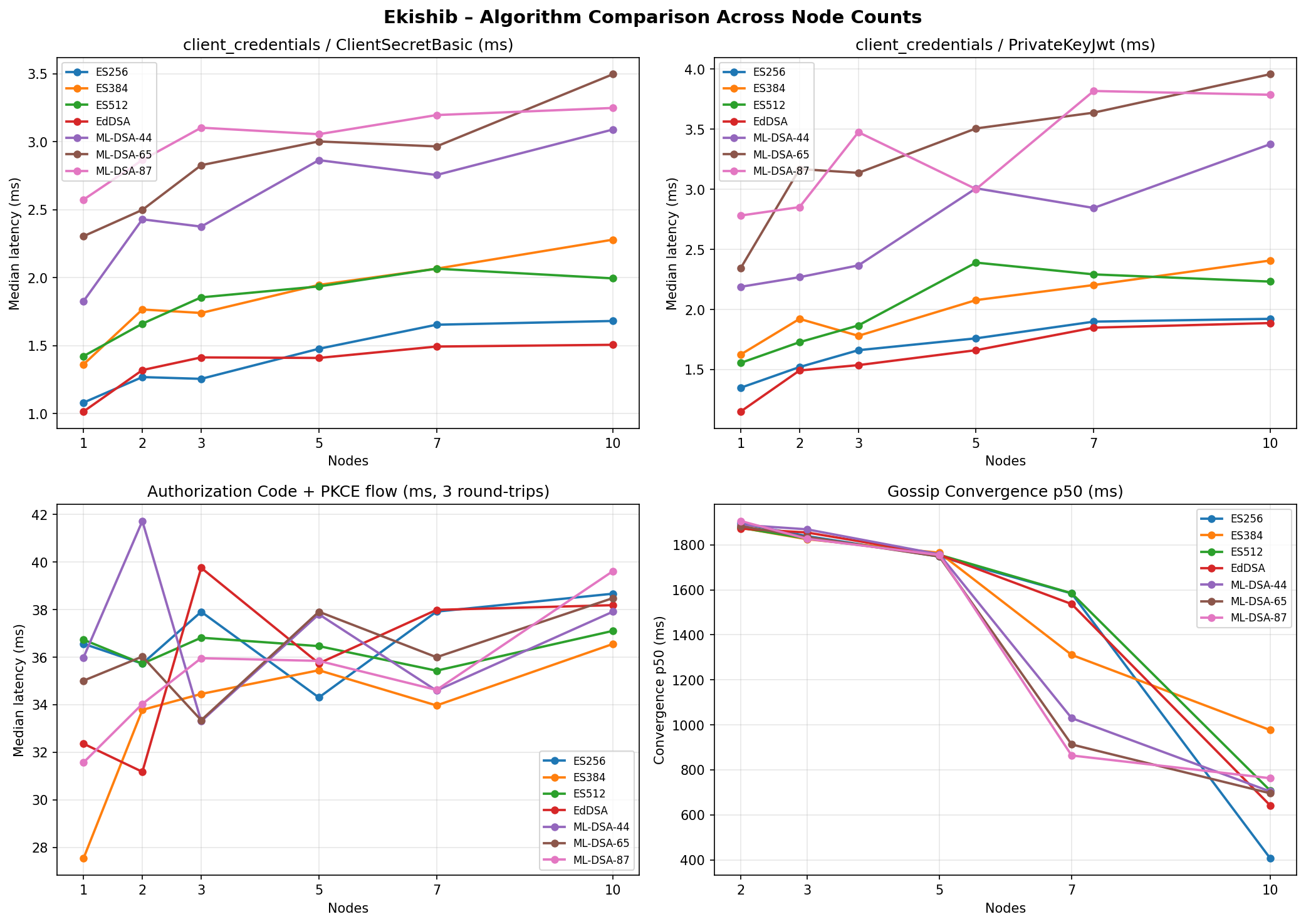
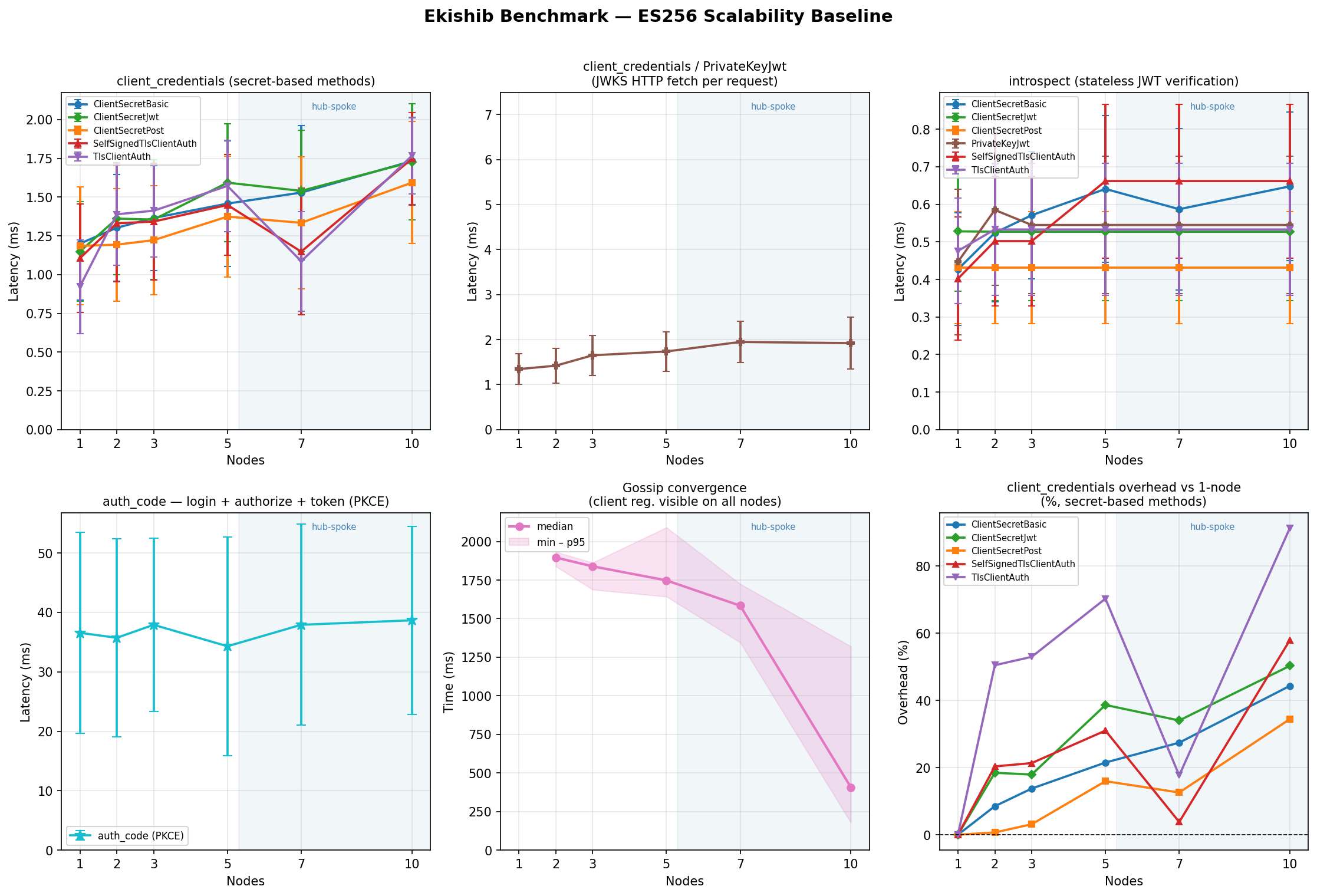
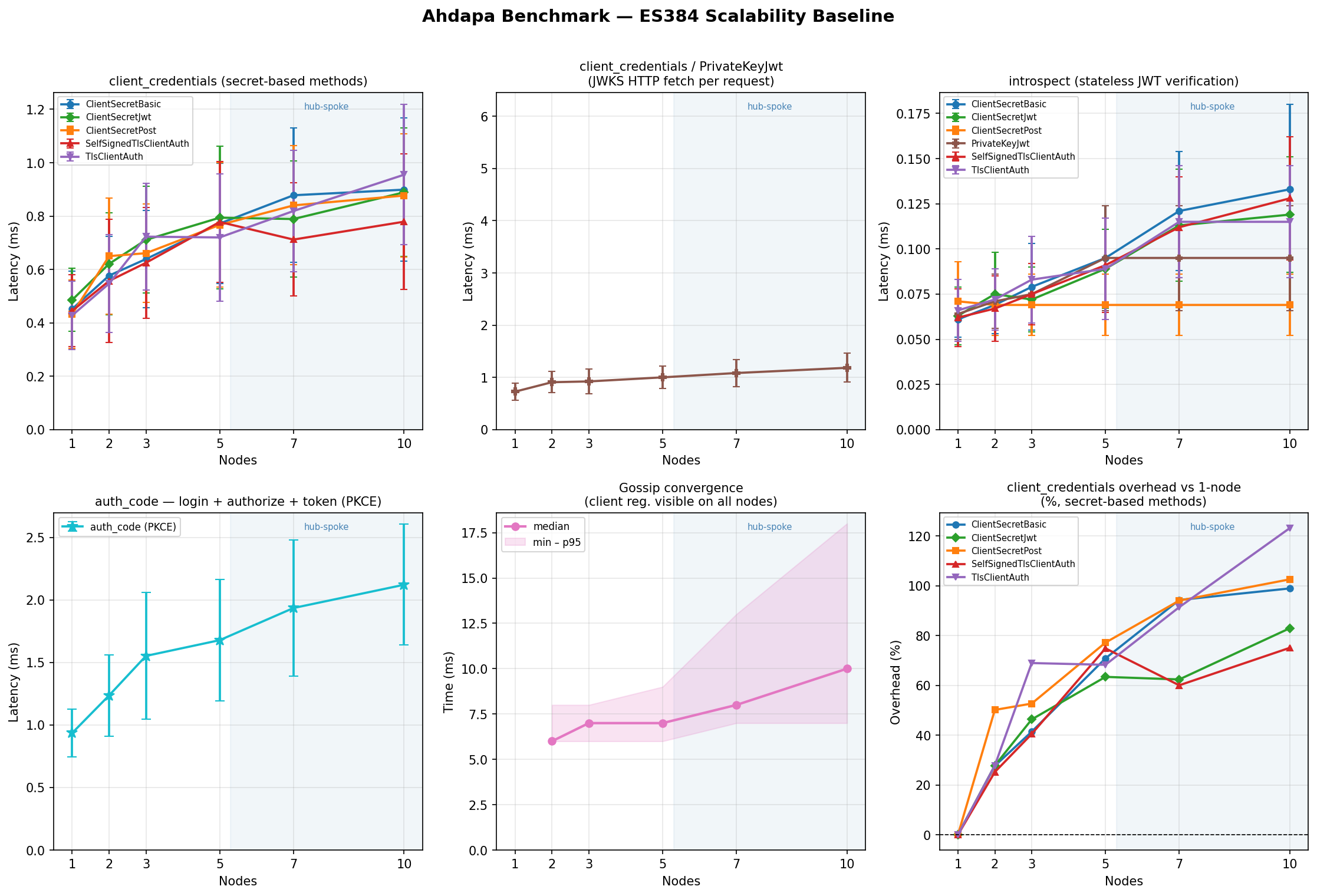
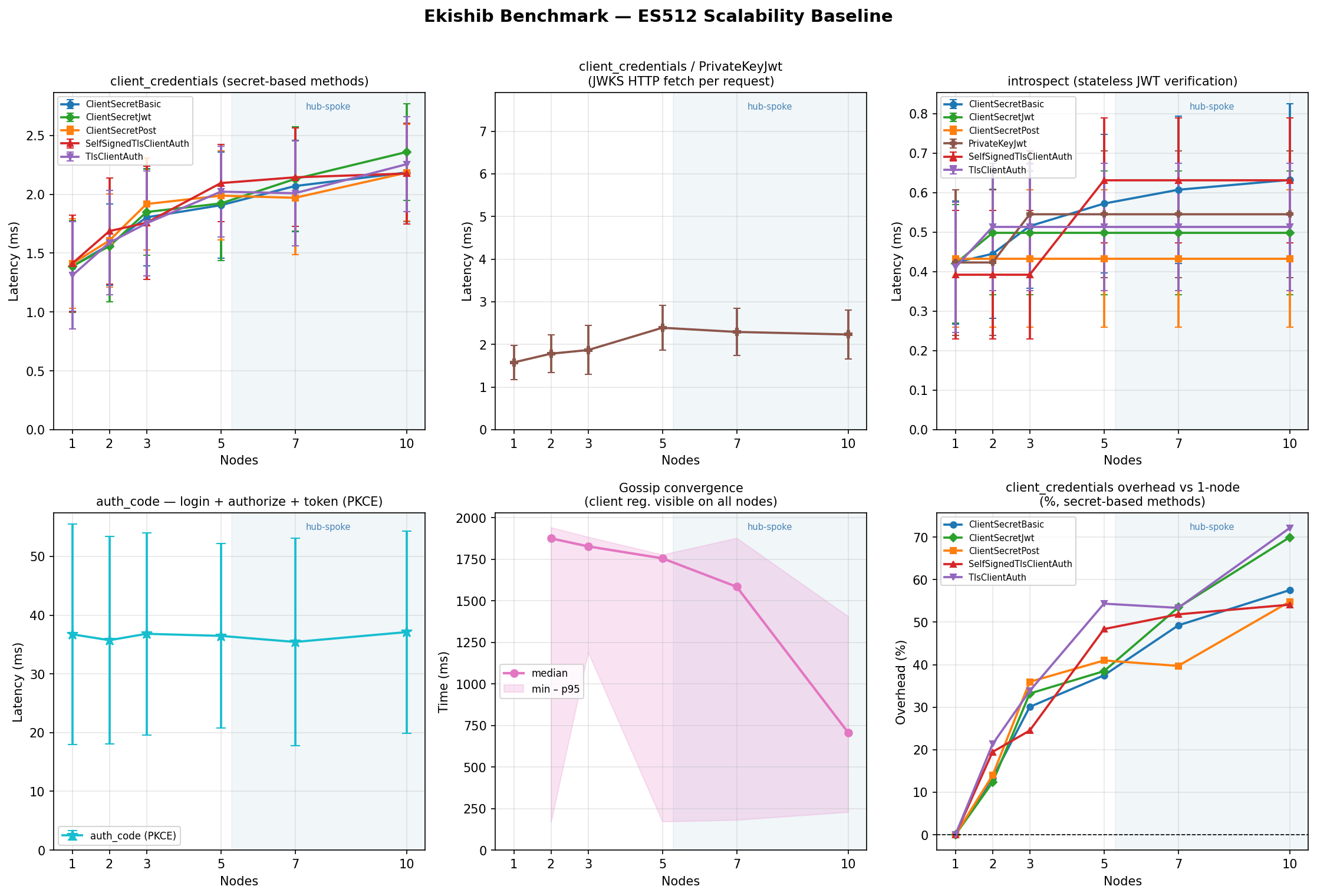
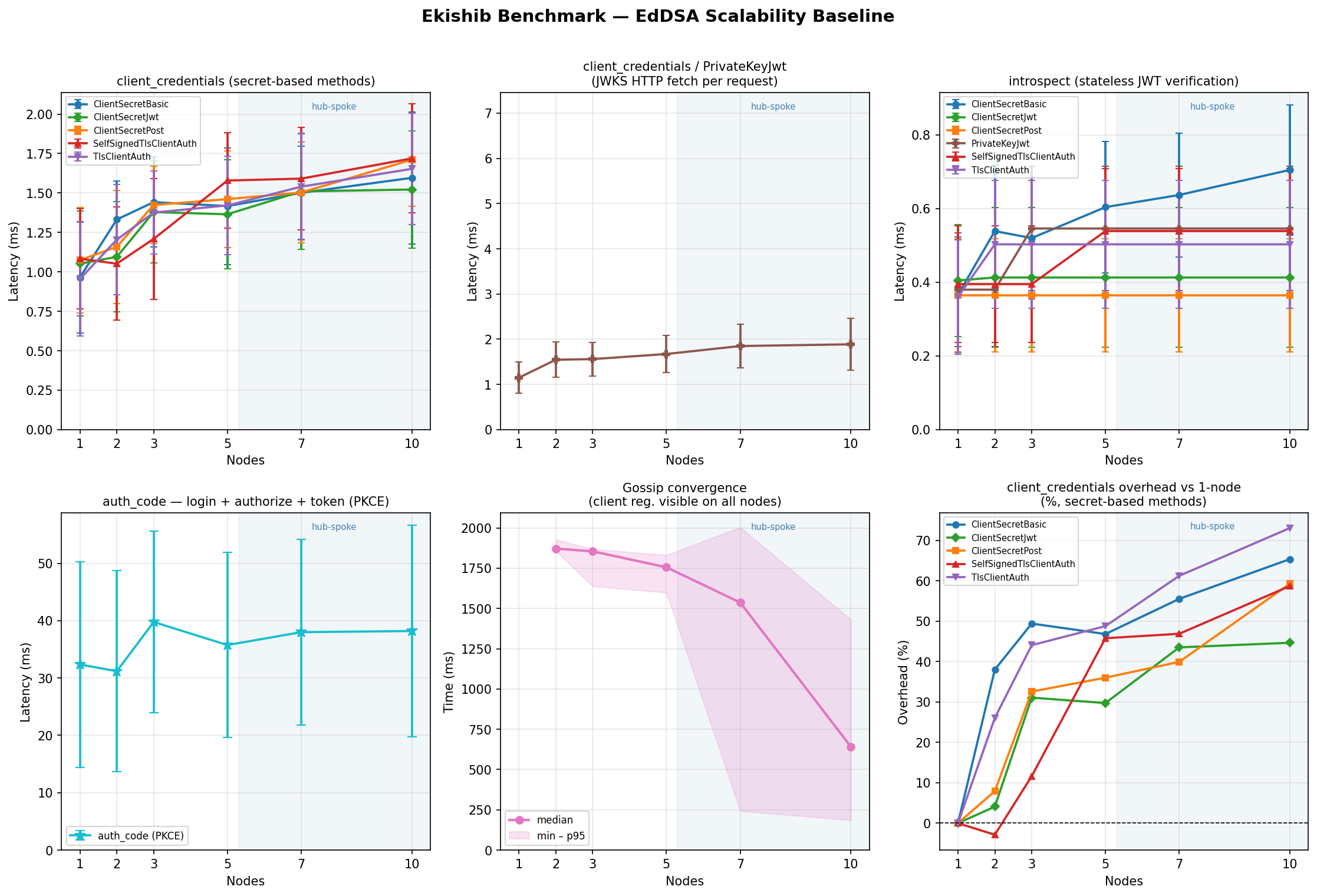
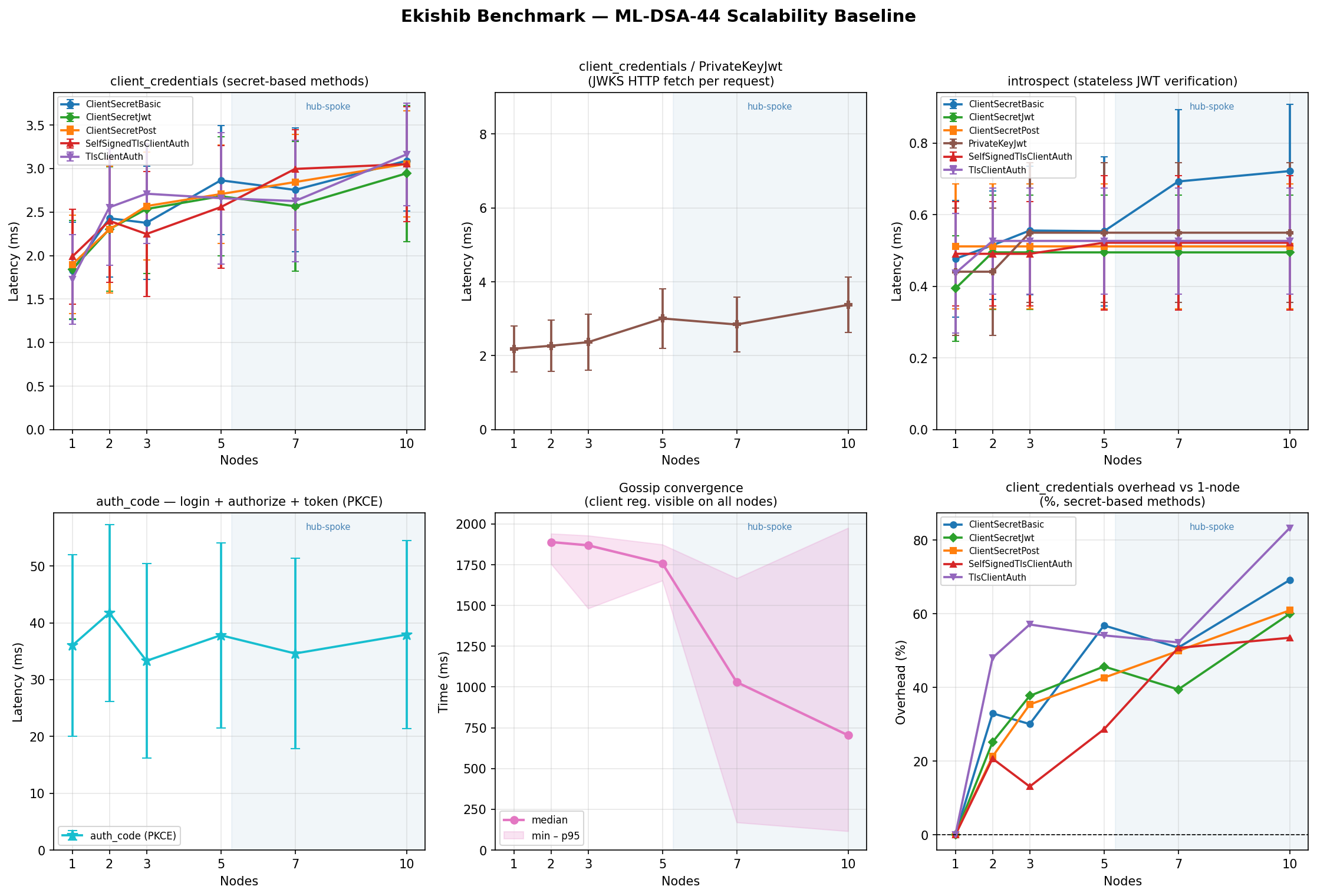
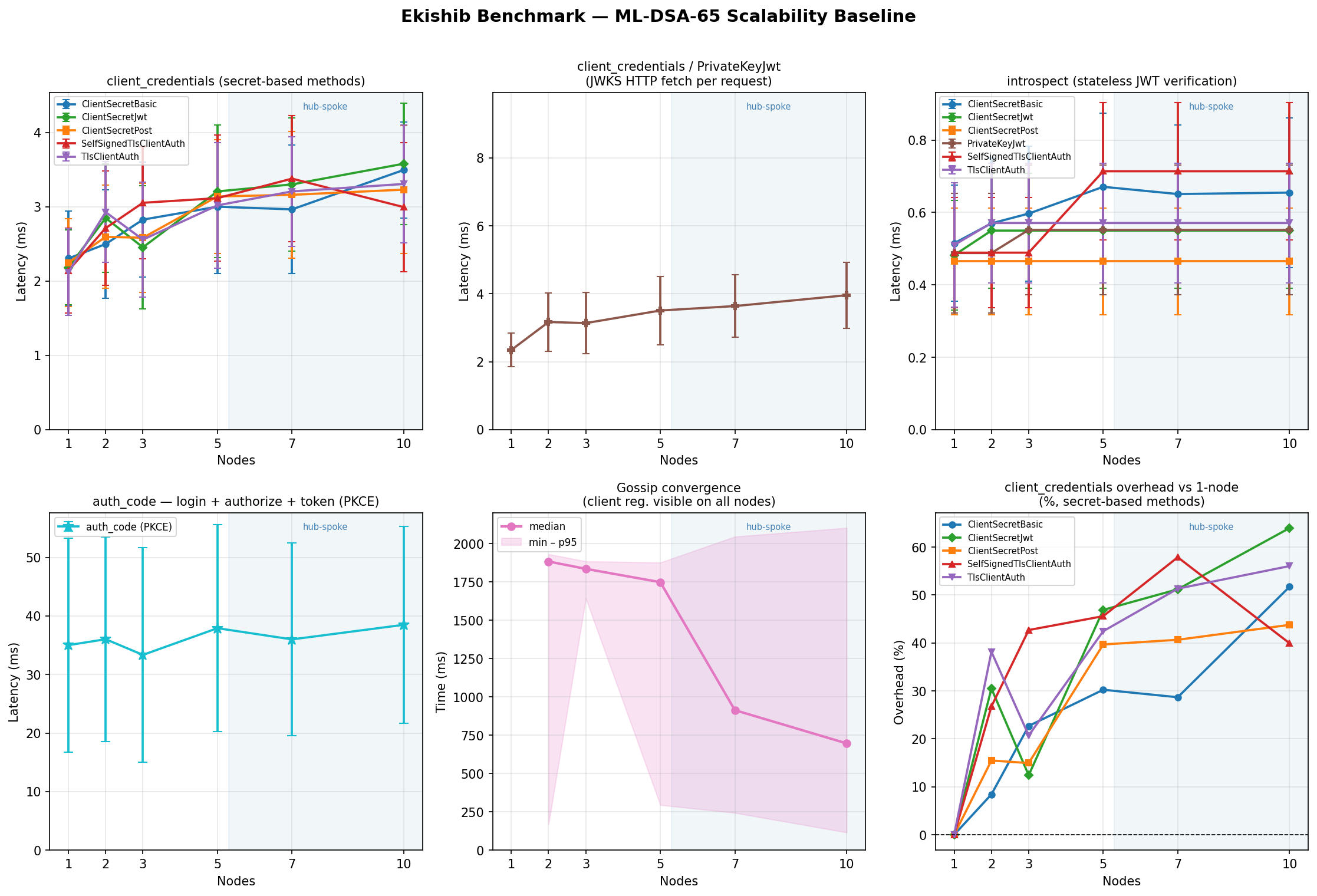
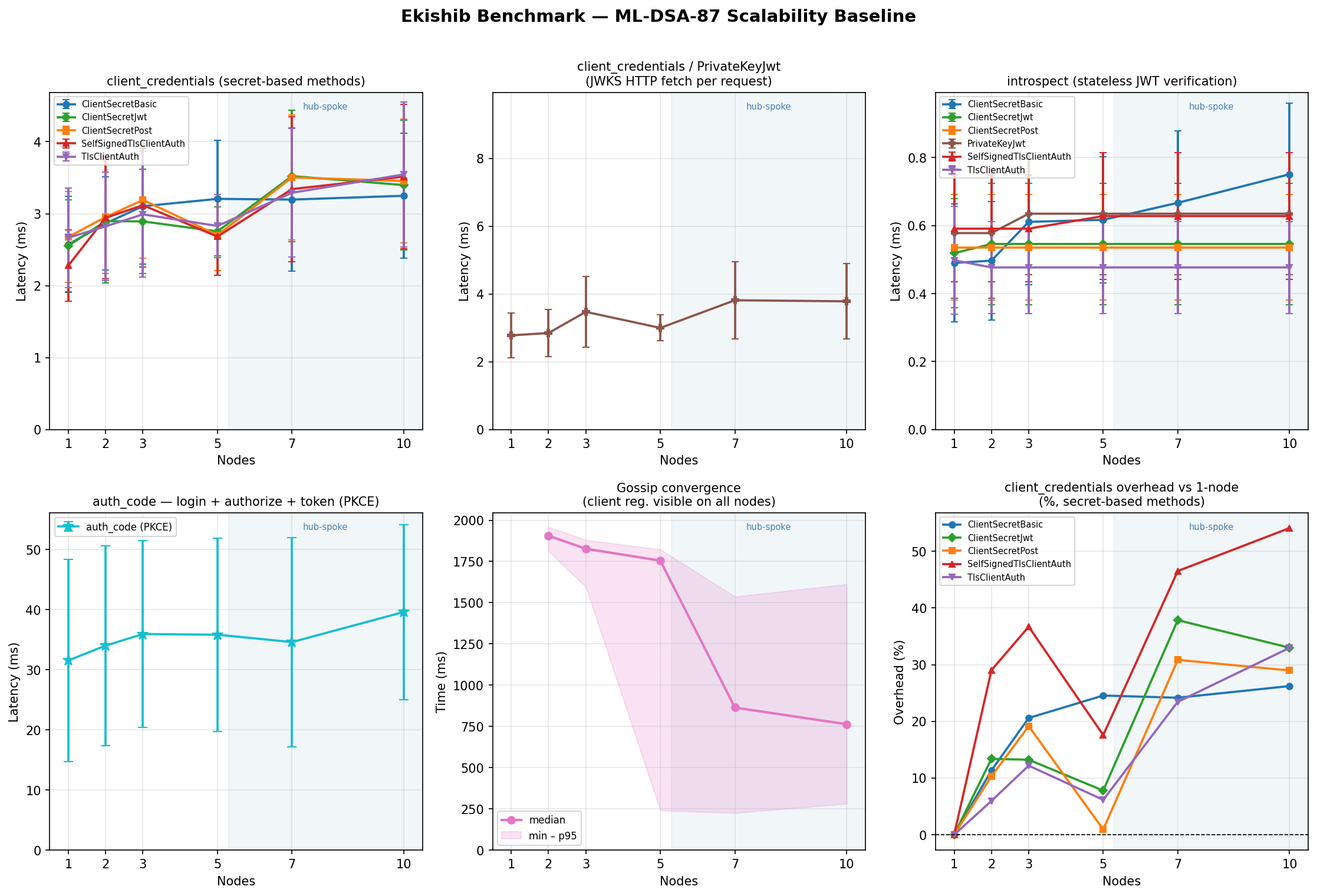
The benchmark grid can be reproduced with:
for ALG in ES256 ES384 ES512 EdDSA ML-DSA-44 ML-DSA-65 ML-DSA-87; do
for N in 1 2 3 5 7 10; do
contrib/bench/bench.sh --algorithm "$ALG" --nodes "$N" --release run
done
done
Contributing
Code style
Formatting
Format all Rust code with rustfmt before committing:
cargo fmt
Lints
Address all Clippy warnings:
cargo clippy -- -D warnings
No speculative code
Follow the project’s simplicity-first rule: minimum code that solves the problem. No features beyond what was asked. No abstractions for single-use code. See CLAUDE.md at the root of the repository for the full rule set.
Running tests
cargo test
Tests are self-contained and do not require external services. GSSAPI and LDAP functionality is tested via integration tests that mock the underlying system calls.
Build checklist
Before submitting a change, verify:
cargo check # no compile errors
cargo fmt --check # no formatting drift
cargo clippy -- -D warnings # no lint warnings
cd webui && npm run build # TypeScript clean, SPA builds
Adding a new OAuth2 endpoint
- Add the handler function to
src/routes/oauth2.rs. - Register the route in
oauth2::router(). - Update the discovery documents in
src/routes/discovery.rsif the endpoint is advertised in RFC 8414 or OIDC Discovery (add it toAuthorizationServerMetadataorOidcProviderMetadata). - Document the endpoint in RFC Support Reference.
Adding a new CRDT field
- Add the field to
IdpCrdtinsrc/crdt/mod.rswith the appropriate CRDT type. - Add persistence in
load_from_dbandpersist_to_db. - Add a merge call in
IdpCrdt::merge. - Add the corresponding database table(s) to
migrations/{sqlite,postgres,mariadb}/. - Document the new table in Database.
Changing the AEAD key derivation
Any change to how wrapping_key or refresh_key is derived is a breaking change for existing tokens and sessions. All in-flight tokens signed or encrypted with the old keys will fail to decode. Plan a migration that:
- Rotates the wrapping key in the CRDT.
- Accepts tokens encrypted with either the old or new key during a transition window.
Dependency rules
| Concern | Use |
|---|---|
| Symmetric crypto (AEAD, HMAC, HKDF, RNG) | native-ossl |
| Asymmetric crypto, JWT signing | native-ossl + synta-certificate |
| GSSAPI | ahdapa-gssapi |
| LDAP | ahdapa-ldap |
| HTTP server | axum |
| Database | sqlx::AnyPool |
Do not add ring, aws-lc-rs, jsonwebtoken, hmac, or sha2 as direct dependencies. The native-ossl + synta-certificate stack is the single cryptographic backend for the project.
Commit messages
Follow conventional commits: type(scope): short description. Types: feat, fix, refactor, docs, test, chore. Keep the subject line under 72 characters and use the imperative mood (“add”, “fix”, “remove”, not “added”, “fixed”, “removed”).